
Update Gemini Notebook Sources from Chat Without Losing the Approved Version
Use the Gemini Notebook connected app to update a source collection with a change log, a narrow request and checks on the saved evidence.
Published October 25, 2026

Use the Gemini Notebook connected app to make a narrow, named change to a source collection, then inspect the saved sources before relying on the next answer. Keep a before-and-after list outside the conversation. A successful-looking chat reply is not enough evidence that the right notebook now contains the right material.
This guide is for the person who maintains a business notebook used for a recurring decision: supplier selection, project readiness, service design or an internal research brief. The purpose is to keep approved evidence current when changes can be requested conversationally. It is not a guide to generating a presentation from an unchanged source set.
If the collection contains only two disposable public documents, a formal change record may be unnecessary. If colleagues use the notebook to support a purchasing recommendation or a customer commitment, a short record of what changed is worth the effort. The standard should match the consequence of using the wrong version.
Product information was checked on October 25, 2026. The workflow and procurement example below are editorial recommendations and constructed scenarios, not claims of a live account test.
What the October change makes possible
Google’s October 23 announcement says the Gemini Notebook connected app can create, edit and delete notebooks, manage sources, and answer questions using notebook context from within Gemini. Users can invoke it with @Gemini Notebook. Google lists it as available now to Workspace customers, Workspace Individual subscribers and personal accounts. Google’s Notebook connected-app announcement
That makes the boundary between discussing a collection and changing it more important. A request to “clean this up” can mean rewrite a paragraph to one person and remove old evidence to another. State which of those jobs you intend before asking the app to act.
The announcement says both Gemini and Notebook access must be enabled for the relevant work group. It also describes the user setting as on by default globally except in the European Economic Area. Check your actual work account’s connected-app settings and organization policy rather than assuming a colleague’s personal account demonstrates your access. Access details for the new connection
This article does not quote a subscription price or promise identical limits across account types. The initial cost is setup and review time. If access requires a plan change, ask the administrator to confirm the relevant entitlement and actual price before deciding whether this workflow justifies it.
Define what counts as an approved source
A source is an item in the collection. An approved source is an item the responsible person has accepted for a specific use. Those are not the same status. A draft proposal, a supplier’s published claim and your own verified delivery requirement may all be useful, but they support different kinds of statements.
For a procurement notebook, distinguish supplier material, internal requirements, agreed decisions and working analysis. A supplier’s claimed implementation time remains a provider claim even after you add the document. An AI-generated summary of that claim does not become independent evidence because it is saved as a separate note.
Write the intended decision at the top of your working record: “Compare delivery options for the November pilot using the currently approved scope and quoted terms.” This gives reviewers a reason to exclude unrelated research, obsolete prices and speculative chat drafts from the active collection.
Assign a collection owner. Other people can suggest additions, but one person should decide whether a replacement is complete and whether old material should remain available. Without that responsibility, a notebook can accumulate several plausible answers to the same question without showing which one the team intends to use.
Capture a starting manifest
A manifest is simply a list of what the collection contains. It does not need a special application. Use a shared worksheet or controlled document that the team can inspect without asking the assistant to remember its own previous actions.
For each source, record its title, original location, document date or version, source type, approval status and the question it supports. Add the notebook’s exact name and link, the date you checked it, and the person who checked it. When two notebooks have similar names, the link is more useful than another descriptive adjective.
Do not assume a source’s display title proves its contents. Open the item and check a distinguishing fact: the effective date, the section heading, the price schedule identifier or the approved project scope. A file named “final” can still contain last month’s material.
Preserve an authorized copy of the starting evidence where your team normally keeps it. This is a recovery precaution, not a claim that Gemini provides a particular version-control or undo feature. If the collection matters, know how you would reconstruct the approved set before requesting deletions.
Request an addition before a replacement
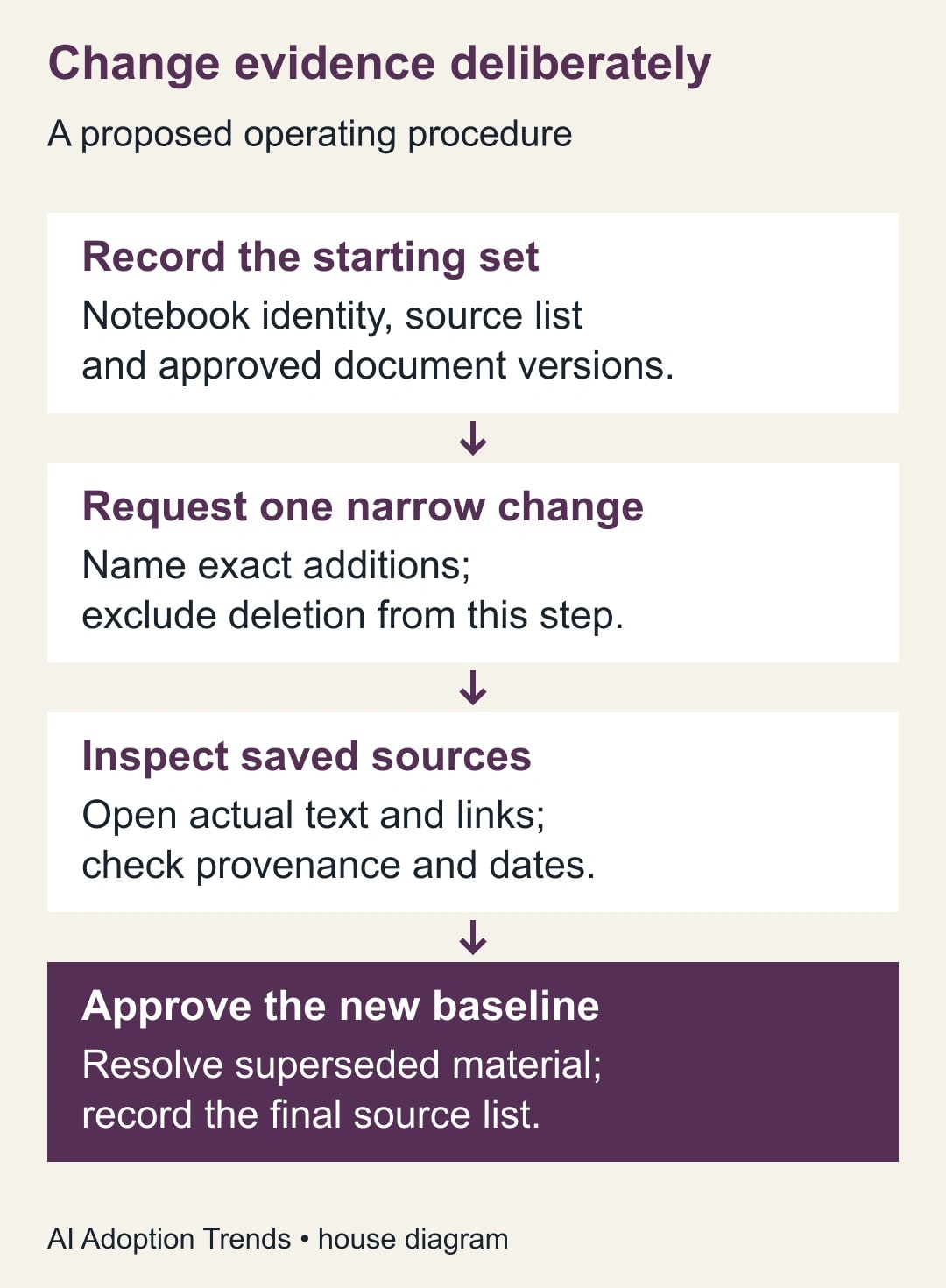
Start with a low-risk addition to a rehearsal notebook or a clearly identified working collection. Ask the app to add one named document from one named location. Keep removal out of this first request, so you can inspect the new source before retiring anything that currently supports an answer.
An adaptable request is: “Use @Gemini Notebook for the notebook at [exact link]. Add [document title and location] as a candidate source. Do not delete or replace existing sources in this step. Report the source you added and any access or format problem. If the notebook identity is uncertain, stop and ask.”
This is a suggested instruction, not a guarantee that the product enforces an approval state called “candidate.” Record that status in your own worksheet if the interface does not provide it. The important point is that the owner has not yet accepted the new source for the business decision.
Follow the actual on-screen prompts and inspect the connected app selected for the request. Google’s general Gemini help explains that available apps and supported actions vary by account, device and other factors; its personal-account instructions should not be treated as a complete work-account configuration guide. Google’s connected-app guidance
If the app asks you to connect a service or expand access that the work requires, have the appropriate account owner make that decision. Do not move internal documents into a personal account to bypass an organizational restriction. A blocked connection is information about the operating environment, not permission to route around it.
Verify the result outside the chat claim
Open the target notebook after the action. Find the new source in its actual list and inspect the source content or original document, as available. Compare its title, date and distinguishing facts with the intended item. Record any difference before asking for a new answer.
Check three things separately: the right destination, the right document and the right content. A correct source title in the wrong notebook is still a failed update. A source in the right notebook with an obsolete effective date is also a failed update. Counting one extra item detects neither problem.
Ask a narrow verification question whose answer is known from the new source, such as the delivery window printed in an approved quotation. Follow the cited material and check the passage yourself. A fluent answer without a usable source reference is not a sufficient release check for an evidence-dependent recommendation.
Also ask a boundary question that the new document does not answer. For example, a delivery note might specify shipment timing but say nothing about ongoing support. The useful response should preserve that gap. If the answer blends assumptions into the source claim, revise the business brief and review process before accepting it.
Work through a nine-source procurement notebook
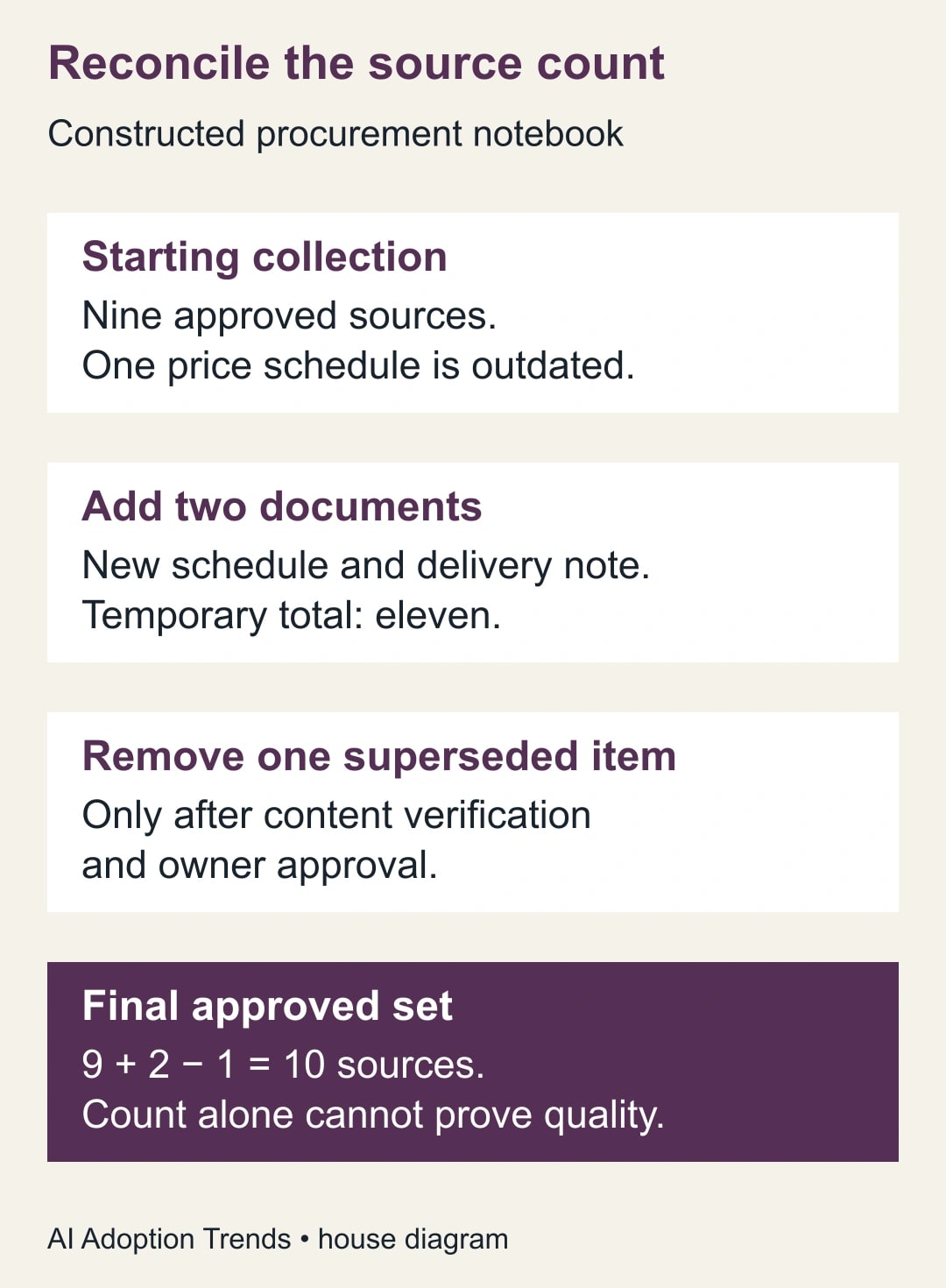
Consider a constructed notebook with nine approved sources. One is a supplier price schedule that is being replaced. The owner receives a new schedule and a separate delivery note, both relevant to the same pilot decision.
The first change adds the two documents while preserving the old set. The temporary collection has eleven sources. The owner opens the new schedule, checks its effective date and confirms that the quoted scope matches the internal requirement. The delivery note is checked separately because it supports timing rather than price.
Only then does the owner authorize removal of the superseded schedule from the active set. The final count is nine plus two minus one: ten sources. The old schedule remains in the team’s authorized archive with a note explaining why it is no longer the current basis for the decision.
During the same conversation, Gemini drafts a paragraph describing why the new supplier appears attractive. That paragraph is useful working analysis. It does not join the approved evidence set merely because it reads well. If the team retains it, label it as generated analysis and keep its underlying source references visible.
Now test two questions: “What is the current quoted amount for the approved scope?” and “Which document supports the delivery date?” The owner checks the actual passages. If either answer still cites the old schedule or merges incompatible terms, the notebook is not ready for the purchasing brief, even though the source count is ten.
Use a change record that another person can follow
The following worksheet is a proposed team control. It can sit next to the notebook in your existing project documentation. Keep the entries short enough that people will update them during the work.
- Change identifier and purpose: what decision needs fresher evidence?
- Destination: exact notebook name, link and responsible owner.
- Starting state: checked source list, count and approved versions.
- Requested action: explicit additions, edits or removals, separated by step.
- Evidence status: provider claim, internal requirement, approved decision or working analysis.
- Verification: actual saved items, distinguishing facts and checked citations.
- Final state: source list, count, unresolved gaps and approval date.
- Recovery reference: where the previous authorized source set can be reconstructed.
For the constructed example, the record might say: “C-07 replaces the current price basis. Added the October schedule and delivery note; verified scope and effective date; removed the superseded schedule from active use; final set ten sources; support coverage remains unresolved.” That final unresolved item prevents a clean-looking source list from hiding an unanswered business question.
If several people maintain the notebook, agree that only one change set is in progress at a time for important updates. This is a proposed working rule, not a product locking feature. Concurrent additions and deletions make it harder to reconcile what happened, especially when both people use conversational requests.
Detect and recover from the likely mistakes
If the wrong notebook changed, stop further mutations and record what you observed. Use the saved baseline and actual source list to plan a narrow correction. Do not ask the assistant to “undo everything” without identifying what must be restored and what unrelated work may have happened since.
If a document cannot be read or added, retain the failure in the change record. Do not silently substitute a model-generated summary of the inaccessible file. Obtain an authorized readable source or leave the relevant question unresolved.
If duplicate versions remain, decide whether both are needed for historical comparison. If they are, label their roles clearly in your working brief and test questions that require the current version. If they are not, remove the obsolete item only after the owner confirms the replacement and recovery location.
If a source changes at its original location, do not assume your notebook copy or representation automatically reflects that change. Inspect the current contents and follow the update behavior actually available in the account. This guide makes no blanket synchronization promise across file types and connections.
Stop using the notebook for the decision if you cannot reconstruct its approved sources, if citations point to unsupported conclusions, or if an access change is needed that no authorized owner has accepted. Continue the decision work directly from verified documents while the collection is repaired.
Measure maintenance effort and answer reliability
Track the time to complete a verified change, the number of incorrect or duplicate sources found, and whether the final brief cites the intended current documents. Keep addition speed separate from review effort. A fast mutation followed by a long investigation is not an efficient workflow.
For a small trial, maintain three real updates with the worksheet. Ask another team member to reconstruct each change from the record without reading the whole chat. If they cannot identify the current evidence or the unresolved question, simplify and repair the record before expanding use.
Any time released by easier source maintenance is capacity for other work. It becomes a cash saving only if a real expense changes. The main benefit may instead be fewer avoidable version mistakes, which should be measured rather than assumed.
Start by listing one notebook’s current sources and choosing a harmless addition to verify. For the decision brief that follows, use our Gemini notebook project-readiness method. If access is unclear, begin with the work-account connected-app audit.
Weekly Newsletter
AI Adoption Weekly
New research, field guides, training studies, and tool decisions for operators.
No spam. Unsubscribe anytime.
Related Comparisons
Calculator
AI seat cost calculator
List price × headcount. You enter the hours and the operating assumptions.