
Fix an Airtable Rollup That Includes Unapproved Project Costs
Build an approved-cost rollup in Airtable, reconcile missing links and amounts, and keep shared expenses from inflating project totals.
Published October 25, 2026

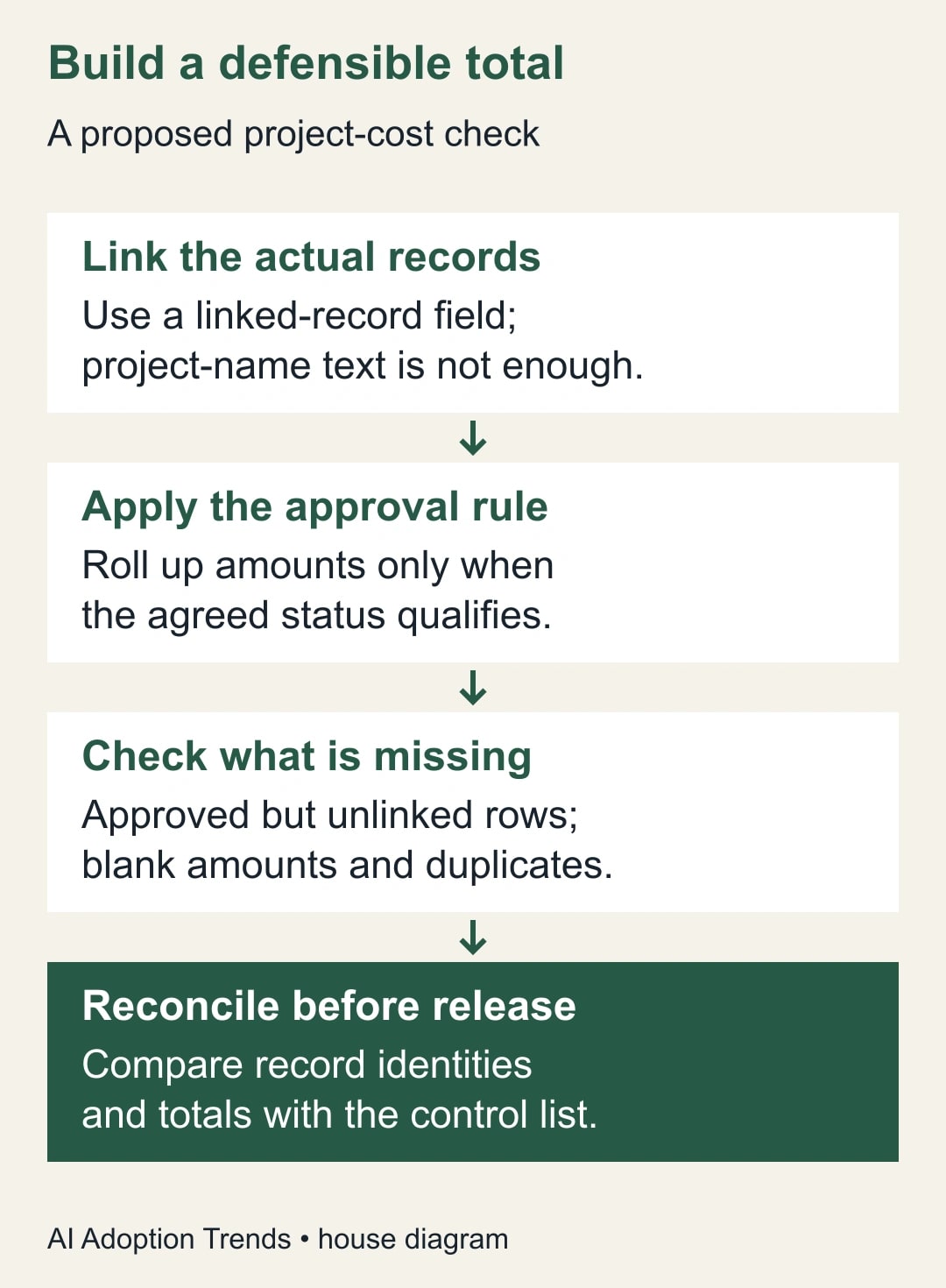
If an Airtable project rollup includes unapproved costs, filtering the cost table’s visible view is not the repair. Apply the approval condition to the rollup itself, then check whether every qualifying cost is linked to the right project. A correct conditional sum can still be incomplete.
The practical setup has three controls: a sum of approved linked amounts, a check for approved records with missing links or amounts, and a reconciliation against the underlying cost list. Together they tell you both what entered the total and what may have been left outside it.
This guide is for an agency or project operations owner using Airtable to monitor internal project costs. It is a planning workflow, not a replacement for the organization’s accounting records or approval authority. Keep tax, currency conversion and financial reporting rules with the people who own those decisions.
The example uses one currency and clearly defined approval states. Product documentation was checked on October 25, 2026. All figures are constructed, and the workflow has not been tested in your base.
Define the total before changing a field
Write down what “approved project cost” means. A useful definition might be: “The sum of approved planned cost amounts assigned to this project, excluding rejected and pending items.” That definition is different from money paid, invoices received or every expense someone has proposed.
Choose one amount field and one approval rule. If some records contain estimates and others contain actual invoices, decide whether the total is allowed to mix them. A tidy number cannot resolve an inconsistent business definition.
Name the approval owner and the person who maintains the base. Airtable’s rollup documentation lists the feature across all plans, while configuring fields requires appropriate Owner or Creator permissions. An editor who can change cost records may still need the base maintainer to change the rollup. Airtable’s rollup overview
Before editing the live total, preserve the existing field definition and a small control list of records. Where practical, create a temporary diagnostic field or use a controlled copy of the base. Your goal is to explain the difference before changing the number people use for decisions.
The prerequisites are modest: a Projects table, a Costs table, a genuine linked-record relationship, a numeric amount field and a clear status field. The main cost is configuration and review time. Do not upgrade a plan simply because a formula looks difficult; confirm the actual capability or permission that is missing first.
Understand why a filtered view did not fix it
Airtable documents that a rollup aggregates values from linked records and that ordinary view filters do not restrict the records used by a rollup. The rollup needs its own conditions when only some linked records should qualify. This explains why hiding pending costs in a view can leave the project total unchanged. How linked records and rollups interact
A view is a way of looking at records. The relationship between a project and its linked cost records is a separate part of the base. A person seeing only approved costs may reasonably expect the displayed project total to match, but that expectation does not configure the aggregation.
Inspect the actual field type used to connect a cost to a project. A text field that says “Project A” is not the same as a linked-record field pointing to the Project A record. The name can look correct while the rollup has no relationship to follow.
Also check whether costs can be linked to more than one project. That may be intentional, but it changes the meaning of totals across projects. One £400 expense linked in full to two projects can appear in both project totals, producing £800 when those totals are added together.
Build the conditional sum deliberately
In the project’s rollup field configuration, choose the linked-record field that connects to the cost records, then choose the amount field to aggregate. Use the sum aggregation, SUM(values), for this example. Check that you selected the numeric cost amount rather than a text label or an already aggregated result.
Enable the option to include only linked records that meet conditions, then set the approval field to the exact status that qualifies. Airtable’s condition controls use a field, operator and value; the condition belongs to this rollup rather than to a nearby filtered view. Airtable’s conditional count, lookup and rollup guidance
Use a small test set with one approved, one pending and one rejected record. Change only the test status you intend to exercise, and observe whether the result changes by the expected amount. Restore the test records or use a controlled copy so that a configuration check does not become an accidental approval action.
If several statuses qualify, document the logic in ordinary language before combining conditions. “Approved or paid” may be sensible in one process and double-count a transition in another. The rule should follow the record model and business definition, not whichever selection happens to produce the expected number today.
Name the field so readers understand its scope, such as “Approved planned cost.” A vague label like “Total” invites people to treat a planning number as actual spend. Add a nearby note explaining the approval state, amount field and currency if those are not obvious to the audience.
Reconcile a project that appears to have £1,000 approved
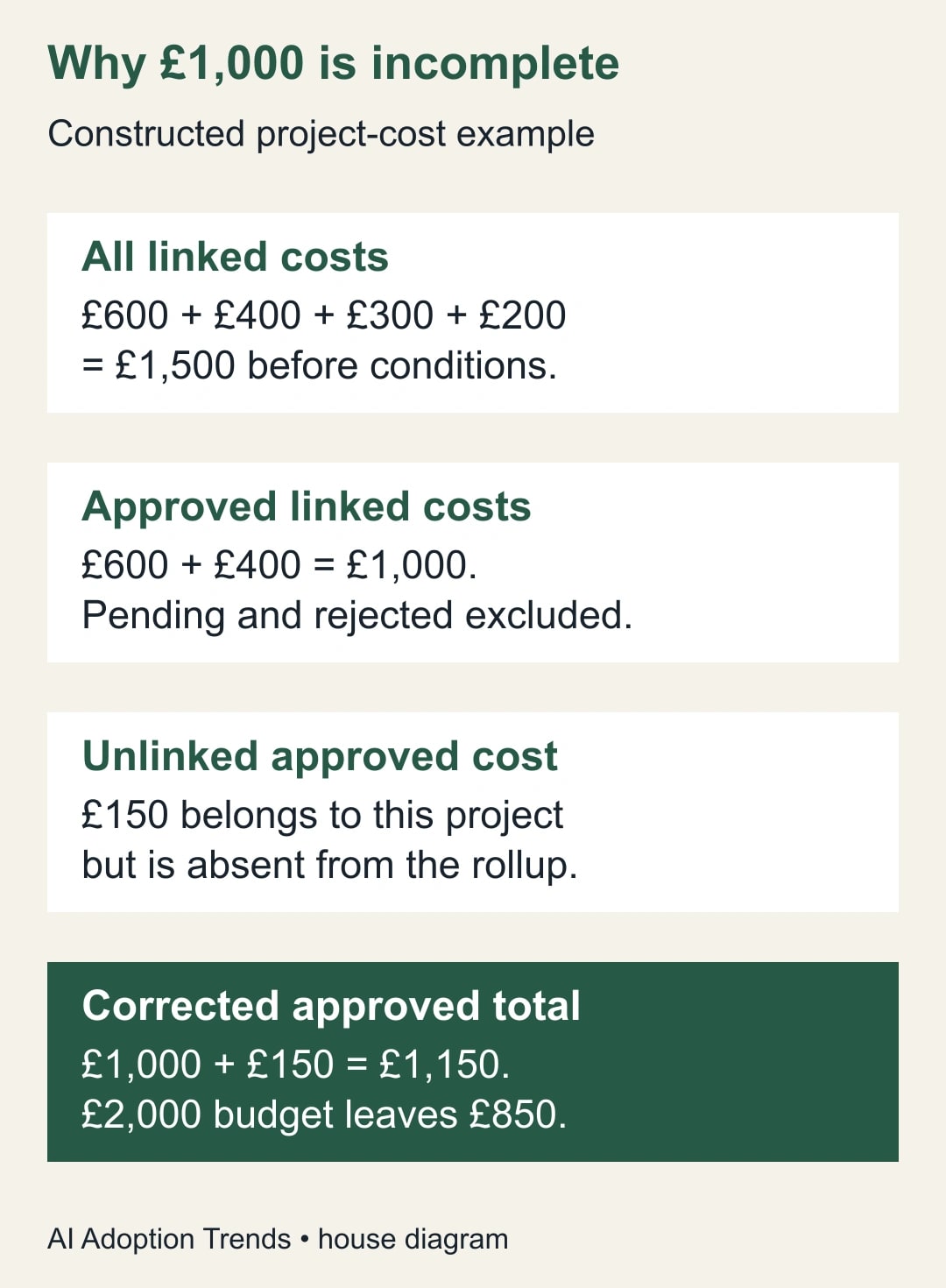
Consider a constructed Project A with four linked cost records. Two are approved for £600 and £400. One is pending for £300, and one is rejected for £200. Before conditions, the sum of all four linked amounts is £1,500.
The conditional approved-cost rollup shows £1,000. That correctly excludes the £300 pending item and the £200 rejected item. At this point, the field’s condition is working for the records it can see.
However, the control list contains another approved £150 cost that belongs to Project A but has no project link. The rollup cannot include a record that is outside its linked set. Correcting that relationship brings the approved total to £1,150.
If the approved planning budget is £2,000, the first conditional result suggests £1,000 remains. The reconciled result leaves £850. The missing link overstated the remaining budget by £150, even though the condition and sum were configured correctly.
The release check therefore has two questions: did the condition exclude the wrong records, and did the linked set contain every right record? The first is a field-configuration question. The second is a completeness question about the data and the process that creates it.
Pair the amount with exception counts
Create a review view or another suitable check in the Costs table for approved records with no project link. That view is a diagnostic queue for the owner to work through. It does not, by itself, change the project rollup; correcting the records does.
Check approved records with blank amounts separately. A blank may mean an estimate is still needed, the amount failed to arrive from another system, or the item is intentionally unpriced. Do not silently interpret all three as zero. Record the reason and keep the project’s decision status clear while the amount is unresolved.
Airtable supports conditions on count fields as well as rollups. A conditional count of approved linked records can help compare the project with the control list. It cannot discover unlinked records from inside that project relationship, which is why the separate Costs-table exception check still matters. Conditional field types and limits
For the constructed project, the initial linked approved count is two. After the missing £150 record is linked, it becomes three. Check the three record identities and their amounts, not only the count. Three wrong records can still produce a count of three.
Also check duplicates using the identifier your process actually trusts, such as a source-system cost ID or an approved internal request ID. Similar descriptions alone do not prove duplication. Two “design support” entries may be distinct periods or suppliers, while two differently worded records may represent the same underlying expense.
Allocate shared costs before adding project totals
Suppose one constructed £400 shared expense supports two projects. Linking the full expense to both may be useful for discovery, but summing both project rollups would count £800. The underlying expense did not double; the relationship caused it to appear twice.
If the business needs allocated project costs, create a documented allocation rather than treating every link as a full charge. For example, allocation records of £150 to Project A and £250 to Project B sum to the original £400. Keep a reference to the source expense so the allocation can be reconciled.
The allocation basis belongs to the business owner. It might reflect agreed usage, time or another documented policy. An AI assistant can help format the worksheet, but it should not invent the split or treat a convenient percentage as an approved financial rule.
When the source expense changes, review its allocations together. A corrected £450 source with allocations still totaling £400 creates a new completeness problem. Check the allocated total against the source amount and keep any unallocated remainder visible.
If project totals are only intended to show “costs associated with this project,” rather than additive allocations, label that limitation. Do not present their combined sum as an organization-wide cost total. The right display depends on the decision the audience is making.
Use this project-cost release worksheet
Keep the following fields in a short control record for the initial repair and for later structural changes. It is a proposed operating worksheet, not a claim that Airtable creates this review automatically.
- Business definition: planned, committed or actual cost, and the qualifying approval states.
- Relationship: Projects-to-Costs linked field and whether multiple project links are allowed.
- Amount basis: field name, currency and any explicitly excluded adjustments.
- Condition: the exact rule applied inside the rollup.
- Control list: expected qualifying record identifiers, count and amount.
- Exception checks: missing project links, blank amounts, duplicates and uncertain statuses.
- Shared costs: allocation basis, source reference and reconciliation result.
- Release decision: reviewer, date, remaining issues and the label shown to readers.
For Project A, the completed control entry would show three approved records totaling £1,150, no unresolved approved cost without a project link in the reviewed scope, and £850 remaining against the £2,000 planning budget. The phrase “in the reviewed scope” matters if the cost import or approval process is not complete.
Choose a cutoff time for the check. If people add or approve records during the review, a moving total can make reconciliation confusing. Record the time and either repeat the check after changes or coordinate a short review window with the team.
Recover when the field becomes blank or the total drifts
Airtable warns that a deleted field or incompatible field-type change can invalidate a condition; affected conditional fields may become blank. If a previously working result disappears, inspect the condition’s referenced fields before treating the blank as a zero-cost project. Airtable’s invalid-condition behavior
If the result rises unexpectedly, trace the changed record set. Look for newly approved items, changed amounts, duplicate imports and additional project links. If it falls, check removed links, status changes, deleted records and blank amounts. Do not overwrite the rollup with the expected total to hide the difference.
If an automation is responsible for creating cost records, preserve the source identifiers and investigate the specific failed or duplicated handoff. A broad replay can add the same cost twice. Repair the affected record only after checking whether the intended record already exists elsewhere in the base.
Stop using the total for a budget decision when the expected population is unknown, the currency basis is mixed, or unresolved approved items could materially change the answer. Keep the verified subtotal visible with an explicit limitation rather than presenting an incomplete number as final.
Make completeness someone’s responsibility
Assign the base maintainer responsibility for the field configuration and the cost owner responsibility for record completeness and approval meaning. A technically correct rollup does not transfer those business responsibilities to the software.
For the next four reporting cycles, record the number and value of missing-link exceptions, blank approved amounts and duplicate corrections. Track how long reconciliation takes. A falling exception count is better evidence of a stable process than the total merely looking plausible each week.
If the repair reduces review effort, describe the result as released staff capacity unless an actual expense changes. Avoid assigning a monetary saving to every corrected field without showing the business consequence. The immediate value may be a more trustworthy remaining-budget decision.
Start with one project and five or fewer known cost records. Prove the condition and the completeness check before applying the setup widely. If missing records originate in an automation, use our Airtable Find records batch checks. If older records never entered the workflow, see why Airtable automations may not trigger for existing records.
Weekly Newsletter
AI Adoption Weekly
New research, field guides, training studies, and tool decisions for operators.
No spam. Unsubscribe anytime.
Related Comparisons
Calculator
AI seat cost calculator
List price × headcount. You enter the hours and the operating assumptions.