
Google Chat Agent Tables: Build a Status Digest People Can Act On
Build a reliable Google Chat status digest with new tables and headings, a six-record answer key, mobile checks and a clear exception handoff.
Published November 24, 2026

If your operations team gets an automated Google Chat report, put the decision and the exceptions before the table. Use the table for a short comparison, include an owner and a source link for every action, and keep a plain-text summary outside it. That design matters because a neatly formatted message can still hide the work someone needs to do.
Google announced on November 23, 2026 that apps and agents can send tables and three levels of headings through the Google Chat application programming interface, or API. The announcement says the feature is available now across account types. Web users see tables inside messages; Android and iOS users initially open them through Show table. These structures cannot be authored in the ordinary message compose box. Those are provider statements, checked November 24, not results of a test by this publication. See the tables and headings announcement.
The useful opportunity is a better daily handoff from an automated process to a person. It is not permission to send a whole spreadsheet into every conversation. This guide develops one constructed six-record exception digest, with a reusable message brief and acceptance checks. The example values and proposed tests are editorial illustrations, not a customer case study.
Choose a report that has a real recipient
This approach fits an operations manager who already owns a recurring queue: incomplete onboarding, orders awaiting a missing field, or support cases needing a decision. It works best when each record has a stable identifier and a person can open the source system to resolve it. The app developer owns delivery; the process owner decides what deserves attention.
Skip a table when the message contains one urgent incident, an approval that needs an interactive control, or a long narrative whose qualifications would be squeezed into cells. A one-sentence alert with a clear next action is better for a single blocked customer. Keep a detailed report in its source system when readers need to sort, filter, audit or edit many records.
Before building anything, identify the destination conversation, its members, the approved data source and the report's decision deadline. A private internal queue and an external client conversation should not receive the same fields simply because both accept the same format. Confirm that the app has the required access and that the recipient can open the linked records. Message appearance does not establish authorization.
The budget includes developer setup, data retrieval, any AI summarization, hosting and support. The announcement is not a complete price quote for those components. Record actual charges from your existing services. If a rule-based filter can select overdue records, there is no need to pay a model to make that same selection. An AI draft may help explain an unusual exception, but the underlying count should come from records.
Write the message contract before the Markdown
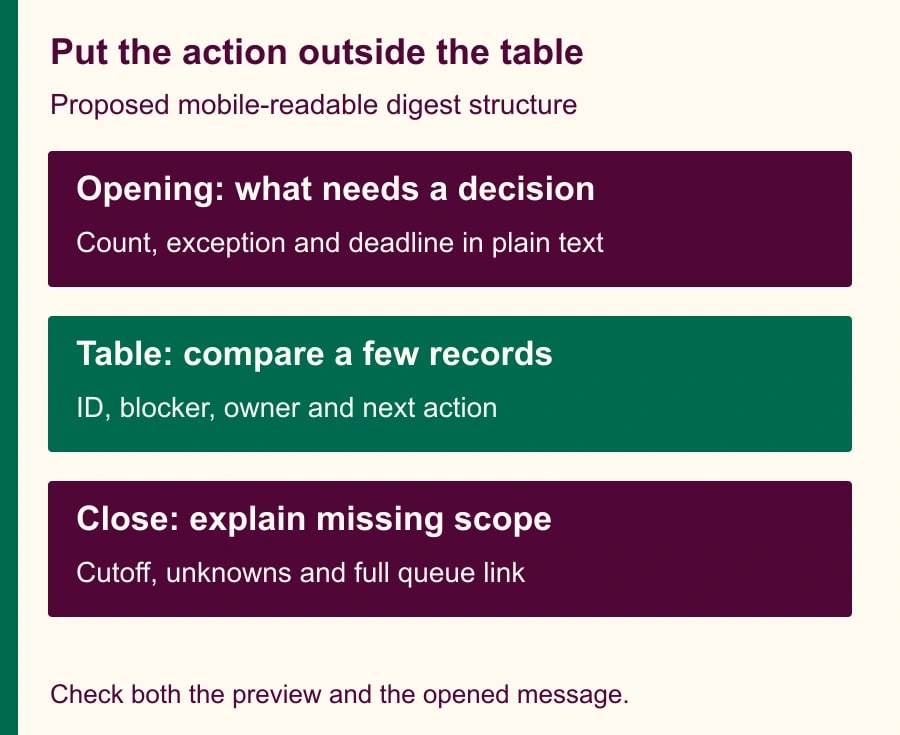
Markdown is plain text marked with characters that describe formatting. A message contract is a short agreement about what each report contains and what the reader should do. Start with a decision sentence: “Three onboarding requests are blocked; R103 needs an owner before 2 p.m. Eastern.” Follow it with the reporting cutoff and a link to the full queue. Then include the short table and a final statement about missing or excluded data.
Keep the fields narrow. For an onboarding digest, use request ID, blocker, owner and next action. Put the long client description behind the source link. Use explicit text such as “Unassigned” rather than an empty owner cell. Avoid color as the only way to indicate urgency, and avoid emoji as the only status value. The same message needs to make sense when copied into an incident note.
Google's message-formatting documentation distinguishes text messages from card-based messages and explains how an app supplies message content. Have the developer implement the current supported syntax rather than assuming that a Markdown preview in another editor matches Chat. The November announcement establishes the new table behavior; verify the final payload on the actual clients your team uses.
Do not let a language model choose the columns anew each morning. Changing the set of columns makes comparison harder and can conceal an omitted owner. Supply the model only the fields it needs, require it to preserve IDs and amounts, and treat its explanation as a draft. Rule-based code should assemble the final table from validated records after any narrative has been reviewed.
Build a six-record answer key
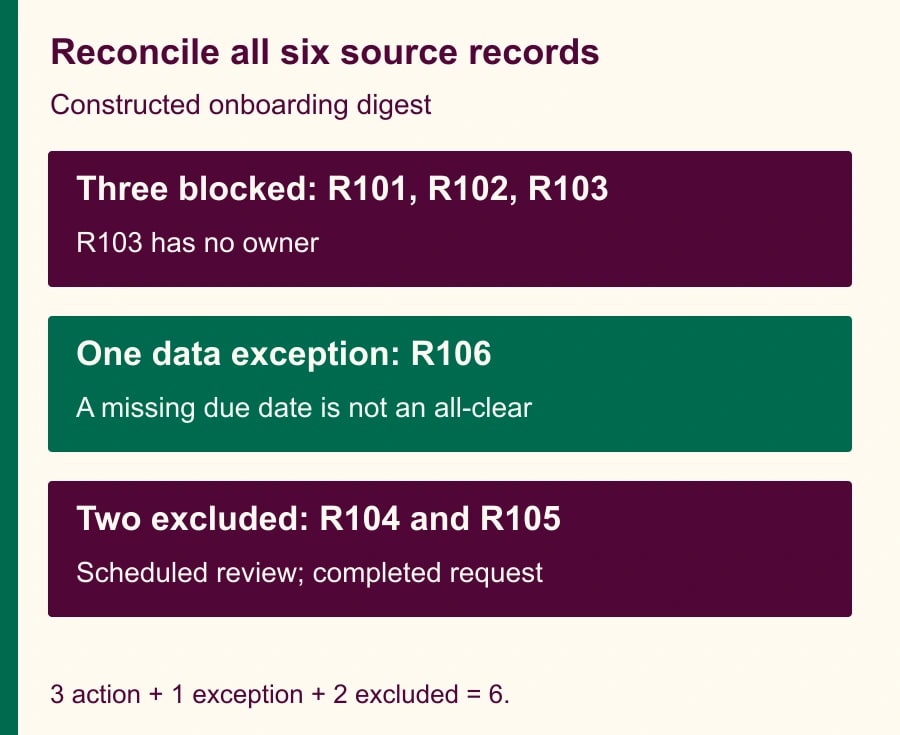
Use this constructed fixture before connecting a live queue. At the reporting cutoff, records R101 and R102 are blocked and assigned to Maya. R103 is blocked with no owner. R104 is waiting for a scheduled review and assigned to Leon. R105 is complete. R106 lacks a due date, so its overdue status cannot be determined from the available data.
Define the report rule: include blocked records in the action table; list records with insufficient scheduling data in a separate exception sentence; exclude completed work and scheduled work that is not blocked. The expected table contains exactly R101, R102 and R103. It shows three blocked records, two assigned records and one unassigned record. R106 appears in the data-quality note, not silently among the completed or on-time work.
The full reconciliation is six source records: three action rows, one data exception and two excluded records. That equation is the check against a pretty but incomplete summary. The table is not a count of all open work. If the heading says “All open requests,” it is wrong even when every displayed row is correct.
Now change R102 to complete before the next cutoff. The action table should fall from three rows to two, and the excluded group should rise from two to three. Preserve R103 as unassigned until someone actually owns it. A model must not infer an owner from whoever handled a similar client last week. The uncertainty is the reason to send the exception.
Add a second variation in which a source request contains a vertical bar or a line break in its title. The developer should verify that escaping or normalization preserves the table structure without changing the meaning. Use the source ID to compare the displayed row with the original. A malformed cell that shifts an owner's name under another request is a data error, not a cosmetic defect.
Test the handoff on a phone
Give a reviewer the message on a desktop and another reviewer the same message on a phone. Ask both to identify the unassigned request, name the first action and open the correct source record. Do not show them the answer key until after they respond. Record incorrect answers and the steps needed to reach the record; do not score only whether the message looks attractive.
For mobile, the sentence above the table should carry the essential instruction even before the reader taps Show table. In this example: “Three requests are blocked; R103 needs an owner. One additional request has no due date.” The table adds detail. It must not be the sole place where an urgent exception is disclosed.
Check a long owner name, a missing owner, a long blocker description and a narrow viewport. Include one source link that the test recipient cannot access. The correct response to that failure is to repair the sharing or route the action to an authorized owner, not to paste the whole confidential record into Chat. Note whether link labels remain descriptive and whether the underlying destinations are correct.
Test the notification and the opened message separately. A reader may see a shortened preview first. Put the business consequence early enough that the preview does not say only “Daily report.” If your team cannot reliably understand a complex table from its normal devices, reduce the columns or switch to a short bulleted list. Adoption of a new feature is optional; completion of the handoff is not.
Use this adaptable report brief
Copy the following brief into the work request for your developer and process owner. Replace the examples with your own decisions before treating it as a specification.
- Reader and deadline: the onboarding lead assigns blocked requests by 2 p.m. Eastern on working days.
- Source and cutoff: use the approved request queue as of the stated timestamp; record the report's time zone.
- Inclusion rule: show blocked requests; separately identify requests that cannot be classified because required data is missing.
- Fields: request ID linked to source, short blocker, named owner or Unassigned, and a concrete next action.
- Opening sentence: state the blocked count, the unassigned count and the data-quality count outside the table.
- Limits: show only the agreed small exception set; link to the full queue and say when additional rows are omitted.
- Approval: the operations owner approves the rules and a named reviewer checks the first three live digests against the source.
- Recovery: the developer can pause delivery, retain the report ID and issue a clearly labeled correction without silently rewriting history.
If you use an AI explanation, add this instruction: “Explain only the supplied exceptions. Preserve every request identifier. Do not invent owners, dates, customer impact or resolution. Mark missing information as missing. Return the explanation separately from the validated rows.” This prompt is a starting point for testing, not a guarantee that the model will comply.
Plan for stale, partial and repeated messages
A stale report needs an obvious cutoff. Readers should not mistake yesterday's snapshot for the current queue. If the source fetch fails, send a failure notice to the owner rather than a zero-row “all clear.” Include the last successful cutoff only when that value is actually known. A blank response and an empty queue are different outcomes.
A partial report should say which scope was successfully read and which scope is missing. Do not combine a complete count from one team with an incomplete table from another. For a first pilot, it may be simpler to stop the digest when any required source is unavailable and let the owner use the source queue directly.
Repeated delivery needs its own control. Give each intended report a stable reporting period and delivery identifier. Keep a delivery log so an operator can distinguish a retry from a new report. If a message may already have been sent, investigate that state before blindly replaying the whole workflow. The table feature does not provide an exactly-once business process by itself.
Corrections should be explicit. Suppose the initial digest shows R102 as blocked because the data cutoff preceded a completion update. That may be an accurate snapshot rather than a defect. If the source was wrong at the cutoff or the report misread it, label the corrected report and explain the affected record. Do not ask employees to reconcile two contradictory messages without context.
Measure decisions completed, not messages generated
Run the pilot for an agreed number of normal working days with the existing manual route available. Track the number of source records expected, records shown, omissions, wrong owners, inaccessible links and actions completed by the deadline. Record review time and correction time separately from generation time. A faster draft that causes extra follow-up is not a faster process.
For a small initial trial, a useful proposed stop rule is any wrong record link, unauthorized disclosure or missed urgent exception. Stop automated delivery, retain the failed example and repair the rule before resuming. Set less severe thresholds, such as maximum review time, with the team doing the work. These are proposed operating criteria, not benchmark results.
Compare the table with the old format using the same fixture and reader task. If both produce correct actions and the table takes longer to interpret, keep the simpler format. If reviewers spend fewer minutes reconstructing ownership, report that as released staff capacity. Count cash savings only when an actual budget or external spending change follows.
Your next action is to write the six-record answer key and the opening decision sentence before asking anyone to change the integration. For the first interaction with the same app, use our Google Chat starter-prompt test. For the work after a meeting summary, see the next-step handoff checklist. Product behavior was checked November 24, 2026; the fixture and operating recommendations above are editorial proposals.
Weekly Newsletter
AI Adoption Weekly
New research, field guides, training studies, and tool decisions for operators.
No spam. Unsubscribe anytime.
Related Comparisons
Calculator
AI seat cost calculator
List price × headcount. You enter the hours and the operating assumptions.