
Google Chat Starter Prompts: Give Helpdesk Users a Safe First Step
Choose three useful Google Chat helpdesk starter prompts, verify first-click behavior and test access, handoffs and duplicate requests.
Published November 19, 2026

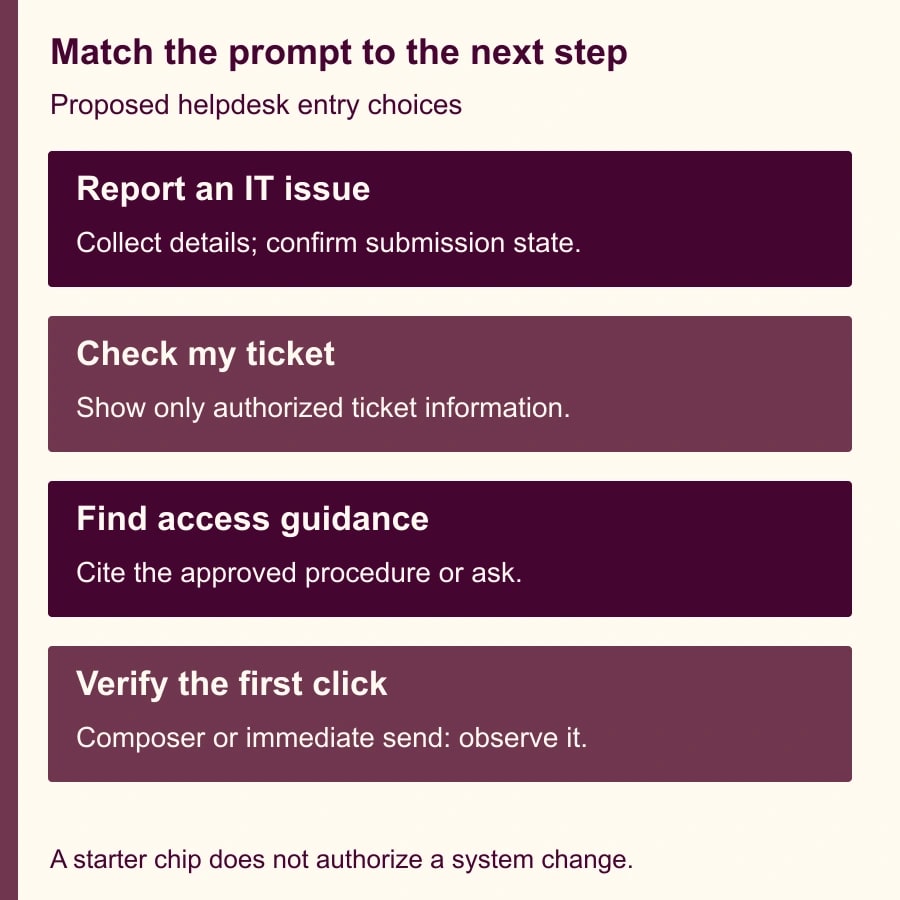
For a helpdesk Chat app, choose starter prompts that describe the next action the app can actually perform. “Report an IT issue,” “Check my ticket” and “Find access guidance” are useful starting points when the app supports those tasks. A button labeled “Reset my password” is a poor choice if the app only opens a request for someone else to review.
The work is partly configuration and mostly service design. Decide what happens after a click, what information the app needs, what it is allowed to reveal or change and who receives an unresolved request. Then verify that behavior with ordinary user accounts before putting the prompts in front of a larger group.
Google's November 18, 2026 announcement introduces descriptions and up to three starter prompts for Chat apps and agents. It says developers can configure these in the Cloud console, with rollout beginning November 16 for Workspace customers and Workspace Individual subscribers. This does not create a helpdesk agent or implement its underlying actions. The announcement separately describes agent sessions as a developer preview. Google's starter-prompt announcement.
Resolve the first-click uncertainty explicitly
As checked November 19, Google's announcement says clicking a text prompt sends its message. Its developer documentation and November 17 release notes say a text prompt populates the compose bar. Both distinguish text prompts from command prompts that run a registered command. Those descriptions are inconsistent; this guide does not assume which behavior your account will show. Google Chat release notes.
Use harmless text during verification, observe whether it appears in the composer or reaches the app immediately, and document the result with the date and client used. Do not promise users a review step that you have not observed. Until verified, design the starter interaction so that either behavior is acceptable: it may begin a conversation, but it must not authorize a password change, expose another employee's ticket or send a request to an external party.
That is a practical way to handle changing product documentation without inventing a product test. The examples below are proposed configurations and acceptance tests. They are not claims that this publication installed or exercised a live Chat helpdesk.
Who should use this approach
This fits an IT service owner with an existing Google Chat app, a working ticket process and a developer or administrator who can change the app configuration. It also suits an operations team introducing a small internal agent that answers approved questions and hands exceptions to staff.
Skip starter-prompt work for now if the app cannot reliably identify the user, route a request or explain its limits. Clear buttons will increase discovery of a broken service. Also skip a broad rollout if no person owns unanswered requests. A friendly conversation that disappears into an unmonitored queue is not successful adoption.
Gather the current app description, registered commands, supported languages, permitted user population and three recent examples of each intended request type. Use anonymized examples where possible. Identify which actions only retrieve information, which prepare a draft and which create or change a record. Those distinctions should determine the next screen or reply.
The service owner owns the wording and the promise. The developer owns event handling and action behavior. The helpdesk lead owns the handoff and acceptance checks. A security or identity owner should review any path that changes access. Budget staff time for all four functions even if two people cover them.
Configuring prompts does not remove hosting, integration, model or ticket-system costs. Estimate those from the existing app's actual usage and contracts. A text chip itself is not a reason to assume a new subscription is needed, and this guide makes no claim that operating an AI-backed helpdesk is free.
Write the description before the buttons
Start with a two-sentence service promise. A constructed example is: “This IT assistant helps employees report issues, check their own tickets and find approved access guidance. It collects details for the helpdesk; it does not change your password or approve access.” Adapt the promise to the actual system rather than adopting it as boilerplate.
Make the distinction between reporting and resolving visible. If a request is submitted, the app should return a ticket reference and the next step. If it only prepares a draft, it should say so and show how to submit it. If the user needs urgent help, provide the organization's established urgent-contact route instead of an invented response-time guarantee.
The description should also explain who the service is for. Contractors, guests and employees may have different access paths. Avoid offering a universal “my ticket” action unless the backend can enforce which tickets the person is entitled to see. Hiding a button is not a substitute for checking access when the request reaches the service.
Three prompts to adapt
Use three distinct jobs rather than three ways of asking the same broad question. The following titles and text are deliberately short and contain no sensitive information. They are proposed examples, not built-in Google templates.
- Title: Report an IT issue. Text: Help me report an IT issue.
- Title: Check my ticket. Text: Help me check my ticket status.
- Title: Find access guidance. Text: Show the approved access request steps.
For the first prompt, the expected next response asks for the affected service, the problem and a safe contact method. It should discourage secrets such as passwords or recovery codes. For the second, the expected next step identifies an authorized ticket, either by asking for its reference or presenting only records the user can access. For the third, the app should provide the approved procedure and its source, or admit that it cannot find an applicable procedure.
Google's configuration guide places starter prompts under Interactive features in the Chat API Configuration page. Each needs a unique rank from 1 to 3. Text titles are limited to 30 characters and prompt text to 60; forward slashes and backslashes are disallowed in those fields. Command prompts select registered slash or quick commands, not message actions. Google's starter configuration instructions.
Keep a text prompt when the intended job begins with clarification. Consider a command only when its existing behavior is already suitable for that immediate entry point. A command that opens a harmless intake dialog may fit. A command that writes to a system needs its own authorization, validation and confirmation design; adding a starter chip does not supply those controls.
A constructed first-conversation trial
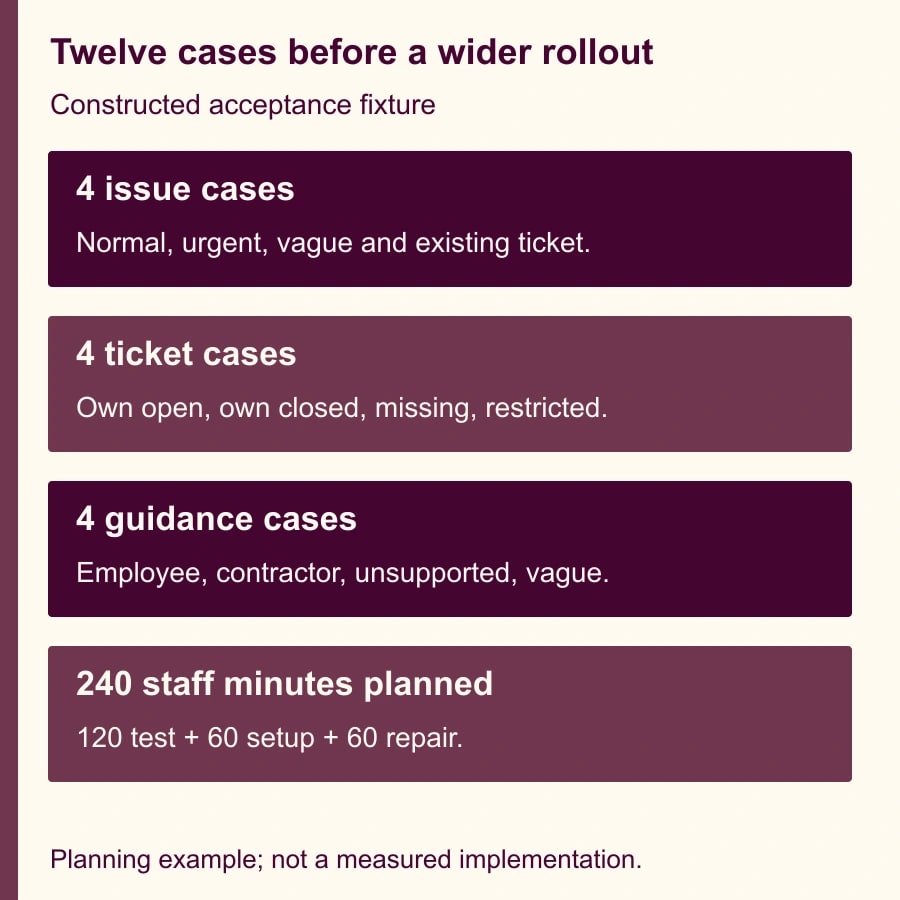
Imagine a helpdesk piloting these three prompts with twelve employee scenarios. Four concern a new issue, four concern ticket status and four concern access guidance. The fixture is designed to expose different failures, not to estimate the organization's real request mix.
The issue cases include a normal software fault, an urgent outage, a vague “it is broken” report and a user who already has an open ticket for the same problem. The expected outcomes are a complete intake, the established urgent route, a clarifying question and a check for an existing request. Creating four new tickets automatically would fail this fixture even if all four clicks produced replies.
The ticket cases include the user's own open ticket, their closed ticket, a nonexistent reference and another employee's restricted ticket. The expected outcomes differ. The restricted ticket must not reveal a title, description or status merely because the user supplies its reference. The nonexistent ticket should lead to clarification rather than a confident invented update.
The guidance cases include a standard employee request, a contractor request, an unsupported application and an ambiguous application name. The app should select the applicable approved instructions or ask a question. It should not combine two policies into a new authorization procedure. A human service owner decides whether a proposed answer is sufficient for the actual request.
Suppose, purely for planning, that one person spends six minutes running each case and another spends four minutes assessing its result. Twelve cases require 120 staff minutes: 12 multiplied by 10. Allow another 60 minutes for configuration and 60 for one repair-and-retest round. The illustrative pilot total is 240 minutes, or four staff hours, before any app development. It is not a vendor implementation estimate.
Record the first-click behavior in each client you intend to support, then inspect the complete interaction. A chip that opens the composer correctly can still lead to a duplicate ticket. A command that returns quickly can still expose the wrong record. Count completed, authorized jobs rather than merely counting clicks or messages.
Make the acceptance record reusable
Use one row per case in a worksheet with these fields. The evidence should be specific enough that a developer can reproduce a failed case without asking the tester to remember it.
- Case identifier and user category: [employee, contractor, guest or other supported group].
- Client and date: [web or intended mobile client; observed version where available].
- Prompt title and configured type: [text or registered command].
- First-click observation: [composer populated, message sent, command started or other].
- Expected next action: [clarify, show authorized information, prepare draft or submit after review].
- Actual record effects: [no record, draft, ticket reference, duplicate or unexpected change].
- Access check: [which user's data was requested; what was disclosed].
- Handoff: [queue or person, ticket reference, communicated next step].
- Result and repair: [pass or fail, evidence location, owner, retest date].
Include an explicit pass condition for each prompt before testing. “It worked” is too broad. A useful condition is “An ordinary employee can retrieve only their authorized ticket status, while a restricted ticket reference produces no ticket details.” A separate condition should cover the fallback when the ticket service is unavailable.
Do not collect full production conversations indiscriminately in the worksheet. Keep the minimum evidence needed to diagnose the issue, subject to the organization's existing handling rules. Synthetic ticket references and test accounts can expose many routing defects without copying employee problems into a new review document.
Failure and recovery decisions
If prompts do not appear, confirm that they were saved for the intended app and that the test uses the relevant empty one-to-one conversation context. The developer guide describes that entry context; do not infer that a long-running chat or every space must show the same starter choices. Verify configuration and availability before changing the underlying agent.
If the wrong action runs, remove or disable the affected starter configuration while the developer checks the command mapping and handler. Preserve the old and new configuration in the change record. A title change alone will not repair a command mapped to the wrong behavior.
If requests are duplicated, examine both repeated user actions and repeated event delivery. Google's interaction guide notes that failed requests to the app's server can be retried, so the same event may arrive more than once. The backend should recognize a previously handled event or request before creating another ticket. Use the event identifiers and ticket records available to your implementation; do not assume the chip provides deduplication. Google's interaction and retry guidance.
If the service exposes unauthorized information or performs an unintended change, stop that path immediately and involve the relevant service and access owners. Recover through the system of record, check affected records and retest with a restricted account. Do not hide the symptom by making the prompt harder to discover.
For a temporary backend outage, the app should say the request has not been completed and offer the established fallback. If it queued a request successfully, report that state and its reference. Uncertain submission is a distinct condition: inspect the ticket system before telling someone to submit again.
Decide whether the prompts earned their place
During a small rollout, measure how many first conversations reach an authorized useful outcome, how many need clarification, how many become duplicate requests and how many require staff rescue. Track each prompt separately. A popular general-help prompt can conceal a poorly performing ticket-status path.
Compare staff handling and maintenance time with the earlier entry method. Released capacity is not automatically cash savings, and a rise in legitimate requests may increase total work while improving access to support. The decision is whether the service becomes easier to use without creating avoidable mistakes or unowned work.
Begin by writing the service promise and testing one harmless text prompt. Before connecting its next action to another tool, review the guide to handing a Google Chat request to a Trello card owner. For actions with different consequences, use the read, draft, send and change approval matrix to make the boundary explicit.
Weekly Newsletter
AI Adoption Weekly
New research, field guides, training studies, and tool decisions for operators.
No spam. Unsubscribe anytime.
Related Comparisons
Calculator
AI seat cost calculator
List price × headcount. You enter the hours and the operating assumptions.