
Google Calendar’s Five-Minute Buffer: Start Late or End Early?
Choose start-late or end-early Calendar buffers with a delegated-calendar rehearsal, rollout dates and a check for usable breaks.
Published November 22, 2026

Choose End 5 minutes earlier when people need a familiar starting time and a clear deadline for decisions. Choose Start 5 minutes later when the transition before a meeting matters more. For delegated calendars, make that choice with the calendar owner, then test new invitations before applying the convention to client work. A shorter invitation creates an opportunity for a break; it does not make people stop talking or reserve a separate block against another booking.
Google announced the per-calendar buffer change on November 16, 2026. As checked November 22, the user setting is gradually reaching Rapid Release domains; Scheduled Release and the admin default are scheduled to begin December 11. Missing controls today can therefore be a rollout issue. Do not reorganize permissions or buy another scheduling product merely because the new setting has not appeared. Google’s announcement gives the separate rollout dates.
This guide is for an executive assistant, operations lead or client services manager deciding how to create usable transition time. Skip the change for an appointment whose duration is contractually fixed, a timed interview assessment or an event governed by an external organizer. Keep the agreed duration until the owner approves a different format. The process below is an editorial implementation recommendation, with a constructed example rather than a customer result.
Decide which five minutes you need
Start by naming the work that falls between meetings. An account manager may need to record a client commitment, check the next agenda and change rooms. A manager working remotely may mainly need a physical break. Those are different requirements. Five minutes can be enough for a brief transition and insufficient for a detailed handoff, travel between buildings or a decision that still needs a written record.
For a team that consistently starts on time but overruns, an earlier ending creates an explicit target for the chair. For a team that arrives from another meeting with no preparation time, a later start gives a visible transition before the discussion. Neither choice repairs an agenda that requires sixty minutes of work in a fifty-five-minute slot. Remove or move work before shortening the invitation.
Use one convention within a recurring internal meeting group where practical. Alternating conventions can produce uneven gaps even when every invitation is technically correct. Ask the chair to explain the purpose in the invitation description: for example, decisions finish before the final five minutes of the original slot so attendees can record actions. Avoid ambiguous language such as “we start around nine.” The actual invitation should carry the precise start and end.
What the new setting changes
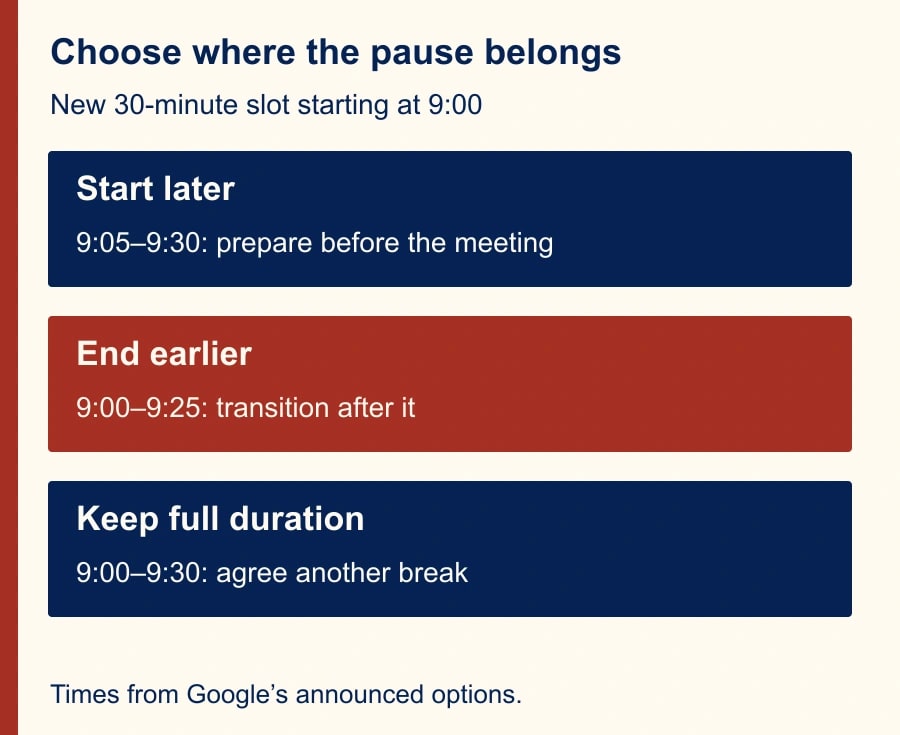
The new options apply per calendar: None keeps the full default duration; Start 5 minutes later preserves the standard end; End 5 minutes earlier preserves the start. For a 9:00 half-hour slot, those become 9:00–9:30, 9:05–9:30 or 9:00–9:25. Previous Speedy meetings users move to the early-ending option. On the web, eligible users can find Event duration & buffer under the selected calendar’s settings; Google specifies Make changes and manage sharing permission. See the new per-calendar controls.
Treat these as defaults for creating new events. Do not assume that changing the default has repaired existing invitations or every event produced by a booking integration. Inspect the actual invitation generated by each route your team uses. This is a verification requirement, not a claim that every integration behaves differently. The schedule a recipient receives is the evidence that matters.
An organization-wide default is a separate decision. Google’s admin guidance on default event duration is the appropriate starting point for the administrator. For this November 22 pilot, keep the announced December admin rollout separate from user settings already appearing. A manager should not promise a centrally enforced change before the administrator has confirmed what is available in that organization.
Prepare a small, reversible pilot
Name one calendar owner and one person who creates invitations. If an assistant does the scheduling, the owner still decides which meetings may be shortened. List the calendars involved, their purpose, the people who can edit them and the current convention. Do not request broader sharing permission merely to experiment on a senior leader’s live calendar. Use an approved test calendar or ask an already authorized editor to run the rehearsal.
Gather six representative invitations: an internal thirty-minute check-in, an internal hour, a client review, a recurring meeting, a room-based meeting and an invitation created through a booking workflow. Record which are safe to test and which require a recipient’s agreement. Use test attendees for rehearsals so a harmless experiment does not send confusing updates to customers.
The feature announcement lists broad account availability, but availability is not the same as rollout completion. This workflow assumes you already have a suitable Google account and authorized calendar access. Its incremental cost is mainly staff time: planning, invitation checks and chair training. A proposed budget is thirty minutes for setup and fifteen minutes for a review after one working week. These are planning allowances, not measured implementation times or a product price quote.
Before changing anything, capture the current setting and one example invitation. Write down the reversal: restore the prior default, inspect events created during the pilot, and decide with the owner whether any need correction. Reverting a preference is not a reason to silently change appointments that other people have already accepted. Any necessary correction should follow the team’s normal invitation-update practice.
A constructed morning: inspect the transitions
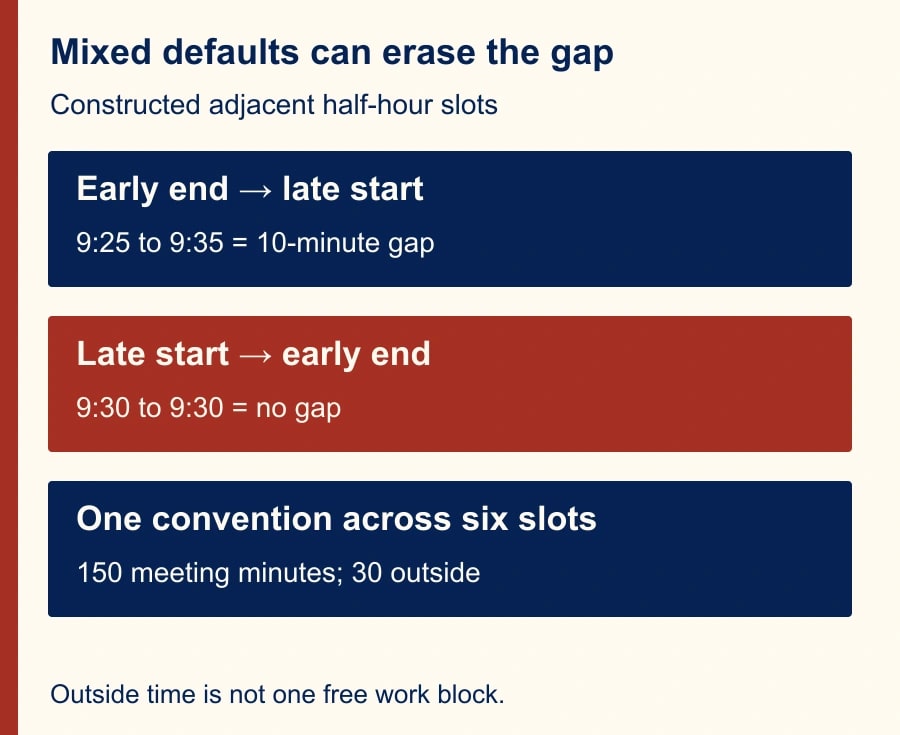
Suppose a services lead has six consecutive half-hour slots from 9:00 to noon, all created using the same convention. With early endings, the invitations are 9:00–9:25, 9:30–9:55, 10:00–10:25, 10:30–10:55, 11:00–11:25 and 11:30–11:55. The total scheduled discussion time is six times twenty-five minutes, or 150 minutes, compared with 180 minutes at full duration.
That arithmetic gives thirty minutes outside the six shortened events. It does not give a single thirty-minute work session. There are five internal gaps of five minutes, plus five minutes after the last meeting. If the lead has to walk seven minutes between two rooms, the five-minute gap still fails that transition. If a meeting overruns by four minutes, only one minute of its planned five-minute break remains.
With later starts, the invitations run 9:05–9:30, 9:35–10:00 and so on, ending at noon. The same total discussion time remains, with five minutes before the first event and five internal gaps. Choose based on where the buffer is needed, rather than treating one setting as inherently more productive.
Mixing conventions changes the pattern. An early-ending event at 9:00–9:25 followed by a late-start event at 9:35–10:00 produces ten minutes between them. Reverse the convention across adjacent half-hour slots—9:05–9:30 followed by 9:30–9:55—and there is no gap. This is a calculation from the invitation times, not a hidden Calendar rule. A calendar full of individually shortened meetings can still contain a zero-minute transition.
Run the invitation rehearsal
Create a new internal test invitation using the chosen setting. Compare the saved event with the planned start, end, calendar and attendees. Ask a second test attendee to read back the received times. If a room is involved, confirm the reservation covers the actual meeting and allows whatever preparation the room needs. Do not infer resource behavior from the organizer’s calendar alone.
Repeat through the other creation routes on your list. For a recurring series, review the proposed series before sending real updates. For a booking workflow, inspect a fresh test booking. For an externally organized meeting, keep the external organizer’s invitation as the authority and plan any transition around it. Record differences without immediately changing several settings at once; otherwise you will not know which action changed the result.
Have the chair rehearse the shorter agenda. A useful twenty-five-minute example reserves three minutes for the decision and context, fifteen for discussion, five for a choice and owner, and two for reading back actions. Those numbers are a proposed meeting design, not a universal standard. If the decision cannot fit, reduce the scope, send background material earlier or keep the longer meeting.
The checkpoint is a complete invitation and an achievable agenda. An attractive calendar is not sufficient. If participants agree the last five minutes will be used to continue the discussion in chat, ask whether that simply moves the same interruption into the next meeting. The owner should choose which unfinished items can wait and which require another scheduled decision.
Keep this rollout worksheet
- Calendar and accountable owner: identify the specific calendar, not just the person’s name.
- Meeting types included: list internal formats that can safely change; list exclusions separately.
- Convention and reason: early ending or later start, with the transition work it supports.
- Baseline: save the previous setting and representative invitation times.
- Creation routes checked: web, delegated creation, recurring series, room and booking workflow where used.
- Recipient evidence: record the test attendee, received start/end and any mismatch.
- Agenda change: state what was removed, moved to preparation or assigned outside the meeting.
- Recovery owner: name who restores the preference and reviews invitations if the pilot fails.
- Review date: compare actual endings, usable breaks and missed decisions after one working week.
Keep this worksheet with the team’s scheduling instructions. It is particularly useful when another assistant covers leave: the replacement should know why a calendar differs from the company’s usual convention. A setting without an explanation is easy to “correct” back to the old habit.
Measure usable breaks, not calendar arithmetic
For the pilot, record a small sample of actual end times and whether the planned transition occurred. Ask whether attendees reached the next meeting ready, whether decisions were completed and whether action notes were captured. Avoid tracking every person’s minute-by-minute behavior. The purpose is to evaluate the meeting design, not create a surveillance exercise.
In the six-meeting example, thirty scheduled minutes outside meetings are potential breathing room. They are not thirty minutes of cash savings, nor necessarily thirty minutes available for another task. If everyone stays on the call until the old ending, the practical gain is zero. If useful pauses reduce rushed handoffs, describe that observed change and the sample size; do not convert it into an unsupported productivity percentage.
Stop expanding the pilot if client expectations are unclear, invitations disagree across creation routes, or the shorter agenda repeatedly drops necessary decisions. Restore the prior convention for affected formats and repair the process before trying again. Missing rollout controls call for a later check, not an improvised permission expansion.
Start with one calendar and one recurring internal format. Once the received invitation and actual meeting behavior agree, document the convention for delegates. For the next scheduling handoff, use our guide to emailing Calendar guests through Gmail with the right agenda and delegate checks. If the meeting includes shared documents, also check whether Meet attendees can actually open the file links you present.
Weekly Newsletter
AI Adoption Weekly
New research, field guides, training studies, and tool decisions for operators.
No spam. Unsubscribe anytime.
Related Comparisons
Calculator
AI seat cost calculator
List price × headcount. You enter the hours and the operating assumptions.