
Microsoft 365 Custom Attributes: Check Guest Visibility Before Sharing
Review Microsoft 365 custom attributes for tenant users and guests with a field approval worksheet, correction owner and synthetic test.
Published November 22, 2026

Before sharing custom organizational attributes with Microsoft 365 people experiences, approve each field for everyone in the tenant—your organization’s Microsoft 365 environment—including guests. Start with a small, useful set of information that is already suitable for that audience. Leave the capability off if you cannot explain who maintains a field, what its values mean or why broad discovery helps employees do a specific job.
Microsoft’s November 17, 2026 release notes describe a new Organizational Data Service setting for selected custom attributes. It is off by default, requires administrator action and includes visibility configuration per attribute. The notes explicitly include guests in the audience. Organizations that do not use the service or enable the capability have no change. These facts were checked November 22; availability should still be confirmed in your own environment. Read Microsoft’s custom-attribute release notice.
This is a guide for the Microsoft 365 administrator working with the owner of human resources (HR) or operational data. The decision is whether a field belongs in broadly discoverable people information. It is not a guide to giving every employee access to an HR system, and it does not assume that a Copilot answer is an authoritative personnel record. The approval process and examples below are editorial recommendations, not a report of a tenant deployment.
Start with the question an employee needs answered
An employee trying to find the support lead for a product line needs a current routing answer. They probably do not need the lead’s compensation band, internal performance category or the confidential customer project they happen to be assigned to. A useful profile is selective. More fields can make a person easier to find while also making a misleading or inappropriate inference easier.
Write one intended question before opening configuration. For example: “Who is the published escalation contact for the Meridian product family?” Then identify the minimum approved information needed to answer it. That might be a public product family label and a published support role. A private staffing forecast is a different dataset, even if it contains the same employee names.
Microsoft describes Organizational Data Service as a central platform that distributes imported organizational information to supported applications. Its application-access guidance distinguishes destination choices and attribute types; global organizational attributes are handled differently from app-specific and custom attributes. Do not assume that a setting for one class changes every existing profile field. Microsoft’s application and attribute-access overview explains the distinction.
If your organization does not already use the service, first establish why it should. Do not build a new HR-data import just to demonstrate an additional field in a profile. This article assumes an authorized administrator, an identified source owner and an existing or separately approved import process. Destination licensing, service availability and administrator roles need checking against your tenant’s current arrangements; no new license price or universal entitlement is assumed here.
Separate three approvals that often get combined
The first approval is meaning: does the value accurately describe the person for this purpose? A field named Region could mean home address region, sales territory, payroll jurisdiction or the office that owns a contract. A tidy label does not resolve that ambiguity. Ask the business owner for a definition and a few representative values, including blanks and exceptions.
The second approval is audience: is each possible value suitable for every tenant user and guest? An attribute can be operationally useful and still fail this test. “Acquisition integration team” might reveal confidential work even if other team labels are harmless. Review actual allowed values and how new values enter the source, rather than approving only the column name.
The third approval is maintenance: who corrects an error, and how does the correction reach the destination? A routing field that stays wrong after a transfer can send requests to someone who no longer owns the work. Do not mark a field ready because it looked accurate on the day it was imported. Require an owner who can answer a correction request and explain the update process.
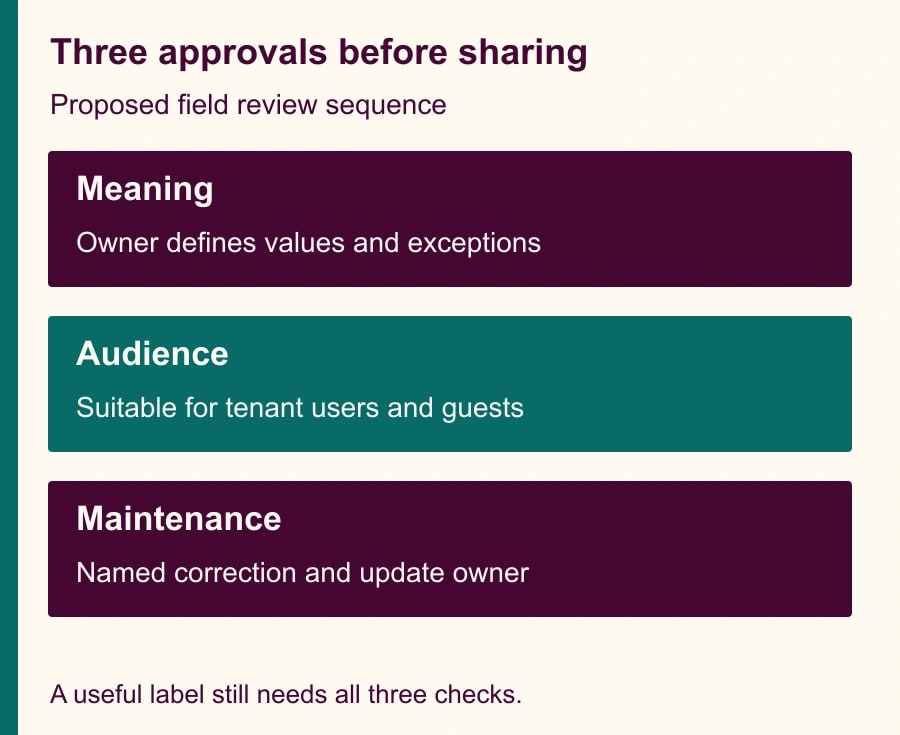
Keep these approvals distinct in the change record. A source owner can certify meaning without being authorized to approve broad sharing. An administrator can configure distribution without knowing whether a sensitive label is appropriate. A business sponsor can explain the benefit without owning the source system. The release needs all three responsibilities covered, even in a small organization where one person holds more than one role.
A constructed field review
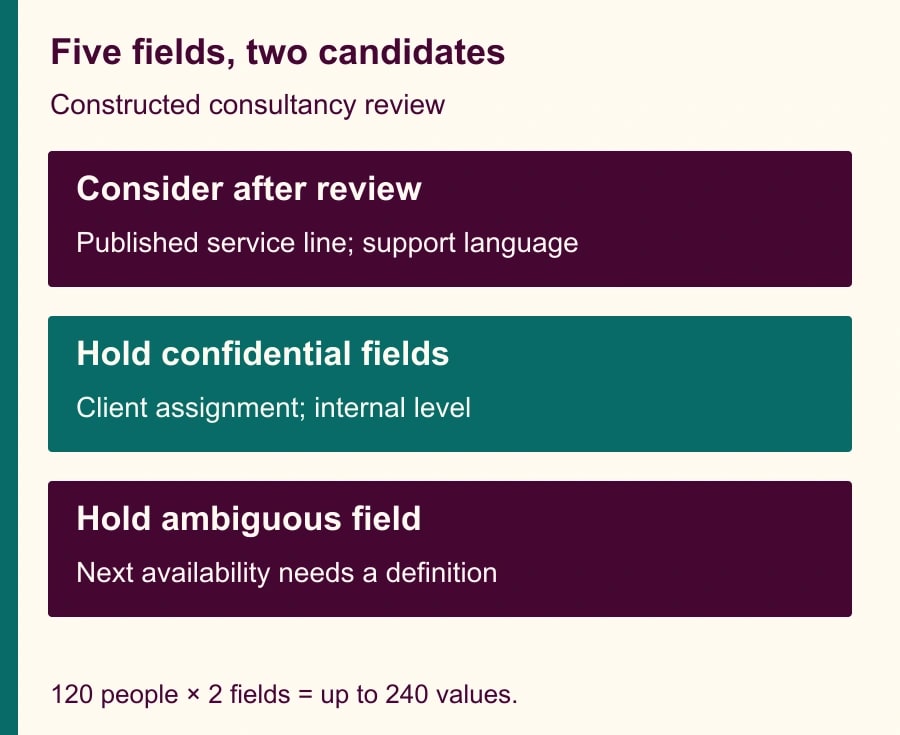
Consider a fictional consultancy with 120 employees. Its operations lead wants colleagues to locate a service contact without asking in a general chat channel. The source export includes five custom fields: PublishedServiceLine, SupportLanguage, ClientAssignment, InternalLevel and NextAvailability. These names and values are invented to illustrate the review, not Microsoft defaults or a customer dataset.
PublishedServiceLine contains the same service names already used in the company’s external directory. The business owner proposes approving it after checking that the source contains only those public labels. SupportLanguage records languages employees have agreed to use for customer support. It can be considered separately, with an explicit definition that it describes a support capability rather than nationality or a verified qualification.
ClientAssignment includes confidential client names and is held. InternalLevel is an internal employment classification and is held. NextAvailability is also held because its meaning is unclear: a date might be a staffing estimate, an approved booking window or a manager’s unconfirmed forecast. The team does not make the field safe by renaming it “availability.” It needs a different, approved source or a different workflow.
The resulting proposal is two candidate fields and three held fields. With 120 employees, two complete fields would contain up to 240 person-field values. That count is a review-sizing calculation, not a count of unique people exposed or proof that every value is safe. A single inappropriate value can still invalidate an otherwise acceptable field. The review must cover exceptions and future input rules as well as today’s totals.
For example, a new service line may be confidential until launch. The owner should prevent that draft label from entering the broadly shared field. One option is a separate approved publication field maintained from a controlled list. That is a proposed data-design choice; confirm the available import and mapping capabilities before implementing it. Do not overwrite a private source field merely to make it suitable for a second audience.
Build a release record before configuration
Use this worksheet for each candidate attribute. A yes/no column alone is too weak because it hides the reason for the decision. The completed record should let a second administrator understand the choice without reopening every discussion.
- Business question: write the specific discovery or routing question the field should answer.
- Attribute and definition: record the source field, destination label, allowed values and what a blank means.
- Source owner: name the person who can correct the data and explain its update process.
- Audience approval: record who approved every tenant user and guest as an appropriate audience.
- Exceptions: list values or circumstances that require withholding the field or using a different source.
- Destination: identify the intended Microsoft 365 application access and the attribute category being configured.
- Evidence: attach a synthetic example and an approved sample review without copying unnecessary personnel data.
- Correction path: record the contact, expected response process and verification step after a change.
- Release decision: approve, hold or retire, with date and approver.
Store this record in the team’s existing change-management location. Avoid creating a second uncontrolled personnel spreadsheet to approve the first one. The record should contain enough evidence to support the decision while keeping sensitive samples in the system where the authorized reviewers already work.
Test with harmless values and the right audience
Use an approved test environment where possible. If you must validate in production, use only synthetic or already approved public information and follow your organization’s change process. A limited set of test people does not turn a broad audience setting into a private pilot. The important distinction is which values you release and who may see them, not how small the initial import feels.
Ask the administrator to locate the application-access configuration described in the current Microsoft guidance. Record the actual setting, selected attributes and destination before saving. If your screen differs or the feature is absent, stop at the prepared approval record and resolve availability with the administrator. Do not invent a parallel permission setting or assume that enabling a related service has the same effect.
Then verify a harmless candidate value through the intended people experience using an ordinary member account and an authorized guest test account where your organization permits such testing. Record the surface, account type, time and result. Do not use a real guest’s account or grant extra access solely to make the test convenient. If you cannot perform a permitted guest check, retain that as an unresolved verification item and obtain the responsible administrator’s documented assessment before release.
Test a correction as well as the first appearance. Change an approved synthetic value through the source process, then check whether the expected destination eventually reflects it. Record observed timing without presenting it as a guaranteed propagation service level. A successful initial display says little about whether the organization can repair stale information next month.
Handle misleading answers without widening access
Suppose a user asks an AI assistant for the “best expert” and receives someone whose service-line label is correct but whose experience is unrelated to the question. That does not necessarily mean the import failed. It may mean the field is too broad for the inference being requested. Change the user guidance or the definition of the business question before adding private personnel details to make the answer more specific.
A directory can help a user identify a contact; it cannot by itself certify that person’s availability, authority or suitability for a sensitive assignment. In the consultancy example, the next step remains asking the listed service contact to confirm ownership. That human confirmation is especially important when the decision affects a client promise, staffing commitment or access to restricted work.
If an unexpected value appears, stop further distribution changes and involve the data owner and administrator. Capture the field, affected surface and correction steps using the organization’s normal process. Withdrawing a field is not proof that copies, screenshots or earlier outputs have disappeared. Verify the supported correction behavior and follow the established response process for any inappropriate disclosure rather than promising instant erasure.
Make the benefit worth the maintenance
Set a small operational measure before release: for instance, the number of routing questions answered by the approved directory and the number redirected because the contact was wrong. Also track correction requests and time spent maintaining the fields. A field that requires constant explanation may be less useful than a link to a well-maintained service directory.
Here is a constructed capacity calculation. If a team previously spent three minutes resolving each of twenty routing questions per month, that is sixty minutes. If the new process takes one minute per question plus thirty minutes of monthly maintenance, it totals fifty minutes. The potential release is ten minutes, not forty, after maintenance. No cash saving follows unless actual expenditure changes. Replace every assumption with observed results before making a business case.
Stop the rollout if the audience cannot be approved, the source cannot be kept current or the expected routing benefit fails to appear. Keep held fields visibly held; do not quietly enable them in a later import because their names resemble approved fields. Recheck the register whenever the source schema, allowed values or intended application changes.
The next action is one field review, not a tenant-wide enablement. Ask the source owner and administrator to complete the worksheet for the most useful candidate. For broader adoption, pair it with a first useful week of Microsoft Copilot tasks and an approval matrix separating reading, drafting, sending and changing records.
Weekly Newsletter
AI Adoption Weekly
New research, field guides, training studies, and tool decisions for operators.
No spam. Unsubscribe anytime.
Related Comparisons
Calculator
AI seat cost calculator
List price × headcount. You enter the hours and the operating assumptions.