
Slack Thread Notifications Missing? Check Following Before Adding Noise
Troubleshoot missing Slack thread replies with a two-person test that separates following, device delivery and accepted task ownership.
Published November 22, 2026

When Slack thread replies are easy to miss, check whether you are following the specific thread before turning on more channel alerts. Then check notification preferences and delivery on the device you actually use. Finally, make the work handoff explicit: a delivered notification does not mean someone has accepted the task.
In channels and group direct messages, Slack says the default thread-notification behavior applies when you start a thread, reply to it or are mentioned. You can also choose to receive replies for an individual thread. One-to-one direct-message threads have a different default: new replies notify you. These distinctions were checked November 22, 2026 against Slack’s thread documentation.
This guide is for a support lead, project coordinator or small operations team whose important decisions happen in channel threads. It is useful when messages exist but the right person misses the next reply. If a message cannot be found at all, investigate the conversation, workspace, access and retention situation separately. More notification noise cannot recover content you cannot access.
The process below uses a two-person rehearsal with invented messages. It is an editorial troubleshooting method, not a claim that we tested your workspace. Keep it in an approved test channel and working hours. Do not send fake urgent incidents to customers or use a real escalation channel to experiment with everyone’s attention.
Locate the failure in the handoff
Begin with one missed reply. Record its link, the intended recipient, when it was sent and what action was expected. Ask the recipient to describe the missing signal precisely: no item in Threads, no desktop banner, no phone alert, or a visible message that did not look assigned to them. Those are different observations and need different repairs.
The sender may say “I posted it in the channel,” while the recipient says “I did not know I owned it.” Both can be true. A channel is a place to communicate, not an assignment agreement. Before changing settings, inspect whether the message named an owner, stated a requested action and included a reasonable deadline. An unowned request can remain unowned even if every member receives a notification.
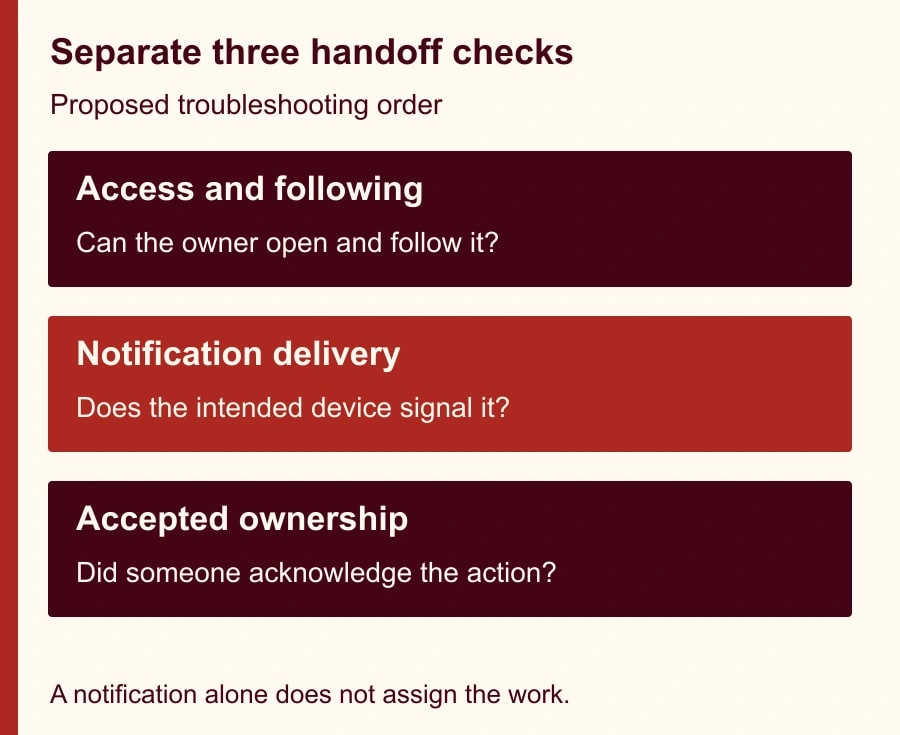
Use three checkpoints. First, the intended person can open the thread. Second, the thread and device settings produce the expected signal in a controlled test. Third, the recipient acknowledges the work or redirects it to the actual owner. Keep these checkpoints separate in the record. That makes it possible to say “delivery works, ownership is unclear” instead of repeatedly reinstalling an app.
Follow the conversation you are responsible for
For a single thread on desktop, use its three-dot menu and select Get notified about new replies. For a channel where you truly need every thread, open the channel name, its notification menu and More notification options, then enable the option for all replies in Threads. These controls are documented for members and guests on all plans. Slack explains the individual and channel-wide choices.
Choose the smallest scope that supports the job. A specialist responsible for three customer issues may need three followed threads. A duty coordinator monitoring a dedicated intake channel may need broader coverage during a shift. A large general channel is a poor place to enable every reply merely because one important conversation was missed.
Record the choice as part of the duty handover. For example: “While covering the onboarding queue, follow each open case thread assigned to you and check the queue at the agreed handover times.” That is a proposed working convention, not a Slack enforcement feature. When the duty changes, the incoming person should confirm the open cases; the outgoing person should not assume a notification preference transferred with the assignment.
Check delivery without turning off healthy boundaries
Slack’s notification preferences include desktop and mobile choices, thread-reply preferences and notification schedules. Its current guidance says keyword messages in threads you are not following do not trigger a keyword notification. A project name appearing inside an unfollowed discussion is therefore a weak basis for an escalation process. Review Slack’s notification settings and keyword behavior.
Use the intended device during the test. Write down whether Slack is open on desktop, whether mobile notifications are enabled and whether the test falls inside the person’s notification schedule. Do not label a missing phone banner a thread-follow failure until you know what the desktop and mobile settings are meant to do. Preserve the distinction between an item visible in the app and an interruptive device alert.
Do not solve a routine daytime handoff by telling everyone to abandon quiet hours. If the work requires an on-call response, use the organization’s agreed coverage and escalation procedure. A normal project channel should not become a substitute for a monitored incident system because someone discovered a way to generate more alerts.
The cost of this repair is usually attention and a short rehearsal, assuming the team already uses Slack. The thread controls described here do not require a paid-plan upgrade. Optional features outside this guide can have different requirements, so do not buy a plan to address an unverified following or delivery problem. Allocate a proposed twenty minutes for the initial two-person test and a short review after several real handoffs.
Run six controlled cases
Call the test sender Maya and the recipient Leon. These are fictional roles, not people we observed. Use a channel both can access, neutral text and a clear label such as “notification rehearsal—no action required.” Before each case, note Leon’s thread state and the expected outcome. Use a fresh thread where necessary so an earlier reply or mention does not contaminate the next case.
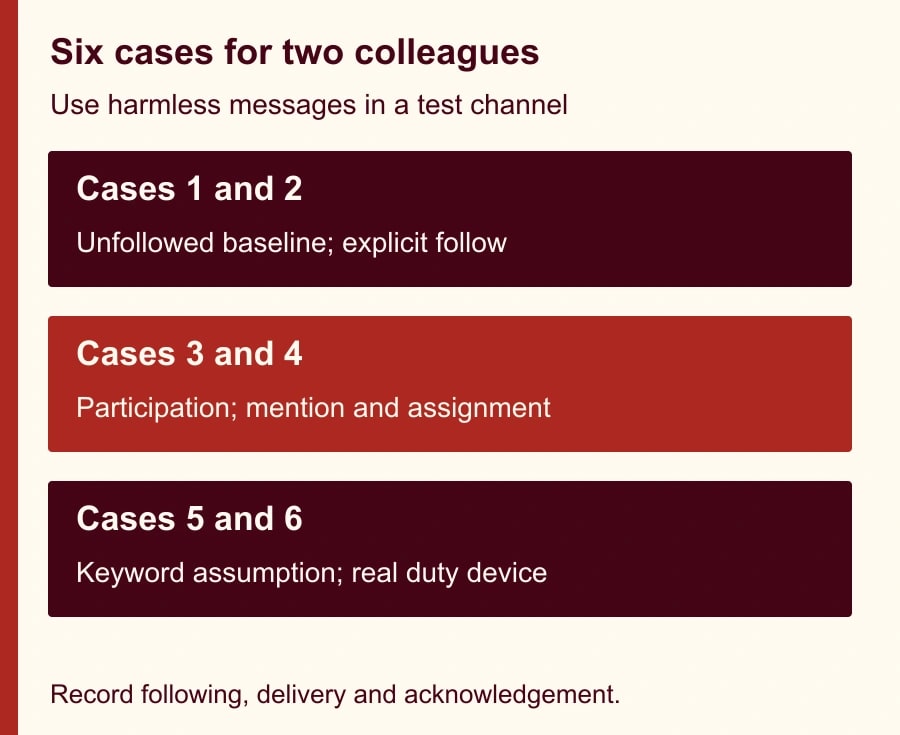
Case one establishes the starting point. Maya creates a thread that Leon has not joined, followed or been mentioned in. Maya adds a reply. Leon checks whether the reply exists and records any signal, without assuming that channel membership alone should subscribe him to every thread. If a broader channel option is enabled, record that as part of the case rather than calling the observation inconsistent.
Case two tests deliberate following. In another thread, Leon enables notifications for replies before Maya posts a second message. Record whether Leon can find the reply in Threads and whether the chosen device signal occurs under the current preferences. If the thread appears but no banner arrives, investigate delivery settings before changing the following state again.
Case three tests participation. Leon replies to a fresh thread, then Maya replies afterward. Compare it with the explicit-follow case. This helps the team understand whether its normal working habit already establishes participation, while still checking the current notification preferences. Do not use a meaningless reaction as a substitute for the documented actions; record what the person actually did.
Case four tests an explicit mention and an assignment sentence. Maya mentions Leon in a fresh thread and asks him to acknowledge a harmless example task. Check the notification separately from Leon’s acknowledgement. The message might arrive promptly while Leon correctly explains that another person owns the work. That is a successful clarification, not a notification failure.
Case five tests the keyword assumption. Maya uses a configured project keyword in a fresh thread Leon is not following, without mentioning him. Record that this is not a reliable trigger under Slack’s documented behavior. The aim is to remove an unsafe team assumption, not to manufacture an expected failure and treat it as a product defect.
Case six tests the actual handoff device and working window. Repeat the approved follow-and-mention pattern under the conditions in which Leon will cover the queue. If mobile delivery remains inconsistent, keep the work covered through the agreed monitored route while the administrator or support team investigates. A successful desktop rehearsal alone does not validate the mobile arrangement.
Turn the result into a usable handoff
Write one message that carries enough context for someone to accept the work without reading forty earlier replies. A reusable brief is: “Owner requested: [person]. Decision or action: [specific task]. Relevant evidence: [thread or system link]. Needed by: [time and time zone]. Please acknowledge ownership or name the correct owner. Escalation if unacknowledged: [existing team route].” Adapt the words to the team’s style and urgency.
For a constructed customer onboarding case, Maya asks Leon to confirm whether a sample account can move to the next setup step by 3 p.m. Leon replies that he owns the check and will report the result in the thread. The acknowledgement closes the assignment gap. The eventual answer still needs the evidence and approval required by the business process; the thread is the communication trail, not permission to skip those controls.
If an AI tool summarizes the thread, have the owner verify the summary against the actual messages before acting. A summary may compress uncertainty or make a tentative suggestion look like a decision. Keep the original link and the explicit acknowledgement accessible. Automating the recap does not transfer responsibility from the person who accepted the work.
When a task needs a personal reminder, use the team’s chosen task mechanism as a second step. Following replies and saving work for later solve different needs. A thread can go quiet while a deadline still approaches. Our guide to Slack Later, To-dos and missing saved items helps distinguish the reminder side from conversation notifications.
Record enough evidence to avoid repeating the diagnosis
- Conversation: record the workspace, channel and exact thread link.
- Expected owner: name the person and the action requested, with a due time where appropriate.
- Following state: record whether the person explicitly followed, participated, was mentioned or enabled wider channel replies.
- Delivery conditions: record desktop/mobile, relevant preferences and the working notification schedule.
- Observed result: separate message visibility, Threads appearance, banner or push delivery, and acknowledgement.
- Change made: record one adjustment at a time and the case repeated afterward.
- Coverage: identify who handles the work while any delivery problem remains unresolved.
- Review: note the next duty handover or settings change that should trigger a recheck.
Keep the record brief enough that a coordinator can use it during a real handoff. It should not require screenshots of private conversations when a synthetic reproduction and settings description are sufficient. If support needs evidence from a real case, follow the workspace’s normal handling rules and include only what is necessary to diagnose the issue.
Measure fewer missed handoffs, not more notifications
Track a small sample of assigned threads for one week. Count unacknowledged requests, requests redirected to the correct owner and follow-up chasing time. Also ask the duty person whether the added alerts are useful. If more notifications produce more interruptions but no improvement in ownership, narrow the scope or change the assignment process.
For example, suppose a fictional team chases twelve handoffs a week for four minutes each: forty-eight minutes. After a change, it still chases three at four minutes each and spends ten minutes reviewing the queue. That totals twenty-two minutes, leaving twenty-six minutes of potential released capacity. This is arithmetic for a planning scenario, not a measured Slack benefit or cash saving. Include setup and ongoing review time when you evaluate your own results.
Stop expanding broad channel notifications if the duty owner cannot distinguish actionable requests from commentary. Escalate a reproducible delivery problem with the test conditions, while keeping a known working route for urgent work. If nobody can accept the assignment, the next action is a staffing or ownership decision, not another notification toggle.
Start with one missed thread and the two-person rehearsal. Once following and delivery work, agree on the acknowledgement sentence the team will use. Where the work involves an assistant sending messages or changing records, pair the handoff with an explicit read, draft, send and change approval matrix so an alert is never mistaken for authorization.
Weekly Newsletter
AI Adoption Weekly
New research, field guides, training studies, and tool decisions for operators.
No spam. Unsubscribe anytime.
Related Comparisons
Calculator
AI seat cost calculator
List price × headcount. You enter the hours and the operating assumptions.