
Use Gmail Live to Find the Facts Before a Customer Call
Use Gmail Live voice search for customer-call preparation, then check dates, conditions and source emails before repeating a commitment.
Published October 19, 2026

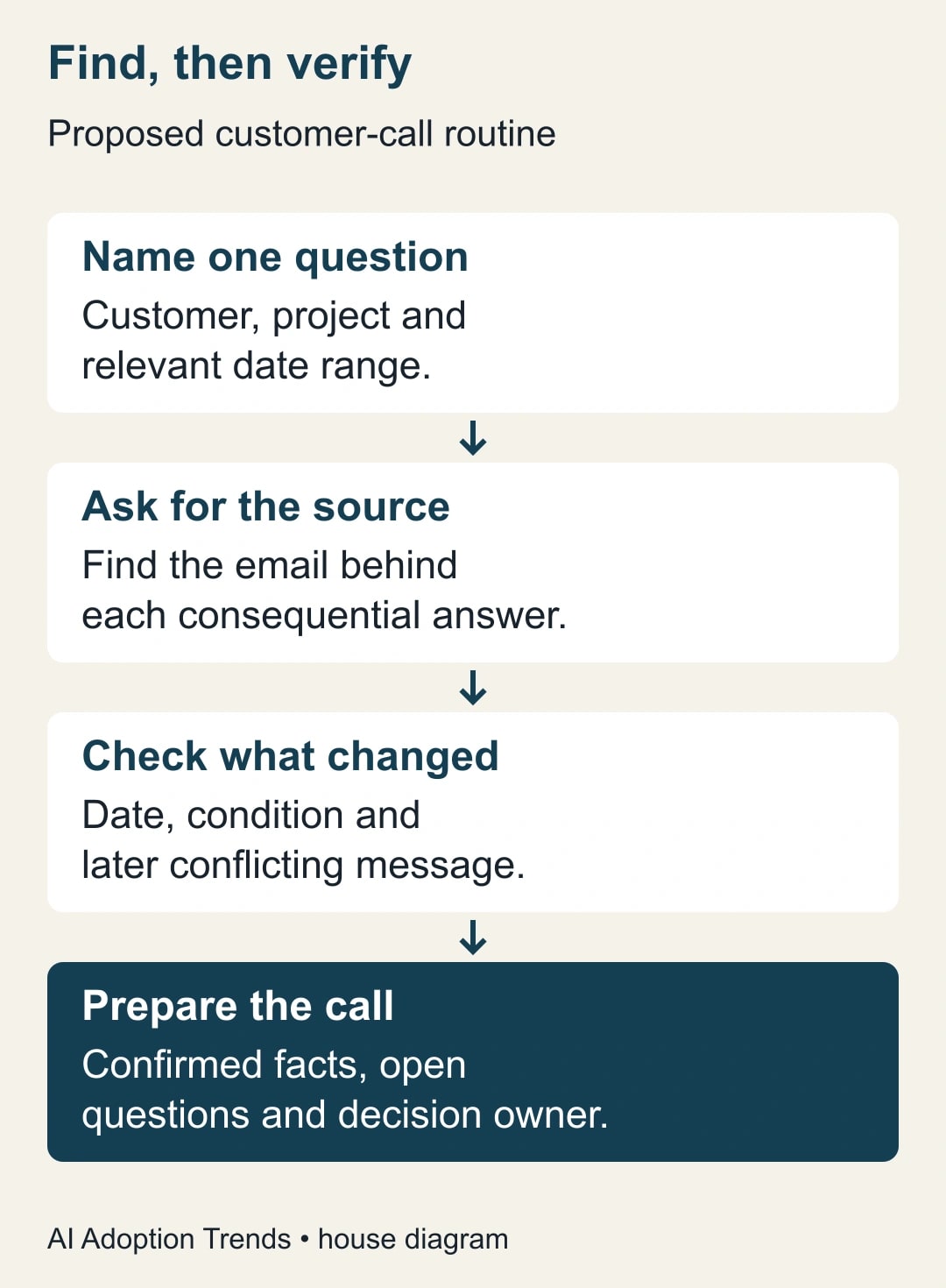
Use Gmail Live to find the email behind a customer question, then read that email before repeating a delivery date, price or approval. Voice search can shorten the route to a source. It cannot decide whether an old proposal still represents your company's commitment.
That distinction matters for account managers preparing on a phone between appointments. The useful output is a short call note with confirmed facts and unresolved questions. A fluent spoken summary, by itself, is not that note.
Google announced Gmail Live's rollout to paid Workspace users on October 15, 2026. Its voice conversation searches inbox information and surfaces source emails. This guide explains a proposed operating routine for that capability; it does not report a hands-on accuracy test or a measured time saving.
Check access before planning your morning around it
The October 15 announcement describes Android and iOS availability, initially for US users with EN-US language settings, with a rollout taking up to 15 days. Listed Workspace editions include Business Starter, Standard and Plus and Enterprise Starter, Standard and Plus. Check the announcement's complete eligibility list against the account you actually use.
As of October 17, the Gmail Live help page also requires eligible work accounts to have Gemini Beta access and relevant smart features enabled. It describes microphone permission for starting a session. A missing entry point can therefore be an account, setting or rollout issue; it is not evidence that you used the wrong question.
There is a documentation mismatch worth recognizing. The release announcement says voice selection is being added, while the current help page still says the voice cannot be changed. Treat that setting as rollout-dependent and follow the controls your account actually shows. Voice selection is not necessary for the source-checking routine below.
Use an already approved business account and device. Ask the administrator to confirm access if needed. Don't buy a new subscription just to test this method without first establishing the team's eligible plan and actual incremental cost. The initial cost to budget is the time to set up, check answers and record exceptions, alongside any separately approved license change.
Choose a question that email can actually answer
Good candidates are narrow: what delivery target was discussed, which attachment the customer requested, or whether the purchasing contact replied. Start with the customer name, project identifier and relevant time period. These details help separate similar conversations without requiring a complicated prompt.
A poor candidate asks the inbox to supply an operational fact it may not contain. A message saying an order was scheduled does not establish that it shipped. An email accepting a quotation does not establish that the signed agreement contains the same terms. Decide which business system or person owns the final answer before searching.
For a delivery question, the account manager may own the customer conversation while logistics owns the shipment status. For a pricing question, sales operations may own the approved quotation. Write that owner next to the question. Otherwise, an incomplete search can quietly become an unauthorized business decision.
Skip voice when the surroundings make customer information easy to overhear, when the source requires careful visual inspection, or when the task is already a simple known-message lookup. Work from a stationary, suitable place where you can open the source. The aim is better preparation, not adding a conversation interface to every search.
Ask, narrow, then leave the conversation to inspect
On an eligible phone, open Gmail and use its Live entry point. Ask one question rather than requesting a broad account history. For example: “Find the latest emails about the Northbridge display shipment, including any conditions on the delivery date.” This is a suggested prompt, not a guarantee that the system will find every relevant message.
Listen for names, dates, conditions and uncertainty. If the answer combines several topics, narrow it: “Which email supports that date?” or “Was that a proposal or a confirmed booking?” The expected intermediate output is an identifiable source, not a polished explanation.
Google's help describes a Sources card and links to supporting emails. Opening one of those emails ends the Live session; View search page also exits to ordinary search. Plan for that transition rather than treating it as a malfunction. The visual check is part of completing the task.
Read the message date, sender and exact sentence that supports the answer. Look at the surrounding exchange for a condition, later correction or unresolved question. Search separately for the same project after that message's date. Finding one relevant source does not demonstrate that it is the last relevant source.
Capture the result in your normal approved account notes. Include a source link, the time checked and the person who can resolve anything still open. Don't copy an entire email chain into another system merely to preserve one delivery fact. Keep the note small enough that the next colleague can verify it quickly.
Worked example: three messages, three different meanings
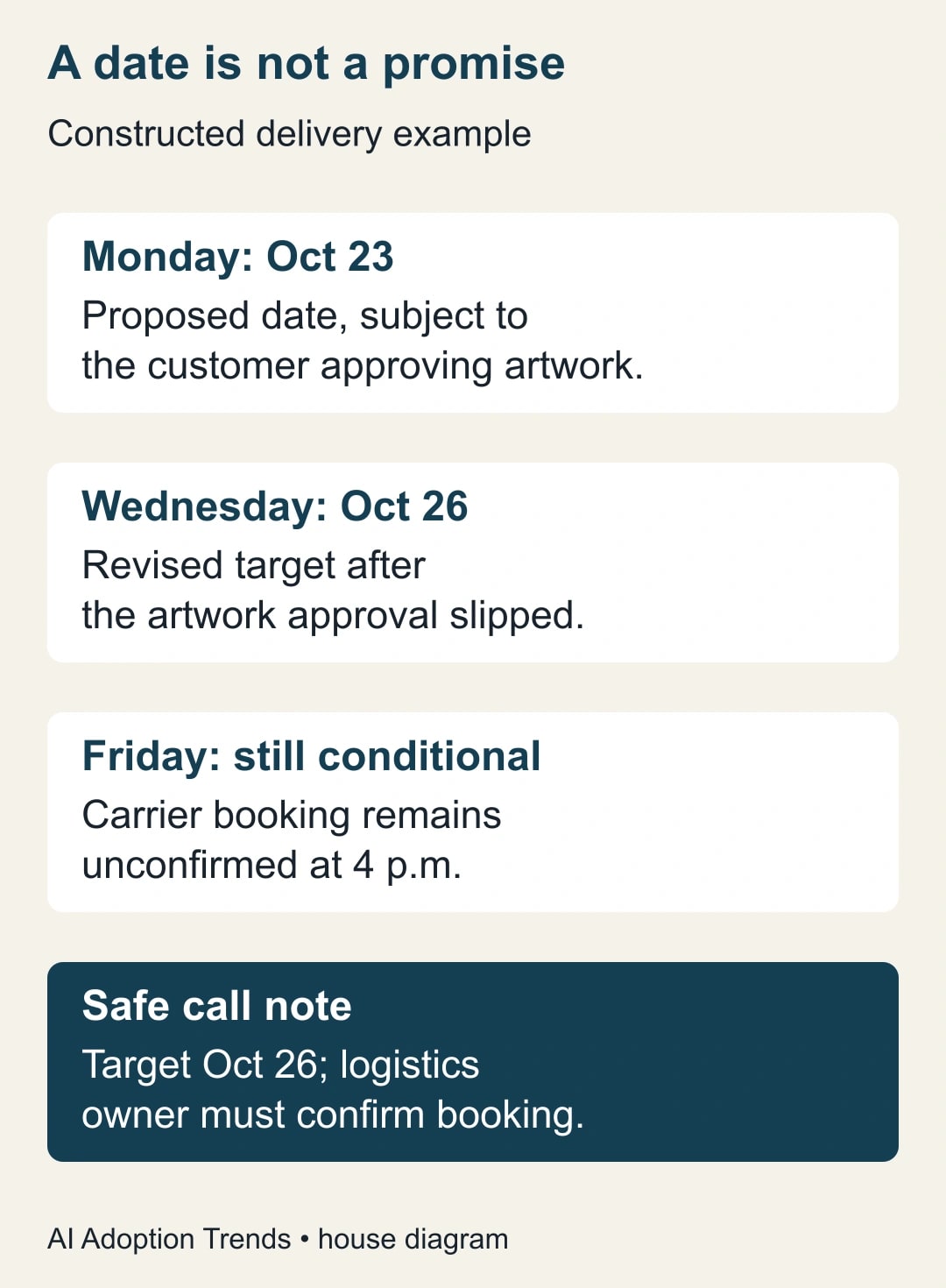
Consider this constructed scenario. An account manager is preparing for a Monday call about a display shipment. On the previous Monday, the supplier proposed October 23 delivery, provided that artwork was approved that afternoon. On Wednesday, the supplier revised the target to October 26 because approval arrived late. On Friday at 4 p.m., logistics wrote that the carrier booking remained unconfirmed.
An answer that says “Delivery is October 26” has retained the newer date but lost the condition. An answer that says “October 23” has also missed the revision. Neither supports an unconditional promise to the customer.
The manager opens the Wednesday and Friday messages and records: “October 26 is the latest target discussed. Carrier booking was still unconfirmed Friday at 4 p.m. Logistics owner to confirm before we promise delivery.” This wording preserves what is known and assigns the missing work.
The preparation note also contains a question for the customer: “Does the installation team need a confirmed arrival window before scheduling staff?” That is the manager's judgment about the call, not a fact retrieved from email. Keeping those categories separate makes the note more useful.
Suppose a later system check shows a booking for October 27. Update the note with that source and explain the change. Do not ask the voice system to reconcile a record it cannot access and then treat an agreeable answer as confirmation. The business owner resolves the discrepancy using the authoritative record.
Use a five-line call worksheet
The following worksheet is a proposed reusable artifact. Complete one copy for each consequential question. It should fit in an account note, and it works just as well when ordinary search is faster than voice.
- Question: What must I know before this call, and what customer or project does it concern?
- Confirmed fact: What exact statement can I support, including its date and conditions?
- Source: Which message or approved business record supports it, and when did I check it?
- Missing or conflicting evidence: What remains unresolved, and who owns the answer?
- Call action: What will I ask, explain or defer without making an unsupported promise?
For the constructed shipment example, the confirmed fact is a conditional target. The missing evidence is a carrier booking. The call action is to explain the current target and agree when the customer will receive confirmation. The worksheet prevents those three things from collapsing into one apparently certain date.
Do not label every field “confirmed” just because it contains a citation. A cited message can still be old, conditional or written by someone without approval authority. The reviewer must decide what that message establishes for the business question.
If a colleague takes over the account, they should be able to open the source from the note and understand the same limit. Test that handoff once during the pilot. A note that only makes sense to the person who heard the voice answer has not yet become a reusable business record.
Recover from the failures that matter
A wrong customer match is a reason to restart with a more specific identifier. Check the sender and project reference before using any figures. Similar company names and repeated subject lines are especially good reasons to verify context explicitly.
A missing answer needs a different search path. Try ordinary email search and the system that owns the fact. “I couldn't find it” is a retrieval result; it is not proof that no commitment exists. Record the unresolved question so that it does not disappear from the preparation list.
A contradictory pair of emails needs an owner, not a longer generated summary. Put both dates and sources in the worksheet and ask the responsible colleague which statement governs. If the meeting starts first, describe the uncertainty rather than choosing the answer that sounds most convenient.
A source that cannot be inspected should not support a consequential customer statement. Return to the original account or ask an authorized colleague for an approved summary. Do not forward restricted content to a personal mailbox to make it easier to read on a phone.
An interrupted conversation also requires a clear restart. Verify which question you were answering and which source you had actually checked. A partially heard answer should not become a remembered fact. End the session when the work is done; muting is described by Google as keeping it active.
Measure accepted preparation, including the checking time
Run a small trial on ten ordinary customer questions whose correct answers a reviewer can establish independently. Include a stale date, a conditional promise, similar project names and a case where the answer lives outside email. This is an editorially proposed test set, not a claim about Gmail's measured performance.
For each question, record whether the first answer was supported, whether the final note was correct, how long the search took, how long verification took and whether another system was needed. Count a correct admission of missing evidence as useful preparation when that is the truthful answer.
Here is a constructed time comparison. Ten manual preparations take eight minutes each: 80 minutes. Voice-assisted search takes three minutes per question, verification takes four, and two difficult cases require an additional five minutes each. The total is 30 + 40 + 10 = 80 minutes. Faster retrieval has produced no net time saving in this example.
That result may still reveal a useful convenience, but it does not justify a productivity claim. If a later trial releases staff time, describe the hours available for other work. Cash savings require an actual reduction in spending; they do not follow automatically from a shorter preparation routine.
Set a practical acceptance rule before the trial. For example, require every date or price repeated to a customer to have an inspected source, and no unresolved conflict to be presented as settled. Pause the routine if a material error survives review. Keep ordinary search as the working fallback while you understand why.
Give the account owner the final sentence
Gmail Live is most useful here as a way into the record. The account owner remains responsible for deciding what can be said, what needs another check and what the customer should expect next. A useful call note ends with that decision, not with the last generated answer.
Try the worksheet on one upcoming call where the relevant evidence already exists in email. If the task expands into organizing a whole project, use our guide to turning a Gmail thread into a checked project brief. Keep the first voice-search trial narrow enough that you can tell whether it actually improved the preparation.
Weekly Newsletter
AI Adoption Weekly
New research, field guides, training studies, and tool decisions for operators.
No spam. Unsubscribe anytime.
Related Comparisons
Calculator
AI seat cost calculator
List price × headcount. You enter the hours and the operating assumptions.