
Excel SUM Ignores Imported Amounts: Convert Text With the Right Separators
Preserve raw amounts, parse known decimal conventions and hold blanks or errors before accepting an imported financial total.
Published November 16, 2026

When Excel's SUM leaves imported amounts out of a total, check whether the cells contain numbers or text before changing the formula. If the values are text, convert them in a separate helper column using the source's decimal and thousands separators. Preserve blanks and errors for review, keep currency explicit, and reconcile the converted amounts to the export's control total before using them in a report.
This guide is for a finance analyst receiving regional sales or expense exports. It addresses amounts that should participate in arithmetic. Product codes, bank references and invoice identifiers often need to remain text even when they contain only digits. Converting an entire sheet indiscriminately can repair one total while damaging the keys needed to explain it.
Why changing the cell format is not enough
Excel can display a value that looks like an amount without storing it as a number. Microsoft's SUM documentation says SUM ignores text in referenced cells and adds the numeric values. The result can therefore look reasonable while excluding part of the import. A number format controls presentation; inspect the underlying type rather than treating a currency symbol or alignment as proof of a successful conversion.
For a candidate cell A2, use =ISNUMBER(A2) in an adjacent column. Microsoft's IS function reference confirms that this checks the value without converting numeric-looking text. TRUE means Excel recognizes that value as numeric; FALSE means it needs further classification. FALSE alone does not authorize conversion: the cell may be an identifier, a blank, a label or an error. Compare several accepted and missing rows with the source export to confirm the pattern.
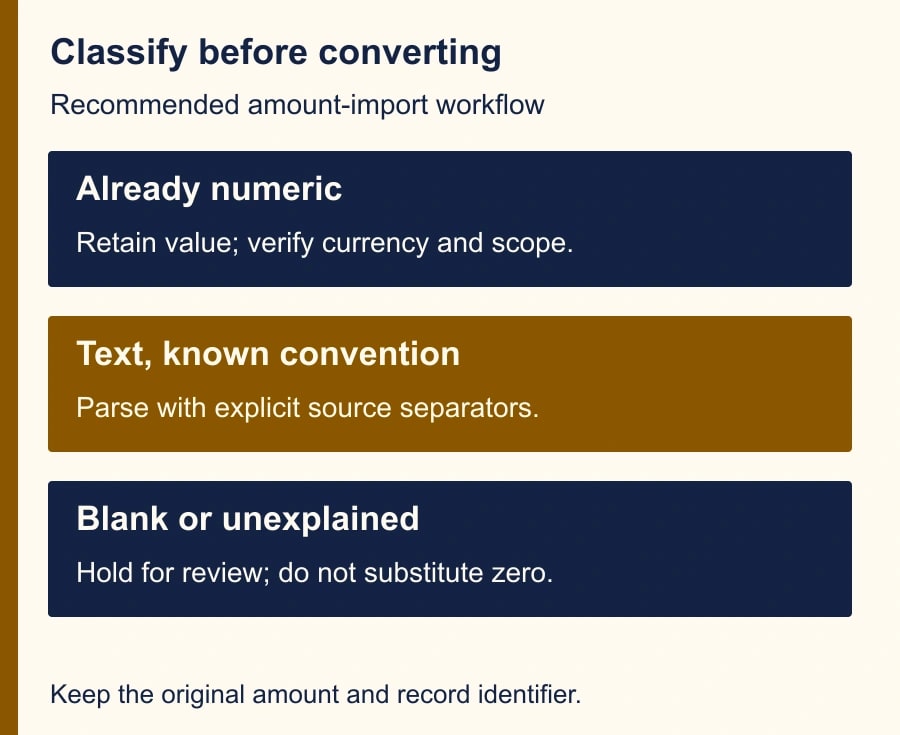
Use this process when the amount convention is known and consistent within a source. Skip automatic conversion when a column mixes decimal conventions without a reliable source indicator, combines currencies, or contains unexplained accounting notation. Resolve those definitions with the export owner first. Guessing whether 1,234 means one thousand two hundred thirty-four or one point two three four is a business-data decision.
Keep the raw value and the interpretation separate
Create columns for RawAmount, SourceFormat, Currency, ParsedAmount and ReviewStatus alongside a stable record identifier. Do not overwrite RawAmount. A reviewer should be able to see the exact imported string and the rule that interpreted it. If the workbook already uses an Excel table, extend that controlled structure; otherwise work in a copy with a clearly bounded range.
The source-format field is a documented convention such as decimal comma with period grouping, not a nationality inferred from the customer's name. A European customer can receive a file exported in a US convention, and an international system can produce different formats for different users. Ask how the export was generated and retain a known example from its owner.
You need access to the source file, an expected total for a defined set of records, and a version of Excel that supports NUMBERVALUE. Microsoft's current page lists Microsoft 365 and several perpetual Excel versions. This repair does not require an AI add-on. Its main cost is analyst and review time; for a recurring import, assess whether a controlled Power Query transformation would be easier to maintain than a growing worksheet of exceptions.
Use NUMBERVALUE with explicit separators
Microsoft describes NUMBERVALUE as a locale-independent conversion from text to number. Its second argument identifies the decimal separator and its third identifies the grouping separator. For an approved decimal-comma source, =NUMBERVALUE(A2,",",".") converts text such as 1.250,50 to the numeric value 1250.5. For decimal-period text, the separator arguments must reflect that different source convention.
The formulas here use English function names and commas between arguments. Your Excel installation may display localized function names or use semicolons between arguments; keep the quoted decimal and grouping characters appropriate to the source. Do not swap those quoted characters just to make the formula resemble your local display format.
Keep the first helper simple enough to inspect. For a known decimal-comma batch, a blank-preserving version is =IF(A2="","",NUMBERVALUE(A2,",",".")). This avoids turning an empty string into an apparent zero amount. Do not add IFERROR with a zero result to make the column look clean. A conversion error should remain visible until someone identifies the reason.
For a batch mixing real numbers and text in the same approved convention, use three short helpers. B2 contains =ISNUMBER(A2). C2 contains =IF(B2, A2, NUMBERVALUE(A2, ",", ".")). D2 contains =IF(A2="", "", C2). D is the final ParsedAmount column: it preserves blanks, passes through existing numbers, and exposes failed text conversions. C is only an intermediate calculation and must not be used as the report amount. Test both input types before filling down. Do not feed an already numeric value through a text parser and assume it will preserve meaning under every regional setting.
Worked example: the missing 1,600 units of currency
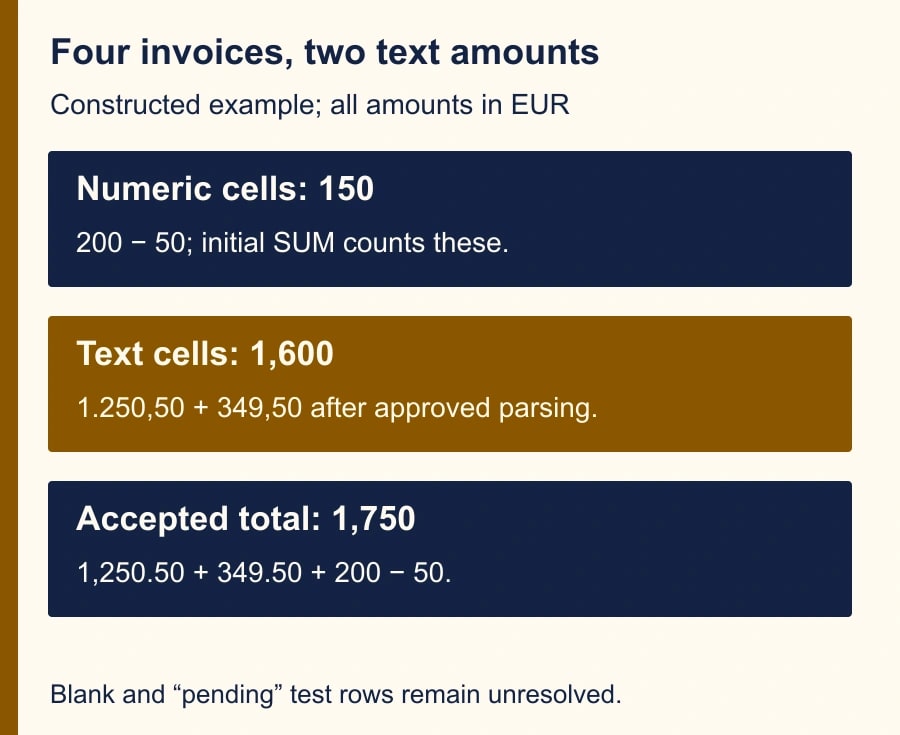
Consider a constructed four-invoice export, all in EUR. The raw amounts are text “1.250,50,” text “349,50,” numeric 200, and numeric −50. The source owner confirms that the text amounts use a decimal comma and period grouping. The expected total is 1,750 EUR: 1,250.50 plus 349.50 plus 200 minus 50.
If the four cells are referenced by SUM while the first two remain text, the result is 150. The omitted amounts total 1,600. A finance reviewer might incorrectly interpret the difference as missing invoices or a currency adjustment if the data-type problem is not checked first. All four rows are present; two are simply excluded from the numeric aggregation.
In the repair copy, classify each row. Pass through the two numeric values and parse the two approved text amounts. The accepted ParsedAmount values are 1250.5, 349.5, 200 and −50. Their sum is 1750, and all four records are accounted for. The change is a corrected interpretation of existing input, not additional revenue or a measured financial improvement.
Add a fifth test row with a blank raw amount. Its ParsedAmount should remain blank and its status should say missing amount. Do not count that row as a zero-value invoice without source confirmation. Add a sixth row containing “pending”; it should be held for review rather than converted to zero. The expected state is four accepted records and two unresolved records, with the known accepted total still 1,750 EUR.
This distinction matters when a manager asks whether the whole file has reconciled. The accepted subset reconciles to its four-invoice control. The six-row file remains incomplete until the two unresolved amounts are resolved or explicitly excluded under an approved rule. A correct subtotal is not proof of a complete close.
Do not strip every unfamiliar character
Currency signs, nonbreaking spaces, parentheses and trailing minus signs can arise from export formatting. Each needs an explicit interpretation. If a source owner confirms that a fixed currency prefix is merely decoration, remove that exact prefix in a helper and retain the Currency column. Do not delete every non-digit character: that would erase decimal points and negative signs as well.
For accounting parentheses such as (250,00), decide whether the source uses them for a negative amount before transforming them. A spreadsheet parser is not an accounting-policy authority. Keep a test case for zero, a normal positive amount, a negative amount and a large grouped amount. Include a malformed value that must fail, because a parser that accepts everything may simply be applying the wrong rule.
Microsoft's NUMBERVALUE documentation also notes that empty text becomes zero and percent suffixes affect the numerical result. That makes an unexpected percent sign significant. In an invoice-amount column, “12%” is not automatically 12 units of currency. Flag it unless percentages are genuinely part of the agreed measure. Do not let the parser's ability to return a number decide whether that number belongs in the report.
An ordinary space and a nonbreaking space are different characters. Diagnose the character before replacing it, and keep the repair scoped to the amount field. If the same import has identifier-matching problems, handle those separately; the site's identifier-preserving CSV guide explains why leading zeros and long codes should not be treated like amounts.
Build a control that survives the next file
For each source batch, record the imported row count, accepted amount count, unresolved count, accepted total by currency, and the external control total for the same scope. The counts should explain every imported record. In the six-row example, four accepted plus two unresolved equals six. If a later filter removes a row, that movement must appear in the reconciliation.
Never combine EUR and USD simply because ParsedAmount is numeric in both. Keep separate currency totals unless an approved conversion method, rate date and reporting currency are part of the process. Similarly, a credit note belongs with its correct sign and reporting period. A parsing repair cannot settle whether the business should recognize it in the current month's sales.
Compare at least one small amount, one large amount, one negative and one value containing a grouping separator with the original source. A single grand total can match by coincidence if positive and negative errors offset. For a large batch, use source-level totals and targeted exceptions, then sample records from every format convention rather than only the first visible rows.
Test a second export before switching the report. Confirm that the helper ranges or table columns include new rows, that the source format has not changed, and that errors still remain visible. If manual copy-and-paste is required, write down the exact destination range and the check that detects an incomplete paste. A reusable transformation should reduce that handling burden, not merely move it to a hidden worksheet.
A reusable conversion review card
- Scope: amount field, source system, extraction date, record population and currency.
- Interpretation: decimal separator, grouping separator, negative notation and approved decorations.
- Preservation: untouched raw value, stable record identifier and the helper rule applied.
- Tests: numeric input, approved text input, zero, negative, grouped value, blank and malformed value.
- Reconciliation: imported rows equal accepted plus held rows; accepted totals agree with the matching source control.
- Release: reviewer, unresolved items, report version and the previous approved output.
AI can help draft a helper formula from this card, but the analyst should give it constructed examples and expected results. Ask it to explain which inputs remain unresolved. Do not ask it to guess missing invoice values or infer a decimal convention from a total you want to reach. The exact formula still needs inspection in the workbook where it will run.
Recover without concealing the original mistake
If a report has already been distributed with the partial total, preserve that version and identify the affected source population. Correct the conversion in a working copy, reconcile it, and have the report owner decide how to replace the output. State the changed amount and scope plainly; avoid describing the repair as a new sale, refund or cash movement.
If the conversion produces a surprisingly large number, stop before filling it across the full file. Recheck the separator assumptions against the raw string. A parser can sometimes produce a syntactically valid number under the wrong convention. The strongest defense is the source contract and expected examples, not confidence that every bad assumption will produce an error.
The acceptance measure is zero unexplained differences for the declared reporting scope, with held records visible. A small reduction in manual reconciliation time is useful released capacity, but it is not cash savings without an actual budget change. Your next action is to test ISNUMBER on one omitted amount and ask the export owner to confirm its separators. If dates are also being interpreted incorrectly, use the separate day-and-month locale repair rather than applying the amount rule to every field.
Weekly Newsletter
AI Adoption Weekly
New research, field guides, training studies, and tool decisions for operators.
No spam. Unsubscribe anytime.
Related Comparisons
Calculator
AI seat cost calculator
List price × headcount. You enter the hours and the operating assumptions.