
Prepare for a Meeting With Copilot in Outlook: Build a Checked Brief
Turn Outlook meeting preparation into a useful decision brief. Check missing sources, conflicting dates and participant access before the meeting starts.
Published October 19, 2026

Use Copilot's meeting preparation in Outlook to assemble a starting brief, then check it against the decision you need to make. The most useful review asks two questions: are the generated claims correct, and is an important fact missing? A brief can pass the first test and still leave the meeting unprepared.
This guide is for managers who already have access to Copilot and prepare account, supplier or project decisions from Microsoft 365 material. The proposed output is a short, checked decision brief with source links, unresolved questions and a named decision owner. It is not a transcript, an automatic approval or a substitute for reading the document that governs a commitment.
If your meeting has no related records, involves material outside your approved Microsoft environment, or requires a decision that only a specialist can make, expect more manual preparation. Do not expand access merely to make the generated brief look complete.
What Outlook preparation can draw on
Microsoft's meeting-preparation guidance, checked October 17, 2026, describes opening a calendar event and selecting Prepare for this meeting. Availability and presentation vary across supported Outlook and Teams experiences. The output can use relevant emails, documents and chats, but missing related content can produce generic or incomplete preparation.
The same guidance says the material is limited to content the individual can access. Participants may therefore receive different summaries. Microsoft also points administrators to Meeting Insights settings when access to the feature needs investigation. Confirm the feature in your own account rather than assuming a colleague's screen proves your eligibility.
Those documented capabilities are the starting point. The workflow below is an editorial method for checking a business brief, not a report of a product benchmark or a guarantee about which records a particular meeting will surface.
Before starting, confirm your organization's approved account, existing license and feature access. Ask the administrator for actual incremental costs if a change is needed. Do not use a general Copilot subscription price as proof that this specific workflow is available to your team. Also budget the preparer's verification time; the generated draft is only part of the work.
Write the decision in one sentence first
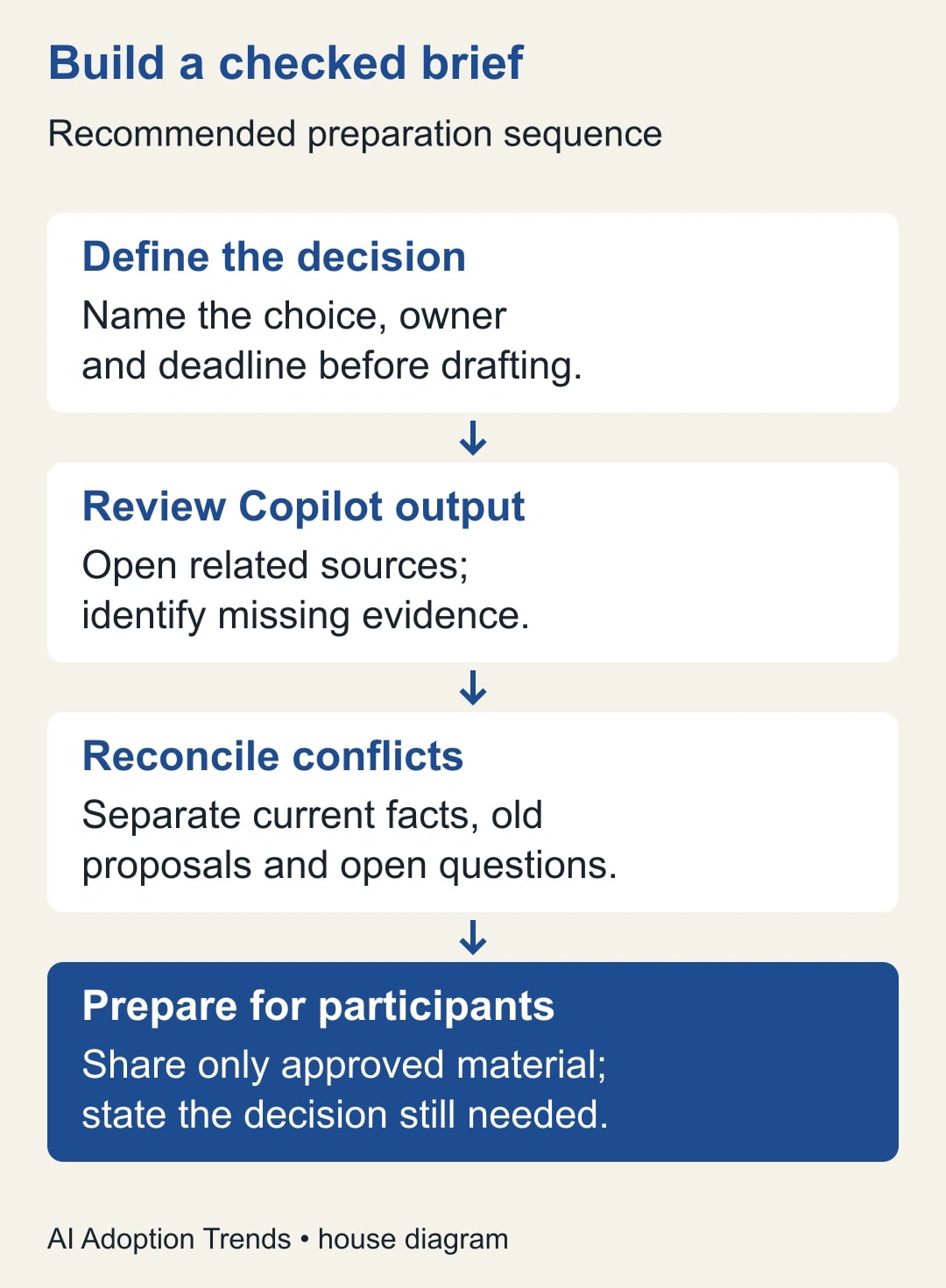
Open a blank note and finish this sentence: “At this meeting, [named owner] must decide [specific choice] by [time], using [required evidence].” If the sentence is unclear, fix the meeting purpose before asking software to summarize its context.
For a supplier review, the decision might be whether to approve an additional delivery week, accept a revised price or defer an order until a capacity question is resolved. These are separate choices. A general supplier history can be accurate while failing to prepare any of them.
List the facts that could change the decision. For the delivery-week example, you may need the current delivery target, the customer's required date, confirmed production capacity, the latest price, the approval limit and the consequence of waiting. The preparer should establish that list independently of Copilot's output.
This list becomes the coverage check. Without it, the generated brief defines both the answer and the standard by which you judge the answer. That is how missing evidence becomes invisible: the summary never mentions the gap, so nobody remembers to ask about it.
Name the decision owner separately from the person preparing the note. An assistant can gather and check sources without having authority to approve an order. The finished brief should preserve that distinction, especially when its prose sounds decisive.
Generate a draft and inspect what it actually used
Open the relevant event in your supported Outlook experience and use the preparation control available there. Read the generated output once for orientation. Then inspect the source references and compare them with your required-facts list. Avoid polishing the wording before you know whether it covers the right evidence.
Mark each required fact as supported, conflicting or missing. A source link counts as a way to inspect evidence, not as automatic validation. Open the important source and check whether it supports the exact claim, the date and the scope presented in the brief.
If the output is generic, return to the meeting purpose and available records. Determine whether the relevant material is attached or otherwise associated with the work in your normal approved process. Ask the record owner for an authorized summary if needed. Don't invite a participant to a restricted folder just to improve an AI answer.
Where your experience supports follow-up questions, use a narrow instruction such as: “Prepare a decision brief for the delivery extension. Separate confirmed facts, conflicting statements and missing evidence. Include source dates. Do not infer approval from a proposed option.” This is an adaptable prompt, not a guarantee that every source or distinction will be handled correctly.
Keep the first generated version long enough to compare it with the checked version during the pilot. That comparison shows what the reviewer had to repair. Store both only in the approved location and follow existing retention rules rather than creating an uncontrolled archive of meeting material.
Build a brief around the choice, not the conversation history
Use five short sections. The first names the decision and owner. The second states current facts with dates and source links. The third describes the realistic options. The fourth lists unresolved evidence and who must supply it. The fifth names the next action if the decision is deferred.
Keep proposals visibly separate from approved commitments. “Supplier offered a two-week extension” is different from “We accepted a two-week extension.” If the source only supports the offer, leave acceptance unresolved. Similarly, an old price in a thread should not override a later approved quotation merely because it appears in more messages.
Remove background that does not affect the choice. A useful brief is short because the preparer has selected what matters, not because an important qualification was dropped. If a detailed source is needed, link it with a clear explanation of the section to inspect.
Before sharing, confirm that the intended recipients are allowed to receive the contents of the brief itself. Rewriting a restricted document into a summary does not make its information unrestricted. If participants have different access, prepare an approved common brief or let the owner present the necessary conclusion through the existing process.
Worked example: a correct-looking brief misses the deciding fact
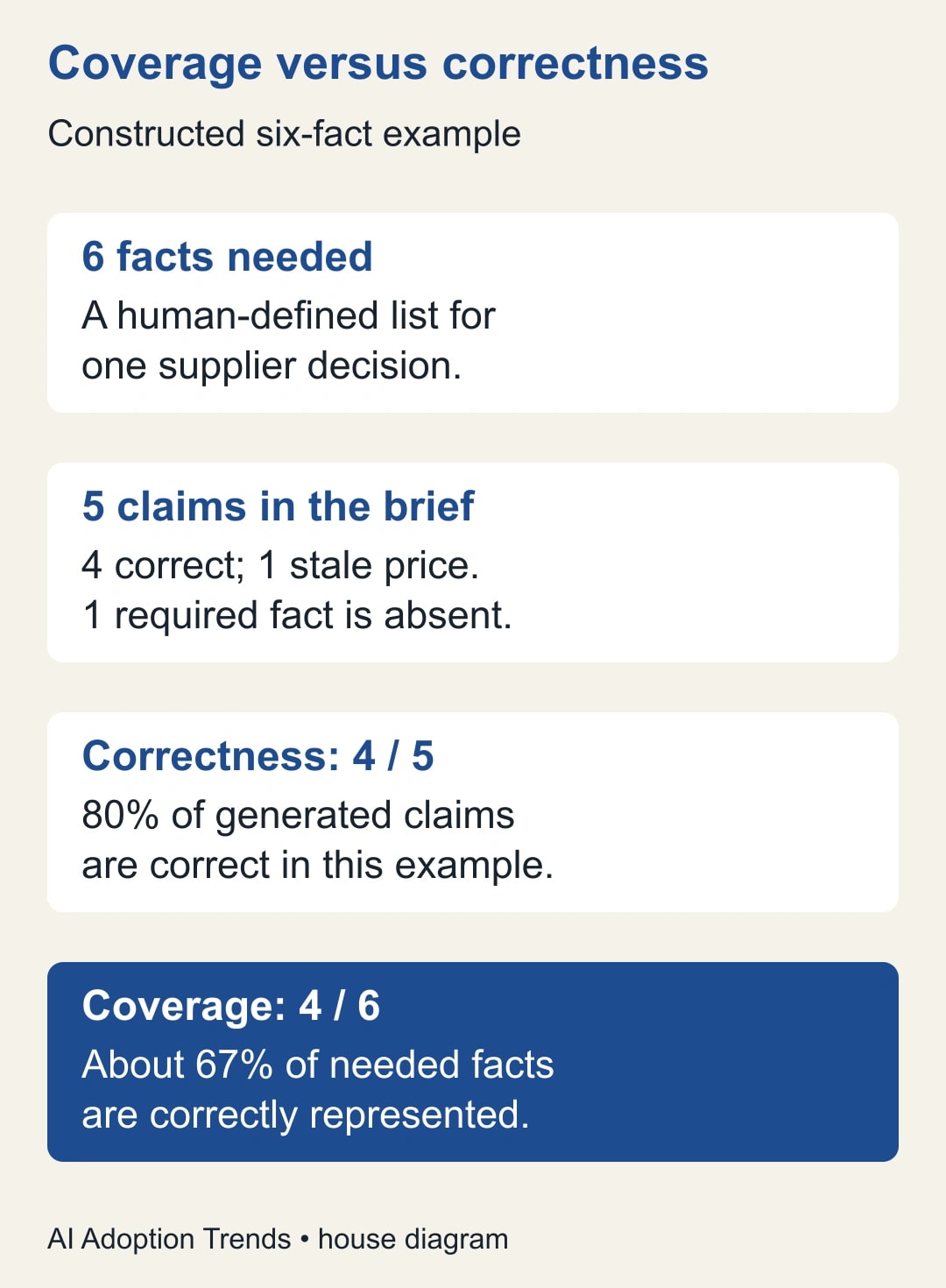
Consider a constructed supplier meeting with six required facts: current price, quantity, delivery date, production capacity, approval limit and cancellation deadline. Copilot's draft contains five factual claims. Four are correct, while the price is from an older quotation. The sixth required fact, production capacity, is absent.
The draft therefore has four correct claims out of five, or 80% correctness, while correctly covering four of six required facts, about 67%. The stale price and missing capacity answer both require work, for different reasons. Count unique required facts for coverage so repeated claims do not inflate it.
The reviewer finds that the supplier cannot confirm capacity until Wednesday, but the order can only be cancelled without a charge through Tuesday. That timing changes the choice. A brief focused on the four correct facts might encourage approval; a complete brief shows why the owner must resolve the timing conflict first.
The checked note says: “Decision needed Tuesday: proceed with the order or preserve the cancellation option. Capacity remains unconfirmed until Wednesday. Purchasing owner to request an earlier capacity answer or negotiate the cancellation deadline.” This is an illustrative decision note, not a reported customer result.
The stale price is corrected from the approved quotation, with its issue date recorded. If no approved quotation is available, the brief should state that the price is unresolved. Replacing an old number with a plausible estimate would hide the problem rather than repair it.
Copy this preparation worksheet
The following worksheet is a proposed reusable artifact. Keep it in the team's approved meeting-note location. The expected output is a brief another participant can check without retracing every conversation.
- Decision: Choice required, decision owner, deadline and consequence of waiting.
- Required facts: The small set of facts that could change the choice, written before reading the generated brief.
- Confirmed evidence: Current fact, source link, source date and person who checked it.
- Conflicts: Competing statements, why they matter and the owner who can resolve them.
- Missing evidence: Required fact not yet established, next action and due time.
- Participant version: Information approved for this audience, plus any material restriction on what can be shared.
- Meeting outcome: Decision made, deferred question, accountable owner and next checkpoint.
Use the worksheet to prepare, then update it after the meeting with the actual outcome. Do not let a pre-meeting recommendation become the recorded decision by default. The person with authority should confirm what was agreed and any conditions attached to it.
For a recurring meeting, carry forward unresolved items deliberately. Check whether last week's open question has been answered, superseded or cancelled. A fresh generated summary should not erase an old obligation simply because it is no longer prominent in recent messages.
Deal with three common gaps
A missing source is a coverage problem. Identify the record owner and ask for the specific fact needed. If the record exists outside the tool's available context, use the approved route to inspect it manually. The brief should remain incomplete until that fact is resolved or the decision owner explicitly accepts the uncertainty.
A conflicting source is a judgment problem. Compare dates, approval status and the authority of the people involved. A later message can be less authoritative than an earlier signed agreement, so recency alone is insufficient. Record which source governs and why, using the organization's normal decision process.
A participant mismatch is a communication problem. One person's summary may include context another person cannot see. Establish the common evidence that the meeting can legitimately use. Avoid opening the meeting with “Copilot says” when the real question is which approved record supports the proposal.
If the preparation control is absent, ask the administrator to check the account and relevant settings. Continue with the worksheet manually. The business method does not depend on a particular button, and a missed meeting deadline is not a useful way to wait for feature access.
Measure review work before claiming time saved
Try the process on a small set of ordinary meetings with a reviewer-defined required-facts list. Record preparation time, checking time, corrections, missing facts and decisions delayed by inadequate evidence. Compare with a similar manual preparation routine rather than comparing a checked brief with an unchecked draft.
Here is a constructed comparison for eight meetings. Manual preparation takes 20 minutes each, or 160 minutes. Assisted preparation takes five minutes to generate and organize, ten minutes to verify, and another five minutes of repair in four meetings. The assisted total is 40 + 80 + 20 = 140 minutes, releasing 20 minutes across the batch.
That is a modest capacity result, not an automatic reduction in payroll or software spending. If the team spends the time on better questions during the meeting, describe that outcome separately. Do not add an estimated quality benefit to the same minutes and count both as cash savings.
Set a stop rule that fits the decision. For example, no material price, deadline or approval claim may remain unsupported in the shared brief. Pause expansion if a stale claim survives review, a required fact is repeatedly omitted, or restricted information reaches an unintended audience. Fix the cause and repeat the relevant cases before treating the routine as standard work.
Make the next meeting easier to decide
Start with one meeting that has a clear owner, a small decision and accessible source material. Write the required-facts list before generating the brief, then compare the two. The most valuable finding may be a missing fact rather than a faster summary.
For a broader introduction, use our first useful week with Microsoft Copilot. For a brief that will become a formal document, apply the source-checking method for Copilot citations. Bring the checked choice to the meeting, with the unresolved work still visible.
Weekly Newsletter
AI Adoption Weekly
New research, field guides, training studies, and tool decisions for operators.
No spam. Unsubscribe anytime.
Related Comparisons
Calculator
AI seat cost calculator
List price × headcount. You enter the hours and the operating assumptions.