
Keep Salesforce Current with Claude Cowork: Tasks, Alerts, and Follow-ups
Use Claude to surface missing next steps and draft follow-ups, while Salesforce Flow enforces the repeatable rules and owners approve consequential changes.
Published September 28, 2026

Salesforce becomes less useful when every opportunity says “follow up” but no one knows with whom, about what, or by when. Claude Cowork can assemble the missing context and draft a clean next step. Consistency comes from a field definition, a named owner, and a rule that runs even when Claude is closed.
Start with four fields on the opportunity: next customer action, date, owner, and evidence source. In the fictional Northstar deal, “send pricing” is too broad; “Maya sends revised security appendix to Northstar procurement by October 6, then asks for review date” gives an owner and a check. Your administrator should confirm the exact field names and required stage rules in your Salesforce org.
Make a daily exception queue before changing records
Daily pipeline hygiene
Using the Salesforce records I own, find open opportunities
with a close date in the next 45 days and any of these gaps:
no named next customer action; next-step date in the past;
no buyer activity logged in 14 days; stage or close date that
conflicts with the latest verified customer note. Return the
record link, exact evidence, suggested owner, and one proposed
repair. Do not change records or send messages. Mark a field
as unknown if the connector cannot read it.
The seller reviews the queue against the actual record. A missing logged email may mean the email connector is absent, not that the buyer went silent. Define an exception as “no activity visible in the approved sources,” not “no activity happened.” Pick one action per row: correct a field, create a task, ask an owner, or close a stale deal after human review.
Let Salesforce enforce a narrow rule
For a repeatable rule, the administrator opens Setup > Flows, creates a record-triggered Flow on Opportunity, sets entry conditions, and uses a scheduled path or Task action. Test it in a sandbox, debug it, then activate. Salesforce’s scheduled-task walkthrough shows a task assigned to the opportunity owner after a date; its Task example shows a record-triggered Flow. Adapt those mechanics to your own date and stage fields.
Example rule: when an open deal enters Proposal with a next-step date, schedule a reminder one business day before that date. At execution, recheck that the deal remains open, the date has not moved, and no matching open reminder exists. Assign the task to the owner and link it to the opportunity. If a recheck fails, do nothing and log why. This duplicate check and exit behavior are design requirements for the administrator; do not assume Salesforce creates them automatically.
Use a second rule only after the first works: if a high-value proposal has no next-step date after two days, create an internal task for the owner to repair it. Avoid customer-facing email alerts until the team has tested recipients, consent, and wording. Salesforce notes that an Email Alert sent by Flow is not automatically logged as an activity unless the flow adds a Task or uses the appropriate Send Email action. Salesforce’s logging guidance explains the difference.
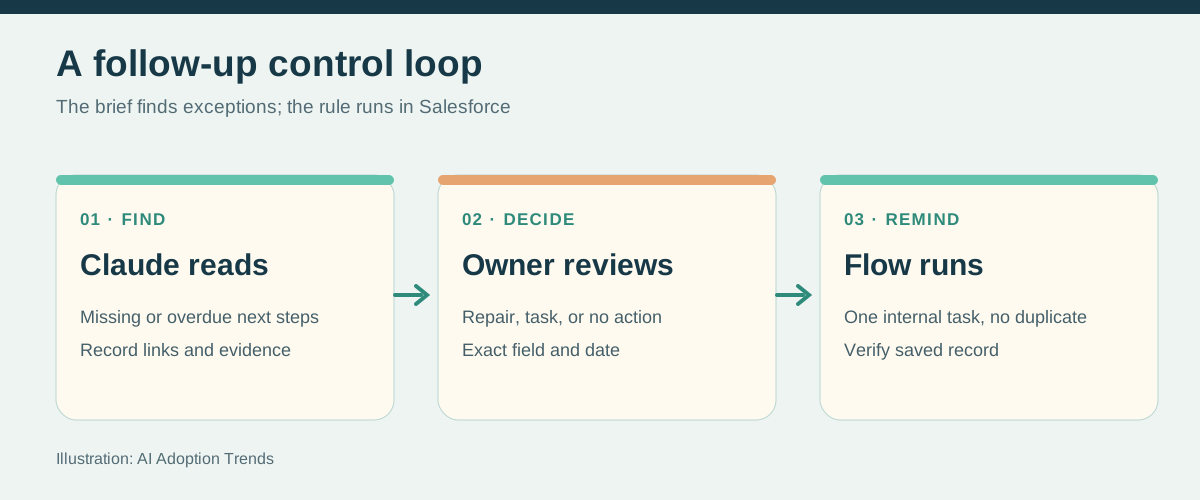
Use Claude to do the context-heavy work
Prepare, then ask before writing
For the three Northstar tasks due this week, read the linked
opportunity and approved notes. Draft a specific task subject,
due date, owner, and one-sentence reason for each. Show the
source record and a before/after table. Do not create tasks
until I approve each row. If the connector is read-only, give
me the exact values to enter in Salesforce manually.
A hosted mutations connector can create the approved Task if the signed-in user has the underlying Salesforce permission. The prebuilt Salesforce in Claude beta cannot. After any write, open the saved Task and compare its owner, related record, date, and subject with the approved row. Limit the first pilot to internal tasks, not stage, amount, forecast category, or customer email.
Schedule a briefing, not a blind customer action
Anthropic says Cowork scheduled tasks can run recurring briefs with connected tools, including when a computer is asleep. In Claude, use Scheduled > New task, choose the cadence and approval mode, and review the saved instructions. Anthropic’s scheduling guide describes the current flow. Its safety guidance advises against scheduled tasks that access sensitive data or send messages without review. For this use case, schedule a read-only exception digest to the seller’s own workspace; keep Salesforce Flow responsible for durable internal reminders.
Scheduled weekday brief, 8:00 a.m.
Read only the Salesforce opportunities I own. List overdue
next steps and deadlines in the next seven days. Show record
links, source timestamps, and missing data. Do not modify
Salesforce, search email, notify customers, or include fields
marked restricted by our policy. If access fails, report the
failure instead of guessing.
Measure the first month: percentage of open deals with a dated next customer action, tasks completed by the due date, duplicate reminders, false alerts, and time the seller spends repairing AI output. If owners start dismissing the digest because it repeats stale or irrelevant warnings, stop and narrow the rule. Part 3 shows how to prepare the actual outreach from approved intake sources.
Weekly Newsletter
AI Adoption Weekly
New research, field guides, training studies, and tool decisions for operators.
No spam. Unsubscribe anytime.
Related Comparisons
Calculator
AI seat cost calculator
List price × headcount. You enter the hours and the operating assumptions.