
Claude Cowork and Salesforce: Set Up the Right Connection First
A step-by-step guide to Salesforce in Claude, Salesforce hosted connectors, permissions, and the difference between reading a deal and changing it.
Published September 28, 2026

A sales leader wants Claude Cowork to assemble a morning deal brief, chase missing next steps, and keep Salesforce current. The first decision is the connection. A prompt cannot grant access the connector does not have, and a connection that can change records deserves a different review process from one that only reads them.
This five-part series uses one fictional business-to-business software team and its $100,000 Northstar opportunity. All names, amounts, and prompts are examples. As of September 27, 2026, Anthropic is gradually merging Cowork and chat into one Claude interface, so a reader may see “Cowork,” “Claude,” or both. Anthropic explains the interface change. The task and connector permissions matter more than the tab label.
Choose the access path before you automate
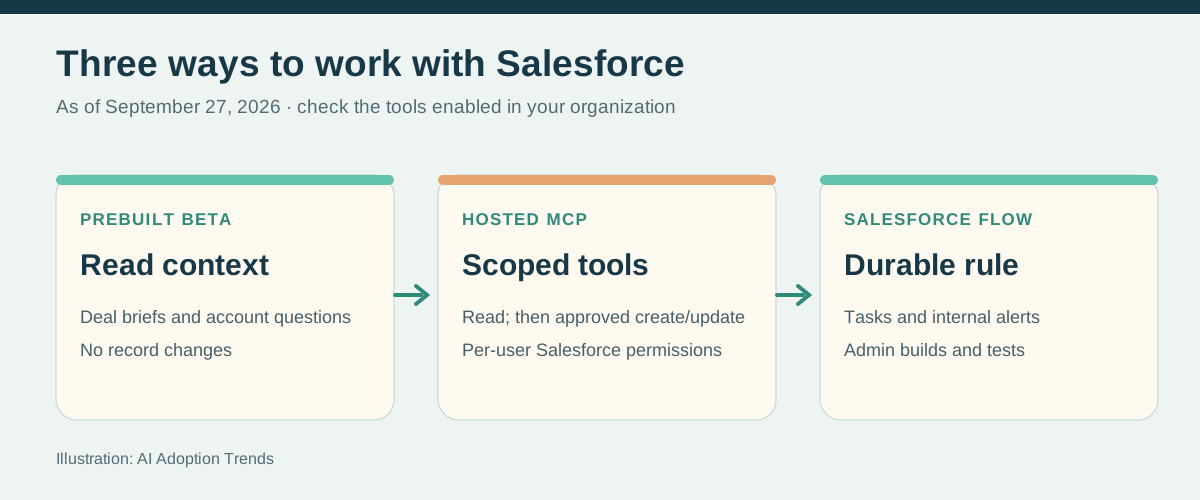
Path A is Salesforce in Claude, a new prebuilt beta. Salesforce says its September 2026 rollout requires Claude Enterprise and is read only: Claude can surface deal, account, and pipeline context but cannot create, update, or delete Salesforce records through that beta. Salesforce marketing describes broader action plans, but the release note states the current beta limit. Check your tenant’s actual tools before promising write automation.
Path B is a Salesforce Hosted Model Context Protocol (MCP) server. MCP is the standard connection through which Claude calls tools in another system. Salesforce offers separate servers for read only, create/update, delete, and all actions; every call uses the signed-in user’s Salesforce object, field, and record permissions. This is an administrator setup, not the same product as the prebuilt beta. Salesforce lists the server types. Hosted MCP use may require Flex Credits and incur charges, according to Salesforce’s overview.
Path C is Salesforce Flow or another approved automation inside Salesforce. Use it for a deterministic rule such as “create a task when the next-step date is missing” or “alert the owner when a review date arrives.” Claude can help draft the rule and explain exceptions; the administrator builds and tests it in Salesforce. This keeps the recurring trigger in the system of record instead of depending on a chat session.
Set up the prebuilt read-only beta
Ask your Salesforce and Claude administrators whether Salesforce in Claude is available in your organization. Salesforce’s setup instructions call for enabling its MCP server and registering an External Client App; the Claude organization connects the Salesforce - Beta connector with the app credentials. The seller then goes to Claude Customize > Connectors, connects Salesforce - Beta, signs in through Salesforce OAuth, and asks a limited question such as “What accounts do I own?” Salesforce’s sign-in steps describe the user flow. If the beta is not available, do not treat a sales demo as a deployment schedule.
First connection test
Using only the Salesforce connector, list five open opportunities
I own, with record links, stage, amount, close date, and current
next step. Say which fields or records you cannot access. Do not
change Salesforce, search other apps, or infer missing facts.
Have a seller open two of the linked records and compare every field. A wrong owner, missing record, or stale date is a setup failure to fix before writing executive briefs. A read-only assistant can still expose private deal information to the wrong audience if the human copies its output into a broad channel.
Set up a hosted connector when you need controlled changes
Start in a Salesforce sandbox. An administrator enables Hosted MCP Servers in Setup, creates an External Client App for OAuth, grants the MCP scope and only the necessary users, then connects Claude using Salesforce’s documented server URL and OAuth client. Salesforce’s setup guide, External Client App steps, and Claude connector instructions supply the current screens and callback URL. Do not paste a consumer secret into a prompt.
Use `platform/sobject-reads` first. When a pilot needs task creation or a field update, add `platform/sobject-mutations` for an approved user and disable any unneeded actions in Claude. Avoid `sobject-all` simply because it is convenient: it exposes delete as well. Salesforce says the read server cannot change data, while the mutations server can create and update but not delete. The read-server reference states the boundary.
Test with a deliberately narrow user who can see a small set of accounts and cannot edit stage, amount, or probability. Query an allowed record and a forbidden one. If you later allow a Task create action, propose one task in a sandbox, inspect its owner, due date, related opportunity, and duplicate behavior, and confirm it exists in Salesforce. Tool permissions in Claude add a second layer; Anthropic says write-capable Cowork connector tools require per-task approval by default in Team and Enterprise.
The first useful job is a cited brief
Morning deal brief
For my open opportunities due to close in the next 30 days,
show a table with record link, stage, amount, last verified buyer
action, promised next step, owner, and missing evidence. Use only
Salesforce. Put “unknown” where the record is empty. Flag any
close date before the next customer meeting. Do not update fields
or message anyone.
This is heavy lifting worth delegating: find the records, assemble the context, and make gaps visible. The seller checks two or three source records before using the brief. If the output is useful, Part 2 shows how to turn the gaps into consistent tasks and alerts.
Weekly Newsletter
AI Adoption Weekly
New research, field guides, training studies, and tool decisions for operators.
No spam. Unsubscribe anytime.
Related Comparisons
Calculator
AI seat cost calculator
List price × headcount. You enter the hours and the operating assumptions.