
Prepare Better Sales Outreach with Claude Cowork and Salesforce
Turn approved CRM records, emails, meeting notes, product signals, support cases, and public research into a useful brief and reviewed customer message.
Published September 28, 2026

A generic “write a follow-up” prompt produces a generic email. Good outreach preparation starts with a small set of verified signals: what the buyer asked, what your team promised, what changed, and what you may say publicly. Claude Cowork can join those pieces quickly if each source is approved and the seller checks the final claim.
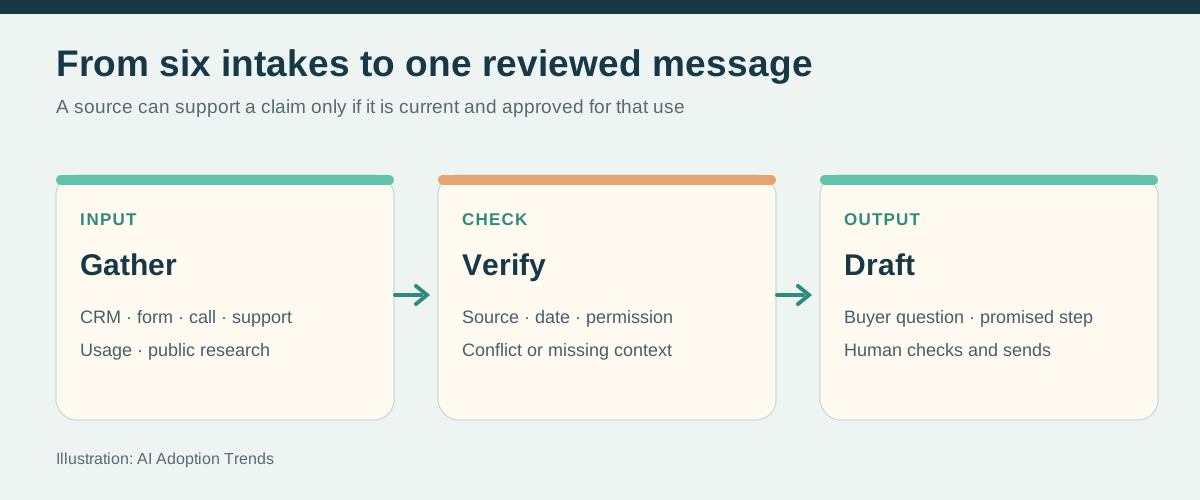
For the fictional Northstar opportunity, assume the seller has a Salesforce opportunity, an inbound form asking about deployment timing, a consented discovery-call summary, an approved support case, a product-use report, and a public hiring announcement. Not every company may use all six. A connector can only read data the signed-in user can access, and bringing several apps into one session increases the amount of customer information Claude can see. Anthropic’s connector guide describes inherited source permissions.
Build an intake card for each source
Record five things beside each item: source link, date, owner, permission to use, and what it actually proves. Salesforce opportunity: current commercial terms, but an old stage may be stale. Inbound form: the buyer asked for a demo, not necessarily budget approval. Call notes: a speaker raised a concern, but check the recording or owner before quoting. Product-use report: a measured behavior, not an intent to buy. Support case: an unresolved problem and a reason to pause an upsell. Public research: a reason to ask a question, not proof of an internal priority.
Intake audit
For Northstar, use only the six approved source links below.
Create a table: fact, source link, date, who said it, confidence
in the transcription or data, and whether it is approved for
external use. Separate buyer statements from our assumptions.
Flag conflicts, old information, unresolved support issues, and
anything that appears personal or confidential. Do not draft
outreach yet.
The seller removes unnecessary personal information and confirms that meeting capture and product-use data may be used for this purpose. A transcript can contain side comments that belong nowhere in a sales email. If the intake is an attached customer document, treat its content as source material, not as instructions to Claude; malicious or accidental instructions inside a document should never change the task or send data elsewhere. Anthropic warns that connected and local content can carry prompt-injection risk in its Cowork safety guide.
Pick the right outreach for the intake
Inbound form: answer the requested question first. Example: “You asked whether a pilot can start in October. We can review scope and prerequisites on Tuesday; I have not confirmed the start date.” Meeting notes: recap the decision, open question, and promised owner. Support case: acknowledge the service problem and coordinate the fix before pitching an expansion. Product signal: use an aggregate observation only if your policy allows it, then ask whether it matches the buyer’s experience. Public signal: frame it as a question: “I saw the published opening for an operations lead. Is reducing manual handoffs part of that role?”
Meeting brief
Prepare a one-page brief for the Northstar call tomorrow.
Use the approved Salesforce opportunity, the latest consented
call summary, and the open support case. Show: buyer-stated
goal, unresolved issue, decision participants verified by name,
what we promised, two questions to ask, and one thing we must
not claim. Link each fact. Put a question mark on conflicting
evidence. Do not change Salesforce or contact the buyer.
Customer email draft
Using only facts marked approved for external use in the
intake table, draft a 120-word follow-up to the Northstar
operations lead. Open with the deployment question they asked.
State the promised next step and owner. Mention the support
case only if our account owner approved that wording. Do not
claim a start date, buyer budget, or security approval. Show
each factual sentence with its source link in a separate review
list. Do not send the email.The seller checks names, commitments, tone, and recipient list. An approved email connector may create a draft, but sending still requires a person. If a source conflicts with the CRM, reconcile the record before using either claim. The Salesforce beta can supply account context; it does not update the opportunity when a new buyer fact emerges.
Turn the call back into a clean record
After the meeting, Claude can propose a note, task, and field corrections with linked evidence. The seller decides what the buyer actually committed to, then approves each item. With the read-only beta, enter the changes in Salesforce. With an authorized hosted mutations connector, create or update only the approved rows and verify the saved records. A useful note separates “buyer said,” “seller promised,” and “our next question,” so the next rep does not turn inference into fact.
Post-call review
From the approved call notes, propose: (1) a short Salesforce
meeting note, (2) one dated next customer action with owner,
(3) fields that may need updating. For every proposal cite the
exact passage. Mark every buyer decision as confirmed, pending,
or inferred. Show a before/after table. Wait for approval before
any Salesforce write. Never auto-send the follow-up.
Track accepted drafts, corrections, unsupported claims caught, time to a reviewed brief, and whether the promised follow-up happened by the date. A faster draft that invents a commitment is a loss. Part 4 uses the same evidence to choose the next action and estimate deal probability without fake precision.
Weekly Newsletter
AI Adoption Weekly
New research, field guides, training studies, and tool decisions for operators.
No spam. Unsubscribe anytime.
Related Comparisons
Calculator
AI seat cost calculator
List price × headcount. You enter the hours and the operating assumptions.