
Recover Records a Zapier Polling Trigger Missed During a Burst
Trace missing source IDs, check the trigger’s retrieval limit, and recover only confirmed gaps without creating duplicate customer actions.
Published November 15, 2026

If a bulk import creates records that never appear in Zapier history, reconcile the source IDs before replaying anything. A polling trigger can miss records when the source produces more items between checks than that particular trigger can retrieve. A faster polling interval may reduce the problem, but it does not remove the source app's retrieval limit.
First separate records with no matching run from records whose runs are held, failed or already completed. Those groups require different repairs. Recreating every missing destination record can repeat work that succeeded partly or is still waiting to continue.
Zapier describes this failure mode in its missed-run troubleshooting guide, updated May 29, 2026 and checked November 3. The limit varies by app and trigger. The numbers below are constructed examples, not a claim about a particular integration's capacity.
Confirm that this is a missing-record problem
This guide is for a sales or service operations owner moving incoming requests into a work queue. You need access to the source records, the Zap configuration and history, and the destination. You also need a way to test recovery without sending real customer messages or creating live commitments.
A record that arrives a few minutes later is a timing problem. A record that never started a run is a different investigation. For a Sheets workflow that eventually completes, use the Google Sheets trigger-delay diagnostic. Do not assume that its mixed trigger behavior applies to every polling integration.
Check the exact event in the Zap editor. Zapier identifies polling triggers with a clock icon and a time; instant triggers use a lightning symbol. Its polling-pagination explanation does not apply to an instant trigger in the same way. If the trigger is instant, investigate event eligibility, source behavior and available delivery evidence rather than applying a polling fix by analogy.
Avoid using this lightweight recovery process as an untested guarantee for emergency dispatch or payment execution. For a workflow with serious consequences from missing or duplicated actions, have the system owner design durable delivery and reconciliation controls. The checklist here helps specify the evidence those controls should produce.
Establish a fixed reconciliation window
Record the start and end of the import or burst, including time zone. Export or otherwise preserve the source IDs that should have qualified in that window. Use a stable request identifier, not a display name or a row position that changes when someone sorts the source.
Define eligibility explicitly. A record created during the window might still be excluded by the configured event, selected project, status or other condition. Keep intentional exclusions in a separate list with their reason. Otherwise the recovery team can turn a correct exclusion into an unwanted customer action.
Record the destination definition of completion as well. A created contact may not be the required outcome if the job is to create an assigned service request. Check the required fields, owner and status, rather than counting any record with the same email address as success.
Temporarily control the affected recovery path so the same IDs cannot be processed manually and automatically without coordination. Preserve the original Zap settings and note any pause. A pause can itself leave new source work waiting, so assign someone to track arrivals during the investigation. Do not stop unrelated workflows merely because they use the same app.
Trace one missing ID through the system
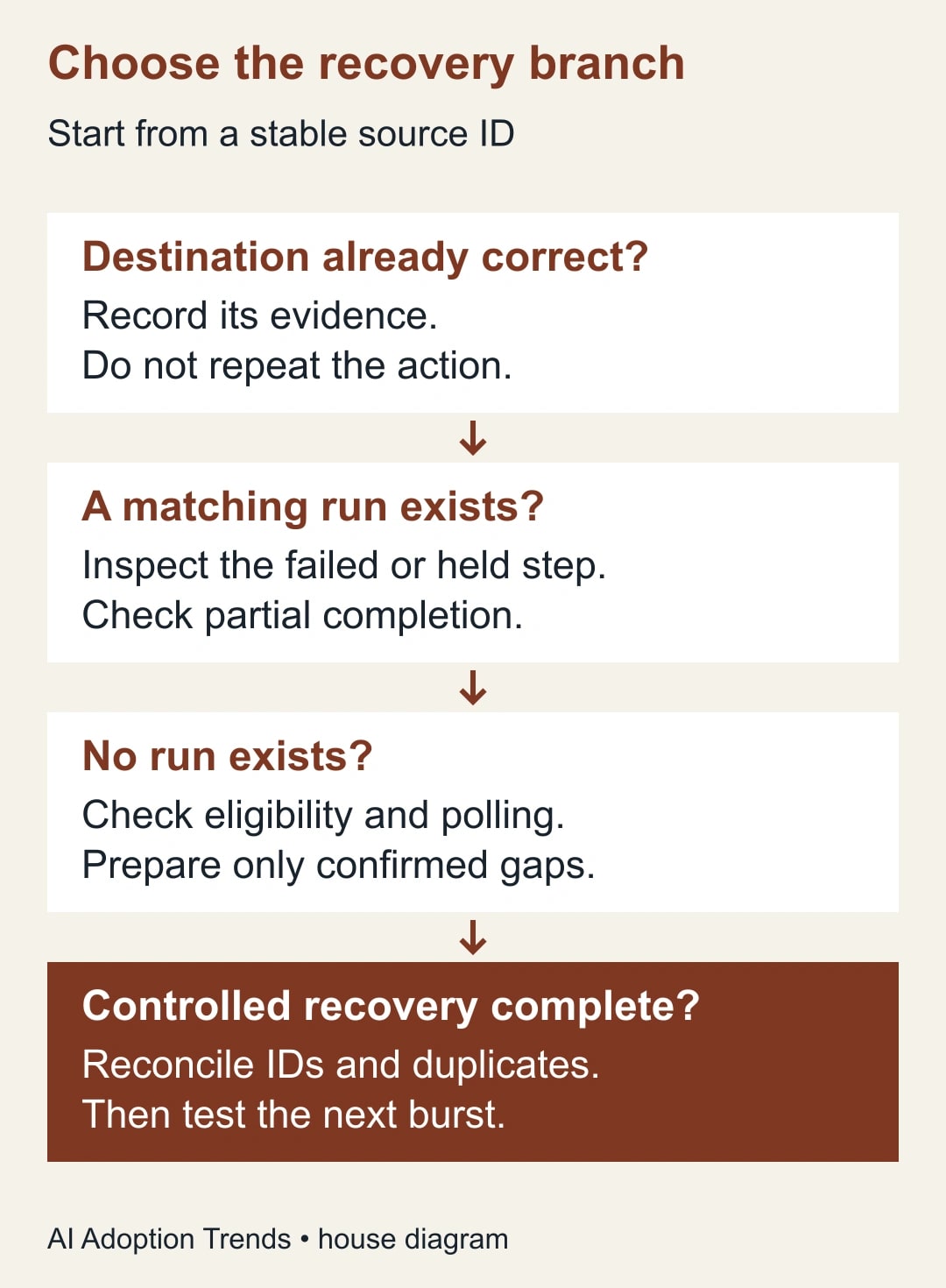
Search Zap history using a unique value from the source record. If a matching run exists, inspect its input and each relevant action. A successful trigger with a failed destination step is not a missing trigger. A held run belongs in a queue for controlled continuation, not a new intake event.
If no run appears, record the search period and the history available to your account. Absence from a limited view is not proof that an event never ran. Widen the appropriate filters and compare a known successful ID from the same window. Preserve references to the searches or exported evidence used in the investigation.
Look in the destination even when history is incomplete. A manual intervention, another workflow or a partly successful run may already have created the intended object. Match on the stable request ID where possible. Similar names and timestamps are supporting clues, not a reliable duplicate-prevention rule.
Only after those checks classify an item as a confirmed gap for recovery. If the destination outcome remains uncertain, keep it in an investigation state. The cost of one extra check is usually easier to manage than the cost of sending a second onboarding email or assigning duplicate work to a colleague.
What a burst can do to a polling trigger
Polling means checking the source periodically for newly eligible records. Pagination is the source's way of returning data in limited batches. Zapier warns that some polling triggers can fail to retrieve every item when the volume between checks exceeds what the integration expects. The actual cap must be confirmed for the selected app and event.
Consider a purely illustrative trigger that retrieves the latest 100 items in a check. If 160 eligible items arrive before that check and the trigger does not retrieve the earlier remainder, up to 60 items could fall outside that response. This example explains a mechanism; it does not establish that your trigger has a 100-item limit or behaves identically.
An average of ten new records per minute can conceal a single import of 160 records in seconds. A shorter interval might help with steady arrivals while doing little for a burst that already exceeds a per-response limit. Measure the largest observed group of arrivals between checks, not only the day's average volume.
Ask the app's documentation or support team about the exact retrieval behavior, ordering and supported bulk-import route. Zapier also identifies restrictive trigger conditions and source application programming interface requirements as possible causes. The application programming interface, or API, is the programmatic route the integration uses; a record visible in the app may still fail that route's eligibility rules.
Reconcile a 160-request import
In this constructed example, the source owner confirms 160 eligible request IDs. The destination has 145 correct records. Five IDs have held runs, two have failed runs, and eight have no matching run after the agreed history and source checks. The four groups are mutually exclusive and account for all 160 IDs.
There are 15 missing correct destination records, but only eight are candidates for investigating a missed trigger. That distinction prevents the team from treating all 15 as a fresh import. The seven existing runs need their own partial-completion checks before anyone resumes or retries them.
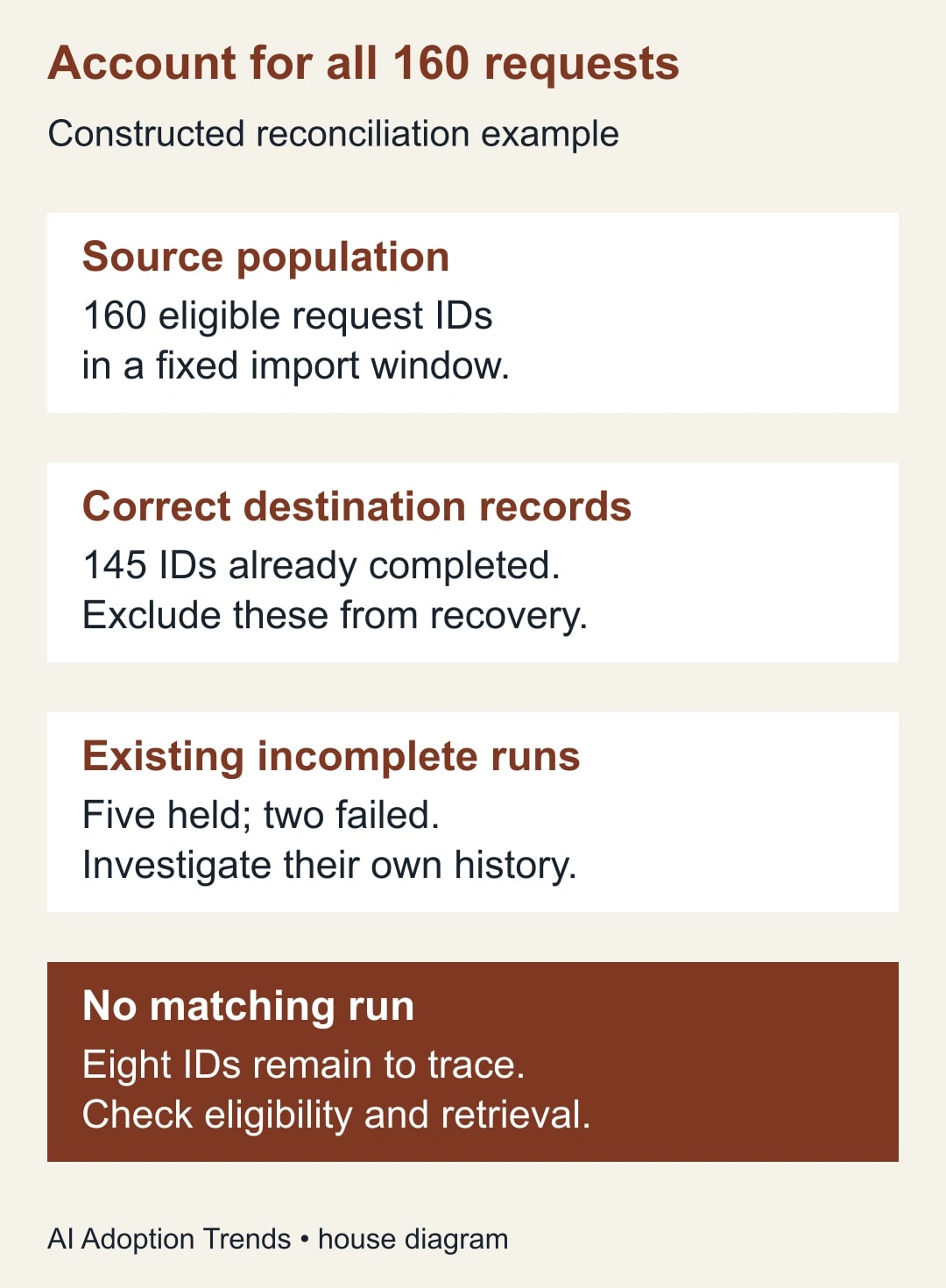
Suppose the five held runs and two failed runs are resolved through their appropriate paths, producing seven correct destination records. The team then recovers the eight confirmed gaps through a controlled, supported transfer or manual process. The intended result is 160 correct request records and no duplicate request IDs, not merely 160 successful action messages.
If one recovery record already exists when the operator performs the final pre-write check, skip its creation and record the existing destination ID. Completion can occur while an investigation is in progress. Rechecking immediately before the recovery action reduces that race, though a destination-enforced unique key is a stronger control where the system supports it.
If two records have the same request ID but genuinely represent separate jobs, the identifier design is wrong for this purpose. Resolve that ambiguity with the service owner. Do not force one-to-one matching onto a process that intentionally allows several destination jobs per source request; define the expected set of jobs instead.
Recover only the confirmed gaps
Zapier's current transfer route uses records in Zapier Tables and maps them into a connected Zap. Its instructions require the Zap to have been published at least once and to be on. The operator selects records, maps fields and confirms the run; each selected record becomes a run. Verify this route with a safe test before using it for recovery. Read the transfer procedure and limitations.
Build a recovery file or register containing only approved missing IDs, the fields required by the destination, the reason each item qualifies and the operator responsible. Keep a separate column for the resulting destination ID. This is a work list whose items must be reconciled, not a copy of the whole source export.
Test the path with one harmless record first. Check mapping, destination ownership, dates and any downstream notification. Then process a small group and compare each result. If an unexpected external message or duplicate appears, stop that path and investigate before increasing the group size.
When a recovery action reports an error, inspect the destination before retrying. An error can leave uncertainty about whether the write happened. Mark that item as uncertain until its outcome is known. Repeated retries without reconciliation can convert eight missing items into eight missing items plus several duplicates.
Keep the original source event time distinct from the recovery time. A request received Monday but recovered Tuesday should not automatically appear to be a new Tuesday request in service reporting. Agree which timestamp drives the team's response measure and preserve both where the destination allows it.
Decide whether to change the design
If the cause is an incorrect trigger condition, repair that condition and test both a qualifying and an intentionally excluded record. If the cause is source-specific API behavior, use the supported creation or update route. A polling-frequency change cannot repair a record that the integration does not recognize as eligible.
If the cause is a verified retrieval limit, test a shorter supported interval, a controlled import process or another supported intake mechanism. Zapier's interval controls depend on both the plan and the app; some triggers manage their own schedule. Check the available timing controls. A redesign may cost more in setup and monitoring than occasional manual reconciliation. Compare alternatives against peak workload and the consequences of a missed request.
Budget for connected-app access, any plan change, successful automation actions and the staff time required to monitor and recover work. Do not justify an upgrade with an assumed recovery rate. First show that the proposed change affects the limiting step and passes the same burst test.
For a constructed labor comparison, suppose manual reconciliation takes 45 minutes after each weekly import. A revised process takes 20 minutes of review and ten minutes of exception handling. It releases 15 minutes per import, assuming the measured quality is comparable. Those minutes are capacity; cash savings require an actual change in spending.
Keep this burst-recovery worksheet
- Scope: source, exact trigger event, time window, time zone and import method.
- Population: expected eligible IDs and explicitly excluded IDs with reasons.
- Destination: definition of a complete record and evidence for each already completed ID.
- History: matched run references, held or failed states, search filters and available history period.
- Retrieval: confirmed app-specific limit or documented uncertainty; observed peak arrivals between checks.
- Recovery: approved missing IDs, chosen supported path, operator and destination results.
- Acceptance: every expected ID accounted for, duplicate check complete and unresolved items assigned.
- Prevention: repeated burst test, monitoring owner, backup and escalation time.
Run a controlled test with normal arrivals, a realistic burst and an intentionally ineligible record. The goal is to recover every eligible item once while leaving excluded items alone. Include a destination failure to confirm that the operator can distinguish a missing trigger from an incomplete action.
Track unreconciled IDs, duplicate destination jobs and time to resolve exceptions alongside successful runs. Stop expanding the workflow if the team cannot account for its busiest intake window. The next useful step is to choose one affected import, list its expected source IDs and classify each against history and the destination before touching the replay controls.
Weekly Newsletter
AI Adoption Weekly
New research, field guides, training studies, and tool decisions for operators.
No spam. Unsubscribe anytime.
Related Comparisons
Calculator
AI seat cost calculator
List price × headcount. You enter the hours and the operating assumptions.