
Why a Stripe payout doesn’t match the day’s sales
Match an automatic deposit to its itemized settlement, isolate fees and refunds, and send unexplained differences to the right owner.
Published November 6, 2026

A Stripe bank deposit is a transfer of money already in your Stripe balance. It need not equal yesterday’s orders, and booking the whole deposit as another sale can count revenue twice. For an automatic payout, find the deposit’s payout record, download its itemized transactions and add the signed net amounts in the settlement currency. First match those rows to Stripe’s payout total. Then match that total to the bank. The step at which the match fails tells the bookkeeper where to look.
This walkthrough is for someone closing an ecommerce bank account with automatic Stripe payouts. You need authorized read access to the payout report, the posted bank transaction, and the books that already record orders or processor activity. A spreadsheet is enough to investigate one payout. Keep cardholder and customer details out of the shared exception sheet; a payout identifier and a transaction identifier are usually far more useful for this job than a customer's name.
Choose the right report before hunting for a missing sale
Stripe’s payout reconciliation documentation explains which report matches an automatic settlement to its underlying transactions. The itemized download shows the individual entries. Select a range around the payout’s estimated arrival date; widen it if necessary. A sales export filtered by the day the bank posted the deposit answers a different question. It can omit an earlier charge included in this batch while including a later charge that is still waiting to settle.
If you make ordinary manual payouts, start with the balance report instead. Stripe distinguishes accounts making automatic payouts, including qualifying connected accounts on a platform, from users who choose payout amounts and timing themselves. Stripe also says it cannot identify the transactions comprising an instant payout you initiated. Do not manufacture that allocation by selecting a convenient set of orders whose total happens to match. Use a running balance reconciliation and describe what you can actually establish.
A third question is whether you are looking at the correct business, connected account and currency. In a group with several stores, the same brand name on a statement can refer to different settlement streams. Confirm the account from the authorized dashboard and check the bank destination using its approved identifier. Record only the identifying detail necessary for the review. Do not mix currencies and solve the difference with an unexplained exchange-rate adjustment.
Build a bridge with three independent figures
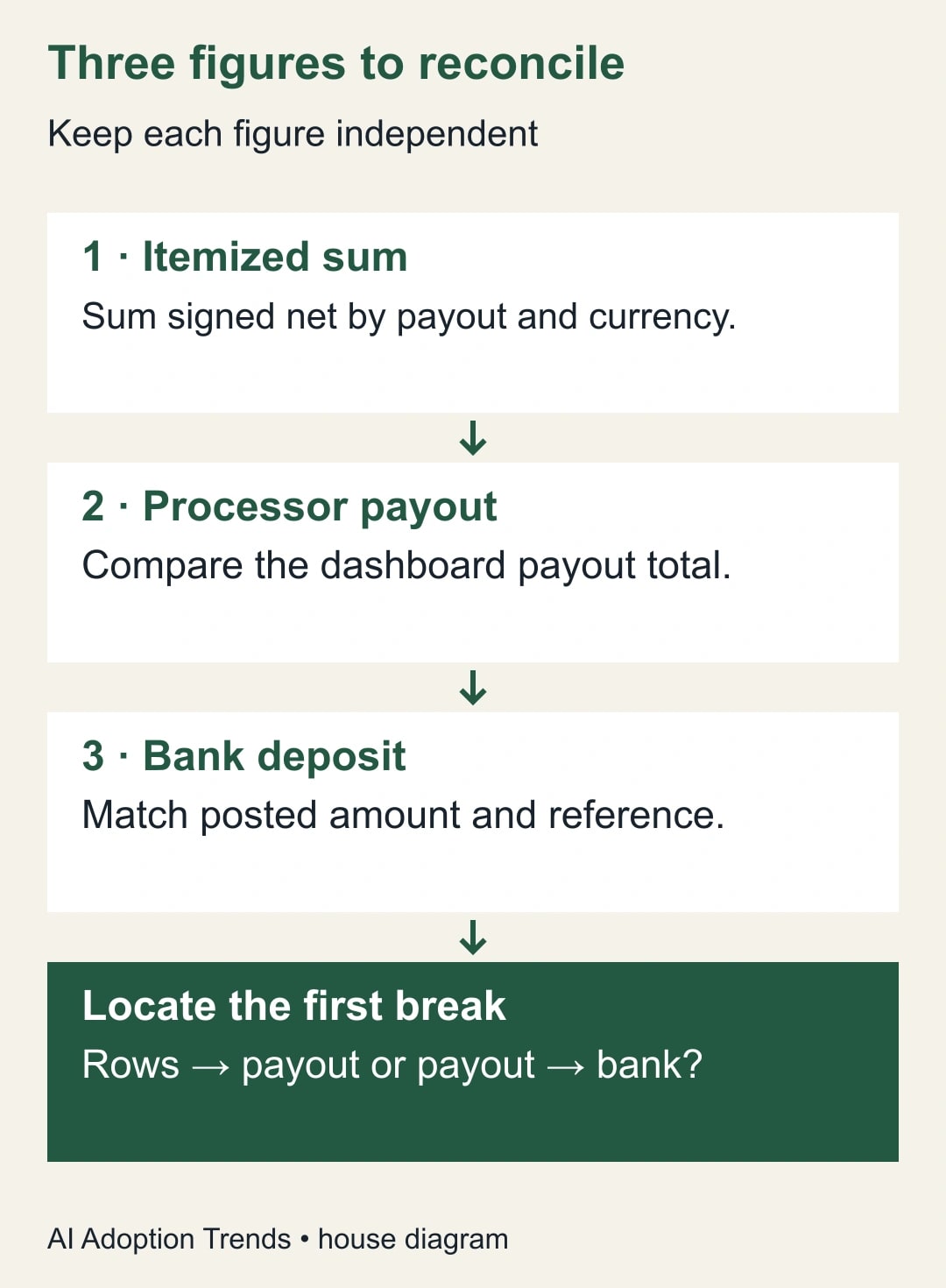
Write the bank’s posted amount at the top of the worksheet. Add the amount Stripe says it paid out and a third figure computed from the itemized rows. Keep all three as separate cells. If you link the “expected” cell to the “actual” cell, a green zero can survive almost any import mistake.
Leave the original download unchanged. In a working copy keep the payout identifier, transaction identifier, reporting category, currency, gross amount, fees and net amount where available. Use the signs in the export. Confirm your interpretation against one ordinary charge and one refund before applying a calculation to every row. If you use the signed net amount, fees already reflected in that amount must not be deducted a second time.
Group the working copy by payout identifier and currency. Count the rows and distinct transaction identifiers before attaching orders or customer information. An order can contain multiple lines. Joining a payment to all of those lines can multiply its net amount, even though the visible order number is correct on every row. Preserve the settlement calculation at its original transaction level; attach order details in a separate lookup that does not change its total.
The $925 deposit that follows $1,200 in orders
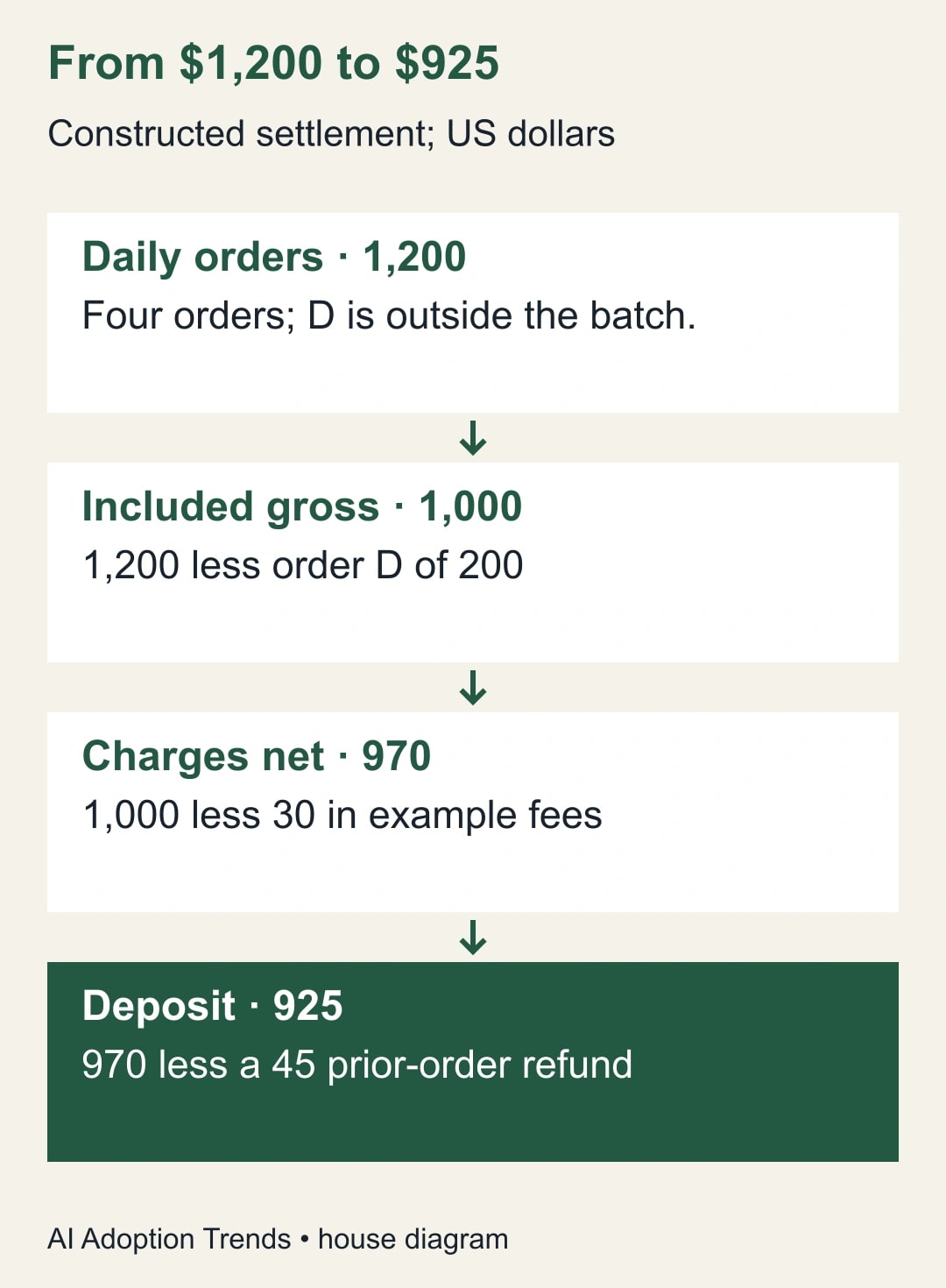
Constructed example, all amounts in US dollars. The store’s daily sales export shows four orders: A for 400, B for 350, C for 250 and D for 200. The day totals 1,200. The itemized report for one automatic payout contains charges A, B and C. Their example fees are 12, 11 and 7, leaving net charges of 388, 339 and 243. Those fees are assumptions for this example, not a Stripe rate quote.
The payout also includes a refund of 45 on an earlier order. For simplicity the example refund row has a signed net of minus 45 with no separate fee adjustment. Add the four signed amounts: 388 + 339 + 243 − 45 = 925. The dashboard payout shows 925. The bank posts 925. The difference from the day’s orders is 275: order D contributes 200 that is outside this batch, fees account for 30, and the prior-order refund accounts for 45. Every dollar has a different reason for being absent.
This is where a superficially sensible shortcut fails. Subtract the 30 fee total again from the signed net entries and you get 895. The apparent missing 30 is the spreadsheet’s mistake. Compare the fee treatment on A: the transaction’s gross 400 already became 388. If you want to explain the money using gross amounts, start from 1,000 in included charges, deduct 30 once, then deduct 45. The gross bridge and the net bridge should agree.
Do not relabel the 200 as a fee just because order D is absent. Track it by identifier in a separate unsettled-items list. Trace it to a later settlement or obtain evidence of a different status. If you only know that it is outside this payout, write exactly that. Finding the amount in a later deposit is a separate piece of evidence. This distinction matters when the earlier order list contained an unpaid or canceled order in the first place.
Diagnose the break without adjusting the bank to fit
If the itemized rows fail to equal Stripe’s payout, return to the untouched download. Check the report section, payout identifier, currency, missing negative entries, repeated imports and whether you accidentally downloaded a summary. Compare row counts before and after your filtering. If the raw report ties but the working copy does not, you have narrowed the investigation to your transformation; no bank adjustment is warranted.
If the rows and payout agree but the bank does not, set the sales export aside. Verify that the statement item is posted rather than pending, check the receiving account, and match reference information before relying on a similar date or amount. Two equal payouts are not interchangeable. Check whether a payout failed and whether there is a separately identified reversal or replacement. Stripe’s documentation describes a failed-payout section when applicable. Keep both the failed item and its resolution rather than overwriting one with the other.
If the bank and payout agree but the books do not, examine the accounting import. Has an ecommerce connector already recorded the gross orders? Is a bank-feed rule creating additional income when it sees the deposit? Has a refund been booked both from the orders system and again as a separate expense? Ask the accountant which account carries amounts waiting for settlement and how fees and refunds are posted. The worksheet provides transaction evidence; the appropriate accounting entry depends on the existing books.
Turn one balanced deposit into a repeatable close
Lay out the worksheet in three tabs. In Source, keep the download and its report period untouched. In Batch, calculate one row per payout and settlement currency, with separate columns for signed net, payout total and difference. In Bank, enter the posted statement reference and amount independently. The two differences should be visible even when one is zero. If the bank tab is still blank, display “awaiting bank evidence” rather than treating a missing value as a zero-dollar deposit.
For the constructed $925 example, the closing note might read: “Payout P-example, USD; four itemized entries, including one refund; itemized net $925; processor $925; bank $925; payout matched. Order D, $200, not in P-example; owner to trace separately.” The exact same worksheet now supports two different statuses: the bank deposit is reconciled, while one order from the sales comparison is still being followed. Keeping the status at the right level prevents an unresolved order from blocking a sound bank match, or a sound bank match from making an unexplained order disappear.
Test the workbook with a deliberate bad import in a copy. Import A a second time: the computed batch net should rise by 388 to 1,313 while the processor and bank totals remain 925. The first comparison should fail by 388. Restore the input and instead enter a bank figure of 952. Now the itemized sum and payout still agree, but the bank entry is 27 higher. These two failures should land in different queues. If the automation marks both cases “payment missing,” change its exception labels before introducing it to the close.
Set a rule for corrections to a previously checked batch. Preserve the original export, what changed, who approved the correction and which downstream report consumed the earlier version. If a corrected import changes accounting entries, have the responsible accountant decide the posting period. Never let an automated re-import silently replace the only record of what was reviewed. A useful close package lets another person reconstruct both the original match and the reason it was reopened.
There is a practical cost test here. Measure minutes preparing exports separately from minutes resolving exceptions. An automated download may save the first category while adding new exceptions through a bad join. Compare matched deposits, unresolved dollar amounts and time spent investigating on a similar mix of batches before agreeing to an ongoing software charge.
A handoff the next bookkeeper can reproduce
- Statement line: posted date, bank reference, currency, amount and destination account identifier.
- Processor record: account, payout identifier, status, expected arrival date, reported total and original export location.
- Recalculation: row count, category subtotals, signed net sum and difference from the payout total.
- Bank match: payout amount less bank amount, matching evidence and any unsettled or failed items kept open.
- Approval: preparer, second reader, unresolved difference, assigned owner and next check date.
A residual of zero is a necessary arithmetic check; it does not prove identity. Before closing, trace one included charge to its order and one non-charge row to supporting detail. Inspect repeated amount and date combinations. If two possible bank entries remain, mark the match ambiguous and route it for review. The cost of holding an item for evidence is visible. The cost of clearing the wrong equal-dollar item often shows up only when next month's reconciliation fails.
Automate the matching step after you can explain several varied batches manually. Keep a no-match queue and a multiple-match queue. Let the system propose matches that share the verified identifiers, account and currency. A person should own exceptions, changes to matching rules and any posting that would recognize revenue or clear a discrepancy. Track the count and age of unresolved payouts alongside the amount outstanding. One large unresolved item can matter more than a hundred clean matches.
Start with one posted deposit and save the three figures together. If a tool supplier offers to automate the close, use that saved batch plus a refund and an ambiguous bank match in the demonstration. The site's finance software buying guide can help decide whether a new tool would remove enough recurring work to justify its cost.
Weekly Newsletter
AI Adoption Weekly
New research, field guides, training studies, and tool decisions for operators.
No spam. Unsubscribe anytime.
Related Comparisons
Calculator
AI seat cost calculator
List price × headcount. You enter the hours and the operating assumptions.