
Fix expired Airtable attachment links in client emails
Choose between an actual attachment, an Airtable viewer link and a client portal. Recover a failed delivery without exposing another client’s file.
Published November 6, 2026

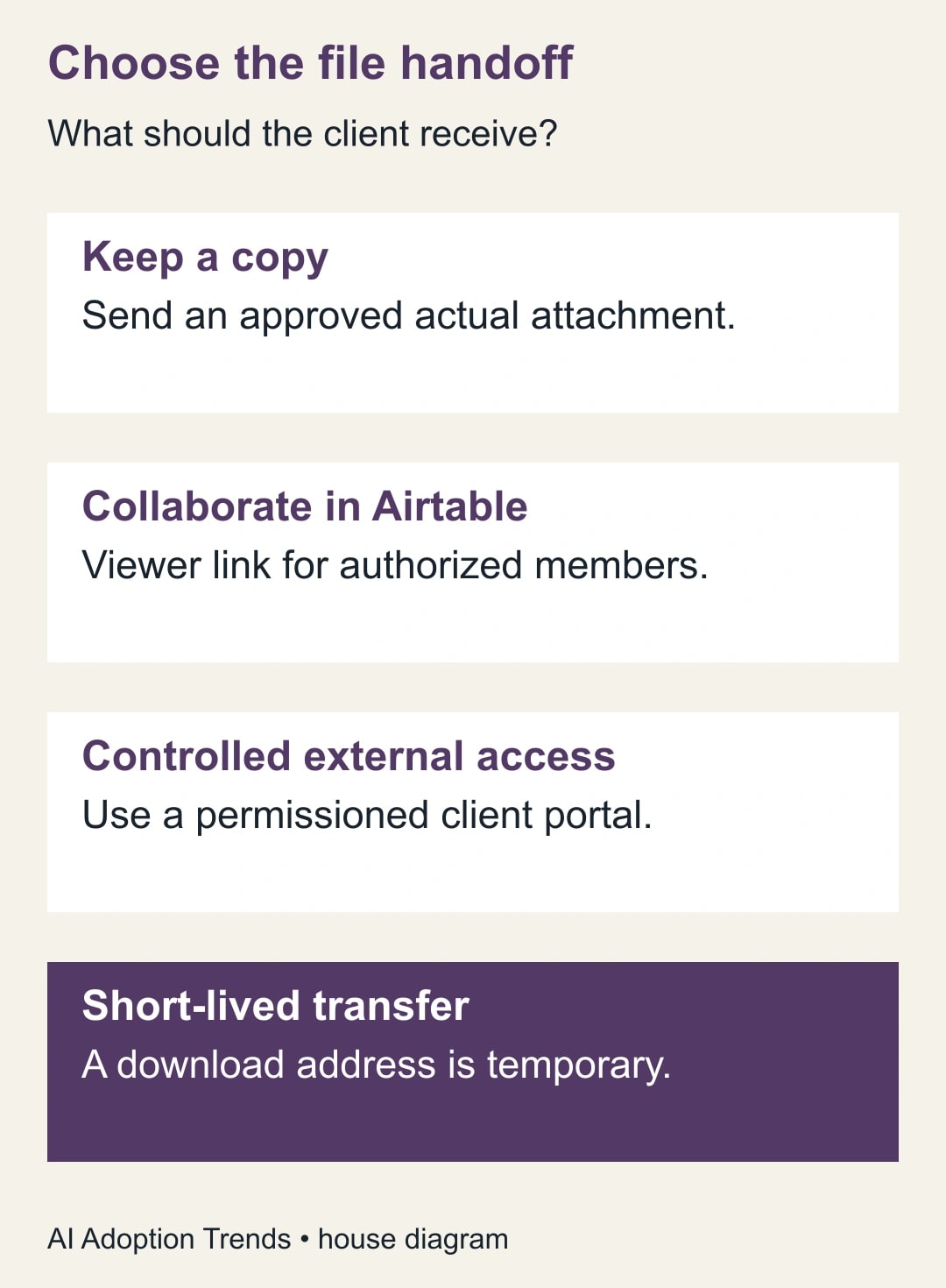
If a client could open an Airtable attachment on Friday but cannot open the same emailed link on Monday, first identify what you sent. A temporary download address can expire while the file remains intact in Airtable. Replacing it with another temporary address restarts the clock. For an approved document the client should keep, send the actual file if copies are permitted. For a document whose access or version must remain under your control, deliver it through a managed location where the intended client can sign in.
This is a delivery decision for the person responsible for client communications, not a reason to grant an external recipient access to the entire base. The owner needs access to the automation, the source record, the original message template and the approved document. Work with a harmless sample first. A request about a sensitive file should never require the client to forward a working download address to a group mailbox.
Two links that look like the same promise
Airtable’s attachment URL guide distinguishes an attachment viewer address from an expiring download address. The viewer belongs to Airtable and requires an authorized, signed-in collaborator with access to the relevant base or interface. The download address uses airtableusercontent.com and can work without an Airtable account while it is valid. Airtable describes its lifetime in hours. Do not turn that description into a guaranteed delivery deadline.
This creates two different failure reports. “It worked yesterday but stopped” is consistent with an expired download. “It asks me to sign in and I have never used Airtable” points toward a viewer link meant for collaborators. Neither message by itself proves the cause. The record or attachment could have been deleted, an internal permission could have changed, or the template could point at the wrong client’s record. Ask the sender to check the original reference and file before resending anything.
An internal success test is particularly misleading here. An employee signed in to the base may open a viewer link all week. The client who receives it lacks the same access. Conversely, a temporary link opened straight after the test message may succeed for both of them. A preview in the automation editor checks neither a real recipient's permissions nor the delay between sending and opening.
Choose what the recipient should possess
Start with the promise in the email. “Keep the attached signed-off summary for your files” promises a copy. “Consult the current rate card before quoting” promises a current version. “Review this file with the team in Airtable” promises access to a workspace. Those are three different products from the reader's perspective. The person who owns the document must choose before the automation owner selects a field.
For a copy, put the approved attachment field in the email action's Attachments input, as described in Airtable's guide. Putting a URL in the message body is different. Verify the received message contains the actual file and that the client can open it. Confirm that file type, size and destination are permitted by your mail system and recipient. An attachment can be saved or forwarded; replacing the source file will not correct a copy already delivered. If that consequence is unacceptable, choose a managed link.
For an internal review, a viewer link may be exactly right. Verify that the recipient already has the intended base or interface access and that opening the link does not reveal unrelated records. Do not promote a client to collaborator merely to solve a delivery ticket. If they need to comment regularly in a workspace, the project owner should make a separate access decision with a defined scope and removal date.
For a controlled external handoff, place the final file in the team's approved client portal or document service. Assign a named owner to the destination, restrict the intended audience, and test as the recipient. Decide whether the link points to a version that must remain fixed or to a page that will show the current version over time. A client agreement may require the former; a frequently updated instruction may require the latter. The permanent thing is your responsibility for the handoff, not a claim that a provider’s URL will live forever.
Trace one failed delivery without exposing the file
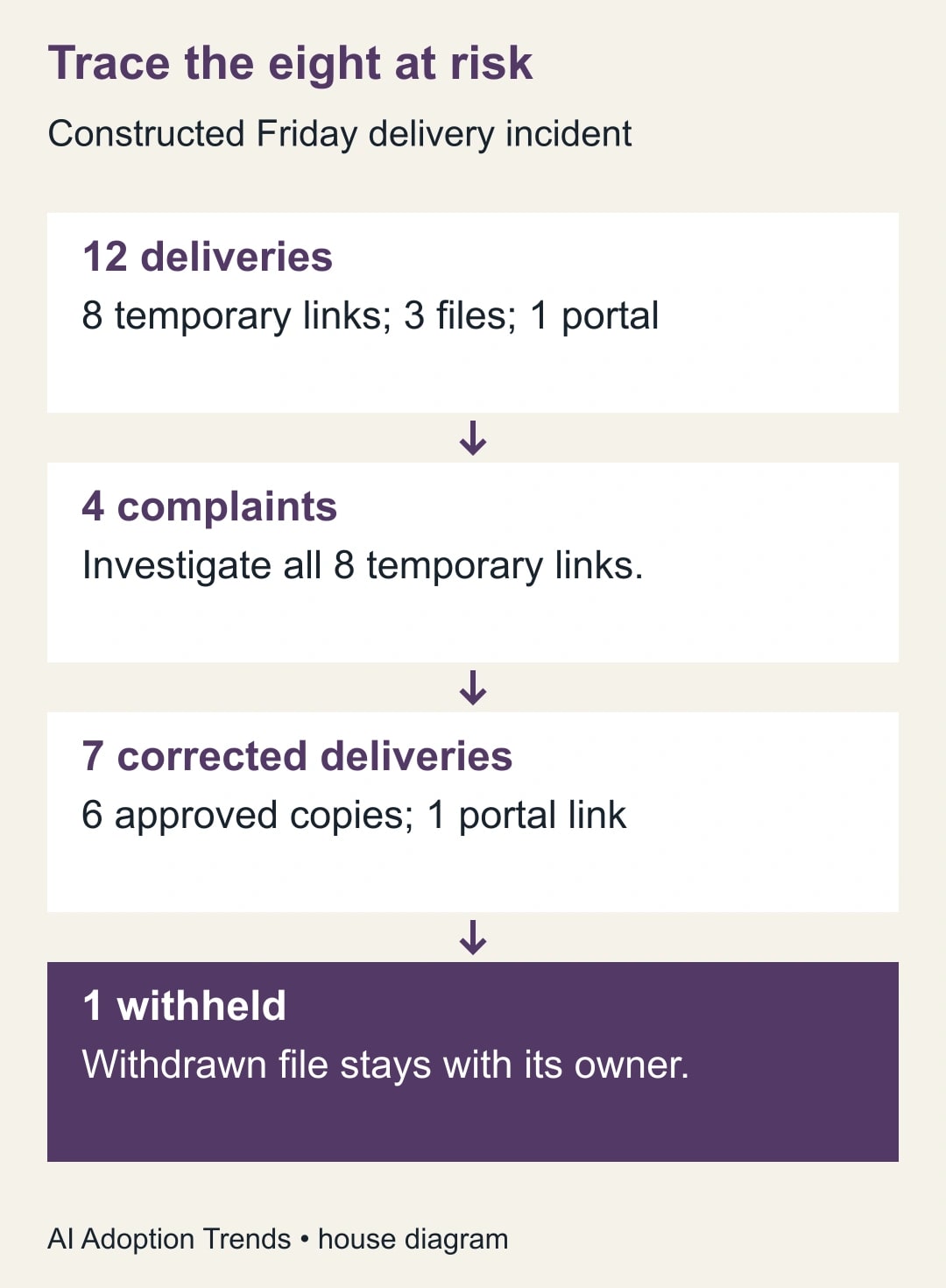
Constructed case: a studio prepares approved artwork for eight clients. The automation sends twelve messages on Friday: eight deliveries use a temporary link in the body, three contain an approved file, and one links to a portal. Four clients report a failure Monday. The support count is four, but the group requiring investigation is all eight temporary-link deliveries. The other four might simply not have tried their links. Twelve messages are not twelve unique clients or twelve proven failures.
Create a case list keyed by the delivery, not by an email address alone. Record an internal client identifier, message time, approved attachment version, delivery method, expected access and corrective status. Confirm that the source file still exists and the intended recipient is still authorized. A client’s project may have been canceled since Friday. Do not automatically resend all eight or copy the same eight people on one email.
Suppose six of the eight remain approved for email copies, one needs a revocable portal link and one file has since been withdrawn. The response plan is six corrected attachments, one checked portal delivery and one withheld document pending the project owner's instructions. Six plus one plus one accounts for all eight exposed deliveries. The three prior attachments and one previous portal message remain outside this correction unless separate evidence implicates them.
Send the correction to each intended recipient through the approved channel. Describe which earlier message this replaces and what the recipient should expect to open. If a version changed, identify the approved version plainly and explain whether to discard the older one. Record a successful recipient check separately from “message sent.” If the recipient reports that a different client’s file was accessible, stop the affected automation and involve the responsible incident owner immediately; expiry is no longer the main issue.
Run a delivery rehearsal that survives the weekend
Use one non-sensitive document with an obvious version mark and two test identities: the intended recipient and a person outside the project. For a portal, the first should open the approved version and the second should be denied. For a file attachment, verify the file is readable without a session and accept explicitly that a recipient can forward it. Do not apply the portal's revocation expectations to a file delivered by email.
Test after the message has sat unopened for the delay your business actually promises. For a Monday customer task, opening a Friday test immediately is insufficient. Save a separate test for the next business day and check which artifact remains usable. Where an approved version should persist, replace the source with a new sample and verify which version the old message now opens. This exposes an especially costly error: an old “final proof” silently opening a later revision.
Add a missing-file case. The expected result is no client delivery and an exception assigned to the owner, not a cheerful “your file is ready” email with an empty field. Add a multiple-file case if the field can contain drafts and finals. Require a deliberate approved selection, or give approved files a separate field. The convenience of attaching a whole field is exactly what makes a mixed field dangerous.
Change the automation without mailing clients twice
Separate the document's business state from the automation's delivery state. “Approved” describes the file. “Sent” describes one attempt to give a particular recipient one approved version. If those states share a single checkbox, correcting a link can make the system treat the whole project as newly approved. In a test copy, replay the same approval event and make sure the automation recognizes an already completed delivery. For a legitimate correction, create a new delivery entry linked to the original one, with its own reason and recipient.
A workable delivery reference combines a project identifier, an approved version and an intended recipient identifier. If one client has two separately authorized reviewers, these are two deliveries. If the same reviewer receives a corrected version, that too is a new delivery. A repeated trigger for the exact same approved version and recipient should instead lead the operator back to the existing entry. Do not use the filename alone as the identifier; “final.pdf” can refer to different files for different customers.
When the send action times out, separate “no response from email service” from “message definitely not sent.” Check authorized sent-message evidence or your delivery service's status first. If there is evidence of acceptance, inspect that message before retrying. If the evidence is ambiguous, assign the case to a person who can decide whether a duplicate is acceptable. A blind retry may send the same sensitive document twice without solving the client's access problem.
Test one version change during the transition. Approve a file, queue a delivery, then withdraw approval before sending the test. The desired business behavior is to hold the delivery. Confirm what your actual implementation does rather than assuming an earlier trigger snapshot includes later changes. Have the automation owner check the intended version immediately before delivery or stop and revalidate when a file changes. Record the outcome in the same case list used for recovery.
Give client support a two-sentence response they can adapt: “We’re checking which approved version was sent in Friday's message. Please tell us whether you see a sign-in request or a message that the file is unavailable; you do not need to forward the link.” That gets the team the distinction it needs while the document owner verifies the destination independently.
Keep the fix cheap enough to maintain
For occasional deliverables, a person can inspect the file, send it and record the handoff. The cost is staff time per delivery. For repeated work, budget configuration, a test mailbox, possible portal storage or licensing, and time for periodic access reviews. Compare the cost with actual redelivery work; do not call fewer support minutes cash savings unless an expense actually falls.
Copy this release note into the automation record: “Owner ___; client promise ___; source of approved version ___; recipient and access rule ___; mode (copy / viewer / portal) ___; missing or ambiguous file goes to ___; two recipient tests completed ___; next delayed-open check ___.” Keep full temporary addresses out of routine logs. A log entry can remain readable long after the team remembers why a live link was put there.
Track corrected deliveries, delayed-open failures and wrong-version reports per delivery method. Pause on any wrong-recipient file, unexplained access or inability to prove which revision was sent. Start by reading one previously sent message as a client would. Once the delivery method is right, check the time zone used by the Airtable email automation so that “available Monday morning” means Monday morning for the recipient.
Weekly Newsletter
AI Adoption Weekly
New research, field guides, training studies, and tool decisions for operators.
No spam. Unsubscribe anytime.
Related Comparisons
Calculator
AI seat cost calculator
List price × headcount. You enter the hours and the operating assumptions.