
Check Gemini’s Google Forms survey insights before changing an event
Check which attendees answered, recount a finding and test demand before committing budget to a larger workshop.
Published November 6, 2026

Before you move a workshop to a bigger room, ask Gemini for the claim you can check: how many people answered the room question, how many picked that workshop, and which attendees never saw the question? A Google Forms insight can point an event manager toward a good experiment. A percentage without those three counts is a poor basis for paying a larger venue deposit.
On November 5, Google announced actionable insights in Google Forms. Google says Gemini can run code against responses, compare answers across questions and suggest next steps. That helps with counting. It does not tell you whether the people who replied represent the people who will buy tickets next year. The event team still owns that inference.
First decide what the survey is allowed to change
Write the impending choice on the review sheet. “Improve next year” is too broad. “Move the hands-on workshop from a 30-seat room to a 60-seat room before the venue releases our hold on Friday” gives the review a deadline, a financial consequence and another option: keep the smaller room and open a waitlist. The second option matters because it lets you learn without making a nonrefundable commitment.
Separate the people involved. The form owner knows how people reached the survey and which questions they saw. An analyst or a second event coordinator checks the counts. The budget owner chooses the room. A single person may play two roles on a small team, but write down where their count ends and their judgment begins. A perfectly counted request for more networking does not say which session to cut.
Use the feature for exploring feedback when you have the original form, permission to inspect responses and enough time for someone to check a finding. Skip it for a six-person debrief where reading all six replies takes less effort. Also skip individual decisions such as selecting applicants from sensitive disclosures. A program trend is the wrong evidence for a judgment about a named person.
Find out whether the analysis is available to your team
As of November 6, Google's release lists Business Standard and Plus and Enterprise Standard and Plus among eligible editions. Rapid Release rollout started November 2; Scheduled Release rollout is due to start November 19. Both are gradual. Check the form owner's edition, release track and smart-feature settings before buying anything or assuming the control is broken. Follow Google's instructions for analyzing responses in the Responses area. If your form or account does not qualify, the manual count below still works.
Budget for the work around the button: collecting an unchanged response export, identifying duplicates where you have a defensible identifier, and checking the recommendation with the person who owns the event. Do not give a contractor access to named responses merely to draw a chart. Supply the smallest aggregate table they need. Keep sensitive free text in its approved location; a rare job title in a comment can identify an attendee even after you remove the name.
Rebuild the question as it appeared to a respondent
Capture the wording, available choices, whether more than one choice was allowed, whether the item was optional, and any condition that sent someone past it. An attendee asked to choose two improvements casts up to two votes. A respondent asked to pick the single most important improvement casts one. Adding the first survey's percentages and expecting them to equal 100 creates an error where none exists.
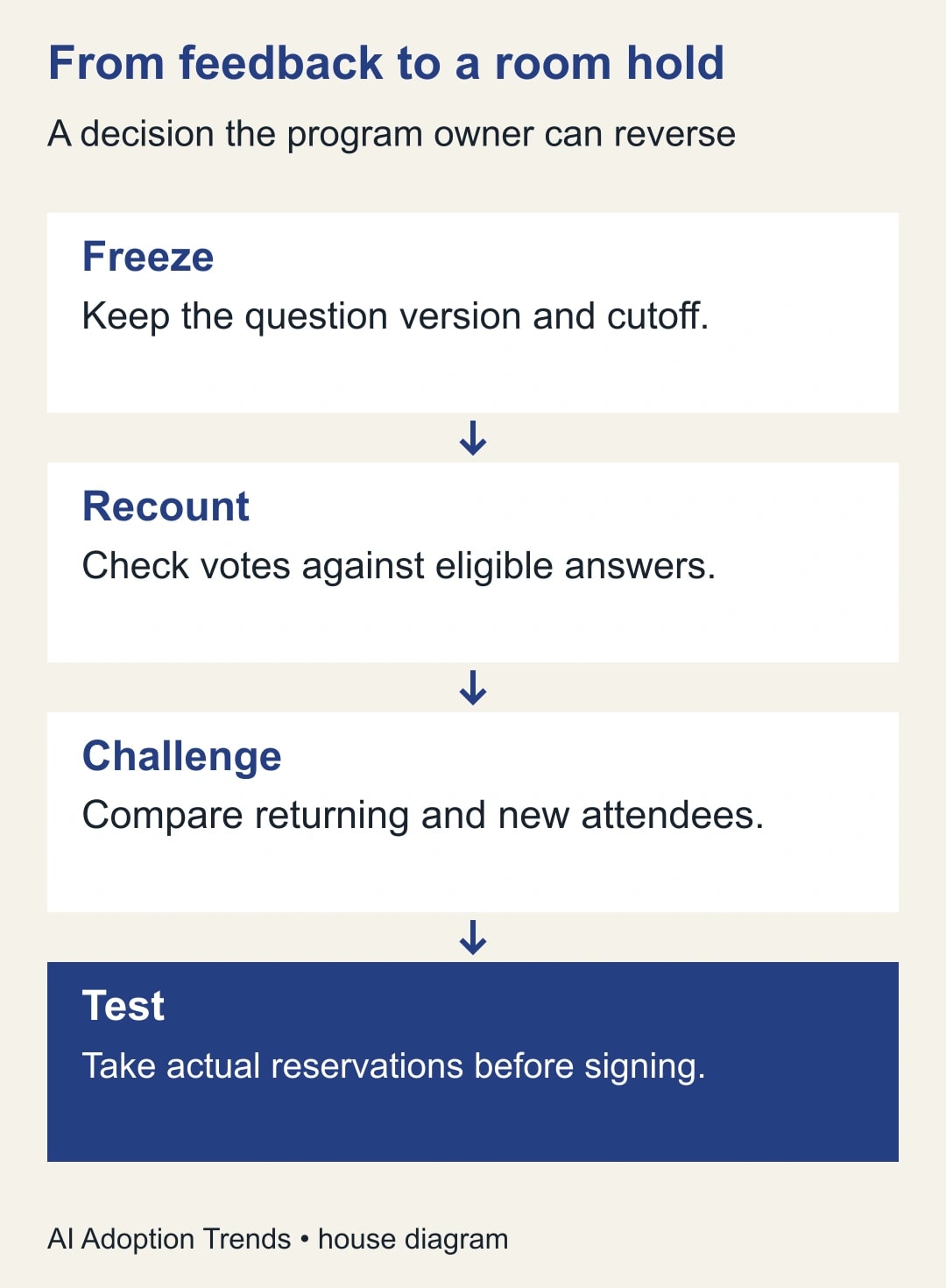
Freeze the response set at a stated time. A live form can receive another answer between the generated summary and the manual check. Save the original export, work on a copy and record the cutoff including the time zone. In the copy, mark each row eligible or ineligible for the question. Within eligible rows distinguish an actual answer, a deliberate “no preference” and an empty cell. A blank does not mean an attendee dislikes workshops. If no stable identifier exists, describe the unit as submissions rather than promising one submission per person.
Select one generated finding at a time. In your review notes, restate the finding as a fraction, even if the tool supplies only prose. “Most wanted the practical session” becomes “selected the practical session / answered this question.” Count that fraction directly with a filter or pivot table in the working copy. Look at the actual option names; a workshop renamed halfway through registration may need a documented mapping before its votes can be combined.
A room decision from 120 submissions
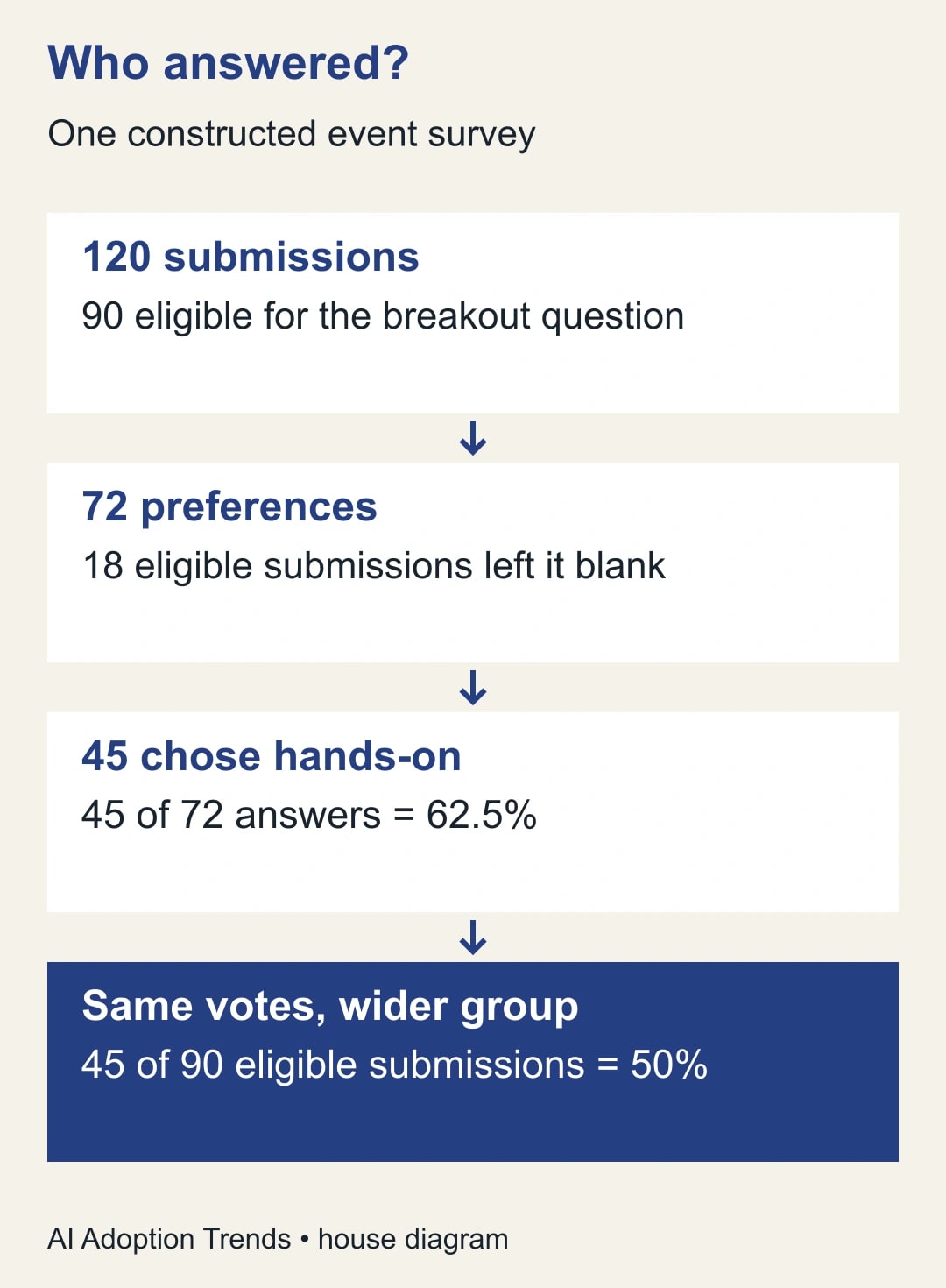
Constructed example: 200 attendees receive an invitation and 120 submit forms. Only 90 submissions record attendance at the breakout block and qualify for a follow-up question. Of those 90, 72 name a preferred format and 18 leave it blank. Of the 72 answers, 45 select hands-on and 27 select discussion. Assume one response per attendee in this example and one choice per answer.
Hands-on wins 45 of 72 expressed preferences, or 62.5%. It accounts for 45 of 90 eligible attendees who submitted a form, or 50%. It is selected on 45 of 120 submissions, or 37.5%. All three calculations divide the same number by a different group. The first answers which option won among people who chose; none tells you how many tickets a 60-seat workshop will sell. Even the 60% response rate (120 of 200 invited) does not establish that respondents and nonrespondents wanted the same thing.
Now split the 72 answers by registration type. In this example, 30 of 40 returning attendees choose hands-on, as do 15 of 32 first-time attendees. The two groups add back to both headline counts: 40 + 32 = 72 and 30 + 15 = 45. The difference is worth investigating. It does not show that returning to the event caused someone to prefer that format. Perhaps returning attendees received a different session invitation. Ask the registration owner before announcing that first-time buyers need a different product.
A room with 60 seats might still be the right purchase, but the missing piece is demand for seats at this year's price and time. Offer people a reservation for the actual session, disclose the terms and measure qualified reservations before the hold expires. Set the decision point from the venue's quote and the event budget, not from a percentage that happens to look decisive. If there is no way to gather reservations in time, write down who accepts the risk of the smaller or larger room.
Turn a theme in a comment into something you can verify
A theme has an additional failure mode: the analyst chooses what belongs together. “I couldn't hear the speaker” and “I wanted the speaker's slides” both mention a speaker and call for different fixes. Keep one short definition for each category and an example of what falls outside it. Count submissions mentioning a theme, not occurrences of a word. One attendee using the word “sound” four times is one account of a problem.
Take a selection of comments labeled with the theme and a selection that were left out. Read each in context. The first group exposes overcounting; the second exposes complaints the summary missed. Look deliberately for a comment that contradicts the prevailing interpretation. If the analyst and the room lead disagree about whether a comment refers to sound quality or session pace, keep an “unclear” category. Don't turn an ambiguity into a second vote.
Suppose the budget owner hears “sound was the main issue.” Ask whether that means the most comments, the largest share of all attendees, or the easiest actionable repair. A single credible accessibility problem might deserve immediate attention even if only one person reported it. Treat that as a service decision and investigate privately. You need not promote it to a majority opinion to take responsibility for it.
What the form owner should see
In the Responses tab, find Actionable Insights, choose Generate insights and open Analysis steps before copying a takeaway. Google's help page specifies a non-quiz form with at least twelve responses and three questions. If a linked spreadsheet exists, the person running the analysis must have access to it. This is a different feature from the summaries of individual text questions. A visible text summary does not establish that whole-form insights are available. Use your normal access process rather than sharing a private response sheet with a larger group to make a button appear.
Record the exact claim and the item it refers to before refreshing or retrying. A retry can produce a different emphasis; it does not constitute an independent vote for the same conclusion. Review the response set once and preserve any finding you intend to present with the checked table. If the linked sheet contains staff notes or cleaning formulas, keep your count clearly separated from the original form answers so someone else can reproduce it.
Set a price for being wrong about the room
Take the constructed example one step further. Suppose moving rooms costs another $600, the initial room has 30 seats and each extra paid reservation contributes $25 after its variable costs. You would need 24 additional paid reservations to cover the room upgrade: $600 divided by $25. That is 54 reservations in total if the first 30 would have been sold anyway. It is not enough to point to 45 preferences. They are neither bookings nor necessarily additional buyers.
If the room change also avoids turning away essential participants, the program owner might still authorize it below that threshold. Write that reason separately from the ticket calculation. If the event includes workshops at no additional charge, drop the ticket model altogether and decide whether the extra capacity is worth the incremental cost per seat used. The better decision may be to repeat a popular session, but that brings another cost and a presenter scheduling constraint. Make those choices visible to the budget owner rather than letting a generated recommendation pick one.
Copy this finding card into the planning meeting
- Decision and deadline: What commitment would change, who can authorize it and when does the choice expire?
- Response set: Form version, cutoff and time zone, invited group, submissions, eligibility rule and question wording.
- Checked claim: Number choosing the option, number answering, eligible blanks, group that never saw it, and analyst's name.
- Counterexample: A subgroup, contrary comment or collection condition that makes a different explanation plausible.
- Action: Smallest reversible change, owner, cost ceiling, success measure and date for checking the result.
- Limit: What the evidence cannot establish and which observation would reverse the decision.
If the summary and the working copy disagree, first match the cutoff and question version. Then check multiple selections, unanswered rows, eligibility and grouping. Change one assumption at a time and keep the before and after counts. If you cannot reconstruct the result, remove that claim from the meeting slide. You can still share verified counts and make a limited decision without the disputed interpretation.
The useful measure for the event lead is whether the decision proved workable: for the room change, record confirmed reservations, actual attendance and any people turned away. Keep the survey finding alongside those outcomes so next year's team can see how well preference translated into attendance. Start with one decision card and one independently recounted question. If the next step is a spreadsheet generated with Gemini, use the worksheet checks for a Gemini-generated tracker before sharing its totals.
Weekly Newsletter
AI Adoption Weekly
New research, field guides, training studies, and tool decisions for operators.
No spam. Unsubscribe anytime.
Related Comparisons
Calculator
AI seat cost calculator
List price × headcount. You enter the hours and the operating assumptions.