
Keep the Latest Record in Power Query Without Trusting Sort Order
Choose the latest record with an explicit per-ID rule, hold ambiguous ties and reconcile every ID before replacing a current-status report.
Published October 31, 2026

To keep the latest record for each ID in Power Query, define the business ID and update timestamp, find the maximum timestamp within each ID, and select the matching row only when the result is unambiguous. Keep tied or undated groups in an exception output. Sorting the entire table newest-first and then removing duplicates is not a reliable definition of “latest.”
This guide is for operations analysts building a current-status report from repeated exports or a history table. It fits a customer status, asset status or case summary where each business entity should appear once. It does not fit a transaction ledger where every event contributes to the result. If repeated rows represent legitimate order lines, selecting one row per order would discard real activity. Confirm the intended row meaning before changing the query.
Why a sorted preview can mislead you
Microsoft documents that sorting followed by duplicate removal may appear to retain the desired row, but the behavior is not guaranteed. Power Query can optimize operations or move processing to the data source, and sort order may not survive grouping, merging or duplicate removal. Microsoft suggests approaches such as sorting within groups or ranking with an explicit tie-breaker. Read Microsoft’s explanation of sort preservation.
The Table.Distinct reference also warns that you cannot generally assume which duplicate survives. That matters because a preview showing the newest row today is not proof that the query implements your business rule on tomorrow’s source. See the duplicate-removal behavior.
The remedy is to make the selection criterion part of the calculation. “Keep the row whose update time equals this ID’s maximum update time” is inspectable. “Keep whichever row remains after deduplication” is not enough when a wrong status could send work to the wrong queue.
Agree on what latest actually means
Choose a stable business key: the field or combination of fields identifying the entity. A case ID might work alone; an account ID may need a source-system name if two systems reuse the same values. A row number created during import is not automatically a business key, because the same record can receive a different row number in another file.
Choose the event that determines recency. A business update timestamp, an approval timestamp and the time a file was exported answer different questions. If an older case is re-exported today, today’s file timestamp does not necessarily make its content the newest business state. Ask the source owner which field changes when the relevant information changes.
Finally decide whether “latest” means latest observed or latest approved. If the latest row is a draft, selecting it may be wrong for an approved-status report. Apply a documented eligibility rule before selecting the maximum. Be careful with filters: removing “closed” rows first would make a recently closed case appear to remain open if an older open row survives.
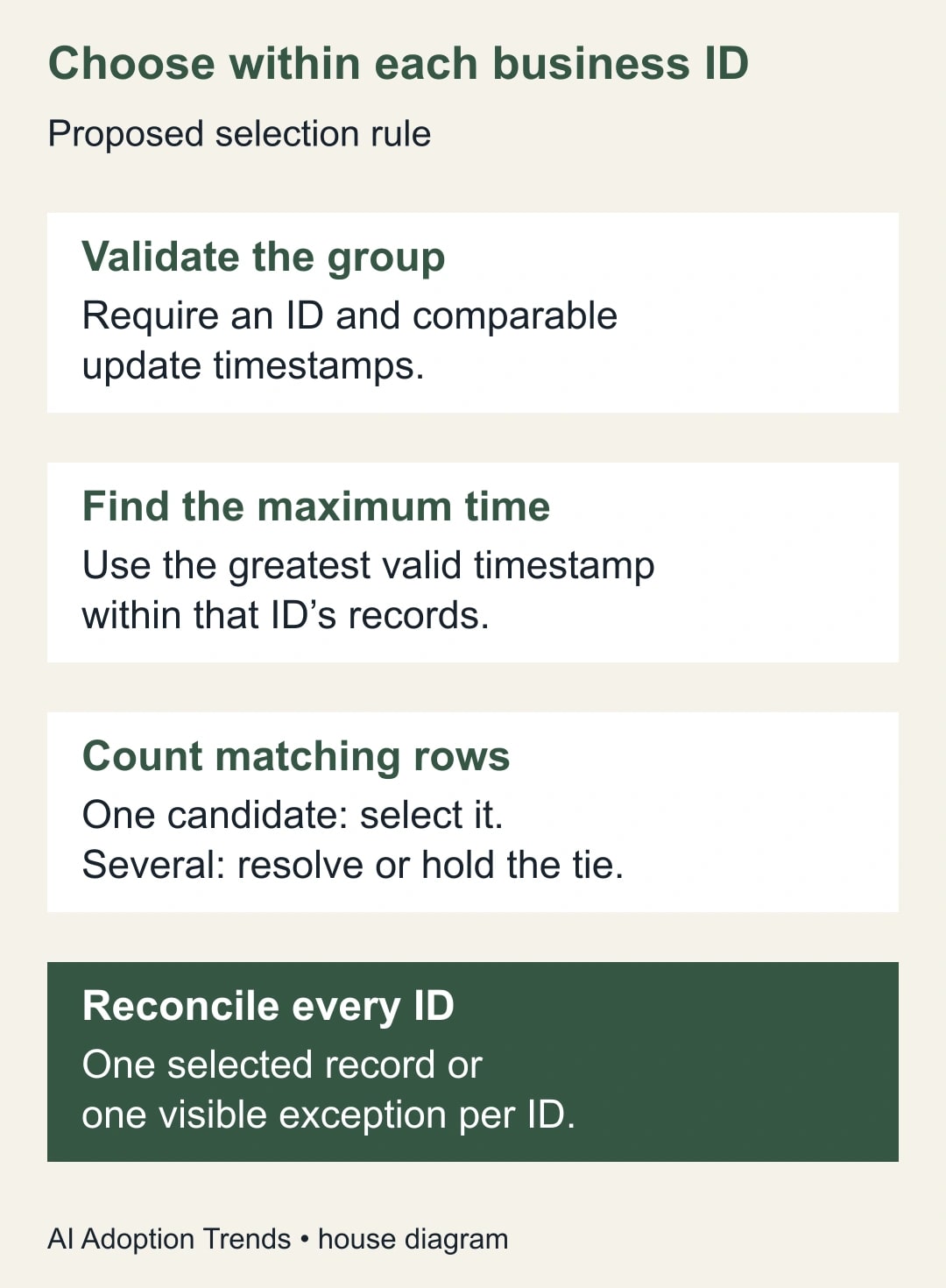
Record the rule in one sentence: “For each source-system and case-ID pair, select the row with the greatest valid business update timestamp among all eligible status records; hold conflicting ties and groups with missing timestamps.” That is a proposed rule, not a universal standard. The source owner should approve the eligibility and exception decisions for the actual report.
Prepare a safe working copy
Keep the existing report and its last accepted output. Duplicate or otherwise isolate the query work so the repair does not replace the production result while you are investigating. Retain the raw history separately; a current-state output should not erase the evidence needed to explain a change.
You need access to the source, an environment with the required Power Query features, permission to change the report and a source owner who can resolve ambiguous records. The cost is mainly analyst time, review time and refresh resources within your existing setup. Additional platform or connector charges depend on where the query runs. Measure refresh duration on representative data before assuming the more explicit query is operationally acceptable.
Validate the key and timestamp before selecting rows. Keep IDs as the intended type, preserve meaningful leading zeroes and reject missing keys into an exception output. Ensure timestamps are comparable: a text field that looks like a date is not enough, and timestamps from different zones need an agreed common basis. Do not infer an unknown zone from the analyst’s computer settings.
Power Query’s duplicate comparisons are case-sensitive. Only normalize ID case when the business definition says case is irrelevant. If “a7” and “A7” identify different entities in the source, uppercasing them would merge two entities incorrectly. Review Microsoft’s duplicate-handling guidance.
Build a maximum-time selection you can inspect
One practical design uses a grouped summary and a merge back to the validated history. First create a query containing eligible rows with valid keys and comparable timestamps. Keep a separate list of IDs whose history includes a missing or invalid timestamp. Under this guide’s conservative rule, those IDs are held rather than silently choosing a dated row that may be older than the undated one.
In a reference of the validated history, group by the business key and calculate the maximum of the update timestamp. Name the resulting field LatestUpdate. Power Query’s Group By operation supports aggregations such as Max. The output should contain one summary row per eligible business key. See Microsoft’s grouping instructions.
Merge that summary back to the validated history using both the business key and the timestamp: summary LatestUpdate matches history UpdatedAt. For a multi-column key, include every component in the same corresponding order. Use a left outer merge so every summary key remains visible. Before expanding, flag an empty matched table as an unmatched-key exception. Then expand the needed history fields from matched tables, including a stable source-row reference if available. This returns the candidate rows at the maximum timestamp, not automatically one winner. Read the merge-query overview.
Count candidates per key. A count of one can proceed to the selected output, provided the key is not on the invalid-history hold list. A count greater than one belongs in the tie-review output. Keeping that distinction visible is the essential step: a merge that produces two candidates is evidence of ambiguity, not a reason to click Remove Duplicates again.
If tied rows are identical across all business-relevant fields, the owner may approve collapsing the identical copies while preserving a duplicate count. If they disagree, require an authoritative tie-breaker or source correction. A sequence number can be a valid tie-breaker when the source defines it that way. An arbitrary alphabetical status order or freshly added index cannot establish which business state is correct.
After tie resolution, reconcile the selected and held keys against the source key set. Keep the history-row counts as a separate measure. A reduction from many history rows to one selected row per entity is expected; an unexplained disappearance of an entire entity is not.
Work through eight rows before using a full export
Here is a constructed acceptance file. All listed times use the same agreed time basis. The purpose is to test selection and exceptions, not to claim a private workbook has been executed.
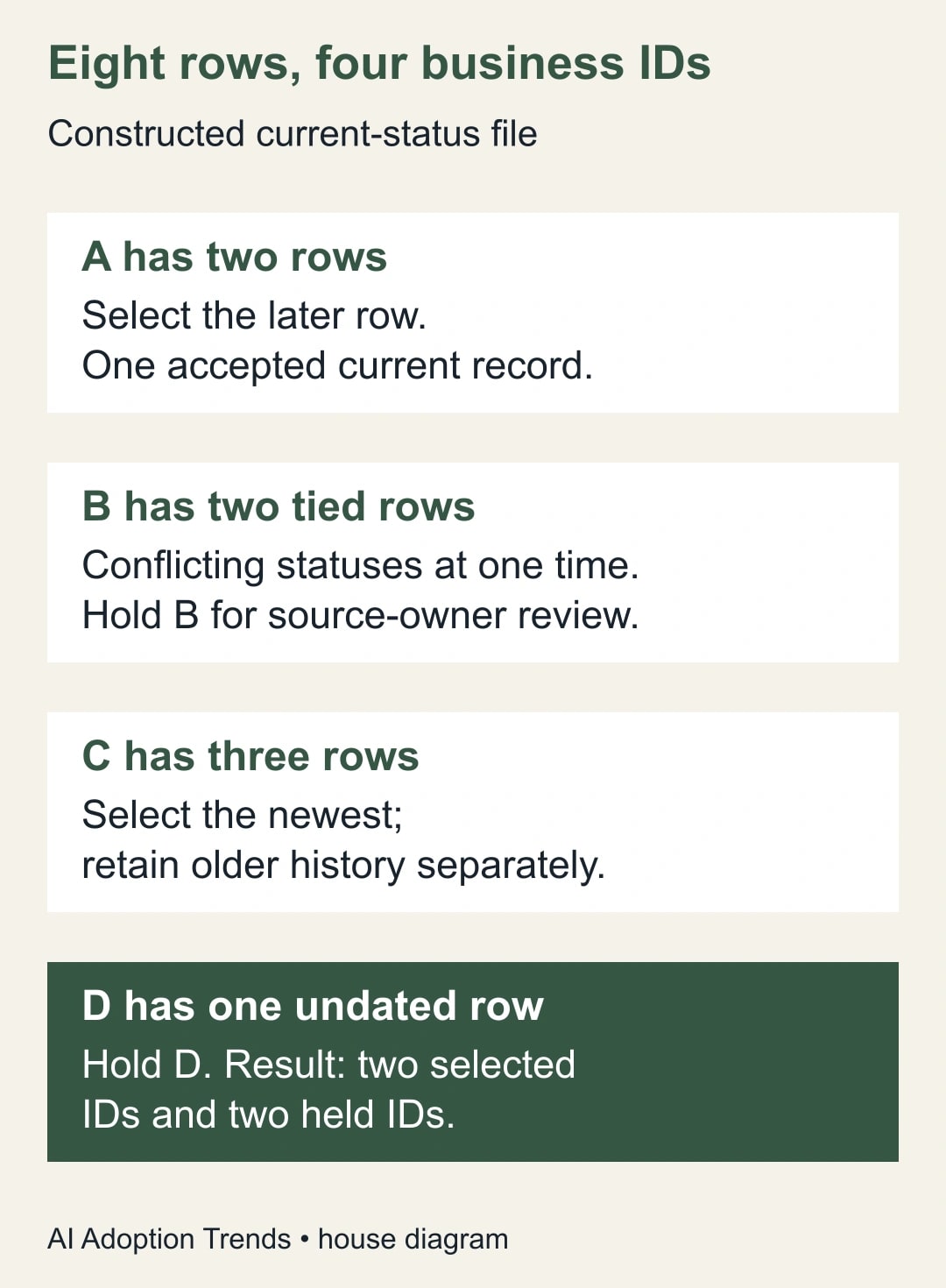
- A: October 29 at 09:00, status Open; October 30 at 09:00, status Closed.
- B: October 30 at 10:00, status Open; October 30 at 10:00, status On hold.
- C: October 28 at 08:00, status New; October 29 at 08:00, status Assigned; October 30 at 08:00, status In progress.
- D: timestamp missing, status Open.
There are eight history rows and four distinct business IDs. A has one latest candidate: Closed. C has one latest candidate: In progress. B has two candidates at the same maximum time and conflicting statuses. D cannot be placed in time. The accepted output contains two rows, while the exception register contains two ID-level holds.
Do not reconcile two accepted rows plus two holds against eight history rows as if they were the same unit. Reconcile four accounted-for IDs against four source IDs. Rows with no usable business key need a separate rejected-row count because they cannot enter this ID-level reconciliation. Separately record that all eight history rows remain available. This avoids a common reporting mistake in which correct deduplication appears to lose rows, while an actual lost entity is hidden by a plausible total.
Now add a ninth row for A with a later timestamp and status Reopened. Only A’s selected row should change. Add a tenth row for C with an older timestamp and the status New. C should remain In progress. These two mutations check that the rule responds to business time rather than file arrival or row position.
Next add an undated row for A. Under the conservative rule used here, A moves to the hold list until the source owner resolves the undated record. That behavior is intentional: the pipeline cannot prove the dated row is latest. If your business chooses a different rule, document the risk and test the alternative explicitly.
Test the cases that a normal refresh misses
Shuffle the source-row order and repeat the selection. The accepted business result should stay the same. This is a useful test of the intended rule, even though it does not prove every connector optimization behaves identically. Run the actual query in the environment that produces the report, with the same source types and refresh path.
Test a duplicate file, an empty file, a missing key, a timestamp conversion error and a timestamp at the edge of the reporting period. Include a tied pair that agrees and a tied pair that conflicts. Expected outcomes should be written before running the pack, so the reviewer does not redefine success to match whatever appeared.
Check the complete dataset’s exceptions rather than only the first preview rows. Record the number of selected IDs, held IDs and unmatched keys after the merge. If a validated maximum fails to match its source row, inspect type conversion, precision and key transformations. Do not fill the gap with a convenient older row.
For large sources, have the maintainer inspect performance and where processing occurs. A design that works on eight rows can still be too slow on months of history. Optimize only after preserving the selection rule and rerunning the same acceptance pack. A faster query that reintroduces arbitrary selection is not an improvement.
Keep a repair worksheet beside the report
- Business entity: key fields, their types and whether case or leading zeroes matter.
- Recency rule: authoritative timestamp, time basis, eligibility conditions and treatment of missing values.
- Tie rule: identical-copy handling, approved tie-breaker or named source-owner review.
- Outputs: selected current records, held IDs and retained history location.
- Reconciliation: source IDs equal selected IDs plus held IDs, with no overlap or unexplained missing key.
- Tests: reordered rows, later update, older arrival, conflicting tie, missing key and invalid timestamp.
- Release: analyst, business owner, refresh evidence, accepted output and rollback copy.
Use the worksheet to make exceptions actionable. “B has conflicting statuses at October 30 10:00; source owner to confirm the authoritative row” is better than “duplicates found.” It identifies the decision and prevents a future maintainer from removing the exception simply to make the refresh green.
Release the current-state view without hiding uncertainty
Publish the selected output only with a visible account of held entities and the source’s effective date. Whether the whole report must stop or may show a partial view is a business decision. A staffing queue may need every case accounted for before use; an exploratory dashboard may tolerate a clearly labeled incomplete result. Decide that before a failure occurs.
Monitor exception counts, unexplained selection changes and refresh duration. Investigate a sudden fall to zero exceptions as well as a rise: a new filter may have removed the problematic records rather than repaired them. If the source changes key or timestamp meaning, hold the affected batch and revisit the contract.
Start with the eight-row pack and compare the actual selected and held IDs. If your problem begins after combining tables, use the guide to find duplicate merges that inflate totals. If the export has changed structure, first classify missing columns as required or optional so a successful refresh still represents the intended data.
Weekly Newsletter
AI Adoption Weekly
New research, field guides, training studies, and tool decisions for operators.
No spam. Unsubscribe anytime.
Related Comparisons
Calculator
AI seat cost calculator
List price × headcount. You enter the hours and the operating assumptions.