
Review Gemini Edits Across a Google Slides Deck Before Sharing
Use a bounded change brief and a 12-slide acceptance check to review Gemini edits before sharing an updated client presentation.
Published October 31, 2026

Use Gemini’s whole-deck editing on a copy of the approved presentation, give it a narrow change brief, and compare every slide with the baseline before sharing. A consistent style does not establish that numbers, dates and qualifications survived. The useful outcome is an accepted revision that a named person can defend, with a clear route back to the earlier version.
This guide is for account managers, operations leads and small marketing teams refreshing an existing client or internal decision deck. It fits work such as applying a new visual style or shortening an explanation whose underlying facts are already settled. Skip this workflow when nobody can identify the approved source, when the presentation contains information your organization has not authorized for this use, or when the deadline leaves no time to review the resulting slides.
What changed, and what to check before starting
Google announced on October 30, 2026 that Gemini in Slides can edit multiple slides or an entire presentation from one prompt. It can change content and styling, combine slides and use reference files. Changes affect editable slides; a side-panel summary and undo or version history help with review and reversal. Launch support is English, with an extended rollout starting October 29. Google lists Business Standard/Plus, Enterprise Standard/Plus, Google AI Pro/Ultra and Google AI Pro for Education among eligible plans. Availability in your account still needs checking. These are provider-described capabilities, not a guarantee of factual preservation. Read Google’s whole-presentation editing announcement.
Before assigning the task, confirm the editor can access the deck and the approved reference file, the feature appears in the intended account, and the document may be used there. Budget for the existing subscription, any approved incremental access cost, the editor’s time and the subject owner’s review. This article does not assume a new subscription is necessary or quote a universal per-deck price. The operating decision is whether a repeatable edit saves enough preparation work after checking and correction are included.
Give the work two owners. The editor runs the revision and records differences. The business owner accepts factual meaning and commitments. One person may fill both roles in a small team, but the second pass should still be deliberate. An account manager should not silently decide that a narrower delivery qualification is harmless just because it makes a cleaner slide.
Start with a change map, not “make this better”
A change map is a short list of what may change and what must remain. It does not technically protect content. It gives the editor and reviewer a shared definition of success and makes an unexpected change easier to detect.
For a style refresh, identify the reference presentation and specify its useful properties: title treatment, color palette, spacing or section divider style. Do not make an unrelated client deck the source of business facts. For a content revision, name the approved source, its date and the exact sections to update. Avoid combining a new design, a new commercial offer and a new audience in the first attempt; that creates too many kinds of difference to review at once.
Save a baseline copy with a meaningful name, such as “Quarterly review — approved facts — October 30.” Keep it accessible to the reviewer. Record the slide count and any hidden or appendix slides that matter. The comparison must include the whole file, rather than only the slides normally shown in a meeting.
Use this adaptable brief as a starting point:
- Purpose: refresh the appearance of an approved client review deck for the same audience.
- Permitted changes: title styling, background colors and spacing, using the named reference presentation for visual style only.
- Preserve: all numbers, currencies, units, dates, customer names, source links, caveats and speaker notes.
- Scope: all 12 slides; do not add, remove or combine slides in this pass.
- When uncertain: leave the item unchanged and identify it for review rather than supplying missing facts.
- Expected handoff: a revised deck plus a human-maintained list of accepted, corrected and reverted differences.
The brief is an instruction to the model, not a verification mechanism. Even an explicit preservation request needs a comparison afterward. Keep a local checklist of the protected facts so that the reviewer does not have to reconstruct the original intent from memory.
A 12-slide example with an answer key
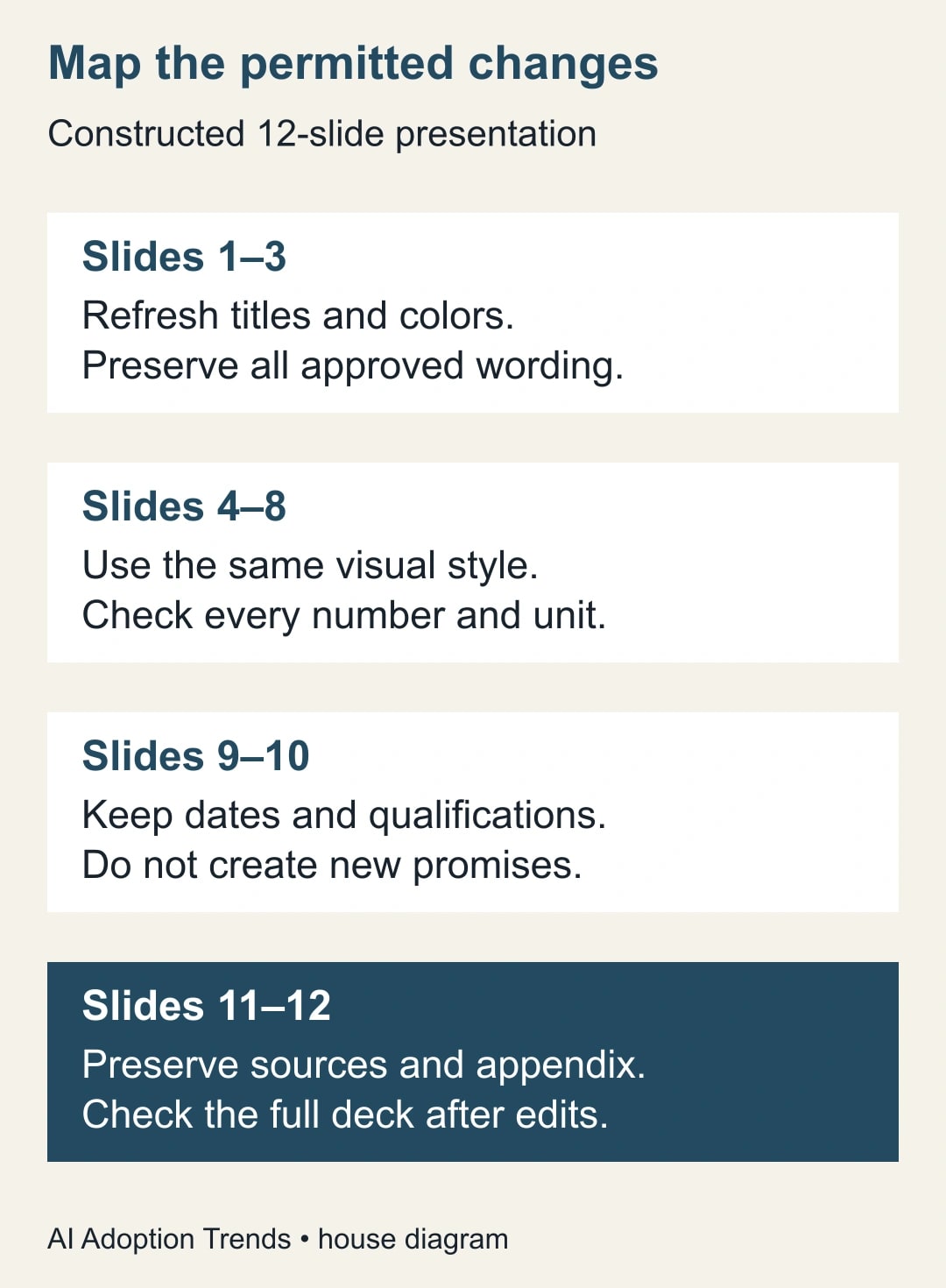
Consider a constructed agency presentation, not a customer result. Slides 1–3 introduce the review. Slides 4–8 contain performance and project figures. Slides 9–10 cover a proposed next phase. Slides 11–12 contain sources and an appendix. The task is to apply a new visual style while preserving the existing substance.
The reviewer records five sensitive items before editing: a 120,000 USD project budget; a 15,000 USD optional add-on excluded from that budget; a November 18 target date conditional on client approval; a 32-of-400 response count; and the phrase “estimated preparation capacity,” which must not become a promise of cash savings. These are not the only facts to check. They are deliberate acceptance points that reveal common meaning changes.
The response rate is 32 divided by 400, or 8%. If a revised slide shows 32% because a label was shortened badly, it fails. If the budget becomes 135,000 USD without explaining that the optional add-on is now included, it also fails. Both figures can be mathematically meaningful in another context, but they do not preserve this deck’s approved statement.
For the date, the words surrounding November 18 matter as much as the date itself. “Target, subject to client approval” and “delivery guaranteed November 18” express different commitments. The comparison should capture the full phrase. The same applies to the capacity statement: available staff time becomes cash savings only if spending actually falls through a separate management action.
Run the visual refresh on the working copy. Afterward, confirm there are still 12 slides and inspect each protected item in its new location. Record the result as pass, correct or revert, with the slide number and explanation. An example exception is “Slide 9: target date retained, approval condition removed; restore the condition before release.” This is a useful review record because another person can act on it without guessing what “check wording” means.
If the first pass fails several factual checks, stop refining the appearance. Restore the baseline and try a smaller change, such as title styling alone. A narrower prompt may make inspection easier, but it still does not replace inspection. If the tool repeatedly changes protected meaning, manual editing is the appropriate fallback for that deck.
Separate factual acceptance from visual acceptance
Review the substance first. Compare every number with its unit and time period, every date with its condition, and every claim with its source. Check titles and callouts as well as body text. A title can overstate a cautious chart even when every plotted value remains unchanged.
Next review presentation quality at the size the audience will actually see. Check clipped text, contrast, labels, reading order and whether a callout now covers part of a chart. Open source links rather than trusting their visible labels. Inspect any speaker notes that the presenter relies on, and check the appendix after the last main slide. A file that looks convincing in thumbnail view may still be unusable on a shared screen or in an exported handout.
Treat the tool’s change summary as a navigation aid. It can suggest where to look first, but the acceptance record should come from the deck itself. An unchanged slide may have become visually inconsistent with an adjacent edited slide; a global color change may make a small qualification unreadable. That is why the review boundary is the complete presentation.
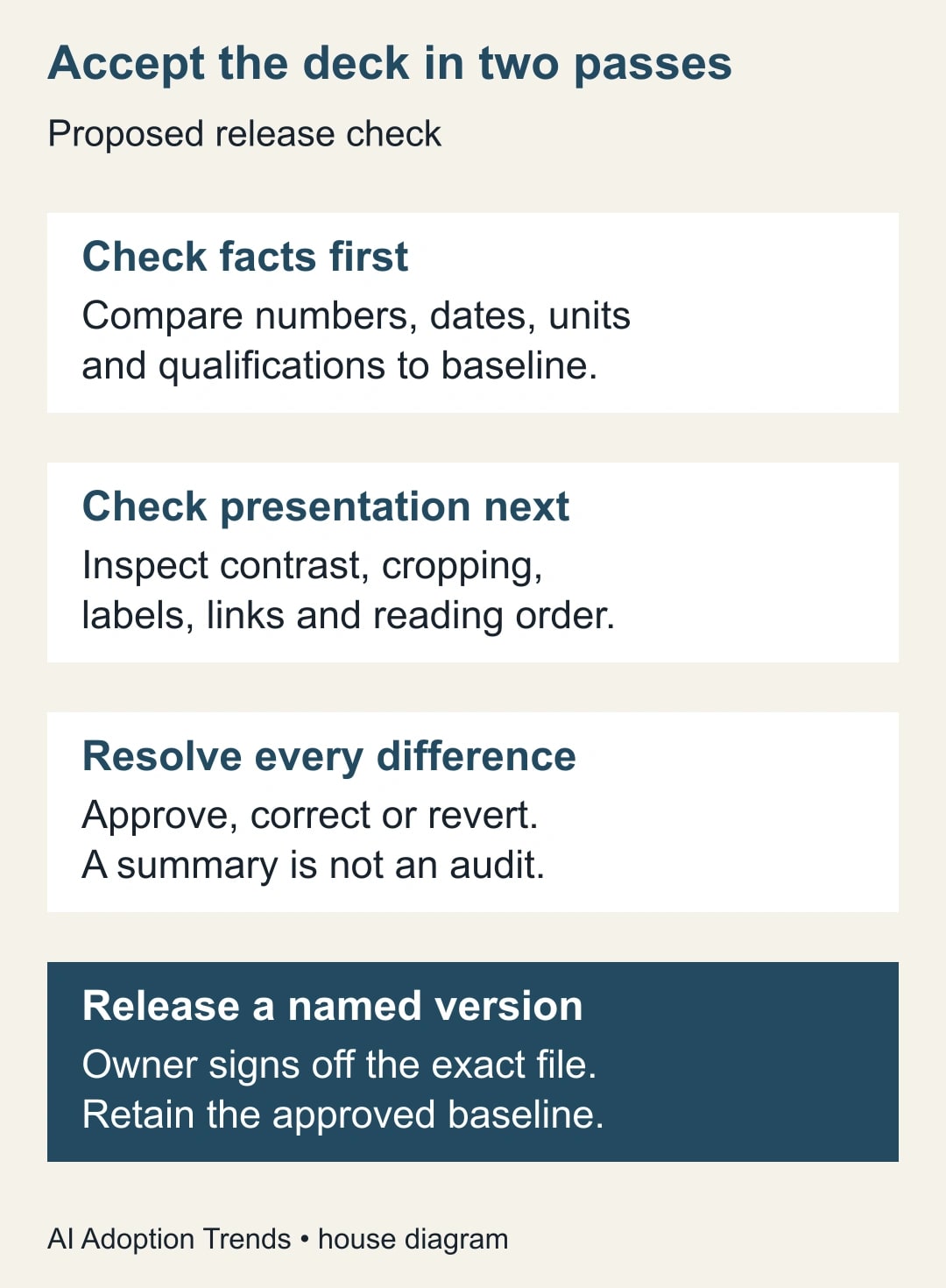
For a content update, add a third comparison: the approved new source against the revised deck. The baseline tells you what changed; the new source tells you whether the change is justified. A revised figure should carry the appropriate period and definition. Do not let an old figure’s label survive merely because the replacement number fits the same box.
Use a compact release worksheet
The following worksheet can live beside the presentation. Complete it for the exact version that will be sent, including any export generated for distribution.
- File and version: working-deck link, baseline link, export filename and review date.
- Change authority: who requested the revision, intended audience and approved reference files.
- Scope check: expected and actual slide counts; additions or removals explicitly accepted.
- Fact check: numbers, denominators, currencies, periods, dates, names and qualifications compared with their sources.
- Presentation check: text fits, meaningful contrast, readable charts, working links and usable notes.
- Exceptions: slide, observed difference, corrective action, responsible person and status.
- Release decision: business owner, accepted version and destination; unresolved items mean hold.
Keep the worksheet proportionate. A small internal status deck does not need a long sign-off ceremony, but it still needs a named person who can say which file was checked. For a repeated monthly deck, retain the stable checklist and update the source references and change scope. That is where the process can become faster without reducing care.
Recover from the failures that consume the most time
If an edit is visually attractive but changes a qualification, restore the approved wording and check the surrounding sentence. Do not just paste the missing word into a sentence whose logic has also changed. Then recheck the corrected slide and any summary that repeats its conclusion.
If a condensed deck loses context, return to the pre-condensation version. Decide what the audience must understand before asking for fewer slides again. A useful test is whether a reader can identify the decision, the evidence and the limitation without the presenter filling in an omitted condition. Shortening should remove redundancy, not the reasoning needed to assess a claim.
If reference files disagree, stop the model-assisted revision and ask the source owner which one governs. Record that choice. A model’s ability to produce a smooth compromise does not resolve an actual disagreement between a current budget and an older planning file.
If an export differs from the editable deck, hold the export. The audience receives the delivered artifact, so checking only the source file is insufficient. Review the actual PDF or other distribution format for missing fonts, broken layout and unreadable small text. Correct the source or export process, then inspect the new output again.
Measure accepted work, then decide whether to repeat it
For a small pilot, record preparation time, review time, correction time and the number of substantive exceptions. Compare similar decks rather than a simple style refresh with a new strategic presentation. Count an accepted deck as the outcome; do not count prompts or generated slides as productivity.
As a constructed calculation, suppose a manual refresh takes 90 minutes and a tool-assisted attempt takes 25 minutes of editing, 35 minutes of checking and 20 minutes of repair. The total is 80 minutes, releasing 10 minutes of capacity. That is a modest result, not a claim of 65 minutes saved based only on editing time. It is also not 10 minutes of cash savings unless spending changes.
Stop the pilot if approved facts repeatedly change, the reviewer cannot reconstruct the source, or correction time exceeds the work avoided. Continue when the same bounded task produces accepted revisions with a clear time benefit and manageable exceptions. Start with one approved deck and the release worksheet. For a different job, use the guide to turn a report into a decision slide with Copilot, or review a Gemini Notebook slide outline before creating the presentation itself.
Weekly Newsletter
AI Adoption Weekly
New research, field guides, training studies, and tool decisions for operators.
No spam. Unsubscribe anytime.
Related Comparisons
Calculator
AI seat cost calculator
List price × headcount. You enter the hours and the operating assumptions.