
Review a Gemini Notebook Slide Outline Before Rendering the Deck
Use the new outline review step to check a business-case deck before rendering. Includes a six-slide brief, worked costs and a manual fallback.
Published October 22, 2026

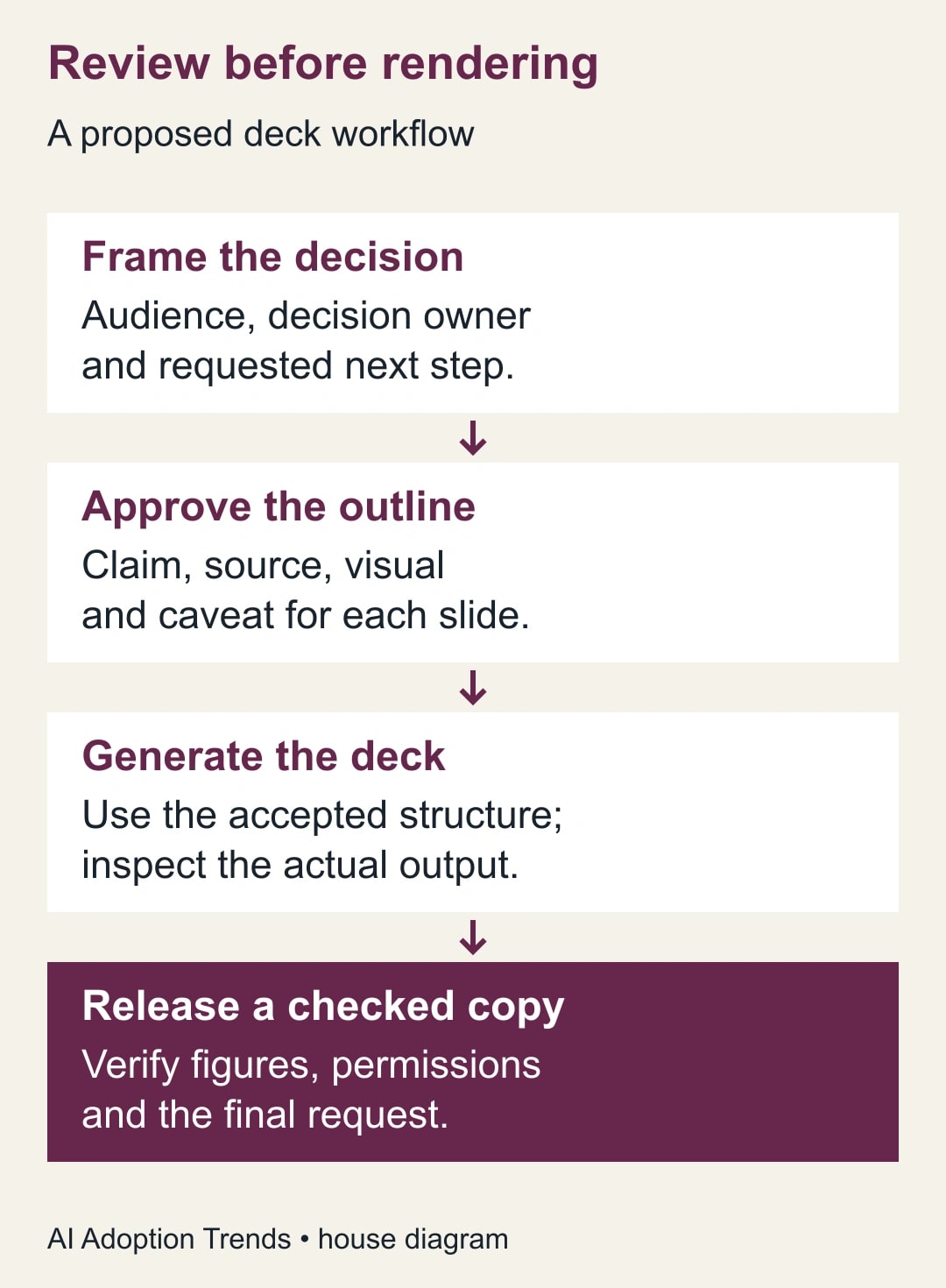
A team leader preparing a business-case presentation should review the argument before spending time on the finished slides. Gemini Notebook's new outline review step gives that decision a place in the generation process. Use it to check the proposed claims, calculations and requested approval, then inspect the rendered deck separately. An approved outline does not guarantee an accurate slide.
Google's October 21, 2026 announcement says users can review an outline or video producer notes before generating the final output. The rollout began October 16 and can take up to 15 days. This guide uses the presentation case: a manager seeking approval for a limited operations pilot. The workflow and example below are our proposed method, not a customer result. Google's outline-review announcement
Confirm the review option in your account
There is an availability discrepancy to resolve before buying anything. As checked October 22, the announcement lists broad account availability, while Google's help page still labels the co-creation section as Google AI Ultra only. We cannot determine from those two pages which entitlement a particular account will receive. Check the actual Review option and ask your administrator if it is absent; do not upgrade solely on the assumption that the announcement settles access. Current Slide Deck help
You can still perform the editorial method manually. Ask for a plain outline in the notebook conversation, review it as text, then use the accepted structure in the presentation brief. This fallback preserves the important decision without pretending that it reproduces the new interface or guarantees identical generation behavior.
This approach fits an internal proposal with a small approved source pack and one clear decision owner. Skip it for a presentation whose figures, layout or accessibility requirements must be produced in a prescribed template that generated output cannot reliably meet. Use the approved authoring tool directly in that case, while keeping the same claim-by-claim review.
Budget for source preparation, outline review, generation and final inspection. Check any incremental subscription cost and generation allowance in the actual account. Repeated regeneration consumes time even when there is no separate invoice for each deck. A team can save design effort while increasing the work needed to verify the argument.
Write the decision in one sentence
Start with a decision the audience can actually make. “Approve a four-week, one-team pilot with a £200 monthly software allowance and a named review owner” is a workable request. “Adopt AI to improve productivity” leaves the scope, cost and authority unresolved. Slides cannot repair a proposal that has not decided what it is asking for.
Name the decision owner, the people affected and the date by which the answer is needed. State whether the meeting will approve spending, select an option or simply collect feedback. If those purposes are mixed, the deck may treat a tentative discussion as a funded project.
Then assemble only the evidence needed for that decision. For a small pilot, that might include a workload sample, a process description, the proposed operating cost and the review plan. Record the version and owner of each source. Remove an older estimate if it is superseded, or explicitly identify it as a comparison rather than leaving two apparently current figures.
For a broader source-readiness exercise, use the guide to build a checked project brief with a Gemini notebook. This article starts after that work: its question is how to turn an adequately supported proposal into a presentation whose argument survives compression.
Give each proposed slide a job
Our suggested outline record has five fields: slide purpose, main claim, evidence reference, visual plan and limitation. The purpose tells the reviewer why the slide exists. The main claim says what the audience should learn. The reference makes the claim checkable. The visual plan describes the comparison. The limitation prevents a conditional estimate from becoming an unconditional promise.
Use a prompt like this: “Prepare a six-slide outline for a decision meeting about the proposed support-workflow pilot. Use only the selected source pack for factual claims. For each slide give its purpose, one main claim, the supporting source and location, a useful visual and the limitation that must remain visible. Separate measured workload from constructed estimates. End with the exact approval requested and a stop condition. Do not render the deck until I review the outline.”
Treat the last instruction as a request to the tool, not a technical guarantee. In an account with the review feature, enable the review control as well. If it is unavailable, obtain and inspect a text outline before requesting a deck. The human checkpoint must be visible in your work record even if the interface changes.
Reject slides that only repeat the title in more enthusiastic language. Six slides are a planning choice for this example, not an ideal length for every proposal. A missing comparison may justify another slide; an ornamental summary may deserve removal. The reader's decision determines the length.
A six-slide business case you can reuse
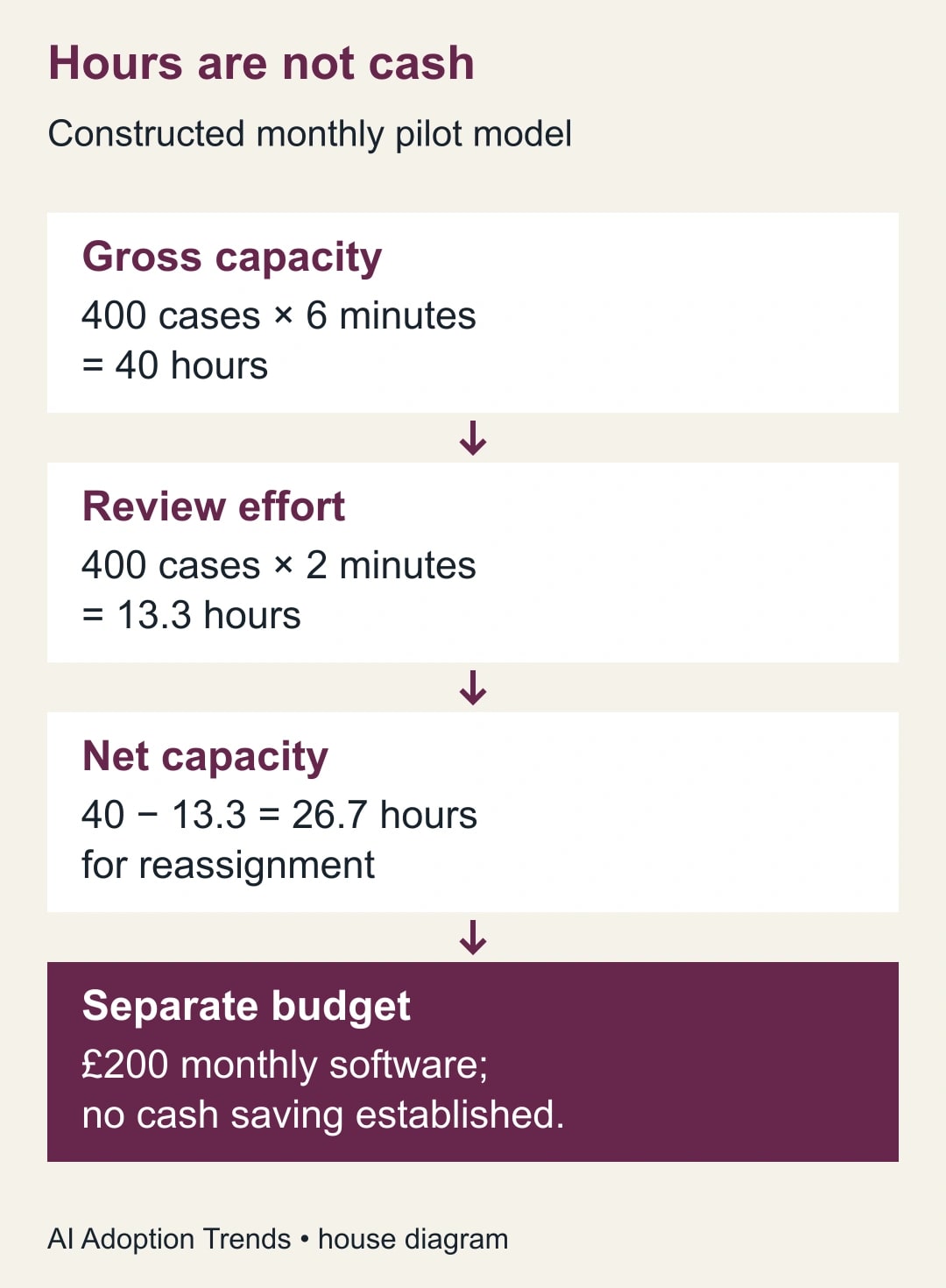
Consider a constructed example involving 400 support cases per month. The team estimates that assistance could reduce drafting by six minutes per case, but every case would still need two minutes of additional checking. Software would cost an illustrative £200 per month. None of these numbers represents measured performance or a current vendor quote.
Slide one asks for a four-week pilot on one queue, with one operations lead responsible for the decision. Its visual can be a simple scope box naming included and excluded work. Urgent exceptions and policy-sensitive responses remain outside the pilot until the team defines a separate review process.
Slide two describes today's workload: 400 cases in the chosen monthly example and the specific drafting step being changed. It must not imply that all support effort disappears. A reviewer should ask whether the source count refers to unique cases, messages or replies; those are different units and would produce different estimates.
Slide three shows the capacity model. Four hundred cases times six minutes equals 2,400 minutes, or 40 hours of gross drafting capacity. Four hundred times two minutes equals 800 minutes, or about 13.3 hours of added review. The modeled net is about 26.7 hours available for reassignment. Keep the review cost visible rather than hiding it in a footnote.
Slide four shows the separate budget question: £200 monthly software and whatever setup or support cost the actual proposal establishes. No cash saving has been demonstrated. Salaried time becoming available does not itself reduce payroll, and an hourly cost estimate should not be presented as a bankable saving without a specific budget action.
Slide five presents the measurement and stop rules. The proposed pilot records total handling time, corrections after sending and the share of cases requiring escalation. Any unauthorized customer commitment triggers a pause and investigation. A manager may choose stricter conditions for the actual work; the rule needs to exist before the first live case.
Slide six asks for the bounded approval: the team, duration, budget limit, review owner and date of the next decision. It should offer an alternative such as a smaller offline trial if the evidence is weak. A presentation with no credible option to wait is closer to a sales pitch than a decision aid.
Review the outline for three kinds of distortion
First, look for a changed unit. Cases becoming customers, minutes becoming hours, or monthly costs becoming annual costs can make a superficially coherent deck wrong. Read every number together with its unit and period. The outline should identify the source or calculation, not simply claim that a chart will show an improvement.
Second, look for a changed level of certainty. A scenario is not a forecast. An estimated improvement is not an observed result. A vendor's feature description is not evidence that the team's work will improve. Add those distinctions to the slide claim itself so the final presentation does not depend on the speaker remembering a caveat.
Third, look for a missing counterargument. In this example, review could take longer than two minutes, and the cases suitable for assistance could be fewer than 400. The outline should show what happens if those assumptions worsen. Asking the tool for “a stronger business case” may remove the very uncertainty the approver needs to understand.
Try a simple sensitivity check before rendering: if gross drafting improvement is only three minutes per case and review still adds two, net capacity is 400 minutes, about 6.7 hours. The software cost remains £200 in this constructed scenario. That does not prove the pilot is bad, but it changes how much evidence is needed before expanding it.
Use the review step deliberately
Google's help describes selecting Slide Deck, customizing the request and enabling outline review. Once the outline is ready, review it and submit the feedback before proceeding to generation. The documentation says Proceed starts generation and ends further outline refinement at that stage. It also notes that scheduling generation with Generate later bypasses the outline in that described flow. Google's review workflow
Prepare one consolidated feedback note. For the example: “Keep six slides. On slide three show gross capacity, added review and net capacity separately. Remove cash-savings language. On slide four show £200 as an illustrative monthly cost. On slide five add the three-minute sensitivity case. On slide six preserve the four-week limit and name the operations lead as owner.”
Resolve disagreements in the proposal before sending feedback. If finance and operations disagree about the workload count, the generator cannot adjudicate the business fact. Either use a verified count or show a clearly labeled range. A visually precise chart should never disguise an unresolved source disagreement.
Inspect the final deck as a separate artifact
Compare each rendered slide with the approved outline and original sources. Check numbers, labels, units, chart proportions, legends and the final approval request. Look for new claims introduced during generation. If the model adds a customer quote, a benchmark or a performance percentage that was not in the source pack, remove it or supply evidence before release.
Read the deck at presentation size and as the file the audience will receive. Small type that looked acceptable in a preview can disappear on a meeting-room screen. Check whether a person reading without narration can distinguish gross capacity from net capacity and estimates from results. Do not rely on color alone to carry those differences.
Keep corrections traceable. Google's help cautions that sources are not considered during slide revisions, so any revised factual slide needs another source check. An instruction to fix a number does not verify the neighboring caption. Review the complete changed slide and the conclusion that depends on it. Slide revision limitations
Confirm access separately from correctness. Decide whether recipients need the notebook and its underlying sources or only the approved presentation. Inspect the actual sharing settings and exported file before distribution. Do not broaden source access simply because the deck needs to reach a larger audience.
Keep a release checklist and a useful measurement
Use this checklist before the decision meeting:
- The decision, owner, spending scope and review date match the proposal.
- Every important number has a unit, period and source or reproducible calculation.
- Constructed estimates and observed results remain visibly different.
- Review effort is included, and released capacity is separate from cash savings.
- The strongest plausible reason to wait is presented fairly.
- Every changed slide has been checked again against its supporting evidence.
- The recipient can read the deck and has only the access needed for the meeting.
Measure time to an accepted, checked deck, including source work, review and regeneration. Also record material corrections caught before and after rendering. Finding an error in an outline is a success of the review process; repeatedly finding the same error after release means the workflow needs repair.
Start with one proposal you already understand. Approve its argument in plain text, render once, then compare the result with that record. If the work begins with a report in Microsoft 365, the separate guide to build a decision slide with Copilot in PowerPoint covers that route. In either tool, the useful milestone is an argument the approver can inspect.
Weekly Newsletter
AI Adoption Weekly
New research, field guides, training studies, and tool decisions for operators.
No spam. Unsubscribe anytime.
Related Comparisons
Calculator
AI seat cost calculator
List price × headcount. You enter the hours and the operating assumptions.