
Use Docs Live to Turn Site-Visit Notes Into a Checked Report
Turn spoken visit notes into a useful service report with Docs Live. Check observations, dates, costs and approvals before assigning the next job.
Published October 22, 2026

For a service manager leaving a customer site, the useful output is a report that another person can act on: what was observed, what remains uncertain, and who must approve the next step. Docs Live can help turn spoken notes into that structure. Use it to draft the handoff, then check every commitment against the visit record before sharing it.
Google announced Docs Live for mobile on October 21, 2026. The company says it can build documents conversationally using context from Workspace and the web. Our recommendation is narrower: start with one internal visit report, keep the source material small, and measure whether the checked report reaches the next owner sooner. A fluent paragraph is not evidence that a repair was approved. Google's Docs Live announcement
Choose a report that benefits from speaking
This workflow fits account managers, facilities coordinators and service supervisors who already write short reports after visits. Speaking can capture details before they fade: the asset label, the sound a machine made, or the customer's exact question. Those details become useful only when the recipient can tell an observation from a possible explanation.
Skip voice generation when the job needs an exact quotation, a formal inspection record with prescribed fields, or a signed technical finding. Use the required record first. Also skip it when discussing the visit aloud would expose customer information to bystanders. Wait until you have a private, stationary place to work; the purpose is better reporting, not reporting while distracted.
Before starting, collect the visit reference, the equipment or service identifiers, your original notes, and any approved scope document. Choose one person who owns the report and one person who can authorize follow-up work. They may be the same person in a small firm, but the two decisions remain different: confirming what happened and permitting what happens next.
Check access before designing the process around it
As checked October 22, Google's help describes mobile availability on Android and iOS, in English, with an eligible Workspace or Google AI plan. The launch lists Business Standard and Plus and Enterprise Standard and Plus among eligible editions. Confirm the feature in the actual work account before promising it to a team. Access through a personal account is not a substitute for an approved business workflow. Current voice-document help
Budget the experiment using your current subscription and actual incremental cost, if any. This guide does not assume that a new paid seat is necessary. There is also a labor cost: setting the source context, correcting speech recognition, checking the output and distributing it. Record those minutes. A fast first draft followed by a long correction session may be a poor trade.
Prepare a simple fallback template with the same headings. If the voice option is absent, the connection fails or the draft becomes unreliable, type into that template. Keeping a common report structure allows the team to compare methods without changing the handoff itself.
Capture facts in three passes
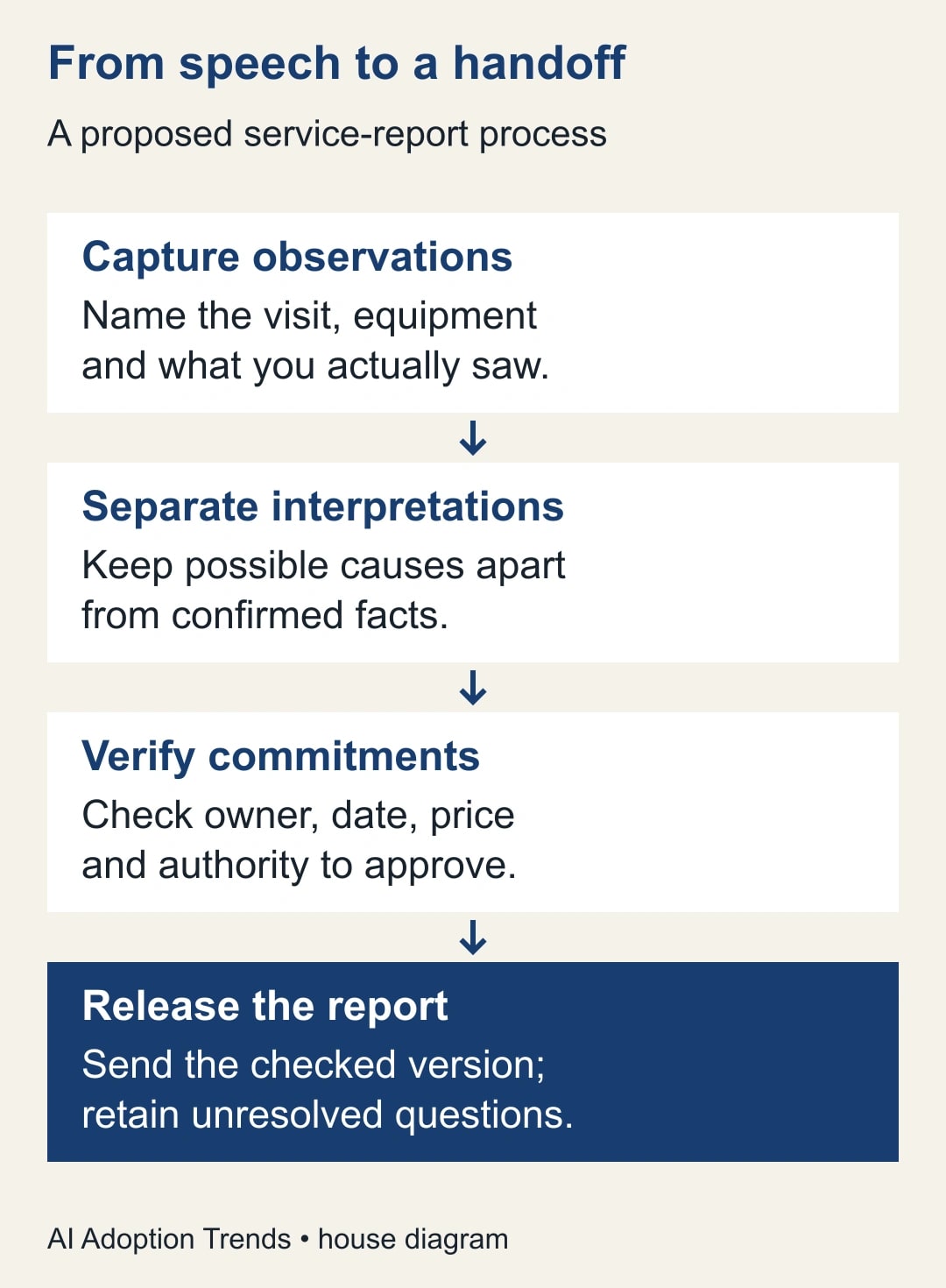
Begin with the identity of the visit. Say the customer or internal site reference, visit date, purpose and equipment identifiers. Spell ambiguous codes and check them visually afterward. Do not let a familiar-sounding customer name replace the exact account reference. Two sites can have similar names while requiring different owners and approvals.
Next, describe only what you observed or what a named person reported. “Unit B did not start during our check” is an observation. “The controller is faulty” is a diagnosis that needs support. “The site supervisor says it failed twice yesterday” is a reported statement. Preserve those differences even when they make the prose less tidy.
Finally, describe proposed actions separately. State which ones you can assign yourself, which need approval, and which are questions for a specialist. If you said “perhaps Friday,” ask for an unresolved date rather than a Friday appointment. If you mentioned a possible price, label it as an estimate and name what it excludes or still depends on.
This three-pass method is an editorial recommendation, not a Google feature or an assurance that the model will obey perfectly. Its value is that it leaves clear categories for the reviewer to inspect. You can use exactly the same method with a typed report.
Generate a plan before accepting the draft
Google's Android instructions start in the Docs app with the create button and Create with voice. Describe the document, inspect the proposed plan, then request the draft and finish with Done. Source settings let you add references and choose locations for proactive searching. Labels can differ on another device. Check the current instructions for your platform. Google's documented creation steps
For the pilot, use a short spoken brief like this: “Create an internal service-visit report for visit SV-104. The reader is the service coordinator. Separate observed facts, statements attributed to the customer, possible causes, proposed work and approvals still needed. Keep equipment identifiers exactly as supplied. If I have not provided an owner, date or approval, mark it unresolved. First show me the proposed sections.”
Inspect the plan for a section that can carry uncertainty. If it offers only a polished summary and next steps, add “Questions requiring confirmation.” Otherwise the draft may conceal the most useful part of the visit: what the team does not yet know. Tell it to keep conflicting statements visible rather than choose the more convenient one.
Where source settings are available, select the smallest relevant scope. A previous proposal may contain a plausible price or date that belongs to an older visit. Even if the tool can find it, the report owner must decide whether it applies. Record the name and date of each reference used for a consequential statement.
Work through one visit before expanding the pilot
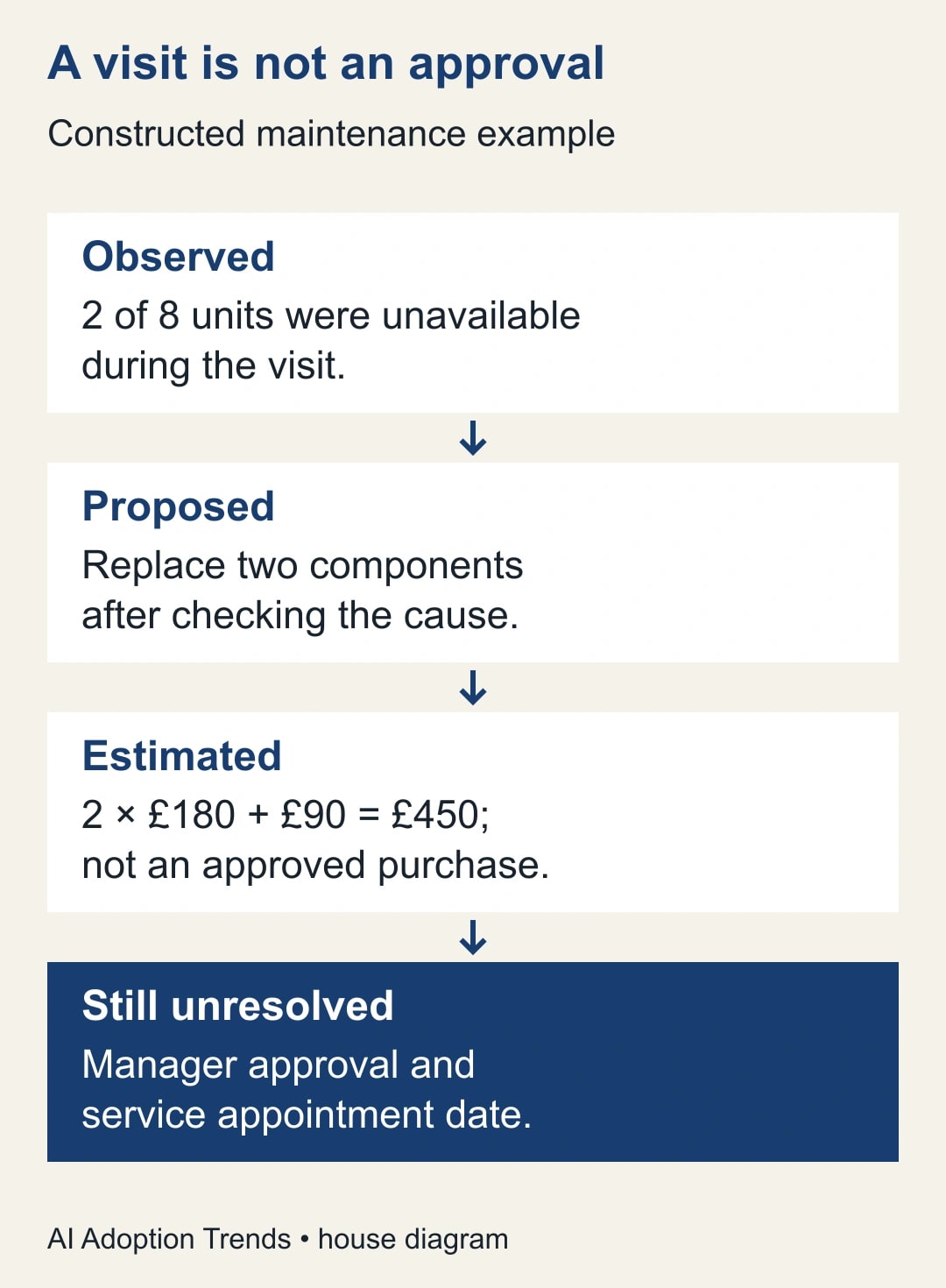
Consider this constructed example, not a reported customer result. A service supervisor visits a small distribution site with eight packing units. Two units are unavailable during the visit. The supervisor observes a startup failure, hears that both units stopped the previous day, and proposes checking two components. No repair has been authorized.
The spoken note includes a possible component cost of £180 each and a £90 call-out charge. Two times £180 plus £90 equals £450. That is an illustrative estimate under the stated assumptions, not a quote or a purchase approval. Taxes, other labor and additional parts have not been established. The service coordinator needs those unresolved items before arranging work.
An acceptable draft says: “Two of eight units were unavailable during the visit. The cause remains unconfirmed. Proposed next step: obtain a technical check and confirm the repair scope. Illustrative component and call-out estimate: £450 before unresolved charges. Site-manager approval and appointment date are outstanding.” The report should not say that 25% of output was lost: the eight units may have different capacities and utilization.
Now imagine the draft says, “Replace both controllers Friday for £450.” It has promoted a possible cause to a diagnosis, an uncertain date to a commitment, and an estimate to a fixed price. Editing only the price leaves the handoff unsafe. Correct all three claims and check whether another paragraph repeats them in different words.
Use a report worksheet that survives the tool
Keep these fields in the report or in a short companion record. They are a proposed worksheet, so adapt them to the work rather than treating them as a product requirement.
- Visit identity: date, site reference, report owner and equipment identifiers.
- Observations: what the visitor directly checked, including the limits of that check.
- Reported information: who supplied it and whether it has been independently confirmed.
- Interpretation: possible cause, supporting evidence and the person qualified to decide.
- Proposed action: specific task, intended owner and expected output.
- Approval: approver, evidence of approval, spending scope and unresolved conditions.
- Timing: confirmed appointment or an explicitly unconfirmed target.
- Release record: reviewer, version, recipients and the location of the original notes.
A useful checkpoint is whether the next owner can begin without calling the author to reconstruct the visit. That does not mean every question must be answered. “Ask the site manager to approve the diagnostic visit” is a complete next action. “Resolve the equipment problem” is too broad to assign responsibly.
Give every unresolved item an owner and a way to close it. For example, the coordinator obtains a written appointment confirmation, while the technician determines whether the component needs replacing. Those are different outputs, and neither should disappear because the report sounds complete.
Review the draft against the original notes
Read names, numbers, dates and negatives first. “Did not start” becoming “started” changes the job. “Two units” becoming “unit two” changes the subject. Check these items directly against the original notes or identifiers, not against a second summary of the same generated report.
Then read for implied authority. Words such as agreed, approved, confirmed, guaranteed and scheduled deserve a source. Ask who made the decision, where it is recorded, and whether the statement applies to this visit. If the evidence is absent, use proposed or pending and assign the verification task.
Check the report as the recipient will see it. Remove internal speculation from a customer-facing copy if it would misrepresent the team's position, while preserving unresolved technical questions in the internal record. Confirm sharing permissions and recipients separately from the document's wording. A correct report sent to the wrong account is still a failed handoff.
Keep the original notes until the report is accepted under your normal retention practice. Do not replace the record of what you observed with a generated narrative. If someone disputes a detail, you need the observation and the revision history, not just a more polished paragraph.
Recover without creating two competing instructions
If the draft contains several unsupported commitments, stop refining sentences and return to the three factual categories. Rebuild the report from the original notes with a smaller source set. Repeated prompting can make an error sound increasingly confident while obscuring where it entered the draft.
If an incorrect report has already been shared, identify the specific changed instruction, issue a corrected version to the same operational recipients and confirm that the previous action has been stopped or revised. Do not silently edit the document and assume everyone will notice. The person arranging the visit may have copied the old date into another system.
If the voice method keeps confusing equipment codes or amounts, type those fields and reserve speech for narrative observations. A mixed workflow can be better than insisting on a fully spoken one. The goal is an accurate, timely handoff; the percentage of the document generated by AI is not a useful success measure.
Measure the checked report, not the first draft
Run a small comparison using similar visits and the same reviewer. Record capture time, drafting time, checking time and correction time after handoff. Also count reports returned because an owner, approval or date was unclear. A shorter report is not necessarily a better report if the coordinator must reconstruct the missing details.
For illustration, a typed report might take 8 minutes to capture, 15 to draft and 7 to check: 30 minutes. A voice-assisted version might take 6 minutes to capture, 4 to draft and 12 to check: 22 minutes. The difference is 8 minutes of released capacity per report under these invented inputs. It is not cash saved unless the business makes a corresponding budget change.
Stop the pilot if a report creates an unauthorized commitment, loses a critical observation or repeatedly takes more total time than the fallback. Investigate the specific cause before expanding. Continue only when recipients can use the reports with fewer clarifying calls and the full review remains practical.
Your next step is one real, low-risk internal visit report with the worksheet above and a named reviewer. If the evidence starts in email instead of a spoken account, use the separate guide to turn a Gmail thread into a checked project brief. Keep the capture method flexible and the approval boundary clear.
Weekly Newsletter
AI Adoption Weekly
New research, field guides, training studies, and tool decisions for operators.
No spam. Unsubscribe anytime.
Related Comparisons
Calculator
AI seat cost calculator
List price × headcount. You enter the hours and the operating assumptions.