
Mailchimp Existing Contacts Missing from a Flow: Plan a Controlled Backfill
Find why existing contacts missed a Mailchimp flow, review eligibility and history, then add a controlled cohort without replaying messages.
Published November 26, 2026

If existing contacts are missing from a Mailchimp automation flow, first separate people who never qualified from people who already received the sequence. Then manually add only a reviewed group whose subscription status, history and current need support the messages. A tag on a contact is not proof that a new triggering event occurred after the flow became active.
This guide is for a marketing operations owner repairing a missed onboarding sequence. It is not a reason to restart a promotion for everyone in an audience. The useful outcome is a small, reconciled group receiving the right remaining information, with an explanation for every excluded contact.
Product documentation was checked on November 26, 2026. Mailchimp says automation flow triggers apply to events after activation, and available tools depend on the plan. Its overview of marketing automation flows also distinguishes these flows from classic automations. Confirm which product you are editing before applying this process.
Start with one missing person and one expected message
A team notices that a customer never received the getting-started email. Someone suggests selecting the whole onboarding segment and adding it again. That would turn one unexplained omission into a much larger sending decision. Some people may already be halfway through the sequence; others may have completed it months ago.
Choose one representative missing contact. Record the audience, flow name, expected first message, subscription status, relevant tag or field, and the date the qualifying event supposedly occurred. Compare that date with the flow's activation history. Read the actual contact activity rather than inferring delivery from membership in a saved segment.
The first output is a diagnosis, not a new send. Write one sentence such as: “This person joined before activation, has no recorded entry into this flow, remains eligible for these messages, and still needs onboarding.” If any part is unknown, investigate it before expanding the selection.
Skip a backfill when the original offer has expired, the content is no longer appropriate, or the team cannot establish why the contact should receive it. Backfill means adding a reviewed older group that was missed; it does not mean treating an old audience as newly subscribed.
Establish access, ownership and the sending limit
Assign one operator to prepare the list and one marketing owner to approve the audience and message purpose. In a small business, one person may hold both roles, but should still document the decision before making the active change. Customer support should know what people will receive and where to route confused replies.
You need permission to inspect the audience, contact history, flow settings and message reports. Check that the account's plan supports the intended flow and steps. Use the account's current billing information for subscription costs and sending allowances; this guide does not assume a particular plan price or that additional sends are free.
Set a maximum number of contacts for the first release and a named stop condition. For example, approve three eligible customers for the first group, then inspect their entry and first-message outcomes before releasing the remaining nine. This is an editorial operating proposal, not a Mailchimp default or a statistically validated sample size.
Use staff-controlled test contacts before those real customers. Confirm that the test accounts can receive the messages and that their data matches the route being tested. Keep them clearly identified so their activity does not become evidence of customer demand or campaign success.
Diagnose the trigger without manufacturing a new event
Open the flow's trigger and filters. A trigger is the event that starts the route; a filter narrows who may enter. Record the exact condition, any required field values, the activation date and whether the person met those conditions at the relevant time.
Mailchimp's trigger reference distinguishes adding a tag, signing up for email and manual addition. It also describes an option to include newly imported email contacts for the signup trigger. These are different entry paths. Do not assume that an old tag, a fresh import and a new signup have interchangeable effects.
Check three explanations in order: the event happened too early; a filter excluded the contact; or the contact did enter and is waiting or has already progressed. The corrective action differs. A person waiting at an intended delay does not need another entry. Someone excluded for the right reason does not need a workaround.
Avoid removing and reapplying tags across the audience just to force movement. That changes customer data and may affect other flows using those tags. Likewise, do not reimport a list to create an apparent new signup, overwrite an opt-out, or erase history. The contact import checklist for opt-outs and blank fields covers the separate job of keeping audience records trustworthy.
Build a mutually exclusive contact ledger
Make one row per contact in the intended audience, using a stable contact identifier alongside the email address. Keep this working file restricted to the people handling the campaign. It should contain enough evidence to explain a decision without copying unrelated customer information into another tool.
Use these fields as a reusable worksheet:
- Contact identifier and audience; do not merge different audiences by guesswork.
- Current subscription status and the evidence supporting the proposed message.
- Relevant trigger event, event date and expected filter values.
- Current flow status and prior messages from this sequence.
- Decision: already active, completed, excluded or eligible but missing.
- Reason, reviewer, approval date and intended entry route.
- Actual entry time, first-message result and any corrective action.
Make the decisions mutually exclusive. Someone who is already active belongs in that category even if they also have an old tag. Do not count them again among the missing contacts. When the history is ambiguous, mark the person excluded pending investigation rather than quietly treating a blank field as permission.
Here is a constructed 40-contact example. Eight are already active. Ten completed the sequence. Six cannot pass the subscription or permission review. Four are in the wrong customer group for this content. Twelve are eligible, have no entry record and still need the information. The counts add to 40; only the final 12 form the proposed backfill.
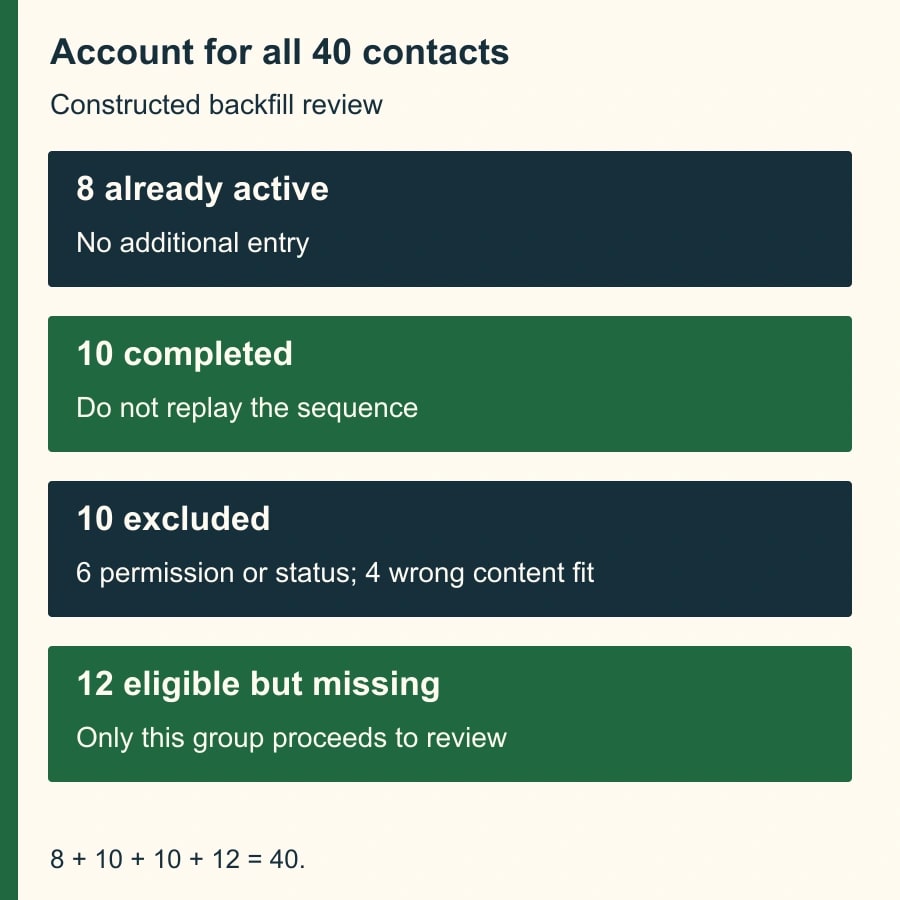
The six excluded for subscription or permission issues are not a mailing opportunity waiting for a technical fix. The four with the wrong content fit need a different business decision. Keep both explanations visible, even if a summary report combines them into ten excluded contacts. A high enrollment count is not the objective.
Review the route before adding anyone
Read every message and branch that an added contact could encounter. Check names, dates, offers, onboarding links and references to earlier emails. A sequence written for someone who signed up today may sound misleading to a customer who has been using the product for six months.
Decide whether the existing route is suitable from its beginning. If only one missed instruction is relevant, a separately approved message or a dedicated catch-up route may be clearer than replaying the entire series. Do not assume that manual addition lets you jump directly to the desired message. Verify the actual entry behavior with test contacts.
Mailchimp's flow editing instructions say manual addition requires an active flow. They also describe a re-entry setting with a minimum waiting period. That makes adding contacts an operational release: review the first reachable action and repeat-entry setting before proceeding. A prompt to an assistant or a note in a spreadsheet does not change those settings.
If the flow needs editing, plan the pause with its owner because existing participants may be affected. Complete the changes and test the route before adding the approved group. Do not describe manual addition to a paused flow as a safe staging technique; the documented requirement is an active flow.
Test entry, content and repeat prevention separately
Use a staff-controlled test contact that has not completed the route. Add it through the intended method and inspect where it enters. Confirm the expected first action, message content and timing. Record the observed behavior, including any delay; an unexplained absence of email is not a successful test.
Use another appropriate test case to check the boundary for someone who has already completed the route. Inspect the configured re-entry rule and resulting history without repeatedly experimenting on real customers. The desired behavior for this repair is no unintended repeat sequence. If the business deliberately permits recurring messages, document that separate purpose and its timing.
Finally, test a contact whose data should take a different branch. Check that the selection worksheet and the actual route agree. A list can be carefully reviewed while a branch still sends the wrong content. The release evidence should therefore include both audience eligibility and the messages each tested path produces.
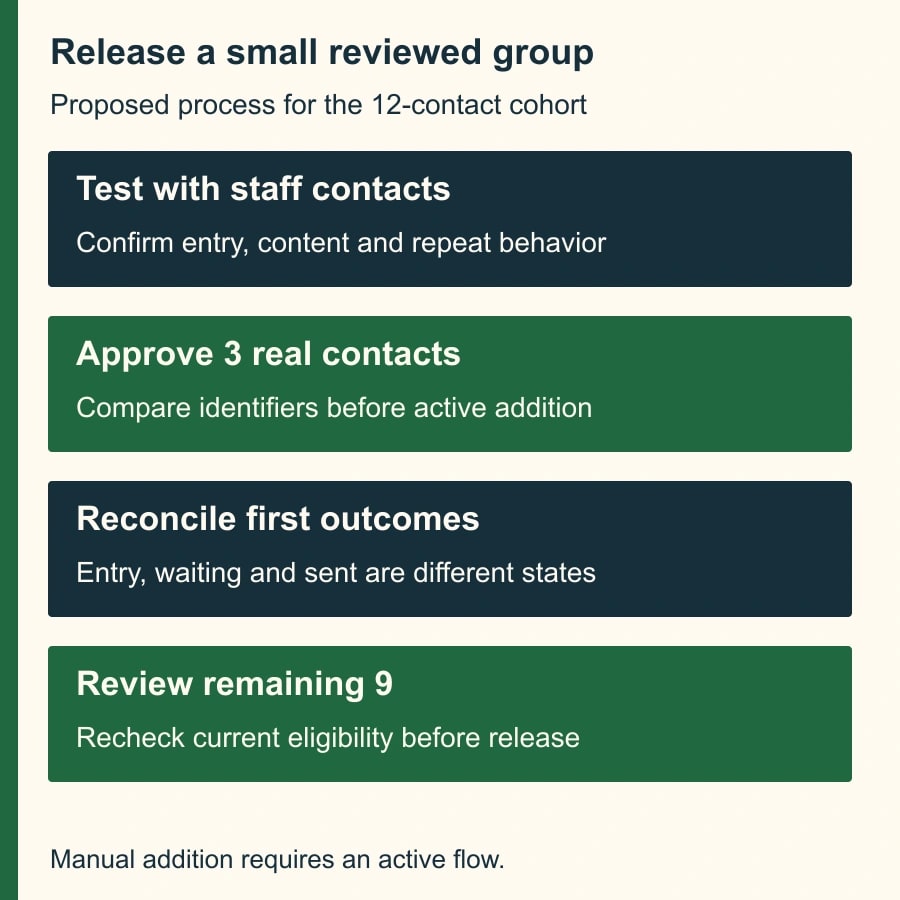
Before selecting real contacts, write the expected count beside the selected count. In the constructed example, the initial release is three of the 12 approved customers, not three arbitrary audience members. A second person should compare the identifiers where practical. Stop if the interface selection expands beyond the reviewed list or if the route has changed since approval.
Reconcile the first group before releasing the rest
After adding the first group, record each contact's actual entry and the result of the first reachable action. Distinguish entered, waiting, sent and an observed delivery problem. A person appearing in the flow does not by itself prove an email reached their inbox. Use the available reports and contact history for the specific claim you make.
If all three enter as expected and the first messages are correct, review the remaining nine against current subscription status before proceeding. Approval from yesterday is not a reason to ignore a later opt-out. Keep a release timestamp so the team can distinguish the first group from the remainder if a problem appears.
If one person receives the wrong content, stop further additions and identify the affected path. Preserve the original list and observed results. Correcting a template does not undo an email already sent. The marketing owner should decide whether a direct clarification is needed and ensure the repair does not create another unwanted sequence.
For contacts who never enter, return to the recorded entry method, current eligibility and flow state. Do not keep clicking until something happens. For duplicates, reconcile the person's previous activity and any parallel flows before removing or changing them. The general distinction between stopping a workflow and restarting a person is also useful in our HubSpot suppression and workflow restart guide.
Measure a completed repair rather than a larger send
Report the reviewed population, approved missing group, successful entries, unresolved exceptions and unintended repeats. In the constructed example, a clean reconciliation would account for all 40 people while adding only 12. That is a proposed acceptance condition, not a reported campaign result.
Budget staff time explicitly. A planning allowance of 45 minutes for history review, 30 for testing and 15 for reconciliation totals 90 minutes. Actual work may take longer when records are incomplete or branches differ. These are staffing estimates, not claimed software savings; a reduction in manual effort does not automatically reduce payroll or subscription costs.
Keep the ledger until the last relevant step has been reconciled, then retain only what your normal campaign records require. Assign the flow owner to fix the original cause, such as a launch checklist that failed to distinguish existing contacts from new trigger events. Otherwise the next campaign can reproduce the same missing group.
The next action is small: inspect one missing contact, compare its qualifying event with activation, and record its prior messages. Expand to a reviewed cohort only after that diagnosis is clear. A controlled backfill earns its value by reaching the right people once, with a record showing why everyone else was left out.
Weekly Newsletter
AI Adoption Weekly
New research, field guides, training studies, and tool decisions for operators.
No spam. Unsubscribe anytime.
Related Comparisons
Calculator
AI seat cost calculator
List price × headcount. You enter the hours and the operating assumptions.