
HubSpot Sends Records Down the Wrong Branch: Check Order and Timing
Diagnose HubSpot branch priority and evaluation timing with a six-record fixture, then recover assignments without replaying messages.
Published November 18, 2026

When a HubSpot record takes the wrong workflow branch, compare the branch order and the record's values at the moment it reached that step. Do not start by moving the record or changing its current properties. In an AND/OR branch, an earlier matching condition can win over the branch you intended, and later property changes do not rewrite the path already taken. Diagnose the actual enrollment before replaying emails, tasks or assignments.
This guide is for a revenue operations owner maintaining a sales or service-routing workflow. It fits deterministic rules such as existing-customer priority, account size and territory. It does not cover random experiment splits or the broader question of whether a record should enroll at all. If the intended owner is disputed, resolve that business rule before editing automation.
Separate a wrong rule from a wrong execution
As checked November 18, 2026, HubSpot's branch documentation says AND/OR branches are evaluated in their displayed order, with the first match determining the path. Evaluation happens when the record reaches the branch. Later changes do not automatically reroute it, and unmatched records use None met. These mechanics explain why a workflow can behave consistently while producing the wrong business outcome.
Start with one record whose expected path is clear. Record its ID, workflow, enrollment time, expected owner and actual result. Ask the process owner why that path was expected. “It should go to enterprise” needs a rule behind it, such as company size, named-account status or a documented exception. A label in someone's memory is not enough to diagnose the configuration.
Then inspect the actual enrollment. HubSpot's record-path review instructions describe opening enrollment history, choosing the record and viewing its logs alongside the workflow diagram. Use that history to identify the branch reached and actions performed. Record the relevant workflow version and property evidence where available. Today's screen is not necessarily the configuration or state that handled yesterday's record.
Keep four possibilities separate: the configured priority is wrong, the input was incomplete or different, a later action changed the result, or the business expectation was wrong. Each calls for a different repair. Reordering branches will not fix a downstream assignment action that overwrites the correct owner, and a property edit will not explain why an earlier condition captured the record.
Write the routing contract in ordinary language
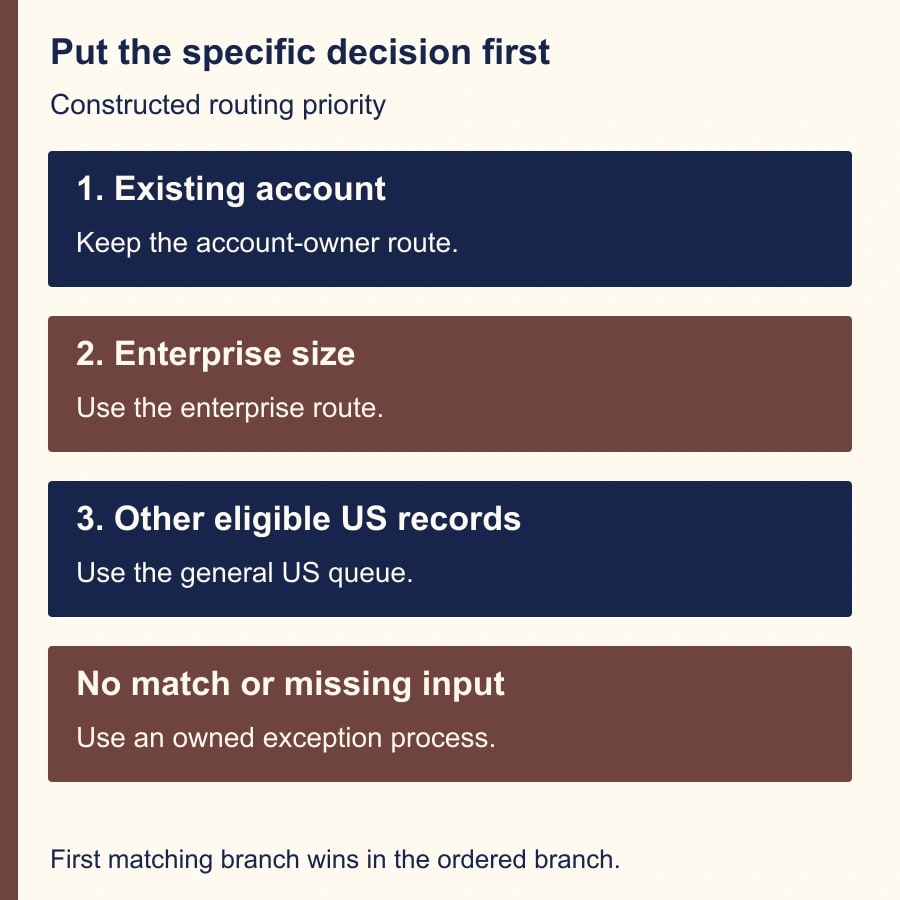
Use a small constructed example. A company wants existing customers routed to their account team. New prospects with at least 200 employees should go to enterprise sales. Remaining US prospects should go to the US general queue. Other complete records should go to manual territory review. Records missing required routing inputs should be held for data repair before the branch.
Those sentences establish precedence. Existing customers take priority even when they are large US companies. Enterprise prospects take priority over the general US queue. The last path is a deliberate exception process, not a wastebasket. Ask the sales and service owners to approve that ordering before the workflow maintainer converts it into filters.
Name the required inputs and their allowed values. For this example, the test needs customer status, employee count and country. Define what a missing value means and where it is repaired. A blank employee count is not proof that the business has fewer than 200 employees. A country abbreviation and a country name may require a source-data rule before they can support reliable routing.
Write the output contract too: one routing decision, one accountable queue or owner, a recorded reason and an exception owner when no normal path applies. If the workflow also sends a welcome email or creates a sales task, list those as separate effects. They matter later when correcting an earlier mistake without repeating customer communication.
A six-record fixture exposes the overlap
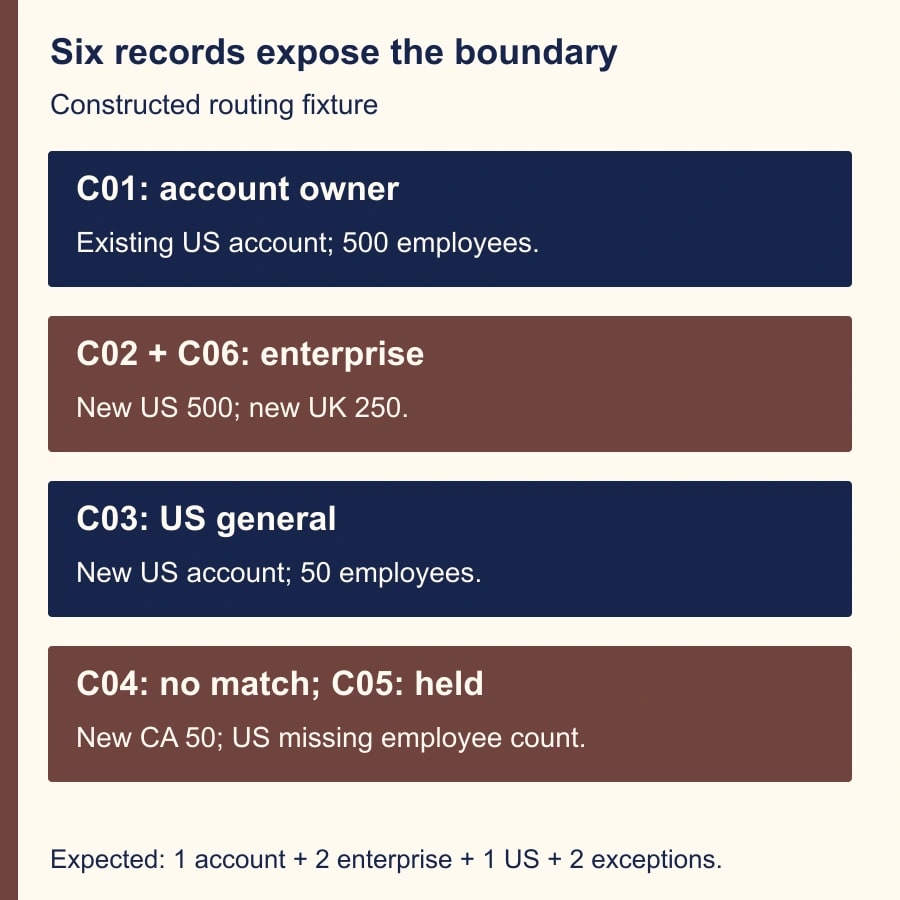
Build six test records with harmless data. C01 is an existing US customer with 500 employees. C02 is a new US prospect with 500 employees. C03 is a new US prospect with 50 employees. C04 is a new Canadian prospect with 50 employees. C05 is a new US prospect with employee count missing. C06 is a new UK prospect with 250 employees. This is an illustrative fixture, not a report of a live HubSpot test.
The expected outcomes are C01 to the account team; C02 and C06 to enterprise; C03 to the US general queue; C04 to manual territory review; and C05 held for missing data. The six inputs reconcile to one account-team record, two enterprise records, one US general record, one territory exception and one data exception.
Now put “Country is US” before the existing-customer and enterprise conditions. Among the five complete records, C01, C02 and C03 all take the US branch. C06 still reaches enterprise and C04 still reaches None met. Two records have the wrong business destination: C01 and C02. All five complete records can still have a destination, so a simple “nothing was dropped” check will miss the defect.
After correcting the priority, test the exact record-to-path mapping, not only the total assigned. A result showing two enterprise records is insufficient if it contains the wrong two. Keep the expected IDs beside the observed IDs. This small discipline catches errors that a visually tidy workflow diagram or a count-only dashboard cannot reveal.
Make precedence visible in the branch filters
One approach is to place existing-customer criteria first, enterprise criteria next and the general US branch after them. Another is to make later filters explicitly exclude earlier categories, while retaining an understandable order. The right choice depends on maintainability. The important point is that the approved priority remains evident to the next person who edits the workflow.
Avoid a broad catch-all branch near the top. A condition such as “email is known” may match almost every record and prevent later specialist branches from being considered. Give each branch a name that states its purpose and priority. “Existing customers — account team” communicates more than “Branch 1,” but the name must still match the actual filter.
Review the None met path deliberately. It should produce the team's chosen exception outcome, with an owner and enough information to repair the record. Do not assume the presence of a None met label means someone is notified. Inspect the actions beneath it. If the process is intended to stop without an action, document why that is acceptable and how the team notices unresolved work.
Change the smallest set of rules that resolves the known defect. Save a recoverable record of the previous configuration and the reason for the revision. Reworking enrollment, delays, routing and messaging in one untracked change makes it difficult to tell what fixed the problem or what introduced a new one. The repair should be reviewable by the process owner, not only the builder.
Timing can imitate a priority problem
A record may reach a branch before an integration supplies a required value. The current record can look complete when you investigate later, creating the impression that HubSpot ignored the criteria. Compare the timing of the property update with the branch decision. When the sequence is uncertain, record that uncertainty instead of claiming a confirmed product defect.
For the sample C05, the process requires a known employee count before routing. If the value arrives later, the data-repair process must decide how the record becomes eligible for evaluation. Do not treat an arbitrary delay as proof that every integration will finish in time. Prefer a readiness condition that reflects the required inputs, with a monitored exception route for records that never become ready.
HubSpot's branch guide recommends delays for some dependent updates and analytics. Treat those recommendations as context-specific, and verify the actual workflow's data arrival. A delay can give data time to appear; it cannot create missing data or settle an ambiguous field definition. Record the normal arrival time and investigate outliers before lengthening every workflow indiscriminately.
Now suppose C04's country changes from Canada to the US after it has already followed the manual-review path. That change does not retroactively route it through the US branch. The owner must decide whether a new evaluation is appropriate and what previous effects need to be preserved. Re-enrollment is a workflow design decision with consequences, not an automatic correction button.
Use the test tool, then verify a controlled run
HubSpot's workflow testing guide describes previews that do not enroll the record or execute the workflow actions. It also says tests use the current workflow and current record state. That makes the tool useful for the repaired six-record fixture, but it does not reconstruct a historical enrollment by itself. Keep the preview result separate from the evidence about the earlier incident.
Open the workflow's Test control, select a sample record and inspect the predicted path. Repeat for each fixture record and for the intended enrollment method. If a branch depends on an earlier action's output, the preview may require manual selection. Record that limitation; a manually selected path is not proof that the real upstream action will produce the expected value.
After the preview checks pass, use the organization's approved testing arrangement to verify an end-to-end run with harmless records and controlled destinations. Confirm both the branch and the resulting assignment or task. Test incomplete inputs and an overlapping case, not only one record that matches a single obvious rule. Avoid sending customer-facing messages during diagnosis.
Check permissions and entitlement before promising the repair schedule. HubSpot's guide lists eligible Professional and Enterprise subscriptions across supported products and separates workflow editing from publishing permissions. Confirm the actual workflow and user rights in the account. This article does not imply the full workflow editor is available on every plan or that a routing fix requires a new purchase.
Repair affected records without replaying everything
Build a recovery list from the affected enrollments. For each record, note the original path, completed actions, intended current owner and proposed correction. A wrong owner may need reassignment while an already sent acknowledgement should remain sent. Treat each business effect separately rather than assuming the entire workflow must run again.
If C01 already received an appropriate customer acknowledgement but was assigned to the wrong queue, the recovery may be a reviewed owner correction and an internal handoff. If C02 received an unsuitable message, the process owner should decide whether a follow-up explanation is needed. Do not erase history or send a duplicate automated message merely to make the workflow log look clean.
For any approved re-enrollment, check eligibility, suppression settings and downstream effects first. Use a stable record-and-action reference to track which corrections were completed. If the recovery stops halfway, the next owner should be able to resume the remaining records without repeating prior work. Keep the original incident evidence alongside the revised test results.
A branch-repair worksheet
- Decision: approved priority order, required inputs, expected owner and reason for each route.
- Incident: record ID, enrollment time, workflow version, actual path and completed actions.
- Fixture: overlapping criteria, ordinary match, no match, missing input and later property change.
- Validation: preview outcome, controlled-run outcome, exact expected IDs and actual effects.
- Recovery: affected records, corrections approved, messages already sent, owner and next observation date.
Measure wrong-route rate on a defined set of eligible records, time spent in exception queues and corrections needed after assignment. Count unresolved inputs separately from routing defects. If ten misrouted records each consume eight minutes of reassignment work, that is 80 minutes of avoidable effort in that constructed example. It is not an estimate of your current loss or a cash-savings claim.
Stop release if the business owners disagree about precedence, historical effects cannot be established, the test relies on unverified upstream output, or the exception path has no owner. Start with C01 and C02: both satisfy the broad US rule, but neither belongs in the general US queue. Use the lead-routing priority guide to settle the business hierarchy, and the HubSpot re-enrollment diagnostic when the remaining problem is whether a corrected record starts again.
Weekly Newsletter
AI Adoption Weekly
New research, field guides, training studies, and tool decisions for operators.
No spam. Unsubscribe anytime.
Related Comparisons
Calculator
AI seat cost calculator
List price × headcount. You enter the hours and the operating assumptions.