
Sharing Workspace Skills: Keep Team Copies on the Right Version
Track independent copies, reference access and acceptance tests so a changed Workspace skill reaches the people using it.
Published November 16, 2026

A sales enablement owner sharing a Google Workspace skill should treat each saved team copy as a separate release. Editing the original will not update colleagues' existing copies. Keep one approved instruction source, a short register of active versions, and a test that each recipient runs before using a changed skill for customer work. This prevents an apparently shared standard from becoming several undocumented standards.
A skill is a reusable set of instructions for Gemini. The business problem is familiar even if the packaging is new: a team distributes a proposal template, changes a rule, and later discovers that several people still use the old version. AI makes the output faster, but it does not remove the need to know which instructions produced it.
The November rollout makes copy ownership important
Google's November 10 Workspace skills announcement explicitly says recipients save independent copies and later edits to the original do not overwrite them. Referenced Drive files require their own sharing permissions. Workspace skills also remain separate from skills and Gems in the Gemini app. Those boundaries were checked November 16, 2026; they are product behavior, not a forecast about team performance.
The announcement lists a gradual Rapid Release rollout beginning November 9 and Scheduled Release beginning November 30. Eligible business editions include Starter, Standard and Plus; users must be at least 18. Creation and management are web tasks, and English is the supported instruction language at this release. Confirm access with your administrator before promising the workflow to a team whose rollout has not arrived.
This article concerns maintaining approved team copies after distribution. It is separate from replacing an old Gem step in an automated flow. For that transition, use the site's Gems-to-skills migration guide. Copy maintenance needs its own owner even after a migration succeeds.
Choose a small instruction set that deserves to be shared
A good first candidate is a proposal-outline skill that turns approved discovery notes into an internal draft. The output has a defined audience, source material and review owner. Keep price commitments, legal changes and automatic customer sends outside the first pilot. A content owner can evaluate an outline much more readily than a skill allowed to act across several business systems.
Skip team distribution if every user needs fundamentally different rules, the reference material has no accountable owner, or nobody can approve a corrected output. In those conditions a shared skill adds the appearance of standardization without a usable standard. Start by settling the business process or use an ordinary template that people can review directly.
Prerequisites include an eligible account, access to Workspace Studio, permission to use the relevant reference documents, and a person responsible for the approved instructions. Google's administrator guidance describes controls for enabling skills. The operator should verify those controls with the administrator, not request broader access merely because one test fails.
Budget owner time as well as tool access. In a small pilot, the main incremental cost may be writing expected answers, reviewing outputs and helping recipients replace old copies. Existing Workspace entitlement is not proof that rollout, review or support is free of staff effort. Do not buy an upgrade until the administrator has checked the actual edition and availability.
Separate instructions, references and outputs
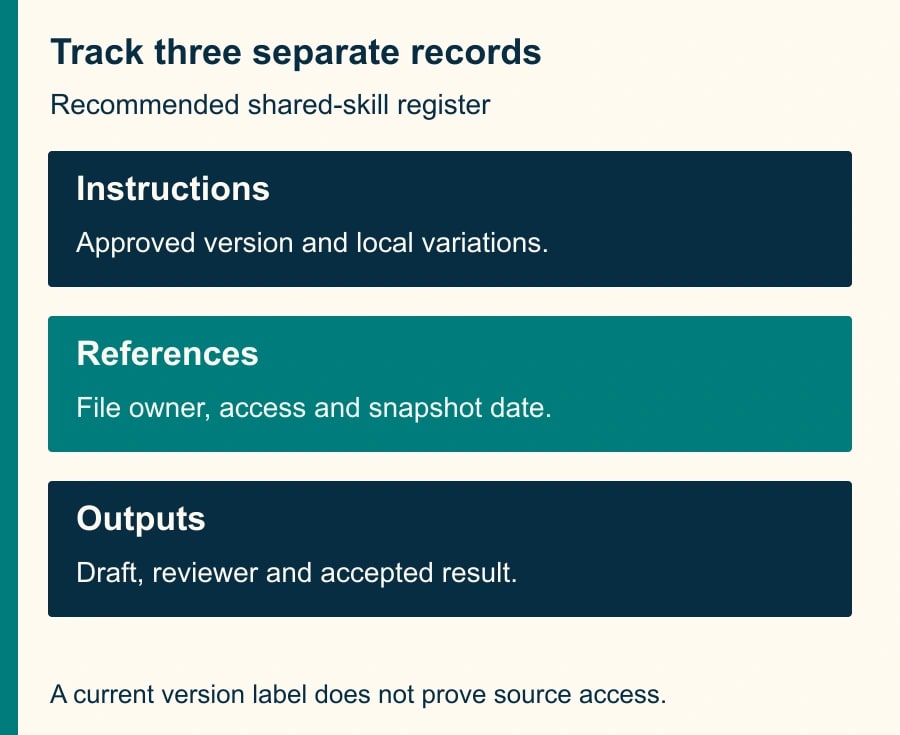
Maintain three records. The instruction record says what the skill should do and how it should behave when information is missing. The reference record points to approved material and names its owner. The output record identifies the draft being reviewed. These records can live in a small team document; no new database is required for the first few users.
For example, the instruction version might be “Proposal outline 1.2,” while its reference is the current service-description document. A teammate can have the latest instruction copy but lack access to that document. Another can have an older copy that reads a recently changed reference. Both states deserve attention. A version label alone does not prove that the output uses the right business information.
Choose whether a reference should be a stable approved snapshot or an actively maintained document. A live document simplifies factual updates but can change outputs without changing the skill. A snapshot makes a release reproducible but needs replacement when facts change. Record the choice and the review date. Do not imply that a filename containing a version number prevents edits or enforces access.
Build and test the master before asking people to copy it
Start with the normal skill creation process in Google's Workspace Studio help: create or select a skill, review its instructions, and test it before enabling it for real work. Use the business rule document as the authority. A generated instruction draft is only a proposal for how to express that rule.
Our suggested proposal-outline brief is: “Use the approved service description and supplied discovery notes to draft an internal outline. Separate confirmed needs from open questions. Do not invent prices, dates, guarantees or customer quotations. If a required source is unavailable, identify it and stop that part of the outline. Return sections for objective, proposed scope, assumptions and reviewer questions. Do not send or publish the result.” Adapt those boundaries to the actual task.
A useful test set includes one complete case, one missing-source case, one contradictory-note case, and one request that exceeds the scope. Write the expected behavior before running the skill. “Sounds professional” is not an answer key. For a missing price, the expected result might be an explicit unresolved price field, not a plausible amount and not a confident promise to follow up.
Use the same constructed source packet across versions. If both the instructions and test inputs change, a better-looking output may tell you little about the instruction edit. Keep realistic confidential documents out of a test unless the organization has approved that use. Invented sample companies and amounts are sufficient for checking structure and missing-information behavior.
Share a release note, not only a link
Give recipients four things: the approved copy, its version identifier, the reference-access requirements, and the acceptance test. The release note should explain what changed in ordinary business language. “Version 1.2 keeps delivery dates unresolved unless the source explicitly approves them” is more useful than “prompt improvements.” Name the person who approves any local variation.
After saving the copy, each recipient confirms its instruction text and opens the required reference files under their own account. Then the recipient runs the same test packet. The master author's successful test is insufficient because that author may have broader file access. Record the result as ready, needs repair or not used; do not count a shared link as adoption.
Google documents that skills can be enabled and invoked in supported Workspace surfaces. For the pilot, use an explicit invocation of the intended skill and inspect the result, rather than relying on automatic selection to prove which instructions applied. If users combine several skills, treat that combination as a separate test condition. Correctness of each component does not establish correctness of their interaction.
The approved instruction copy is a starting point for output review, not permission to accept every generated sentence. A human proposal owner remains responsible for scope and commitments. If the skill is later connected to a flow that performs actions, review that action boundary separately with an approval matrix for reading, drafting and sending.
Worked example: twelve copies and one changed promise
Consider a constructed enablement team with twelve proposal writers. All twelve saved version 1.1. The company changes its service policy: an onboarding date must remain provisional until operations approves capacity. The instruction owner creates version 1.2 and tests a discovery note that mentions a requested date but contains no approval. The expected outline labels that date as requested and leaves the commitment unresolved.
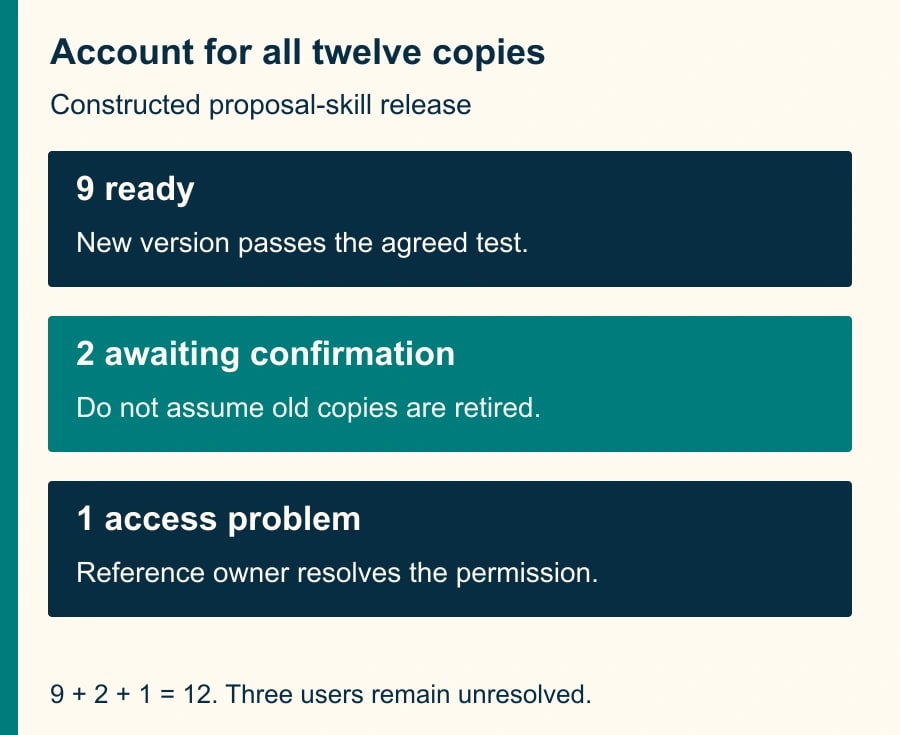
The owner sends the release note and asks each writer to replace or retire the old enabled copy through the available controls, then run the test. Nine writers report a passing result. Two have not responded. One saves the new instructions but cannot open the approved policy document. The correct release status is nine ready and three unresolved, not twelve updated.
The content owner routes customer proposals from the three unresolved users through the manual approved template until they complete the check. The missing-access case goes to the document owner for an appropriate permission decision. The two nonresponses need confirmation, not an assumption that their old copies stopped working. No one should broaden the reference document to an unnecessary audience merely to make the status board green.
The register has twelve rows and accounts for all twelve: nine passing, two awaiting confirmation, one access issue. When the remaining three pass, the release is complete for the declared pilot population. This count says nothing about unknown copies outside that population. If users shared the old instructions further, expand the inventory before claiming organization-wide coverage.
A compact release register you can reuse
- Skill purpose and owner: proposal outline; enablement lead responsible for the instructions.
- Approved version and date: the current label plus a link to the exact approved instruction text.
- Reference set: file links, source owners, snapshot or live status, and last checked date.
- Recipient or team: the declared user of the copy, with local variations recorded.
- Acceptance result: test date, observed version, pass or defect, and reviewer.
- Retirement status: old copy disabled or removed through normal controls, or a documented reason it remains.
- Next review: scheduled policy review or an event that triggers immediate repair.
This is an adaptable worksheet, not a claim that Workspace automatically supplies these fields or centrally enforces the register. Keep it lightweight enough that people maintain it. For a larger deployment, ask the administrator which activity records can supplement it, while distinguishing evidence of use from evidence of correct output.
Handle drift without restarting the entire program
If one copy produces an obsolete promise, preserve the input, output and instruction version before editing. Compare the local instructions with the approved source. Check reference access and whether the reference itself changed. Also check whether another enabled skill or a later user instruction affected the answer. Fix the observed cause rather than rewriting the entire instruction set from a single output.
A harmless formatting preference may be an approved local variation. A changed scope rule or customer commitment is a different release and needs the content owner's review. Define that distinction in the release note. Otherwise the team will either prohibit useful customization or allow silent changes to consequential rules under the label of personalization.
If the central reference is wrong, stop use of the affected output and repair the source. Merely distributing another instruction copy can leave the same factual error in every version. If the reference is correct but the skill repeatedly ignores it, revert to the last tested instruction set or manual template. Preserve the failed case as a regression test for the next revision.
Measure accepted drafts and maintenance effort
Suppose, in a constructed comparison, twelve writers each save five minutes on one accepted draft: 60 minutes of released capacity. If the owner spends 45 minutes maintaining the release and recipients spend five minutes each validating it, the release costs 105 minutes. One draft per writer does not repay that effort. At four comparable accepted drafts each, gross capacity released is 240 minutes; after the same 105-minute release cost, the net is 135 minutes before any additional corrections.
These are planning calculations, not a provider result or cash saving. Measure review and correction time in the actual pilot. Count an output only after a proposal owner accepts it for the intended internal use. Track outdated-version incidents and unresolved access issues alongside time, because rapid drafts with obsolete commitments are a worse outcome.
Stop expanding the pilot if the team cannot identify active versions or if a known old promise reaches customer-ready work. The next action is to inventory one existing shared skill and ask three recipients to run the same missing-information case. That small check reveals whether the team has a maintained standard or simply several copies with a familiar name.
Weekly Newsletter
AI Adoption Weekly
New research, field guides, training studies, and tool decisions for operators.
No spam. Unsubscribe anytime.
Related Comparisons
Calculator
AI seat cost calculator
List price × headcount. You enter the hours and the operating assumptions.