
Check Gemini’s Cell Citations Before Trusting a Supplier Comparison
Use Sheets cell citations to review supplier facts, record unknowns and measure verification work before expanding an AI-filled comparison.
Published October 29, 2026

Use Gemini’s new cell citations as a route to the evidence, then verify each decision-changing fact yourself. Keep the generated answer, the accepted fact and the reviewer’s decision in separate columns. A supplier comparison becomes useful when you can explain why each shortlisted vendor meets the requirement, including what remains unknown.
Google announced cell-level web citations for Fill with Gemini on October 28, 2026, alongside support for requests of up to 3,000 cells. The rollout began October 20 and can take up to 15 days. Availability depends on an eligible plan and enabled access. This is a useful improvement for evidence checking, but a larger request is not a larger review capacity. Google’s announcement describes the rollout and eligible editions.
There is a documentation mismatch as of October 29: the announcement says 3,000 cells, while the AI-function help page still describes a 350-cell selection limit. Check what your account actually supports. The twelve-claim process below works without relying on either maximum. It is proposed guidance based on documentation, not a test of a private Workspace account.
Start with a shortlist decision, not an empty spreadsheet
This approach fits an operations manager comparing a small set of suppliers using public information: service regions, supported exports, published support hours or documented integrations. It is particularly useful when a colleague must later defend the shortlist to procurement or the team that will use the product.
Skip it when the answer depends mainly on private negotiated terms, confidential customer records or a supplier’s unpublished commitments. A web answer cannot confirm your contract. You can still use a sheet to record those questions, but the accepted evidence should come from the responsible person or approved document.
Choose one decision before writing a prompt. For example: “Which of four reporting tools can support our UK operations team’s monthly client-report handoff?” Define three requirements that could actually exclude a tool. A list of forty interesting features will create more checking work without necessarily improving that decision.
Name an owner for the comparison and a reviewer for each specialist requirement. The operations owner can check a documented export format. A systems owner should review an integration dependency. Procurement owns a negotiated price. These responsibilities do not disappear because the information sits in adjacent cells.
Prepare the evidence register
Create one row per supplier and requirement. Avoid a single cell that combines price, support availability and security claims: those statements may need different sources and different reviewers. Give each row a stable reference, such as SUP-02-EXPORT, so a discussion can point to the exact claim even after the sheet is sorted.
Use these columns as a reusable worksheet:
- Claim ID and supplier: identify the legal supplier and exact product.
- Requirement: state the business condition and what counts as meeting it.
- Scope: plan, region, currency and relevant date.
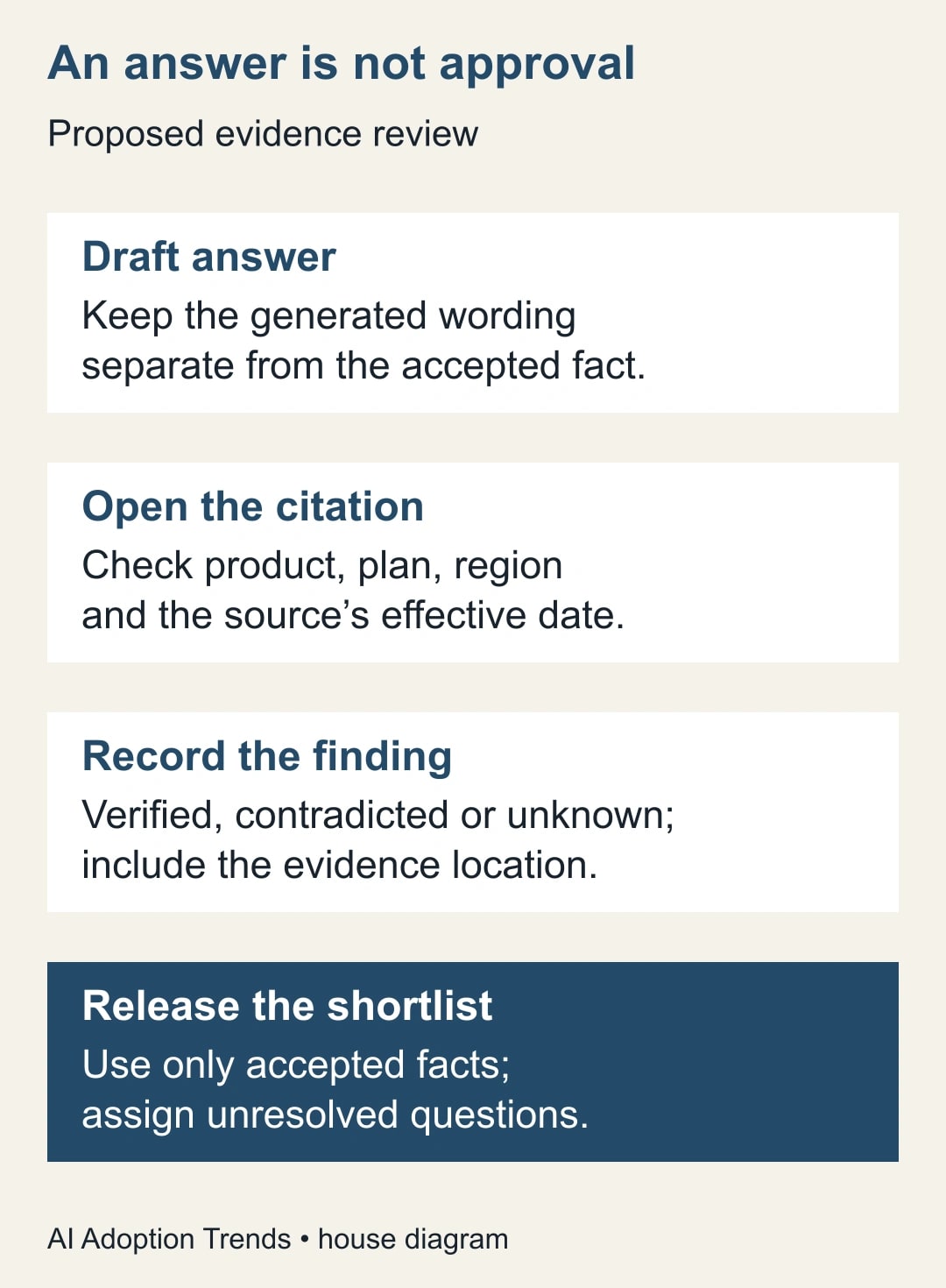
- Draft answer: preserve the generated wording without treating it as accepted.
- Source location: record the page and the section that supports or contradicts the answer.
- Accepted fact: write only what the reviewed evidence establishes.
- Review state: verified, contradicted or unknown.
- Reviewer and checked date: show who checked the claim and when.
- Next action: assign the missing question, owner and deadline.
“Unknown” is a useful result. It prevents a blank from quietly becoming “no” and a confident sentence from quietly becoming “yes.” Keep the review state controlled with a short list of permitted values. Put explanatory notes in another column so a filter does not miss variations such as “probably verified.”
Before generating anything, save the starting supplier list and requirements. Remove unnecessary internal details from the prompt context. The task needs the product name and the business question; it usually does not need a customer’s name, a contract attachment or an employee’s personal information.
Generate one answer that can be checked
Put the supplier, product, plan, region and requirement in adjacent input cells. Then ask for one bounded answer. An adaptable prompt is: “For the supplier and product in this row, identify the published answer to this requirement for the named plan and region. Prefer the supplier’s current documentation. If the scope or evidence is unclear, say Unknown. Do not infer that a feature is included because a different plan has it.”
This prompt is a drafting aid, not a guarantee that the model follows every condition. Review the output against the source even when it uses exactly the requested words. In particular, a statement such as “available on paid plans” does not establish availability on the plan you intend to buy.
The documented AI syntax accepts a prompt and an optional range. On a computer, select the AI cells and choose Generate and Insert. To inspect a generated cell’s web sources, click the cell, hover over its contents and open Sources. The function returns text and does not automatically see the whole workbook or other Drive files. Google’s AI-function instructions explain these controls and limits.
Start with one supplier and one requirement. Confirm that the input range contains the intended row, then expand to the twelve claims in the example. If generation is unavailable, check access with the Workspace owner or complete the same evidence register manually. Do not purchase a higher plan merely to finish an unproven comparison process.
Read the source at the level of the claim
Open the source and ask four questions. Is this the right product? Does it cover the required plan and region? Is the statement still effective? Does it support the whole answer, rather than one nearby phrase? Record the relevant section so another reviewer can reproduce the decision.
Suppose the generated answer says “daily scheduled exports are included.” The source might actually describe a downloadable CSV, an integration sold separately or scheduled exports on an enterprise plan. Each is related to exports, but none establishes the proposed requirement. Mark the original answer contradicted or unknown and write the narrower accepted fact.
Use current provider documentation for product capabilities, but do not confuse a provider’s claim with proof of performance in your workflow. A support page can establish that an export option exists. It cannot establish that your largest monthly file will arrive on time with every required field. That second question needs a bounded trial and a named acceptance check.
For consequential pricing, preserve the billing interval, minimum commitment, currency and any required add-on alongside the amount. Do not compare a monthly headline price with an annual commitment as if they were identical offers. If the relevant terms are hidden behind a quote, assign a quote request rather than filling the gap with an estimate presented as fact.
A twelve-claim example
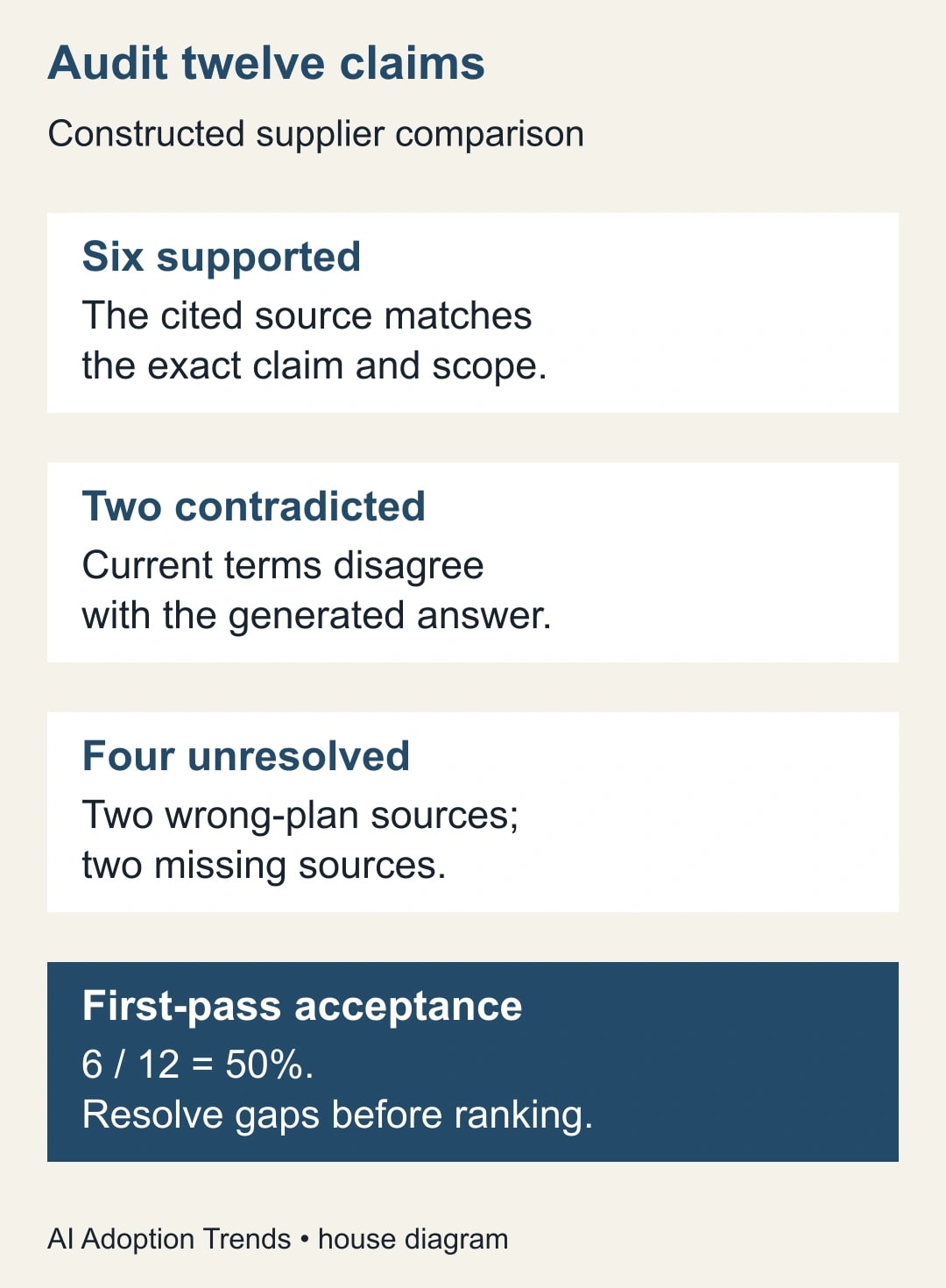
Consider a constructed comparison of four suppliers and three requirements, producing twelve claims. A reviewer finds six answers supported by current documentation for the right scope. Two answers conflict with current terms. Two point to the wrong plan. Two have no usable source.
The first-pass acceptance rate is 6 divided by 12, or 50%. The two wrong-plan answers and two unsupported answers remain unknown for the intended purchase. The two contradictions require correction. This is an illustrative review outcome, not an accuracy measurement for Gemini or any supplier.
Now imagine Supplier B has two verified requirements and an unknown support-hours answer. Supplier C has all three verified, but one fails a mandatory requirement. Ranking B above C on a simple count of positive cells would hide two different issues: B still needs evidence, while C is currently unsuitable. Keep eligibility separate from the quality of the evidence.
A useful shortlist note would say: “Supplier B remains under consideration pending written confirmation of UK support coverage. Supplier C is excluded because the documented export format fails requirement R-03. Supplier A is ready for a file-transfer trial.” That note tells the next owner what to do without pretending the spreadsheet has made the purchase decision.
Check whether the process saves review time
Measure accepted work, not filled cells. In a second constructed example, manual research for twelve comparable claims takes 36 minutes. AI-assisted drafting takes four minutes, source review takes 24 and corrections take 12. The assisted process takes 40 minutes, four more than the manual baseline.
That result can still reveal a useful organizational benefit, such as better evidence records, but it is not a time saving. Repeat the comparison with similar claim difficulty before drawing a conclusion. A batch of obvious homepage facts is not a fair comparison with a batch of plan-specific contractual questions.
Track elapsed completion time, reviewer minutes, accepted claims and unresolved decision blockers. Also record how often a citation leads to the wrong scope. That last measure helps you improve the task: a clearer product identifier may remove more rework than another paragraph of prompt instructions.
Set a budget for the pilot before expanding it. For example, allow one analyst session and one reviewer session, then decide whether the register is worth continuing. Include any incremental license cost in that decision. Existing subscription access is not proof that staff time is free, and released staff capacity is not cash savings unless spending actually changes.
Recover from misleading or stale answers
When a citation does not support the answer, preserve both the original and the correction. Record whether the problem was product identity, plan scope, date, missing evidence or interpretation. Correct only the affected accepted fact after review; do not silently rewrite the evidence history to make the first pass look better.
When a page changes, revisit the claims that depend on it. A checked date is not an expiry guarantee. Price and availability may need another check immediately before commitment, while a basic export-format description might need rechecking only when the product or requirement changes. The decision owner should choose that interval based on the consequence of being wrong.
When several answers repeat the same unsupported claim, stop the batch and inspect the prompt and source pattern. Repeating generation until an answer sounds plausible is not verification. A missing answer should produce a question for the supplier or a manual research task, not an invented value used in a score.
If an analyst edits the prompt or changes the supplier’s plan, mark affected accepted facts for review. Keep previously accepted evidence available, but do not assume it applies to the new scope. The useful unit of approval is a claim about a specific product under specific conditions.
Release a comparison another person can use
Before sharing the shortlist, have the receiving owner trace one accepted claim, one rejection and one unknown back to their evidence. Ask them to identify the next action without help. If they cannot, simplify the register or the decision note before adding more suppliers.
Publish a dated working conclusion with the mandatory requirements, unresolved questions and a clear next owner. Keep the draft-answer column out of an executive summary unless it is needed to explain a correction. Otherwise a reader may quote generated wording that the reviewer deliberately rejected.
Your next step is small: choose four suppliers, define three decision-changing requirements and review all twelve claims. For a comparison based on internal reporting data, use the separate guide to checking Gemini analysis against Connected Sheets source data. To build a repeatable review standard, adapt the method for testing AI answers against an answer key.
Weekly Newsletter
AI Adoption Weekly
New research, field guides, training studies, and tool decisions for operators.
No spam. Unsubscribe anytime.
Related Comparisons
Calculator
AI seat cost calculator
List price × headcount. You enter the hours and the operating assumptions.