
Set Up a Google Meet Policy Notice for Client Calls
Choose when to show a pre-call Meet notice, write useful instructions and test the host, guest and policy-link experience before a wider rollout.
Published November 15, 2026

For client-facing teams, a Google Meet policy notice is useful when participants need a clear explanation of recordings, transcripts or AI notes before the conversation starts. Begin with a small group of hosts, choose whether the message should appear on every meeting, and test it with an external guest. Keep the actual recording, sharing and retention decisions in their own operating process.
Google announced custom Green Room notices on November 3, 2026. The Green Room is the screen people see before joining a call. The feature is off by default, and its extended rollout began November 2 for both release tracks; visibility can take longer than 15 days. Business Standard and Plus and Enterprise Standard and Plus are among the supported editions. These are provider availability statements, checked November 4, rather than evidence that the setting is already visible in your account. See Google's announcement and edition list.
The practical decision is what someone should understand or do after reading the notice. A short message that points to a usable policy can help. A dense paragraph that nobody understands, linked to a page guests cannot open, creates another obstacle at the start of a meeting.
Decide what the notice is supposed to accomplish
This guide fits a service business, agency or internal operations team with repeatable meeting rules and someone responsible for administering Workspace. It is especially useful when hosts handle several kinds of client call and regularly explain how meeting records are used. It is less useful when the organization has not yet decided which artifacts it permits or who can receive them. Resolve those questions before writing the notice.
Do not begin by asking an AI assistant for a comprehensive policy. Start with the decisions your organization has actually made. Which meetings permit recording? Who approves note-taking? Who checks an AI summary before circulation? Where should someone raise a concern? A message cannot accurately communicate a rule that changes depending on whom a participant asks.
Name three owners. The service owner approves the operational wording. The Workspace administrator applies the setting to the intended hosts. A host representative tests whether the message makes sense to a participant. If the wording concerns a contractual or legal requirement, the person responsible for that requirement should approve it. The purpose here is to organize the rollout, not to establish that a notice satisfies a particular law.
The main initial costs are staff time for wording, configuration and testing. Do not buy a different subscription solely because a new setting looks useful. First confirm eligibility, rollout visibility and the problem it would solve. Keep a record of any incremental license expense separately from the time spent on the pilot.
Choose an always-visible or conditional message
An always-visible notice fits a team that wants every participant to know how the meeting will be handled, including calls where no recording is planned. It offers consistent context but can become background noise if it says too much or warns about activities the team almost never uses. A useful message should explain a relevant choice, not list every theoretical feature.
A conditional notice fits a narrower purpose: tell people about artifacts when recording, transcription or AI note-taking is in use. That reduces unnecessary exposure. It also raises a practical test question: what happens when a host starts one of those features after someone has already entered? Do not assume a pre-entry message settles that later situation. Include a spoken host briefing and test the actual behavior before relying on the workflow.
Google's administration help describes both display choices. It also says outside participants can review the notice configured for the meeting host. The setting accepts up to 1,000 plain-text characters and an optional policy URL. The administrator needs the Google Meet administrator privilege and can apply the setting to an organizational unit, which is an admin grouping for users. See Google's notice configuration instructions.
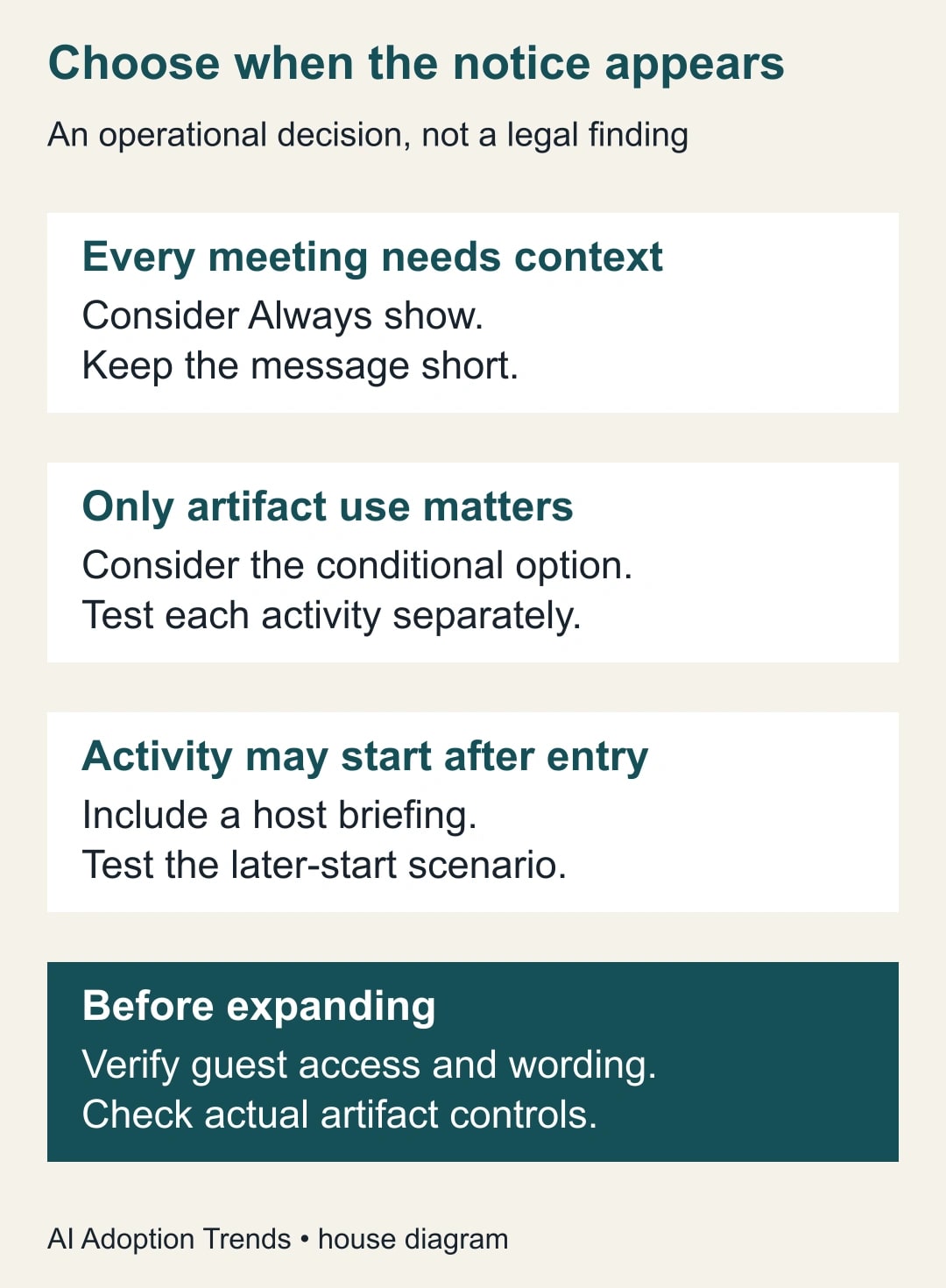
For an initial client-call pilot, choose Always show if the message explains a standing meeting practice that matters before any feature starts. Choose the conditional option if the message only explains active artifact creation and the host has a separate procedure for changes during the call. This is an editorial recommendation about communication design. Verify the choice against your own meetings rather than treating it as a universal default.
Write a notice that gives the reader a next step
Keep the first sentence about the participant's experience. The second can say where to find the full rules or how to ask a question. Avoid unsupported statements such as “Your data is fully protected” or “Joining means you agree to everything.” Those phrases create claims the configuration screen cannot demonstrate.
Here is a constructed operational draft, suitable only if it matches the organization's approved process: “Our host will explain any recording, transcription or AI note-taking before it starts. Ask the host before sharing information that should stay out of meeting records. Our meeting-records policy explains access, review and retention.” Put the approved policy address in the dedicated link field. Replace this wording when the host process differs.
That example deliberately does not promise that a record will never contain an error. A more useful full policy explains who reviews notes, how recipients report a correction and which version should be used. It also distinguishes an AI summary from the approved decision record. People need to know whether a sentence in generated notes is an instruction, an unverified suggestion or an agreed action.
Before applying the text, ask a colleague outside the admin team to read it once and explain what they would do if they did not want a sensitive topic included in notes. If they cannot identify a practical action, revise. This comprehension check is more useful than making the notice sound formally impressive.
The linked page needs a separate access check. A client may not have a company account. Open the link in the same guest circumstances used for the pilot and confirm that the relevant explanation is visible without exposing unrelated internal material. If the full policy is internal, create an approved external explanation rather than broadly opening the internal document.
Configure a small host group and preserve the baseline
Record the existing setting, the selected organizational unit and whether it inherits a parent value. Keep the approved text and link in the change record. This makes it possible to explain which hosts received the pilot and to restore the earlier configuration if something is wrong.
The documented path is Admin console, Apps, Google Workspace, Google Meet, then Meet safety settings and Meeting disclosure & privacy. Select the intended unit, enter the disclosure text and link, choose the display condition and save. Follow the current screen if its wording differs, and confirm the saved value. Do not change the entire organization's setting while trying to test one service team.
After saving, test an actual meeting hosted by an account in the pilot group. The output you need is a visible participant experience that matches the approved wording. A saved administrator screen proves configuration was entered; it does not prove every relevant guest has seen it.
If the control is missing, first confirm the account's edition, administrator privilege and rollout state. Do not treat absence during an extended rollout as a reason to change unrelated permissions. Record the limitation and keep the existing host briefing in use until the setting can be tested.
Work through an eight-scenario acceptance exercise
Consider a constructed pilot with two hosts: one in the new policy group and one in a comparison group. For each host, run four controlled meeting states: no artifacts active, recording active, transcription active and AI notes active. That gives two hosts multiplied by four states, or eight entry scenarios. This is a proposed test design, not a report of our own account test.
For each scenario, record the host, selected display mode, active feature, expected notice, observed notice and policy-link result. Use harmless meeting content. A tester should join as an external guest, note the device and account state, and capture enough evidence to distinguish a genuine mismatch from a different host configuration.
Suppose seven scenarios match and one guest cannot open the policy link. Reporting an 87.5% pass rate would conceal the useful finding: the message directs some guests to an inaccessible explanation. Fix the access route and repeat the affected scenarios. An average is not an acceptance substitute when one failure blocks the purpose of the notice.
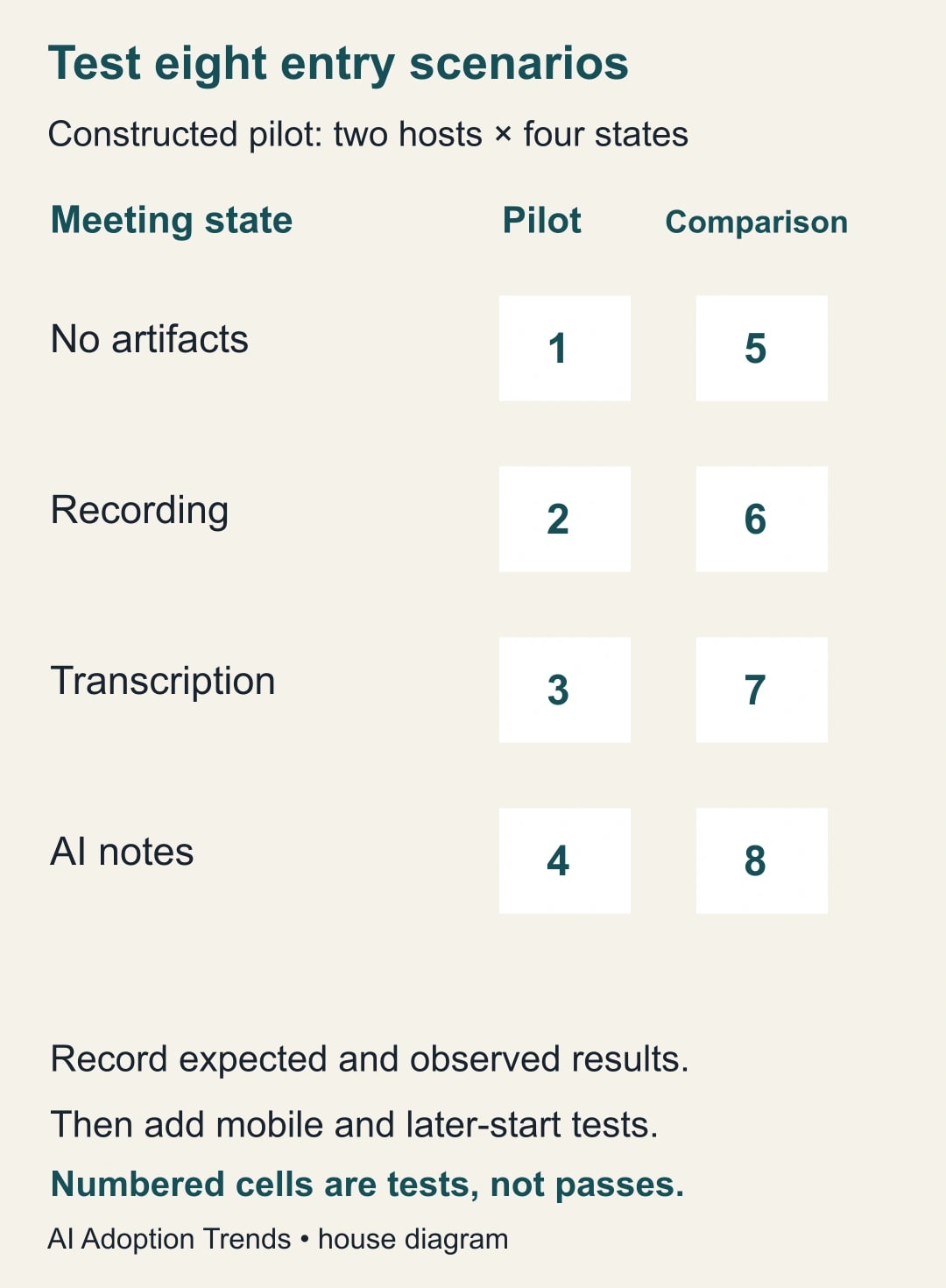
Then add the timing case: someone joins before artifact creation starts, and the host turns it on later. Record what the participant sees and what the host says. Also test the mobile route your clients actually use. These additional checks are outside the eight-scenario starter matrix; do not claim the matrix covered them automatically.
Reuse this release worksheet
- Purpose: the one decision or instruction the notice communicates.
- Scope: named host group, organizational unit, comparison group and meeting types.
- Approved copy: text, policy address, owner and approval date.
- Display choice: always or conditional, with a short operational reason.
- Guest evidence: account state, device, host and whether the link opens.
- Timing evidence: what happens when recording, transcription or notes start after entry.
- Artifact process: who starts each feature, checks the output and approves sharing.
- Recovery: prior setting, responsible administrator and conditions for restoring it.
Keep the worksheet beside the approved policy rather than in a personal notebook. When a new service manager inherits the process, they should be able to understand why the setting was chosen and which cases remain untested. That is particularly useful when several departments use different wording.
Watch for failures that a visible notice cannot prevent
The first failure is a mismatch between words and actions. A notice says the host will explain recording, but the host assumes the notice already did the job. Repair the meeting routine and training. Changing the sentence alone will not make someone perform the missing action.
The second is an outdated linked policy. A new retention period or review owner can make an otherwise clear notice misleading. Assign a review date and change owner to the destination page. When that page changes, check whether the short notice still describes it accurately. Avoid embedding operational details in the short message that the team cannot keep synchronized.
The third is overconfidence about coverage. A successful desktop guest test does not prove mobile, dial-in or every external identity route behaves identically. List the supported routes you actually checked and keep a host explanation available for the rest. If a route matters to a major client, include it before expansion.
Finally, verify the artifact itself. After a permitted test recording or notes session, check who can access the resulting file and who reviews it before distribution. A perfectly displayed notice can coexist with an incorrect sharing setting. Treat those as separate acceptance items with separate evidence.
Measure comprehension and operational consistency
For the first week, track tested scenarios, unresolved mismatches, broken-link reports and host adherence to the agreed briefing. Ask a few participants whether they understood where to raise a concern. These are practical pilot measures; notice exposure alone is not a meaningful adoption result.
Stop expansion when a guest cannot reach the explanation, the message misstates the team's practice or the administrator cannot explain which hosts inherit which version. Restore the prior setting if necessary while the service owner repairs the process. Keep the existing meeting rules in place during the repair.
Start with one approved paragraph and one external guest test. Once that experience works, use the meeting follow-up guide to keep generated notes from becoming unreviewed assignments, and the employee AI policy guide to connect the notice to rules people can actually follow.
Weekly Newsletter
AI Adoption Weekly
New research, field guides, training studies, and tool decisions for operators.
No spam. Unsubscribe anytime.
Related Comparisons
Calculator
AI seat cost calculator
List price × headcount. You enter the hours and the operating assumptions.