
Gemini in Apps Script: Test a Weekly Report Before Scheduling It
Test a Gemini-generated weekly reporting script with known records, reviewed permissions and a clear execution owner before adding a trigger.
Published November 17, 2026

Use Gemini in Apps Script to draft a weekly reporting automation, then prove the selection rules on a small test sheet before adding a schedule. The first useful output is a report preview with traceable source rows. It should not send email, change source records or create a recurring trigger. Once the preview matches a manually calculated answer, a reviewer can assess the code, permissions and ownership needed for production.
This guide is for an operations manager who owns a recurring Sheets report and can involve someone capable of reviewing the script. It is a good fit for a stable backlog summary with clear inclusion rules. Skip this approach if the report's definition is still disputed, the source changes unpredictably, or nobody can maintain code after the first successful demonstration. An existing report or a manually refreshed worksheet may be the better tool.
The new shortcut still needs an operating specification
On November 16, 2026, Google announced general availability of Gemini in the Apps Script editor, following beta. The rollout began November 12 and can take up to 15 days. Listed business access includes Workspace Business Standard and Plus and Enterprise Standard and Plus. The announcement describes block-by-block code review and assistance with runtime errors. These are provider-described capabilities, not evidence that a generated business report is correct.
Google's editor documentation says the side panel requires ownership or edit access to the project and that running saved generated code invokes standard authorization prompts. Its help currently describes active-file context, while the launch announcement describes understanding files across the open project. Do not assume the assistant inspected every dependency: provide the relevant specification and have a reviewer inspect the complete project before release.
Apps Script is Google's programming environment for automating Workspace tasks. A trigger is a rule that starts a script automatically. Keep those two decisions separate: first establish what the program should produce, then decide who should run it and when. Adding a daily trigger to an incorrect program simply makes the error repeat without someone watching.
Define one weekly backlog report
Take a constructed service-operations example. The manager wants a Friday report of open work orders due on or before November 20, 2026. The input sheet has WorkOrderID, Status, DueDate, Owner and EstimatedHours. Each work order should appear once. Eligible rows have Status exactly Open, a valid due date within the cutoff and a nonnegative numeric estimate. Rows with missing required values must be reported as exceptions rather than silently dropped or treated as zero.
For this first test, use a fixed cutoff date rather than “today.” A fixed date makes repeated results comparable and avoids changing the expected answer at midnight. State which business time zone will govern production dates later. Make an explicit decision about overdue work: in this example it remains included. A manager who wants only next week's work needs a lower date boundary as well.
Keep the test source separate from the live workbook. Use invented work orders, not a copied customer list with private notes. The test should be small enough that a colleague can calculate its answer without the script. This is a method for checking behavior; it is not a claim that the following fixture has been run in an actual Workspace account.
Build a seven-row acceptance fixture
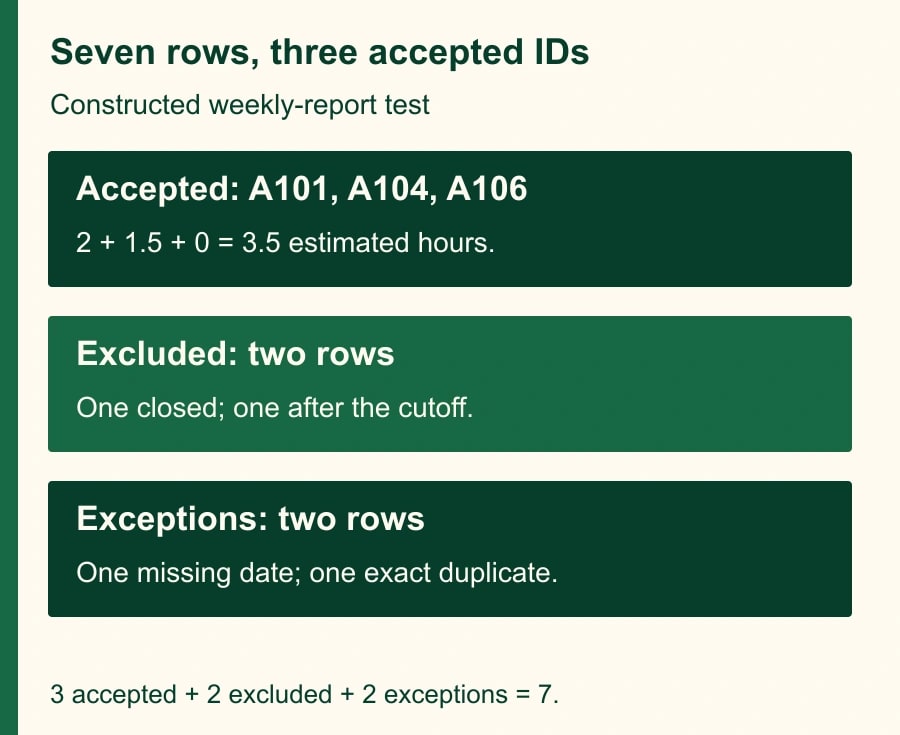
Create these sample rows. A101 is Open, due November 18, assigned to Lee, with 2 estimated hours. A102 is Closed, due November 18, assigned to Lee, with 3 hours. A103 is Open, due November 21, assigned to Sam, with 4 hours. A104 is Open, due November 20, assigned to Sam, with 1.5 hours. A105 is Open, has no due date, is assigned to Lee and has 2 hours. A106 is Open, due November 19, assigned to Lee, with 0 hours. Add an exact duplicate of A104 as the seventh row.
The three eligible unique work orders are A101, A104 and A106, totaling 3.5 hours. A102 is excluded because it is closed; A103 is excluded because its due date is after the cutoff. A105 is held for its missing date. The second A104 is flagged as an exact duplicate. The seven input rows reconcile to three accepted rows, two excluded rows, one missing-date exception and one duplicate row.
The zero-hour row is deliberate. It should not disappear because a programmer treats zero as if it were blank. The duplicate is also deliberate: counting both A104 rows produces a plausible-looking 5-hour total. Define the duplicate policy before coding. Here an exact duplicate is reported and counted once; conflicting records with the same identifier should stop release until the owner resolves them.
Give Gemini a brief that limits side effects
Open the test spreadsheet's Apps Script project, or create a project and provide the test file reference according to your organization's practice. Use the Ask Gemini side panel if it is available for the account. Before accepting code, provide the field names, cutoff and expected output. The instructions should describe both the calculation and actions the program is allowed to take.
Adapt this prompt: “Draft an Apps Script function for a test workbook. Read the WorkOrders sheet with columns WorkOrderID, Status, DueDate, Owner and EstimatedHours. Use the fixed cutoff 2026-11-20. Include unique Open work orders due on or before that date with valid required fields and nonnegative numeric hours. Preserve valid zero hours. List exclusions and exceptions with reasons. Flag exact duplicates and count them once; treat conflicting duplicate IDs as blocking exceptions. Return a preview and reconciliation counts. Do not send email, modify source rows, create triggers, change sharing or call external services. Explain each service and permission the code needs. Show how the seven-row fixture should produce A101, A104 and A106 totaling 3.5 hours.”
That prompt is an adaptable specification, not a tested program or a guarantee of enforcement. Review the generated code for prohibited actions rather than assuming the model obeyed every sentence. Ask the code reviewer to identify each read, write and external call. If the business owner cannot explain why a requested permission is needed, pause authorization until the reviewer resolves it.
Test outputs before making the script convenient
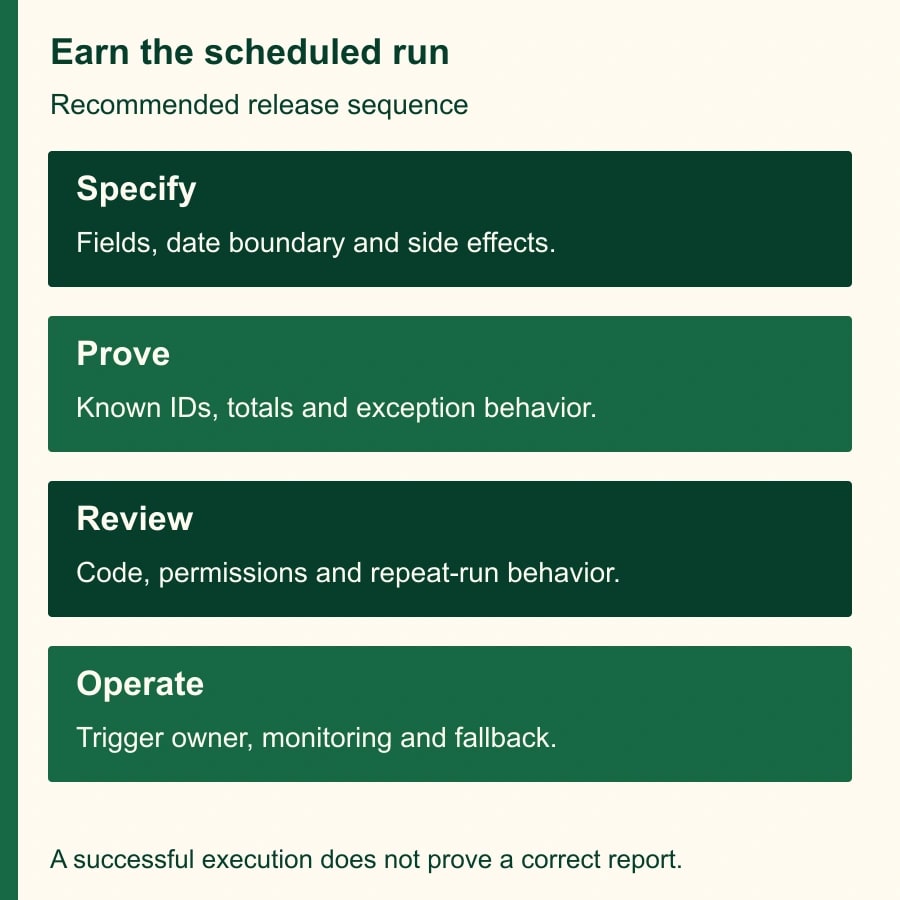
Run the draft manually against the test workbook after the relevant permissions have been reviewed. Compare actual accepted identifiers with the expected set, then compare the total and the exception list. Do not stop at “3.5 hours”: the wrong rows can coincidentally sum to the right number. The three accepted IDs, five classifications and source-row references should all be inspectable.
Repeat with the rows reordered. The answer should not depend on the fixture's original sequence. Remove a required column and confirm the run stops with a useful explanation instead of publishing an incomplete report. Change one copy of A104 to 9 hours and confirm the conflicting duplicate blocks release. Put text in the hours field and verify that it appears as an exception. Restore the fixture after each test so a later failure has a clear cause.
Next test a second run on unchanged input. A preview may be regenerated, but a production design should not create a second supposedly final weekly report without distinguishing it from the first. Agree on a report identifier, such as the reporting week plus the source snapshot reference. Ask the reviewer how the code will detect an existing output and how an authorized replacement will be recorded.
If Gemini suggests a fix, review the revised behavior and repeat the acceptance tests. A patch that removes an error message can still discard records or weaken validation. Save the previously reviewed code and the reason for the change. The ability to explain a failure is useful; it does not prove that the next proposed version preserves the business rule.
Add a schedule only after choosing the execution owner
Google documents that installable triggers run as their creator, even when another person causes the relevant event. It also notes that one account cannot see triggers installed by another. For a team report, record who creates the production trigger and which account provides access to the source and destination. Sharing the spreadsheet is not a complete operational handoff.
Choose a maintained account under your organization's rules and identify a backup person who can diagnose the workflow. Do not solve ownership by sharing somebody's password. Before a staff change, review the script, trigger, source permissions and output destination together. If ownership cannot be maintained, keep the report manual until the team has a supportable arrangement.
A clock trigger is also not an exact deadline guarantee. Google's trigger documentation says the scheduled time may be randomized within an hour. If the business needs a reviewed report by 9 a.m., a nominal 9 a.m. trigger is a poor plan. Schedule enough time for execution and review, then monitor actual completion. If precise timing is a hard requirement, evaluate a scheduler that fits that requirement rather than promising precision the trigger does not provide.
Budget for review, quotas and maintenance
As checked November 17, Google's Apps Script quotas list a six-minute script execution limit and daily trigger-runtime allowances that differ between consumer and Workspace accounts. Limits can change, and related services impose their own restrictions. Check the current table for the actual execution account before expanding the workload. A seven-row success says little about a report with years of history.
Run a representative larger test using approved non-sensitive data. Record rows read, accepted records, exceptions, execution time and output size. If execution approaches the limit, narrow the reporting window or have the reviewer design controlled batches. Avoid responding to a timeout by repeatedly rerunning a script whose completed writes are unknown. First establish what it already produced.
For a constructed effort estimate, suppose the manual report takes 35 minutes weekly. A reviewed automated preview still needs 12 minutes of checking, releasing 23 minutes per week. If setup and testing take 180 minutes, eight weekly runs release 184 minutes before maintenance. The net modeled capacity at that point is only four minutes. Those are illustrative time calculations, not observed savings and not a cash reduction. An additional repair can erase the apparent gain.
That does not make the project worthless. A consistent exception list or fewer missed work orders may justify the effort. Decide which benefit you are testing and measure it. Do not defend the automation using generation speed while excluding review, maintenance and the time colleagues spend interpreting unfamiliar output.
A release note the next owner can use
- Purpose and scope: report audience, accepted statuses, date boundaries, time zone and excluded use cases.
- Inputs and output: file references, required columns, destination, report identifier and replacement policy.
- Evidence: fixture version, expected IDs and total, actual results, exception tests and reviewer.
- Operation: execution account, trigger owner, schedule, last successful output and failure notification route.
- Recovery: how to disable the trigger, inspect partial output, resume manually and approve a revised version.
Make failure visible to somebody other than the builder. A useful alert identifies the report week, execution time, source reference and whether output was created. Avoid including confidential row contents in routine alerts. The manager should be able to tell whether to use the manual fallback without searching a technical log for an hour.
Stop the pilot if accepted IDs cannot be reconciled, repeated runs create ambiguous outputs, permissions exceed the task's needs, or nobody owns failures. Expand only after the small fixture and a representative batch pass, and after the team can recover without the original builder present. Start today by writing the seven-row test sheet and expected answer. For the adjacent design problem, use the duplicate-action recovery guide; for an existing Workspace automation, review the Gmail intake rules that prevent thread replies becoming new work.
Weekly Newsletter
AI Adoption Weekly
New research, field guides, training studies, and tool decisions for operators.
No spam. Unsubscribe anytime.
Related Comparisons
Calculator
AI seat cost calculator
List price × headcount. You enter the hours and the operating assumptions.