
Test GA4 Internal Traffic Filters Before Excluding Real Visitors
Validate staff and customer test events before activating an internal traffic filter, and preserve a clear measurement baseline when collection changes.
Published November 15, 2026

If your own website checks are appearing alongside customer visits, start with a Google Analytics 4 (GA4) internal traffic filter in Testing. Prove that it identifies the staff activity you intend to remove and leaves known outside activity untouched. Activate it only when both tests pass. A filter that removes your visits and some customers is worse than a report that openly includes a small amount of staff traffic.
This guide is for a site owner or marketing analyst working with modest traffic, where a morning of editing and subscription-form checks can distort the apparent result. It fits a team with identifiable staff networks and someone who can inspect analytics configuration. Skip permanent exclusion when staff and customers share the same network, when remote addresses change unpredictably, or when the team cannot establish which events should match. A documented reporting adjustment may be the more useful interim choice.
Google's documentation, checked November 5, 2026, distinguishes Testing, Active and Inactive states. Testing labels matching data; an active exclusion prevents matching incoming data from being processed. The excluded data will not later appear in Analytics or BigQuery. Disabling the filter does not recover it. The setup requires the property Editor role. See Google's internal traffic filter instructions.
Decide which activity you actually want to remove
Write the measurement question before defining a network rule. For a newsletter site, it might be: how many visits and confirmed new subscriptions come from potential readers, excluding our own publishing and form checks? For a software company, the question may concern prospects while retaining legitimate customers who happen to work at the company. Those definitions are different. A network address does not know why a person opened a page.
Name an analytics owner who can change the property and a business owner who approves the scope. They need a short list of staff access routes, a test plan, and a record of the current reporting definition. They do not need to collect employees' browsing histories. Keep any actual network details in the team's restricted configuration record, not in public articles, event names, or shared screenshots.
The first cost is analyst time. Budget a planning and setup session, a later evidence review, and maintenance whenever staff network arrangements change. This is an effort estimate to plan locally, not a quoted software price. Existing GA4 access may be sufficient; confirm your team's account and permissions before assigning the work. Do not purchase an analytics upgrade merely to separate a handful of known test visits.
List obvious exclusions such as your own page checks, developer acceptance tests and repeated form submissions. List legitimate activity that must remain, including visitors on a coworking network, customers using your guest Wi-Fi, and an outside agency conducting a real acquisition campaign. If one address represents both groups, narrowing the rule or retaining that traffic is preferable to pretending the distinction is precise.
Keep report selection separate from data collection
A report filter changes the subset shown in a report; a data filter changes incoming collection. Google documents report filters as retroactive and nonpermanent, while data filters are nonretroactive and permanent. Those different purposes matter when someone asks to clean up last month's chart. An internal data filter activated today cannot retrospectively identify all of last month's owner visits. See Google's comparison of filtering options.
Do not subtract remembered visits from historical totals and call the remainder a verified audience. If you have a reliable event-level marker, a reporting comparison may help. If you do not, label the historical period as potentially including staff activity. Preserving that uncertainty is more honest than manufacturing a smooth growth curve after a collection change.
For the same reason, keep a raw reporting definition and a cleaned reporting definition clearly named. A presentation should say which one it uses, the date the rule took effect, and any known coverage gaps. When a colleague opens an older report, they should be able to understand why its total differs without reconstructing a private conversation.
Build a small, controlled test before activation
In the web stream's tag settings, define internal traffic using the intended address rules and a traffic_type value. In the property's data filters, create an Internal Traffic exclusion matching that value and leave it in Testing. These are two separate configuration steps. Record the property and stream identifiers so a successful test in another property cannot be mistaken for success here.
Google's documented validation uses an Explore free-form report with Test data filter name and Event name as rows and Event count as the value. Google says filter application can take 24–36 hours. Use the current setup and validation guide for the interface path. Do not activate merely because an immediate check is blank.
Prepare harmless, distinguishable test events using your existing approved instrumentation. The labels should describe a test case, not a person. Record the expected event name, approximate test time, network category and intended classification. If your team has no safe test event, use a known page interaction and document the limits of matching it. Avoid creating real orders, duplicate subscriptions or customer messages just to generate analytics evidence.
Run tests from both sides of the rule. A staff member on the intended office connection provides positive evidence. An authorized tester on a separate external network provides negative evidence: that activity should remain outside the internal classification. Use an agreed device and account setup, and record whether measurement was actually permitted and collected. A missing event is not automatically proof that the network filter excluded it.
Other measurement conditions can interfere with a comparison. A consent choice, a blocked request, the wrong property, an inconsistent event name or a time-window mismatch may make the event unavailable. Treat these as separate diagnostic questions. First establish that the test observation reached the intended measurement system; then examine its filter classification. Do not keep widening the network rule to fix an unrelated collection problem.
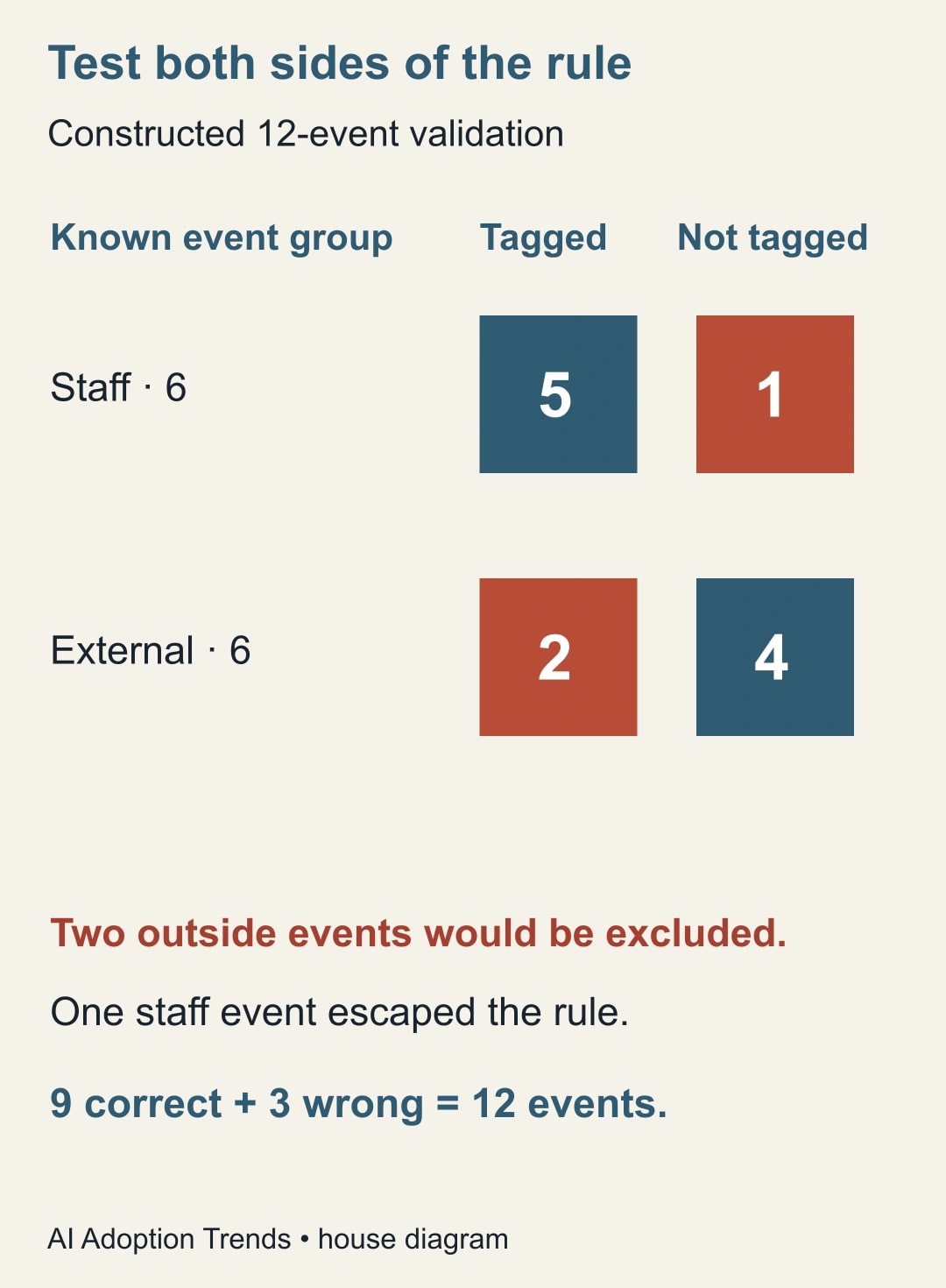
A twelve-event example exposes two different defects
Consider a constructed validation exercise with six known staff events and six known external events. The expected result is six internal classifications and six unclassified external events. Instead, the analyst finds five staff events classified as internal and two external events classified as internal. All twelve events are otherwise accounted for in the test record.
The filter has found five of six staff events, but it has also misclassified two of six outside events. Across the twelve known observations, nine classifications are correct and three are wrong. An overall accuracy of 75% is not an approval criterion here. The two outside events would be discarded by an active exclusion. That defect alone is enough to stop activation until the cause is understood.
The missed staff event requires a different investigation. Perhaps the tester used another network; perhaps the configured rule did not cover the intended route. The analyst should verify the recorded conditions, not guess. Expanding a rule might catch that event while also excluding more customers. Each change therefore needs both the staff and outside checks again.
After a revision, suppose a new controlled run classifies all six staff events and none of the six external events as internal. That is a passed acceptance test for those conditions. It is not evidence of perfect coverage for every visitor, device or future network. Keep the successful case record and name the uncovered situations, such as traveling staff or a shared client office.
The event counts in this example are not sessions, users or subscribers. Do not apply the fraction of staff test events directly to the site's session total. One person can generate many events. Use the test to validate the rule's behavior, then assess business metrics with their own definitions and denominators.
Use a release worksheet that another person can audit
Copy this worksheet into the change record. Fill it with actual observed evidence; an empty field means the release is not ready.
- Measurement question: which business activity should the report represent?
- Scope: property, web stream, intended networks and traffic_type value.
- Owner: person approving the rule and person maintaining it.
- Positive cases: known staff events, expected classification and observed classification.
- Negative cases: known outside events, expected classification and observed classification.
- Exceptions: shared networks, changing addresses and missing test observations.
- Release record: approved configuration, activation time and report annotation.
- Stop rule: unexpected outside matches or unexplained loss of legitimate activity.
The business owner should review the negative cases, not just accept a screenshot showing staff activity tagged. A technical implementer may focus on whether a rule matches; the business owner knows whom the site cannot afford to lose from measurement. That division of responsibility makes the review useful instead of ceremonial.
Keep the configuration change small. Avoid changing consent settings, event names, conversion definitions and internal filtering in the same release unless the changes are inseparable. Otherwise a later movement in the chart becomes difficult to explain. If several changes are necessary, record separate times and separate validation evidence.
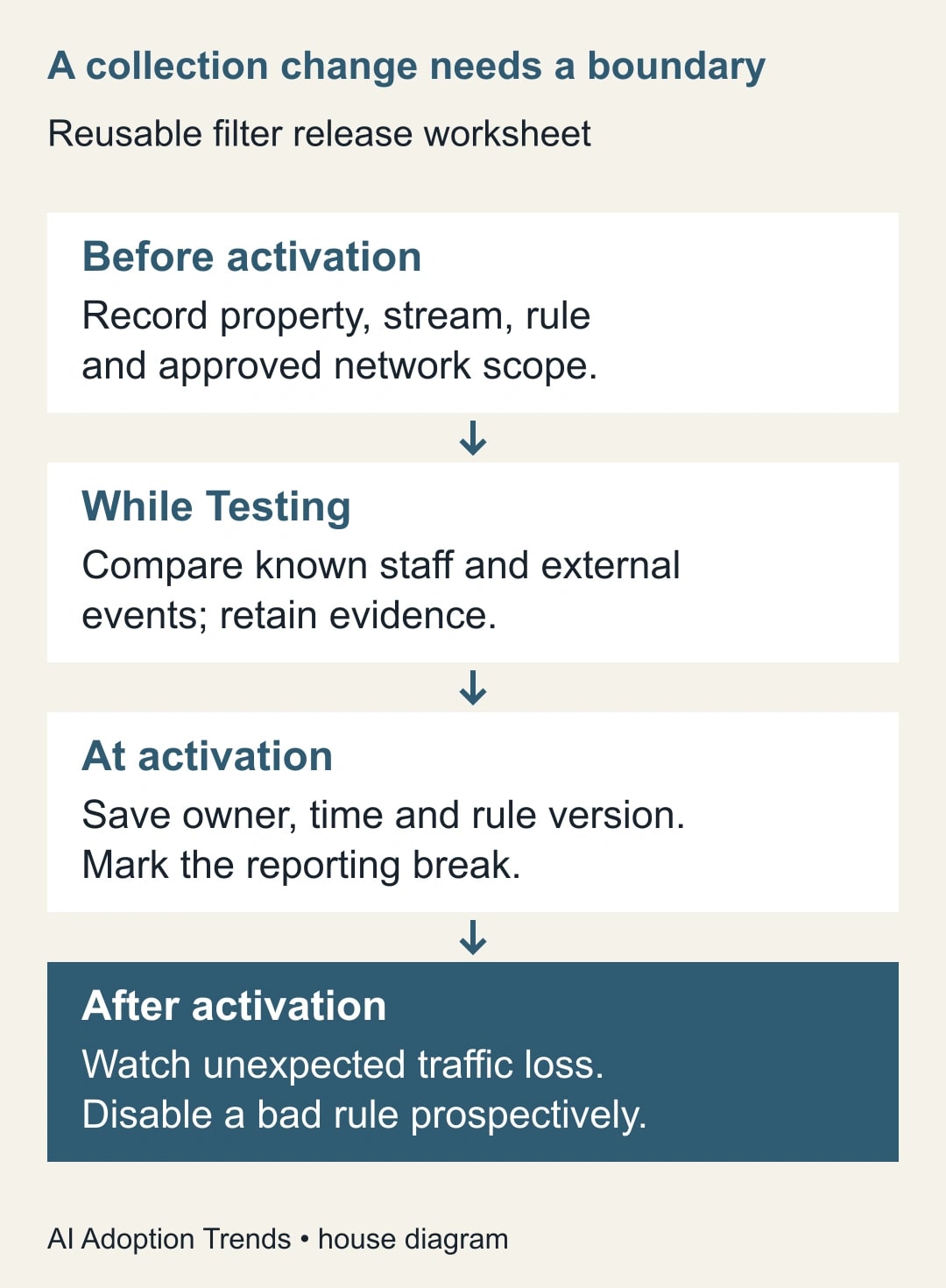
After activation, watch for a reporting break
Record the exact activation time and the first complete reporting period under the new definition. Compare like periods, but label the collection change explicitly. A lower visit total after filtering may represent cleaner measurement. A higher subscription rate may result from a smaller denominator rather than better content or a more persuasive signup form.
For example, a constructed report might show three confirmed subscriptions across 120 measured sessions before a change, or 2.5%. Another period might show three across 100 sessions, or 3%. The arithmetic is correct, but it does not prove conversion improved. The periods differ, and the collection rule changed. Use a stable definition for subsequent comparisons and keep the earlier figure qualified.
If an unexpected decline appears, review the rule and test evidence promptly. Make an incorrect filter inactive to stop future exclusion while investigating. Document the affected interval. Do not claim to have restored discarded events. Other authorized records may help assess business impact, but they do not recreate missing Analytics observations or justify filling the chart with estimates presented as measurements.
Set a recurring maintenance trigger tied to actual changes: a new office connection, a remote-work arrangement, a network provider change, or a new testing workflow. A rule that passed once can become stale. The owner should know where the configuration lives and which outside test case to repeat. If nobody can maintain that responsibility, prefer a clearly labeled reporting limitation over an unattended exclusion.
Measure success as correctly classified known tests, documented coverage, and usable reporting continuity. Track false exclusions separately from missed staff activity. Do not celebrate a large fall in traffic as the objective. The objective is evidence that helps a business decision without hiding legitimate visitors.
Start with the worksheet and one staff-versus-external test pair. Once collection is understood, use the GA4 and Looker Studio diagnostic guide to reconcile reporting differences, and the guide to measuring actual AI-assisted work to connect activity with useful outcomes.
Weekly Newsletter
AI Adoption Weekly
New research, field guides, training studies, and tool decisions for operators.
No spam. Unsubscribe anytime.
Related Comparisons
Calculator
AI seat cost calculator
List price × headcount. You enter the hours and the operating assumptions.