
Copilot Confluence Filters: Index Approved Procedures, Not Just Recent Pages
Filter Confluence content for Copilot by approved scope, then test source permissions, missing pages and synchronization delays.
Published November 19, 2026

To keep obsolete procedures out of a Copilot Confluence connector, select the intended spaces and filter for content that an owner has approved. Do not use a recent-modification cutoff as your only definition of current guidance. An old procedure can remain valid, while a document edited yesterday can still be a draft. Keep source permissions enforced and test both inclusion and exclusion before expanding the audience.
Microsoft's November 17, 2026 Copilot release notes describe new Confluence Cloud connector filters for including or excluding spaces and selecting pages with Confluence Query Language, or CQL. CQL is a structured way to specify which Confluence content matches conditions. The notes also describe a preview of the selection. The change is finer control over connector scope, not the first availability of the connector itself. Microsoft's release notes.
This guide turns that change into a proposed operating procedure for an internal knowledge owner. Product details were checked November 19. The worked example is constructed; it is not a report of a connector deployment or a measured improvement in Copilot answers.
Separate three decisions before changing the filter
First decide which procedures the service should answer questions about. That is the content scope. Next decide which documents are authoritative enough to support those answers. That is the editorial approval decision. Finally decide which person may see each document. That is access control. A useful setup has explicit answers to all three.
A space named Operations may contain approved instructions, meeting notes, abandoned proposals and restricted incident records. Selecting that space does not make every page suitable for general operational guidance. Similarly, a label named approved-sop is only useful if someone maintains its meaning. A forgotten label can keep a superseded instruction in the selected set.
This workflow fits a knowledge operations lead who owns a defined procedure collection and can work with Microsoft 365 and Confluence administrators. Start with one department and one class of questions, such as routine service escalation. Avoid starting with every employee question or every company space.
Skip the filter rollout if no one can identify the authoritative version of a procedure. Repair the source collection first. Also pause if the proposed service requires immediate permission revocation but your synchronization and response process cannot meet that requirement. A narrower content list does not solve a delay in access updates.
Prerequisites and the real cost of preparation
Microsoft's deployment guide requires tenant administration and a Confluence service account that can read the intended content, with appropriate credentials and Confluence administrative involvement for integration setup. Confirm that the filtering controls are present in your tenant; Copilot features roll out gradually. Use an existing approved connection where appropriate rather than creating a duplicate connector for the same content. Confluence connector deployment.
Before a pilot, gather the space keys, page identifiers, current source permissions, procedure owners, approval convention and expected user groups. Confirm applicable Microsoft and Atlassian entitlements, indexing capacity and any incremental charges with the administrators responsible for those accounts. This article does not quote a universal connector price or assume every existing plan covers the proposed scope.
Assign the knowledge owner to approve documents and exceptions. Assign the Confluence administrator to source access and labels. Assign the Microsoft 365 administrator to connector configuration, identity mapping and synchronization. Assign a business reviewer to determine whether an answer is useful and supported. Record a fallback owner for questions that the pilot cannot answer.
Expect source cleanup to consume more time than typing a query. If twenty procedures require fifteen minutes each for an owner to confirm currency and authority, that is five staff hours before connector testing. That constructed estimate is a planning calculation, not a typical implementation benchmark. Add administration, user testing and recurring review time separately.
Build an eight-page selection fixture
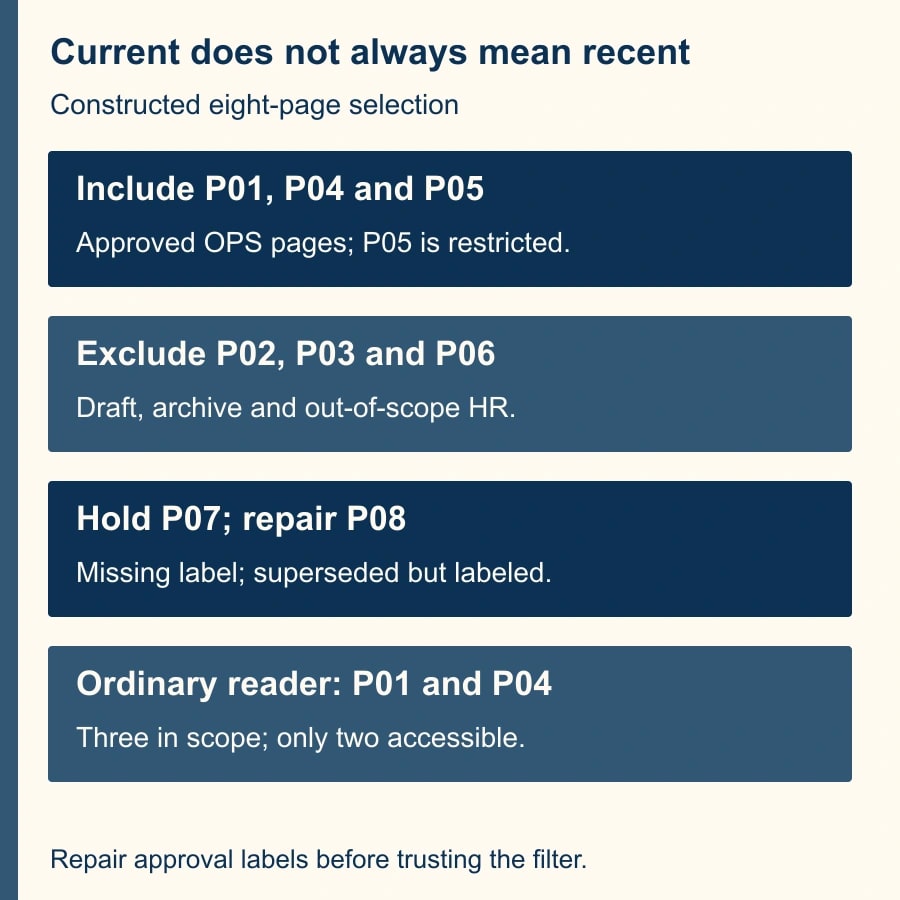
Use a small, named set of documents to make the intended scope concrete. The following constructed fixture uses OPS, ARCH and HR as illustrative space keys. “Approved” means the knowledge owner has confirmed the procedure, not merely that a page happens to carry a tag.
- P01: OPS, approved current procedure, last edited long ago. Include it.
- P02: OPS, recent draft with no approval label. Exclude it.
- P03: ARCH, approved-looking obsolete procedure. Exclude the archive space.
- P04: OPS, approved current procedure, recently edited. Include it.
- P05: OPS, approved current procedure with restricted source access. Include in connector scope only with its access restrictions preserved.
- P06: HR, approved procedure outside the pilot's job. Exclude it.
- P07: OPS, current procedure lacking the approval label. Hold for its owner to decide whether to label and include it.
- P08: OPS, superseded procedure still carrying the approval label. Remove the mistaken approval label before accepting the selection.
After repairing P08 and leaving P07 pending, the expected connector scope is three pages: P01, P04 and P05. For an ordinary pilot user who may read P01 and P04 but not P05, the expected accessible subset is two pages. Those are different counts serving different tests.
This fixture exposes the weakness of recency alone. A recent-only rule can omit P01 and include P02. It can also overlook the reason P08 is wrong: the page's approval state is inaccurate. No query can infer a reliable approval decision from an unreliable label.
Translate the decision into a query
Choose the OPS space in the connector's include settings and exclude unrelated spaces according to the intended setup. Then consider a query such as type = page AND space = "OPS" AND label = "approved-sop". Replace both values with the actual space key and governed label. This is an illustrative filter for the fixture, not a universal query to paste into every tenant.
Microsoft's Confluence setup guidance describes filtering by page type, space and labels, with an optional last-modified condition. Use the connector preview and the source search to inspect the actual result set. The example deliberately omits a recency condition because the owner has confirmed that P01 remains current despite its older edit date. Microsoft's CQL setup guidance.
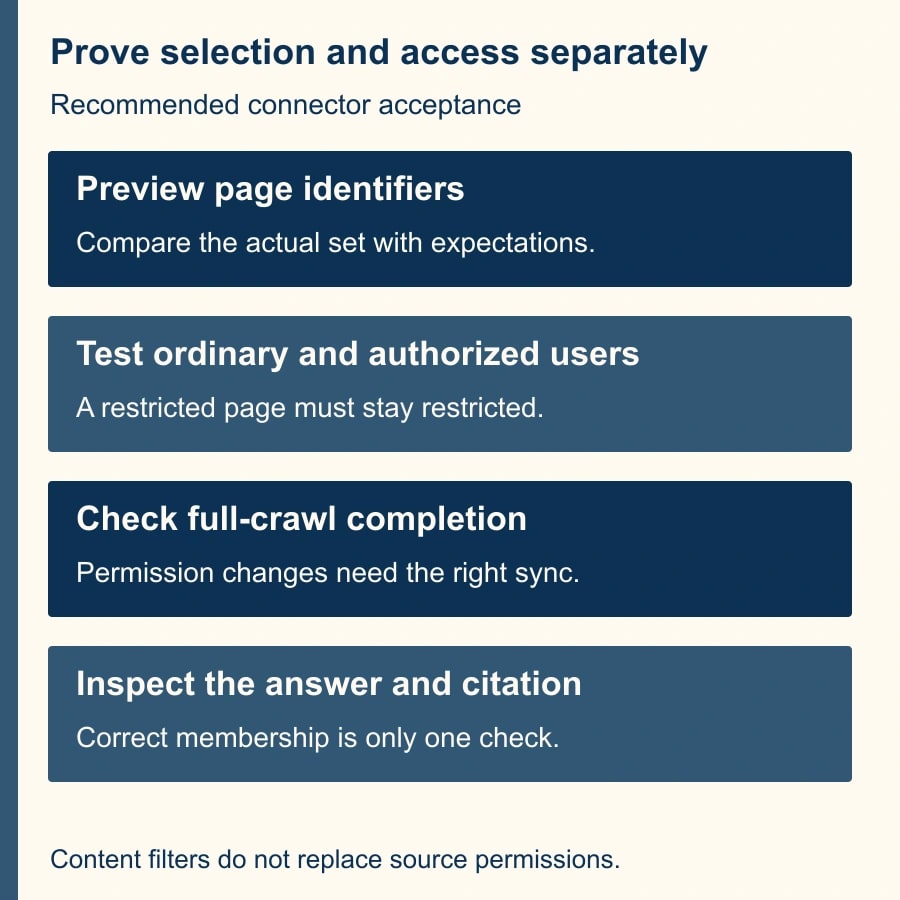
Compare returned page identifiers with the expected list, not just the number of results. Three results could be the wrong three pages. Investigate missing P01 before making the query broader. Investigate included P08 before deciding that the approval label is a sufficient control. Save the query text, selected spaces, result identifiers and review date in the pilot record.
Use the preview as a checkpoint, not final proof that the user-facing answer is correct. Indexing, identity mapping, permissions and the actual question can introduce further failures. A correctly selected document can still be quoted out of context or combined with a contradictory source available through another connection.
Keep other connectors and sources in view. Removing a page from this connection does not prove that no other copy or source can contribute similar content. If the business question requires one authoritative instruction, ask the reviewer to inspect citations and compare competing versions rather than assuming the filter makes the answer exclusive.
Preserve permissions and test an excluded reader
Microsoft documents source-based access as the default permission choice. Selecting Everyone makes indexed data available in search results to all users. Keep source-based access for this pilot and verify identity mapping. A content filter selects documents; it does not replace their access rules. Connector user settings.
Test with an ordinary pilot user as well as an authorized owner. Ask questions that should find P01 and P04, then a question whose answer exists only in restricted P05. Use harmless synthetic restricted content for this negative test where possible. The ordinary user should not receive P05's restricted details or citation through the tested path.
Next test a user who is authorized for P05. A failure for that person may indicate mapping or synchronization trouble rather than successful restriction. Record the source permission, expected user access and observed result for both identities. Do not use an administrator's successful search as a substitute for the ordinary-user test.
If an unauthorized person receives restricted content, stop the pilot audience's access through the affected connection and investigate with the administrators. Preserve the evidence and assess the scope of disclosure through your established incident process. Changing the query to hide one page may reduce exposure, but it does not prove the underlying permission problem is repaired.
Plan for permission and deletion delays
The deployment guide distinguishes incremental and full crawls. Incremental crawls synchronize new and changed content; full crawls also detect deleted items and synchronize access-control changes. The documented defaults are fifteen minutes for incremental crawls and twenty-four hours for full crawls, with configurable intervals. Do not treat the shorter interval as a promise that a permission removal has propagated. Microsoft's crawl guidance.
For a removal test, use a synthetic page and a test identity. Record when access changed at the source, when the relevant synchronization completed and when the tested user stopped receiving the content. Confirm the current connector state rather than waiting an assumed number of minutes and declaring success.
Give urgent removals a separate operating path. The administrators need to know how to restrict or suspend the affected connection or audience while an access problem is investigated. Do not depend on a routine overnight crawl for a time-critical confidentiality requirement. Agree on that response before the pilot contains material that would make a delayed removal consequential.
Also distinguish deletion from supersession. An old procedure may need to remain in Confluence for historical reference while being excluded from current guidance. The owner can retain the historical record and remove it from the approved selection according to the agreed convention. Deleting evidence solely to improve an AI answer can create a different business problem.
A reusable connector acceptance record
Keep a compact record that a replacement administrator can understand. It should connect the business question to the source selection and the observed reader experience.
- Purpose and exclusions: [questions the pilot should answer; departments and document types outside scope].
- Source approval: [page identifier, procedure owner, current version, approval label and next review date].
- Selection: [included and excluded spaces, exact CQL, preview date and expected page identifiers].
- Access: [source permission setting, identity mapping, authorized and restricted test identities].
- Synchronization: [configured intervals, last completed crawl, removal-test timestamps].
- Answer checks: [question, expected source, observed citation, factual correctness, missing qualification].
- Exceptions: [missing approved page, included obsolete page, incorrect access, owner and repair].
- Release decision: [limited audience, rollback owner, pass criteria and review date].
For the eight-page example, require all three intended identifiers in scope, the two intended identifiers accessible to the ordinary reader, no restricted disclosure and no P08 result after the source repair and relevant synchronization. Then assess whether the answers actually help an employee take the correct next step. Membership and permissions are necessary, but not sufficient, measures.
Measure usefulness without overstating savings
Run a small set of real recurring questions through the pilot and record correct, cited answers, missing answers and staff corrections. Track how often an answer sends a person to the wrong procedure. Review the source selection whenever a procedure is superseded, not only when a model gives a conspicuous error.
Compare total staff time spent finding and checking guidance with the earlier process, including source maintenance and exception handling. Any reduction is released capacity unless spending changes separately. Stop expanding if the approval label is not maintained, restricted-user tests fail or reviewers cannot establish which version governs the work.
Start by building the eight-page equivalent for one procedure family. If the underlying source collection is inconsistent, use the guide to repair outdated answers at their source. Before widening the connection, review the questions to ask before connecting business data to an AI service.
Weekly Newsletter
AI Adoption Weekly
New research, field guides, training studies, and tool decisions for operators.
No spam. Unsubscribe anytime.
Related Comparisons
Calculator
AI seat cost calculator
List price × headcount. You enter the hours and the operating assumptions.