
Workspace Studio Wait Until: Recheck Before Sending a Reminder
Set a delayed onboarding review, verify the time zone, and check current task status before a reminder reaches the employee.
Published November 15, 2026

Use Workspace Studio's Wait until step to delay an onboarding reminder, then check whether the task is still open before anyone sends it. A timer can decide when a flow resumes. It cannot, by itself, decide whether the original recipient, deadline, or request is still correct. Start with a reminder to the coordinator when you cannot reliably retrieve the current record after the wait.
This guide is for a people operations coordinator who already tracks a small onboarding task in Google Workspace. It fits a reminder about submitting a profile photo or confirming a training session. Skip automatic employee messages for sensitive personnel matters, disputed requirements, or a process without a reliable completion record. Those need a named reviewer regardless of how neatly the timer works.
What changed, and what the timer actually promises
Google's November 10 announcement introduced Wait until, with rollout beginning November 9. It supports pauses inside Check if branches and Repeat for each loops, with a maximum wait of 14 days. Google lists Business Starter, Standard and Plus among eligible editions, along with specified Enterprise and Education editions. These are provider specifications checked November 15, 2026; verify access in the account that owns the flow. See the Workspace Studio release announcement.
The practical benefit is keeping a short delayed sequence together. You can inspect the initial event and its later continuation without maintaining a separate calendar reminder for every person. That does not establish a delivery guarantee, a complete cancellation mechanism, or permission to act on information that may have changed. Our recommended design puts the decision about the reminder after the wait.
Google's Wait until help page describes three modes: a day next week; a day and time up to 13 days ahead; or a duration up to 14 days. The timed modes include a time zone. Later steps can use the wait start, end, and elapsed-seconds variables. Choose the mode that expresses the business promise, rather than converting every deadline into an arbitrary number of hours.
Make one person responsible for the reminder
Name the coordinator who owns the task list and a backup who can inspect runs. The manager who requested the task owns whether it is still required. The Workspace administrator owns account access and applicable service settings. Keep these responsibilities separate: the person repairing a flow should not have to infer whether an employee still needs training.
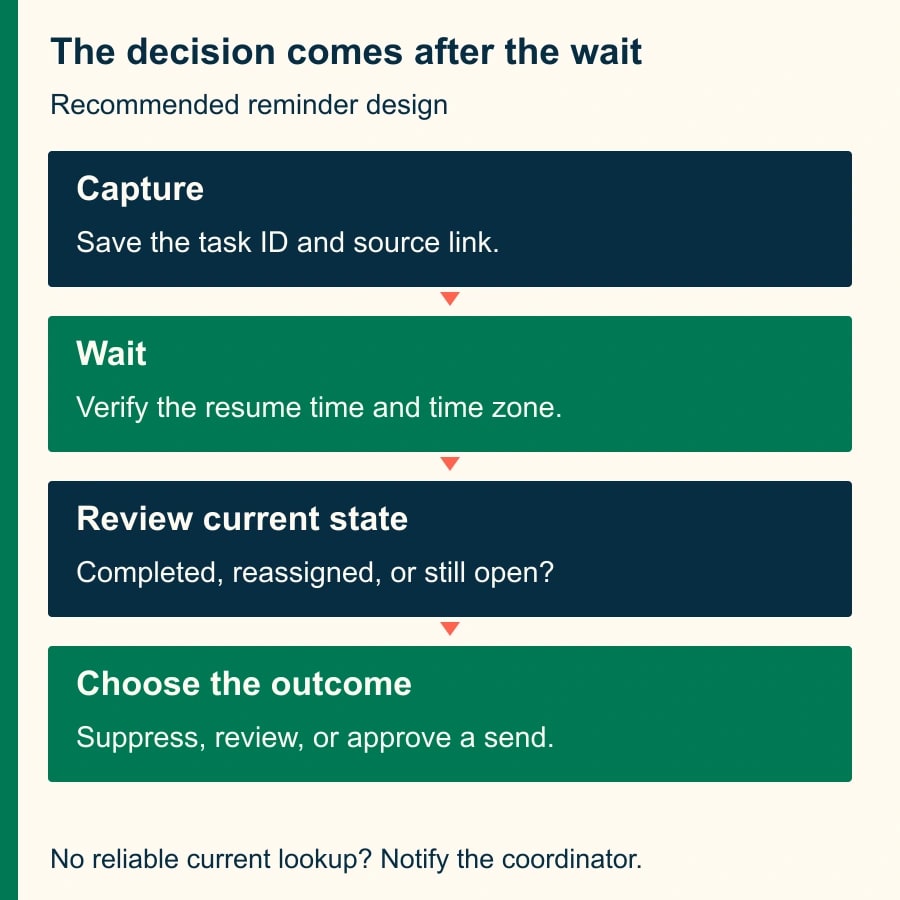
Before building, write the rule in one sentence: “Three days after the welcome task is created, notify the coordinator to review any still-open task before contacting the employee.” This is a usable first release even without a current-record lookup. It also gives you an acceptance test: a completed task must not produce an employee reminder merely because its original timer expired.
Use a stable task ID, an employee work address, a task type, a current status, a due date with time zone, and an accountable owner. Add the original event time and a reminder outcome field. Treat the field names here as a suggested tracking design, not a claim that Studio creates them automatically. Your source system must support the fields and access you need.
The cost to check first is your existing Workspace entitlement. This workflow does not establish a need to purchase a higher edition. Budget staff time to map the source, inspect the available steps, run tests, and review exceptions. A constructed pilot budget of two hours for setup and one hour for review is a planning allowance, not a measured implementation time or a vendor price.
Build the first version around a review task
Start with one harmless task and test accounts. Keep employee-facing sends disabled while you establish the sequence. Use the supported trigger appropriate to your existing tracker, and confirm that it starts once for the intended new task. A trigger that also reacts to later edits needs a filter or a different design; otherwise every status change can create another waiting run.
Capture the task ID and a link that the coordinator can open. Keep the initial task state as context, clearly marked with its capture time. Do not call that snapshot the current state. This distinction is especially important when a generated summary appears later in a message: fluent wording does not make old information fresh.
Add Wait until before the review notification. For a three-day business-time reminder, choose Specific day and time, set Days to wait to 3, and choose the intended local time and time zone. This is three calendar days, not a business-day calculator. If weekends or company holidays matter, explicitly choose and verify an appropriate date or use a separate process that supports that calendar.
After the wait, send a coordinator-only message containing the task ID, source link, original event time, and requested review. Suggested copy: “Review onboarding task ONB-104. It was opened November 16 at 09:00 Eastern. Before contacting the employee, check current completion, owner, deadline and recipient in the tracker.” Avoid a statement such as “Alex has not completed the task” unless the current source supports it.
Inspect the Activity tab after starting the test. Google's announcement says it records the scheduled resume timestamp and time zone, then the resumption. Compare those values with your expected local time. A run that resumes is evidence about the timer; the subsequent message and the coordinator's outcome require separate checks.
Add an automatic send only after a fresh-state test passes
If the available Studio steps can retrieve your authoritative task by its stable ID after the wait, insert that lookup before any send decision. Verify the step in your account; this guide does not assume every tracker or connector exposes a suitable lookup. Test by changing the task during the pause and checking which value the later step actually receives.
Require the returned ID to match, the task to remain open, the deadline still to warrant a reminder, and the recipient to be the current approved work address. A missing record, multiple matches, access error, or ambiguous status should produce a coordinator review item. Do not convert a lookup error into “not completed.” That would turn a technical failure into a false assertion about an employee.
Then use Check if to separate eligible reminders from cases requiring review. Keep the notification outcome in the tracker or another controlled log that your implementation can update reliably. Before sending again, check whether this task and reminder stage already have a confirmed outcome. If two overlapping runs could both pass that check, retain coordinator review until a more reliable duplicate-prevention mechanism is available.
There is also a short interval between reading the source and sending. Someone can complete the task during that interval. For a low-consequence courtesy reminder, the process owner may accept that risk and use wording that acknowledges recent completion. For a sensitive or consequential message, keep a human approval immediately before sending. A timer is not a reason to lower the communication standard.
Worked example: ten tasks, seven completed, one reassigned
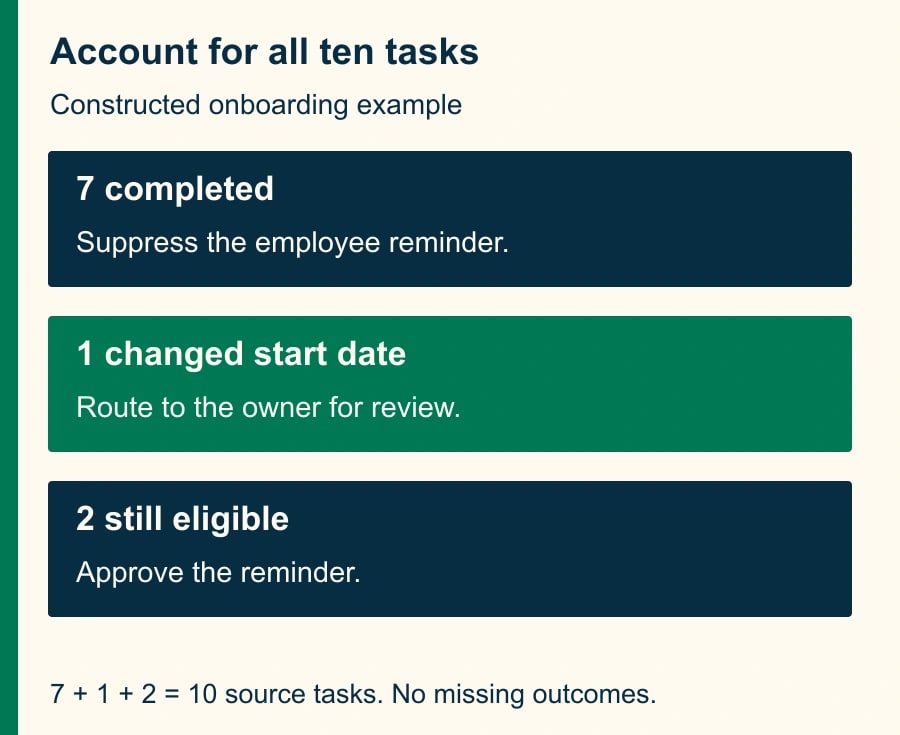
Consider a constructed onboarding cohort with ten photo-submission tasks created Monday, November 16, at 09:00 America/New_York. The coordinator chooses Thursday, November 19, at 09:00 for review. The expected elapsed time for this particular example is 72 hours. Record both the local schedule and the timestamp shown in Activity rather than assuming all calendar transitions behave identically.
By Thursday, seven tasks are complete. Of the three still open, one belongs to an employee whose start date moved to December; its due date and owner were updated. The other two still need a reminder. A process that blindly sends after the timer would send ten messages. The review rule approves two, suppresses seven completed tasks, and routes the changed-start-date task to its owner.
The accounting is ten started tasks equals seven completed suppressions plus one changed-case review plus two eligible reminders. That equality is a useful checkpoint. A missing eleventh run or nine recorded outcomes is a reason to investigate, even if the two visible emails look correct. Count source task IDs, waiting runs, reviewed outcomes, and confirmed sends separately.
Suppose the coordinator previously spent three minutes checking each of those ten tasks. If the pilot later reduces that to one minute per task, the constructed reduction is 20 minutes per cohort. It is released staff capacity, not cash savings. The pilot still incurs setup and exception-review time; do not report the gross reduction as a budget saving or as an observed product result.
A test pack you can reuse before enabling messages
- Complete a task during the pause. Expected outcome: no employee reminder; the log records completion or the coordinator suppresses it.
- Change the work address and owner during the pause. Expected outcome: review uses the current record; an old address is never silently reused.
- Remove access to the task source. Expected outcome: an explicit review exception, with no assertion that the employee failed to act.
- Start a second event for the same task. Expected outcome: the coordinator can identify the overlap; automatic sending stays off until duplicate handling is proved.
- Move the due date beyond the reminder date. Expected outcome: the task is reviewed or deferred under the written rule.
- Choose a different time zone in the test. Expected outcome: the scheduled timestamp matches the intended local time and is visible in the activity evidence.
- Interrupt or disable the flow in a harmless test. Inspect what happens to waiting runs before relying on that action as your cancellation procedure.
Keep a simple review record for each case: task ID, source state before the wait, change made during the wait, expected outcome, actual outcome, reviewer, and evidence link. This worksheet is more useful than a screenshot saying the flow is enabled. It captures the exact business behavior you intended to preserve.
Recover a late or uncertain run without sending twice
If a reminder appears late, first compare the expected time zone and date with the recorded wait end and actual resumption. Next check the notification action and the destination. A resumed flow can still encounter a later failure. A missing message in one view is not proof that no message was delivered elsewhere.
For an uncertain send, have the coordinator inspect the destination and the task log before restarting anything. Record the task as “outcome unknown” until evidence resolves it. If the message already arrived, close the review item and repair the log. If it did not, approve one replacement and link it to the original run. Do not replay an entire cohort to repair one uncertain reminder.
For a deadline beyond the documented wait range, use a maintained due-date queue or an existing scheduling system. Chaining long waits to simulate an indefinite business calendar increases the number of states the owner must understand. The durable record should remain the task and its due date, not an assumption that a flow will remember the obligation forever.
Decide whether to keep the pilot
Run one cohort with coordinator review and count inappropriate reminders, unresolved outcomes, duplicate candidates, late reviews, and minutes spent checking the queue. Agree beforehand that any wrong-recipient employee message stops automatic sending. A repeated inability to retrieve current status is a reason to keep the coordinator-only design, not to hide the lookup failure.
The next action is to create three test tasks: one unchanged, one completed during the pause, and one reassigned. Enable employee messages only if the appropriate checks are observable. If your flow begins in Gmail, use the thread-reply intake checks to prevent duplicate starts, then use the read, draft, send and change approval matrix to decide what the flow may do after it wakes up.
Weekly Newsletter
AI Adoption Weekly
New research, field guides, training studies, and tool decisions for operators.
No spam. Unsubscribe anytime.
Related Comparisons
Calculator
AI seat cost calculator
List price × headcount. You enter the hours and the operating assumptions.