
Workspace Studio Steps Blocked? Check the New Collaboration Setting
Diagnose Workspace Studio collaboration errors, test private and shared steps, and recover unfinished runs before retrying.
Published November 20, 2026

If a Workspace Studio flow still creates a draft but fails when it emails a colleague or updates a shared file, ask the administrator to check Collaboration steps before rebuilding the flow. Google has introduced a setting that can allow private work while blocking actions that affect other people. First identify the blocked step, then account for anything the run already created before trying again.
This is a useful option for an operations team that wants employees to draft and organize work before allowing automatic distribution. It needs a deliberate rollout, however. A business process can depend on its final handoff even when the earlier steps look harmless. An intake flow that prepares an answer but never reaches the service team is unfinished work.
Google announced the setting on November 19, 2026, with rollout over up to 15 days. Collaboration remains enabled by default. Administrators can change it at domain, organizational unit or group level under Workspace Studio > Collaboration & approvals. The launch covers the listed Business, Enterprise and Education editions and eligible add-ons. Check your edition and feature visibility against the Google announcement before planning the change. This article was checked on November 20, while that rollout was still underway.
Decide whether private drafting fits the job
Use the restriction when the intended output belongs to the flow creator: a draft response, personal reminder or private working document. It can help a team introduce automation in a narrower role while people remain responsible for distribution. The business owner should be able to point to the human handoff that completes the job.
Skip a broad restriction if the team depends on unattended shared updates and has no replacement process. That does not mean every flow should retain collaboration indefinitely. It means the administrator and process owner need to agree on which work will pause, which work can become a draft, and who will handle the resulting queue. A successful technical restriction can still produce a missed customer commitment.
Before starting, name two owners. The administrator controls the effective setting. The operations owner decides whether the resulting work is complete and acceptable. Give both access to a small test flow, its run history, and non-sensitive sample records. Ask a third person to act as the intended recipient when testing the collaborative version. Their confirmation is stronger evidence than a green step in the creator's view.
Budget for this as a process change. If the organization already has eligible Workspace access, the immediate work is inventory, testing, communication and recovery preparation. Verify current subscription coverage rather than buying an upgrade solely because the setting has been announced. The effort estimates below are planning examples, not Google prices or measured customer results.
Understand the boundary before changing it
Google's collaboration and approval documentation describes enforcement when a Google Workspace step executes. Existing flows are affected on their next run; blocked steps remain visible in the editor. Read-only steps and starters are outside this control. Third-party steps, custom steps and webhooks have separate controls. A webhook is an automated request sent to another service, so its presence deserves its own review.
Under the restricted setting, examples of permitted work include self-notifications, Gmail drafts and edits to owned, unshared files. Sending to other people, posting to shared Chat spaces or editing shared files crosses the boundary. Group settings override organizational-unit settings, and changes can take up to 24 hours. The separate approval settings are not the same thing as this collaboration restriction. Use the linked documentation to confirm the exact action and effective policy before classifying an error.
Our operating recommendation is to classify each step by its destination and effect. A step named “Update report” could modify the creator's private worksheet or the sales team's shared forecast. Those are different decisions. A familiar title, folder name or email subject does not establish who can see the result.
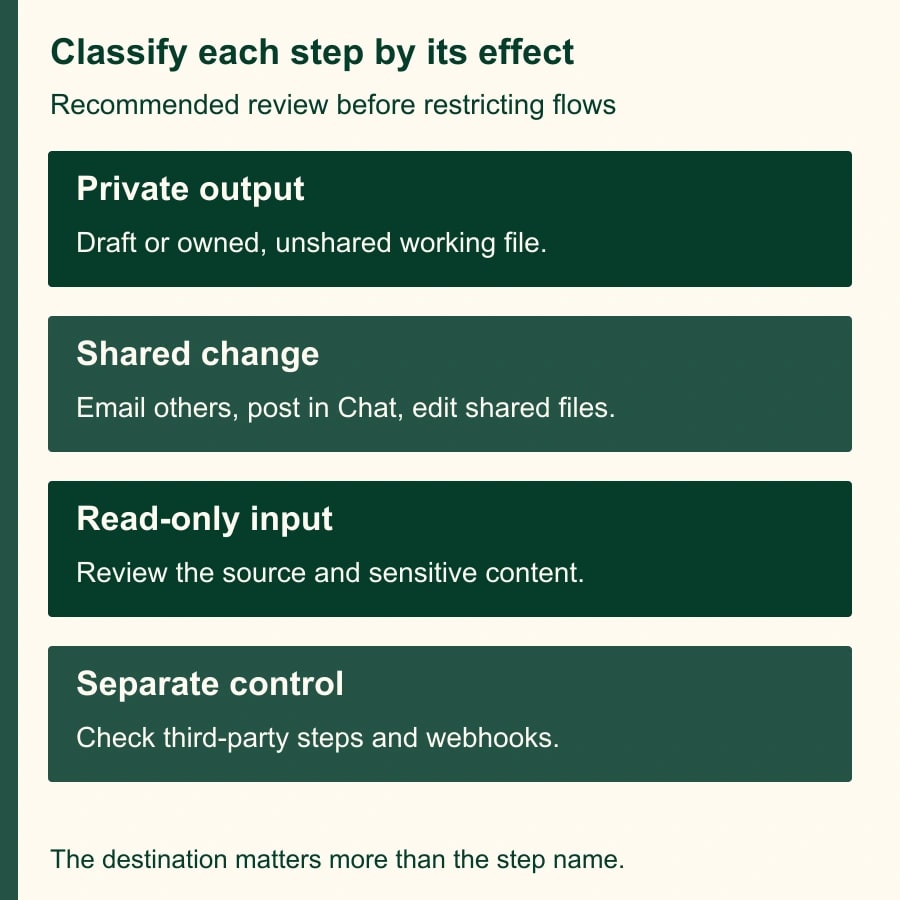
Do not treat the restriction as a complete review of the flow's information handling. An allowed read may still bring sensitive content into a draft. A separately governed connector may still perform an external action. Ask what information enters the flow, where it goes, and which controls apply to each route. The Collaboration steps setting answers one part of that inventory.
Build a five-flow acceptance worksheet
Use a small, constructed test set before changing a busy team. The following cases describe expected behavior based on Google's documentation. They are not results from a live tenant test. Record the actual outcome in your own environment, including the account, effective group, test time and run identifier.
- F01: Read an approved shared reference and prepare a Gmail draft. Expected business output: one private draft, with no message delivered to another person.
- F02: Send that draft's content to a colleague. Under the restriction, expect the sending step to fail. Confirm the recipient did not receive a test message.
- F03: Edit a worksheet the creator owns and has not shared. Expect the edit to be permitted by this setting; ordinary file permissions and other errors still need checking.
- F04: Edit a shared worksheet. Expect the shared edit to be blocked. Compare the target cell before and after instead of relying only on the run label.
- F05: Send a request through a third-party connector or webhook. Mark this “separate control review,” not “blocked by Collaboration steps.” Test only after the relevant administrator has approved the destination and sample data.
For each case, preserve the input, target identity, expected result, observed result and evidence location. The expected set contains two permitted Workspace cases, two blocked Workspace cases and one separately governed case. Calling that a four-out-of-five success rate would hide the point: each case has a different acceptance condition.
Repeat F02 for any group that is supposed to retain collaboration. A negative test under the restricted account and a positive test under the approved account help reveal an inheritance mistake. If both behave identically, first investigate policy propagation and group membership. Rewriting a working flow will not resolve an account that is receiving the wrong policy.
Trace a partial run before retrying it
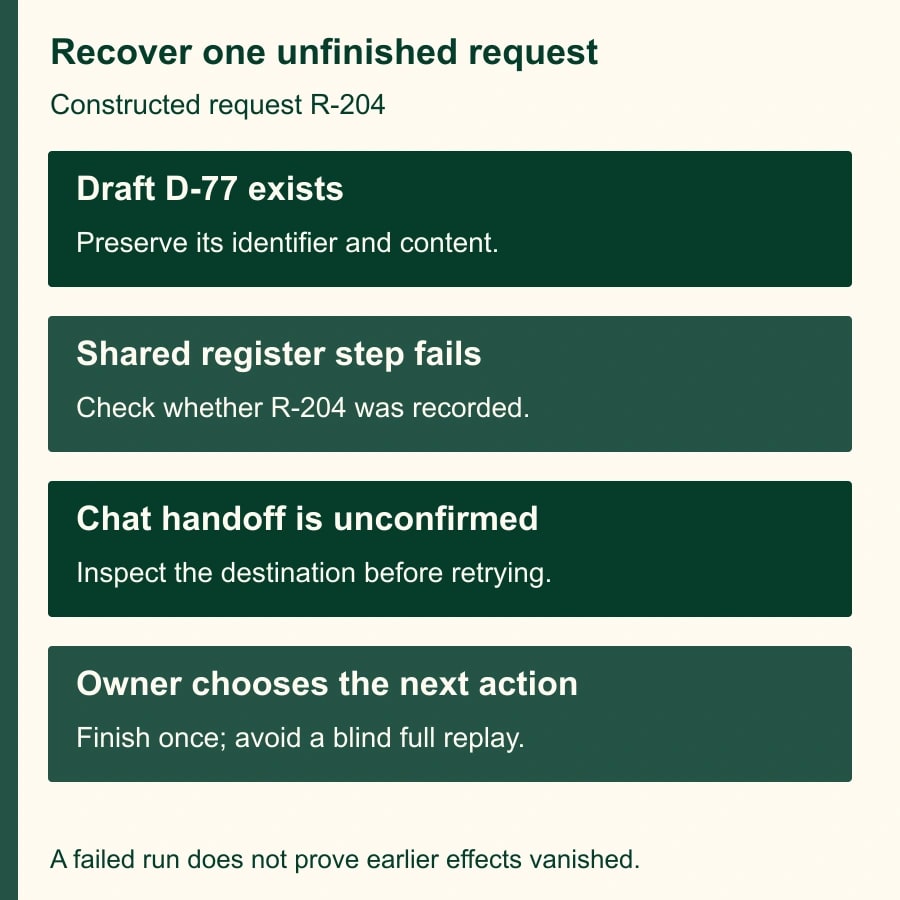
Consider a constructed service-request flow with four steps: read a request, create a private draft, update the shared intake register, then notify a Chat space. The administrator restricts collaboration. The next run creates its draft and stops at the shared register update. The service team sees no new register entry and no notification, but the creator may already have an artifact to reconcile.
This example is a recovery model, not a claim that Studio guarantees a particular rollback behavior. Inspect the actual run and destination systems. A failure at one step is not evidence that every earlier effect was reversed. Nor does it prove that a later action happened. Record each step as confirmed complete, confirmed incomplete or uncertain.
Suppose the request is R-204 and the draft exists as D-77. Put both identifiers in a recovery record. Check the register for R-204 and ask the intended Chat recipient to check the relevant space. If the register is unchanged and no notification exists, the owner can choose a controlled manual handoff using the existing draft. That decision is safer than rerunning from the beginning without knowing whether another draft or message will be produced.
If evidence is uncertain, pause the request. Search by the stable request identifier and review timestamps. Do not infer success from a matching subject alone: two requests can have the same subject. Likewise, do not delete the only surviving draft merely to make the run history look clean. Preserve the material needed to finish or explain the work.
Change the process in a small group first
Choose a pilot group with an owner who can review its queue daily. Inventory the group's active flows and identify every recipient, shared destination and external integration. Separate flows that are essential to a service deadline from experiments that can safely pause. Write down the baseline setting and the previous working version of each affected flow.
Tell users what will change in business terms: “Your draft can still be prepared, but the shared register update will need a person.” Include where to report a blocked run and who takes responsibility for the missing handoff. An instruction to contact IT is incomplete if IT cannot decide what the customer should receive.
After the administrator saves the pilot setting, allow for the documented propagation window and run the acceptance cases. Record when the effective behavior was observed, rather than treating the save time as proof that all accounts changed immediately. Keep production work under its agreed temporary process until the pilot evidence is complete.
For every affected flow, make one of three explicit choices. Retain a private drafting workflow with a named reviewer; allow collaboration for an approved group after testing; or retire the flow because its cost and uncertainty exceed its usefulness. Avoid leaving a broken flow enabled merely because its early steps still run.
A narrow exception needs a reason and a review date. For example, the service-desk group's shared register update may remain necessary while a broader employee pilot stays private. The exception owner should document the recipients, data and permitted actions. Approval for one group should not become an undocumented assumption that every employee needs the same access.
Measure completed work and the review burden
Track requests received, private drafts created, handoffs completed, blocked runs and unresolved items. Use the request identifier to reconcile the sets. A rising draft count is not a good result if the completed handoff count falls. Review the oldest unfinished request as well as the average delay; a small number of stranded items can matter more than the average.
Here is a constructed effort calculation. A team receives 30 requests a day. Preparing each manually takes four minutes, or 120 minutes in total. With private drafting, reviewers spend two minutes on each request plus 15 minutes reconciling the queue: 75 minutes. That releases 45 staff minutes per day if quality and completed output remain comparable. It is capacity, not cash savings.
If setup and acceptance testing take three staff hours, the simple capacity payback is four working days at 45 minutes a day. If blocked handoffs add another 30 minutes of daily repair, the net falls to 15 minutes and the same setup takes 12 working days to recover. Neither estimate includes an assumed reduction in payroll. Measure actual review and repair time before using the forecast in a business case.
Stop expansion if a restricted account can perform an action expected to be blocked, an approved workflow silently strands requests, or the team cannot determine whether a customer-facing effect occurred. Restore the agreed manual process while the administrator investigates. Re-enabling collaboration is a policy decision, not an automatic response to every error.
Your next action is to select one real flow and annotate its steps with “private,” “shared” or “separate control.” Then run the five-case worksheet under the intended account. Use the read, draft, send and change approval matrix to assign responsibility, and the Workspace Studio intake guide if duplicate request triggers are a separate problem.
Weekly Newsletter
AI Adoption Weekly
New research, field guides, training studies, and tool decisions for operators.
No spam. Unsubscribe anytime.
Related Comparisons
Calculator
AI seat cost calculator
List price × headcount. You enter the hours and the operating assumptions.