
Slack AI Inference in Japan: Check Scope and Failure Handling Before Switching
Separate Slack data storage from regional AI inference, confirm Japan scope and prepare a manual fallback before changing the setting.
Published November 18, 2026

Choose Slack's Japan regional AI inference option only after confirming three things: the work uses covered native Slack AI features, the account is eligible, and the team can continue when the selected region cannot process a request. Regional inference controls where the model handles prompts and responses. It is a separate decision from where Slack stores messages, and it should not become a blanket assurance about every app connected to the workspace.
This guide is for an IT owner and procurement lead assessing the option for a Japan-based business. It fits an organization with a specific processing-location requirement and an existing Slack workflow worth preserving. Skip an immediate switch if the requirement is still “keep everything local,” nobody has identified the affected features, or the business needs a region that is not currently offered. First turn the requirement into something the provider and your reviewers can evaluate.
The November change creates a specific choice
Slack's November 2026 product updates introduce regional inference for native Slack AI, starting with Japan. Inference means the model processing that produces an answer. As checked November 18, Slack's regional inference setup guide lists Osaka and Tokyo endpoints, the new Business+ and Enterprise+ plans, and activation by the appropriate Primary Owner through Slack support.
The same guide says the chosen region applies across the workspace or organization regardless of a member's location. It also says there is no cross-region fallback: a request fails if it cannot be processed in the designated region. In Slack Connect, each organization's members use their own organization's inference configuration. These are provider-described boundaries, not a test we performed on a customer account.
That last distinction changes the rollout conversation. A team may accept an unavailable AI summary in exchange for its required processing boundary. It may not accept an unavailable customer-support process. The operating design must separate the optional summary from the underlying work, so a failed AI request does not leave a customer waiting without an owner.
Write a requirement that can be answered
Start with one business workflow rather than a workspace-wide slogan. For example: “Our internal escalation coordinators use a native Slack AI feature to summarize approved incident discussion. We need confirmation of where its model prompts and responses are processed, who can enable the setting, and what happens when processing is unavailable.” This describes a reviewable scope without claiming that the setting answers every security question.
Ask the requirement owner to identify the reason for the constraint and the evidence they need. It may arise from an internal policy, a customer commitment or a procurement condition. Record the actual wording and the person authorized to interpret it. The IT team should not silently translate “storage in Japan” into “all processing in Japan,” or the reverse. Those statements describe different parts of the service.
Create a short register of the workflows under consideration. For each one, name the Slack feature, the people initiating requests, the source material, the output destination and any third-party app involved. Mark unknowns explicitly. An entry reading “AI assistant” is too vague when one team means native Slack functionality and another means an installed external agent.
The useful first output is a scope sheet with three states: covered by the provider's documented feature, outside that documented scope, and awaiting confirmation. Do not turn an unknown into an approved use merely because the prompt starts inside Slack. The place where an employee clicks is not enough to establish the processing path.
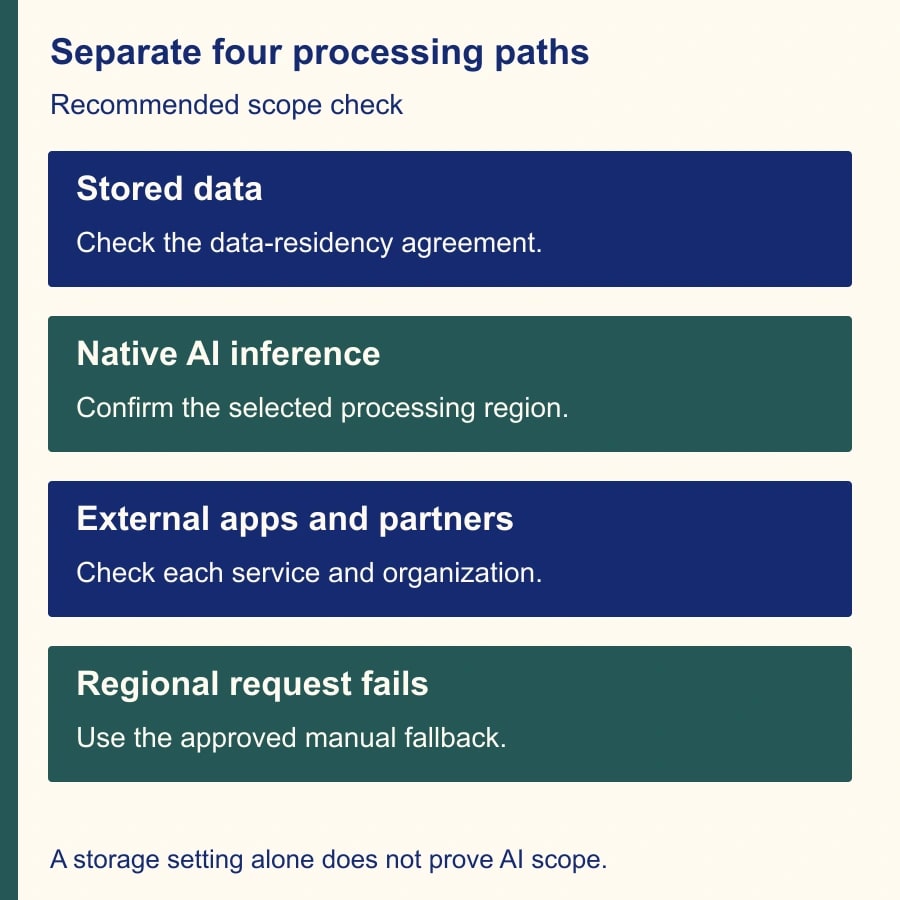
Keep storage and inference in separate rows
Slack's data residency documentation concerns the location of specified data at rest. It lists covered categories, exceptions and separate treatment for some metadata. Its Japan storage entry pairs Tokyo with Osaka as the backup region. Those storage details do not replace the regional inference review. Keep the two source documents and their effective account settings side by side.
A practical procurement worksheet therefore has one row for stored customer content, one for native AI model processing, and one for each external integration. Give each row a provider statement, an account-specific confirmation and an internal decision. If the business uses a third-party agent, obtain that provider's evidence separately. Do not assume Slack's regional inference setting configures an external model service.
Ask about existing versus future material when reviewing storage changes, and about the specific native features when reviewing inference. Record the support case or written response rather than relying on a sales-call recollection. The purpose is not to collect a large archive of generic assurances. It is to connect a defined business requirement to a documented configuration and a named approver.
Avoid publishing a broad internal announcement such as “all Slack data now stays in Japan.” A more accurate rollout note identifies the enabled setting, the covered workflow and the remaining limits. Have the requirement owner review the wording before staff treat it as permission to move new categories of sensitive material into Slack.
A worked decision for an escalation team
Consider a constructed example. A Japan-based service team prepares 30 internal escalation summaries each week. Twenty use a native Slack AI capability, six use a separately installed application, and four are written manually. The manager initially assumes one setting will cover all 30. The scope register instead identifies 20 native-AI requests to assess, six external-app workflows requiring separate review, and four manual tasks that do not need this inference decision.
Now add a Slack Connect channel shared with a supplier. Your employees and the supplier's employees can initiate their own AI requests. Your organization's selection does not establish the supplier's configuration. The coordination owner should ask the partner for the evidence required by the shared workflow, or keep the relevant material and summarization process within an approved internal boundary. Do not describe a shared channel as having one universal inference setting.
The team chooses a narrow pilot of the 20 native summaries. The support owner retains the source incident records and assigns a manual fallback to the shift coordinator. The IT owner obtains confirmation of the enabled configuration. The business requirement owner decides whether that evidence satisfies the stated requirement. Each role answers a different question; a working button alone cannot answer all three.
This example illustrates a decision method, not an endorsement of a particular configuration or a measured service result. A different organization may decide the feature is unnecessary, insufficient for its requirement, or worth using only for a smaller class of work. That is a successful review if the choice is explicit and supportable.
Plan the fallback before requesting activation
Write down what staff should do when an AI request fails. For an internal escalation summary, the fallback might be a short manual brief containing incident ID, customer impact, confirmed facts, open questions, owner and next update time. Link to the source discussion and record. Do not direct staff to paste the same material into an unreviewed external assistant just because the preferred route is unavailable.
Distinguish an AI failure from a wider Slack or source-system outage. If the messages remain accessible, staff may be able to summarize them manually. If the source is unavailable too, the team needs its existing incident communication process. A fallback that assumes access to the failed component is incomplete. Ask the shift coordinator to describe both situations in ordinary language.
Define a retry rule appropriate to the task. A nonurgent internal summary may wait; an urgent customer escalation should move to manual preparation after the team's agreed interval. Record which output becomes authoritative if a later retry succeeds. Otherwise, a manual brief and a delayed generated version can circulate with conflicting facts and no clear owner.
Do not deliberately cause a production outage to test this plan. Use an agreed simulation: withhold the generated summary in a training exercise and ask the coordinator to produce the manual brief from approved sample records. Separately confirm the provider's failure behavior and available diagnostics with support. The exercise tests the team's response, not the location of model processing.
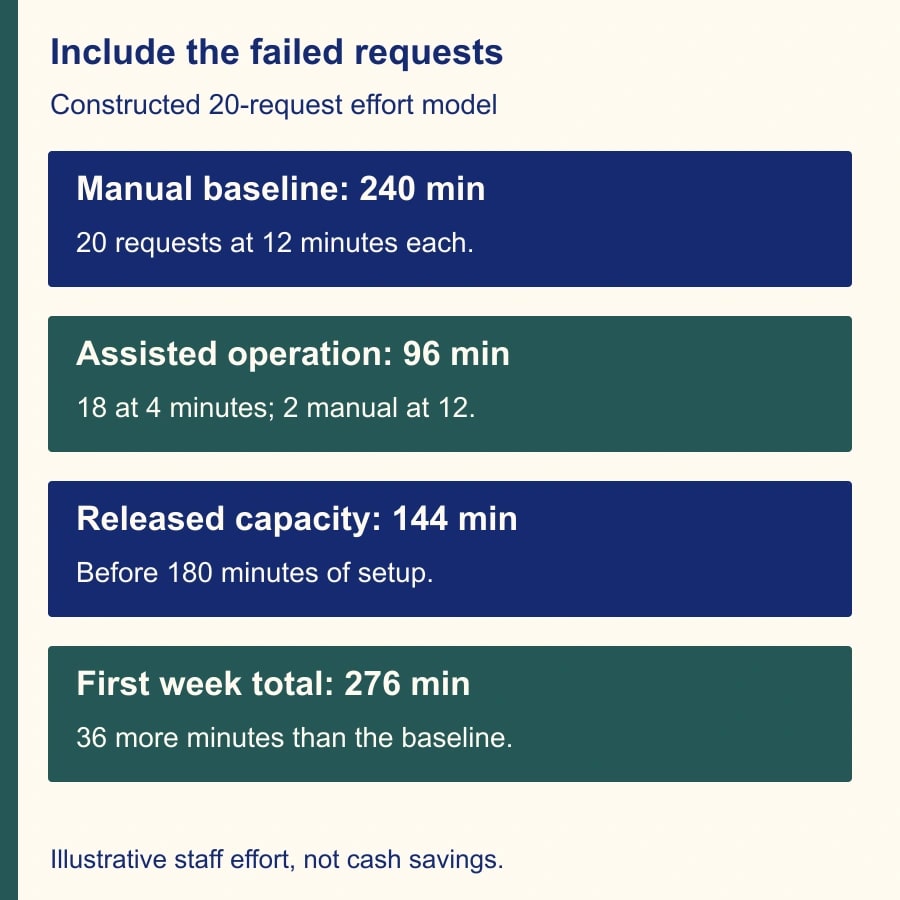
Price accepted work, including the failure case
For a constructed effort model, suppose a manual escalation summary takes 12 minutes. A successful generated draft still takes four minutes to check. For 20 summaries, the all-manual baseline is 240 minutes. If 18 generated drafts are usable and two require the full manual fallback, effort is 18 times four plus two times 12, or 96 minutes. That releases 144 minutes before setup, subscription changes, monitoring and maintenance.
If configuration review and training take 180 minutes in the first week, total first-week effort becomes 276 minutes. The pilot then uses 36 minutes more than the 240-minute manual baseline. The two failed requests are assumed inputs, not a forecast of Slack availability. These figures measure staff capacity, not cash savings; no budget reduction follows merely from a faster summary.
Obtain an account-specific quote if a plan change is necessary. Do not infer an incremental price from a plan name or assume an existing Business+ agreement is the new version named in the feature documentation. Include the time of the Primary Owner, IT reviewer, procurement owner and frontline team. A low-volume workflow may not justify a broader upgrade even when the regional feature is useful.
Measure quality alongside effort. Track whether the final summary preserves impact, ownership and open questions, and whether the manual fallback meets the team's deadline. A fast generated answer that omits a critical exception is not accepted work. Conversely, a reliable manual route may make occasional AI unavailability tolerable without changing the business commitment.
An activation and acceptance checklist
- Requirement: exact processing or storage question, affected workflow, evidence needed and internal decision owner.
- Scope: native feature names, external apps, Slack Connect participants, source material and output destinations.
- Account: eligible plan version, Primary Owner, requested region, support confirmation and activation date.
- Operations: manual brief template, fallback owner, retry policy, authoritative-output rule and support escalation route.
- Acceptance: approved configuration evidence, successful workflow checks, fallback exercise, actual review effort and unresolved questions.
Use ordinary sample material for the initial functional check. Confirm that eligible staff can still complete the intended work and that the output appears where expected. A successful request is evidence of usability, not a location audit. Keep the provider's configuration confirmation as the evidence for routing, and ask for additional assurance if the requirement owner needs it.
After the first operating week, review exceptions with the team. Did staff bypass the approved route? Did a partner assume your setting applied to them? Did anyone confuse storage with processing? These are signs that the rollout explanation needs repair. Correct the instructions and narrow the scope before expanding to more workflows.
Stop expansion if the covered feature cannot be identified, the required region is unavailable, the account entitlement is unconfirmed, or no one can carry the work through a failed AI request. Your next action is to write the one-workflow scope sheet and send its unresolved questions to the provider. Use the AI vendor data-access questions for the broader review, and the Slackbot skill acceptance tests when the workflow also depends on reusable instructions.
Weekly Newsletter
AI Adoption Weekly
New research, field guides, training studies, and tool decisions for operators.
No spam. Unsubscribe anytime.
Related Comparisons
Calculator
AI seat cost calculator
List price × headcount. You enter the hours and the operating assumptions.