
Salesforce Swarming in Slack: Pilot One Case Without Losing Ownership
Pilot Salesforce Agentic Swarming in Slack with a verified case brief, the right entry path and one accountable resolution owner.
Published November 18, 2026

Pilot Salesforce Agentic Swarming in Slack with one defined class of support case, one case owner and a reviewed handoff brief. The useful result is a documented resolution that the support team can act on. A new channel, a generated summary or several experts joining the discussion does not establish that the customer problem is resolved. Keep the customer communication and closure decision with a named person throughout the pilot.
This guide is for a support operations manager working with a Salesforce administrator and Slack owner. It fits difficult cases that need several specialties and already have a reliable Salesforce record. Skip it for routine requests that one agent can resolve from approved guidance, or when the team lacks agreement about who owns escalation. Adding another collaboration surface will not fix an undefined support process.
What the November announcement adds
Slack's November 2026 updates describe Salesforce Agentic Swarming in Slack: a Salesforce record can anchor a dedicated channel, with Slackbot helping summarize the case and research earlier resolutions. Treat those as provider-described capabilities. Whether they shorten your resolution process depends on the quality of the source record, the relevance of prior cases and the experts' availability.
Swarming means bringing the needed experts together around a case instead of repeatedly passing it between queues. The AI portion can help prepare context; the organizational portion determines who investigates, decides and communicates. Assess them separately. A team can have an accurate summary and still waste an hour waiting for someone to accept responsibility for the next action.
As checked November 18, Salesforce's current Agentic Swarming setup instructions require the Salesforce–Slack connection, configured Salesforce channels and the relevant object enabled. Initiators need the Slack Service User permission set. Joining members must be Salesforce users in the requester's Slack workspace. The setup uses the Agentic Swarming toggle; existing swarms remain unaffected. Confirm the actual environment rather than following an older beta walkthrough by memory.
Choose cases that benefit from collaboration
Define an escalation threshold in business terms. A useful pilot class might be “customer access failures that require both identity support and product operations after the standard troubleshooting checklist is complete.” That gives the support lead a reason to convene experts. “Any difficult ticket” invites inconsistent decisions and makes the pilot impossible to evaluate.
Specify what must already be known before a swarm starts: case ID, customer impact, affected product or service, steps attempted, evidence collected, urgency and current owner. If those fields are missing, return the case for intake repair unless the urgency justifies immediate escalation. The exception should be explicit. Experts should not spend the first ten minutes discovering what the customer actually reported.
Set an exit condition at the same time. For the access-failure example, completion could mean the customer has confirmed access, the technical cause or remaining uncertainty is recorded, and the case owner has sent the agreed update. Finding a plausible explanation is not enough. If a workaround is the only available outcome, record its limits and the owner of the permanent fix.
Keep a comparison group of similar cases handled by the existing process. You do not need to present a small pilot as a controlled experiment, but you do need a reasonable baseline. Compare cases with similar severity and required specialties. A week of simple tickets followed by a week of outages will not reveal whether the collaboration method helped.
Inventory the existing configuration before changing it
Have the Salesforce administrator list the current entry actions, standard and cloned flows, permission sets, expert channels and relevant record types. A flow is an automated sequence of actions in Salesforce. A cloned flow is a customized copy; it may contain business rules that are easy to overlook when adopting a newer standard experience.
Salesforce's limitations and considerations say that old cloned swarming flows are not used after the upgrade and need new versions cloned and activated. The page also warns that the old /service-swarm-start command creates the previous swarming experience. Inventory both before the pilot. Otherwise, two agents may believe they are testing the same process while entering different systems.
Assign an administrator to compare the old custom behavior with the new flow before activation. Check required fields, assignment decisions, notifications and closure steps. Preserve the prior configuration and a written recovery plan under the team's change process. Do not assume that copying the old flow's name into a new version preserves its behavior.
Confirm licensing and feature entitlement with the account owner for the actual Salesforce and Slack configuration. This guide does not quote a universal per-case price or promise that every Slack AI capability is included in a swarming entitlement. Separate the cost of the collaboration connection from the cost and availability of the AI features the team intends to use.
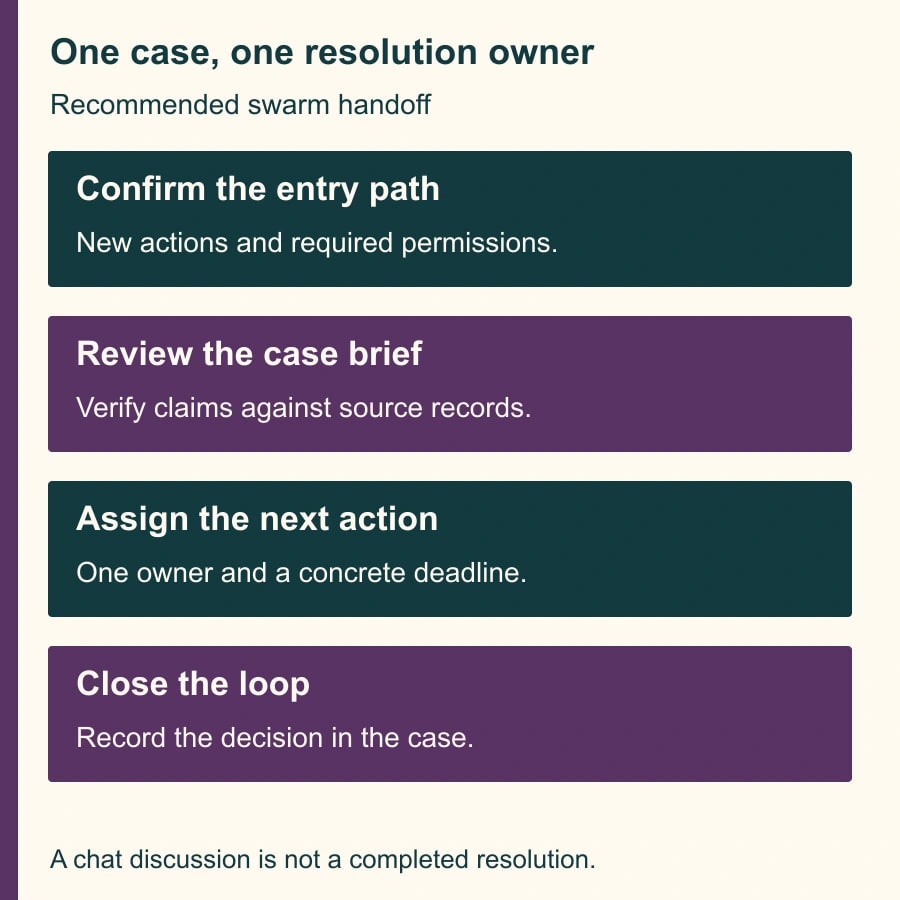
Build a case brief that experts can challenge
Use a short brief with five fields: confirmed customer impact, verified observations, actions already attempted, open questions and the next decision. Link each consequential observation to the case record or supporting evidence. If Slackbot produces the first draft, the case owner checks it before experts use it as their starting point.
An adaptable instruction is: “Prepare an internal escalation brief from this case and the approved linked discussion. Separate confirmed observations from proposed explanations. List troubleshooting already attempted, with outcomes. Identify missing information and do not infer a resolution. Link the source for each consequential fact. End with the decision the invited experts need to make.” This is a suggested brief, not a tested promise about the assistant's behavior.
Have the owner check names, timestamps, product versions, affected scope and the latest customer update. A prior resolution can be relevant without applying to this incident. Ask the expert to explain which conditions match and which differ before reusing a remedy. The costliest summary error may be a confident omission: leaving out the one failed step that rules out an attractive diagnosis.
Keep customer-facing language separate from internal hypotheses. A generated note saying “likely configuration issue” should not become a customer assurance that the problem is understood. The case owner decides what can be communicated and when, using the organization's existing support standards. That responsibility remains even when the assistant writes a polished draft.
Walk one constructed case from intake to closure
Imagine a business customer whose approved users cannot access a reporting portal after a configuration change. The frontline agent has confirmed the affected account, collected two error timestamps and completed the standard access checklist. The unresolved question is whether the issue sits with identity configuration or the reporting service. This is a constructed scenario, not an observed customer incident.
The case owner starts the pilot through the configured new action on the Salesforce record. The brief names the affected scope and links the evidence. An identity specialist checks the authentication path; a product specialist checks the portal state. The owner records which person is investigating each hypothesis and when the team will reconvene. The channel gives them a shared discussion, but the task assignment makes it useful.
Suppose a suggested historical fix concerns a different authentication method. The identity specialist rejects that analogy and records why. The product specialist identifies a configuration discrepancy and proposes a reversible correction. The appropriate operator follows the normal change procedure, and the case owner verifies the outcome with the customer. The record distinguishes the rejected explanation, the action taken and the evidence of recovery.
Before closing, the owner writes a concise resolution note: customer impact, confirmed cause or remaining uncertainty, action performed, validation, follow-up owner and links. If another team still owes a permanent repair, closure of the collaboration must not erase that obligation. Keep the follow-up in the system where it will actually be tracked.
Test the awkward cases, not only the happy path
Use harmless sample records and approved test participants to verify the configured entry action, membership and closure behavior. Test an eligible initiator, a person without the intended access, a case missing the required brief and a case already being handled. Observe the actual result rather than assuming that a channel appearing proves every permission is correct.
Salesforce currently documents that concurrent swarms on the same record are unsupported and recommends one conversation component for addressing members. Turn that into an operating rule: check for existing collaboration before starting another, and name the authoritative discussion location. A duplicated escalation can split evidence and produce incompatible customer updates even when each individual conversation seems sensible.
If the channel does not load the expected record details, give the administrator the case ID, entry action, timestamp and exact error. The considerations page describes an integration-user synchronization issue during upgrades. Do not have frontline staff disconnect shared integrations as a first troubleshooting step. The administrator should establish whether that documented condition applies and assess the effect on other workflows before making a connection change.
Test the handoff between shifts. A new owner should be able to find the current impact, next decision and outstanding work without reading the entire channel. If they cannot, revise the brief and closure fields before expanding. The test of a shared workspace is whether another qualified person can continue the work, not whether everyone enjoyed the discussion.
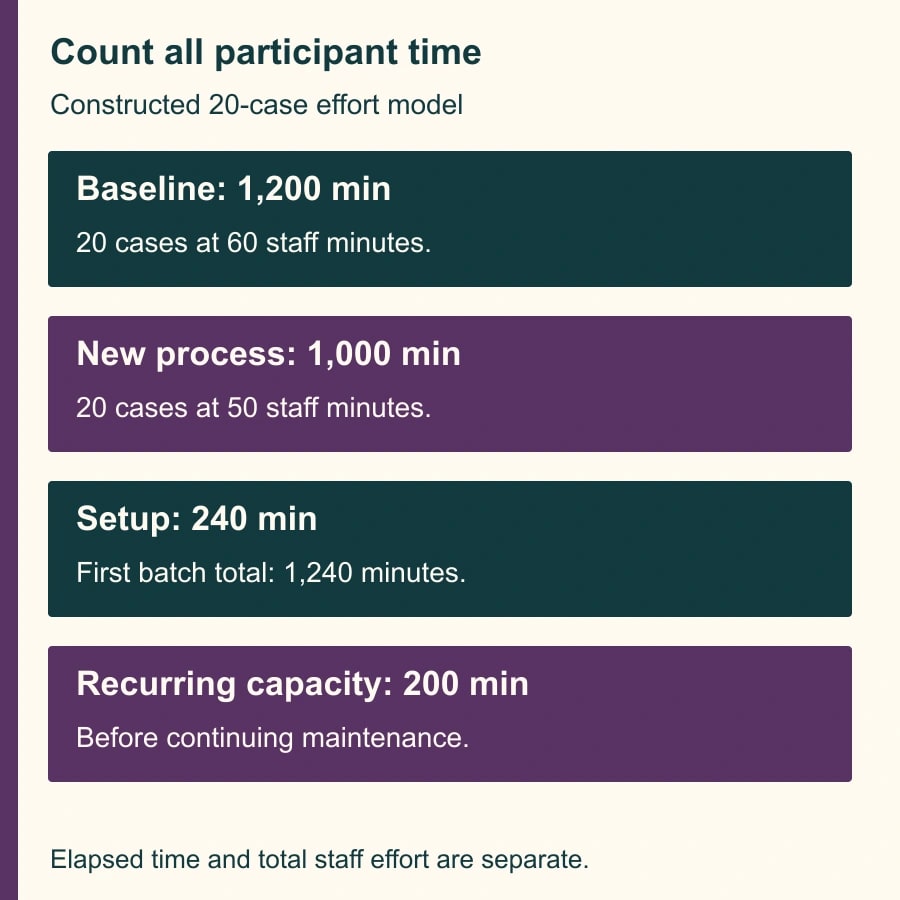
Count expert effort as well as elapsed time
Consider a constructed 20-case comparison. The existing process uses 60 staff-minutes per case across coordination and investigation, or 1,200 minutes. The proposed process uses 15 minutes of owner coordination and three experts contributing ten minutes each, or 45 staff-minutes. Add five minutes per case to review the AI brief and final record: 50 minutes per case, or 1,000 minutes for 20 cases.
The modeled reduction is 200 staff-minutes. If setup and training consume 240 minutes, the first batch uses 40 minutes more than the old process. These assumptions are not Salesforce performance claims. They also do not establish cash savings: the calculation describes capacity, and any financial benefit requires a separate budget consequence.
Elapsed resolution time is a different measure. Three experts working simultaneously may shorten the customer's wait while using more combined staff time. Both may be acceptable, but record them separately. Track time to an accepted resolution, total participant effort, repeat contacts, reopened cases and cases needing correction after an inaccurate brief.
Avoid judging the pilot by channel count or AI-summary count. A swarm that resolves an issue with fewer handoffs may be useful; one that pulls five people into a routine ticket may be wasteful. Ask the support lead to review both successful and unhelpful cases and identify which intake rule should change.
A pilot release card
- Scope: eligible case class, escalation threshold, excluded requests and comparison baseline.
- Ownership: case owner, expert roles, customer communicator, shift handoff and closure authority.
- Configuration: new entry action, relevant channels, permissions, reviewed flow versions and account entitlement.
- Evidence: checked brief, source links, hypotheses rejected, actions taken and customer validation.
- Recovery: duplicate-collaboration check, manual escalation route, administrator contact and remaining follow-up work.
Start with a small, reviewable set of cases and an owner who can stop the pilot. Hold expansion if the new and legacy entry paths are mixed, old custom rules have not been accounted for, access is broader than intended, or cases lose their resolution owner. Fix the operating defect before inviting more teams.
Your next action is to select one case class and compare its current escalation checklist with the proposed brief. For reviewing generated support material, use the false-pass test for AI support grading. For a workflow that starts an agent conversation, the Slack intake brief guide explains how to preserve the request and its decision owner.
Weekly Newsletter
AI Adoption Weekly
New research, field guides, training studies, and tool decisions for operators.
No spam. Unsubscribe anytime.
Related Comparisons
Calculator
AI seat cost calculator
List price × headcount. You enter the hours and the operating assumptions.