
Microsoft Forms Skips Follow-Up Questions: Repair the Branch Map
Fix skipped Forms questions with a complete branch map, three respondent routes and checks of saved answers before automated follow-up.
Published November 23, 2026

If Microsoft Forms sends respondents past a follow-up question or straight to Submit, trace the route into and out of each branch before changing which questions are required. A required question is not a substitute for a correct route. The form needs to show the right questions to the right people and bring them back to any common closing questions.
This guide is for a training or operations manager using Forms to collect requests that later become work: coaching, access help, equipment follow-up or a service callback. It fits a modest survey with a clear set of paths. If you need a respondent to loop backward repeatedly or manage a complicated case over time, reconsider whether one branching form is the right interface. Do not make users compensate for an unsuitable design with handwritten explanations.
Microsoft's current branching guidance says routes must move forward to later questions or the end of the form. It warns that a backward branch can skip intervening questions and take the respondent to the end. Questions and sections can both have branching. The documentation was checked November 23, 2026. Read Microsoft's branching behavior and setup instructions.
Start with the business routes, not the question numbers
Write the intended routes on paper. For each answer at a decision point, list the next relevant information and the final handoff. A form asking “What help do you need?” might have routes for access assistance, training help and no further help. All three may still need a shared final confirmation. If the designer thinks only about the first branch, the access route can accidentally continue through the training questions or end before the confirmation.
Give questions stable working names such as HelpType, AccessDetail, TrainingTopic and FinalConfirmation. Keep their displayed numbers beside those names in the test record, but do not make the number the only identifier. Reordering or inserting a question can make a diagram referring only to “Question 5” hard to interpret. The label should tell the reviewer what information is supposed to be collected.
Ask who uses each answer after submission. If nobody can explain the action supported by a question, remove it from the proposed design or justify why it belongs. Shorter forms are not automatically better, but every extra branch creates more behavior to test. A simple form with one clear routing choice is easier to maintain than several overlapping conditions that a manager must mentally simulate.
The prerequisites are edit access, a safe copy for changes, representative test accounts where needed and a person responsible for the resulting work. Confirm Forms access under your organization's account and subscription. This repair does not depend on purchasing an AI product. The main costs are mapping, testing and reconciling existing submissions. If a downstream automation sends messages or opens cases, redirect the test copy to harmless outputs before submitting test responses.
Build a seven-question example with three complete paths
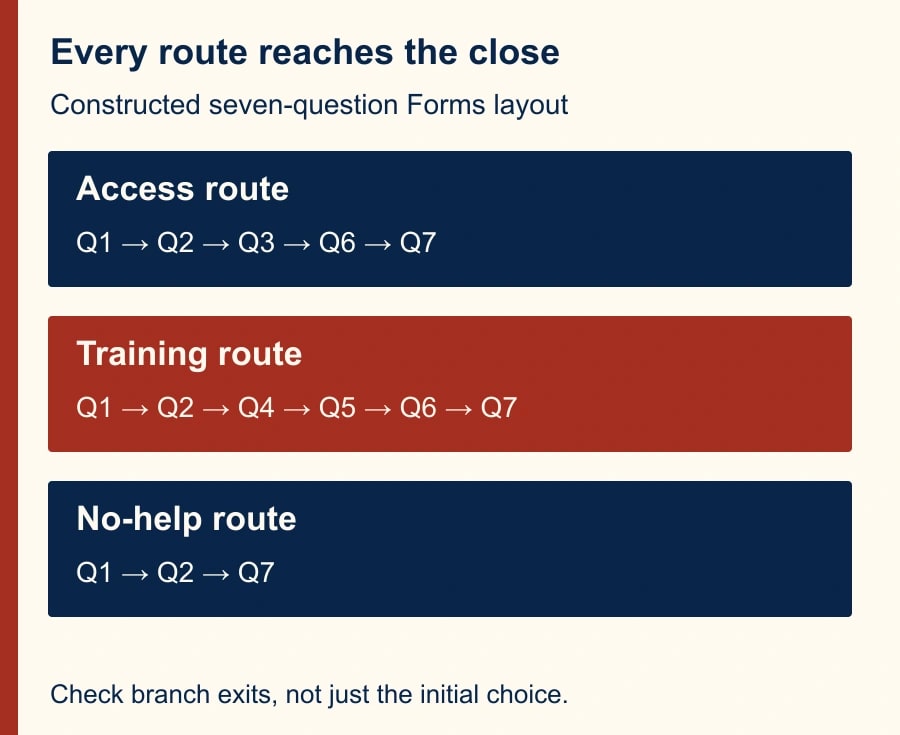
Consider a constructed post-training survey. Q1 asks which session the respondent attended. Q2 asks what help they need, with one choice: Access, Training or None. Q3 asks for the access problem. Q4 asks which training topic needs attention. Q5 asks for a preferred training follow-up format. Q6 asks for a contact route if follow-up is needed. Q7 asks everyone to confirm their request before submission.
The intended Access route is Q1, Q2, Q3, Q6 and Q7. The Training route is Q1, Q2, Q4, Q5, Q6 and Q7. The None route is Q1, Q2 and Q7. The contact question's wording must make sense to both follow-up routes. This layout keeps all transitions forward and places the common confirmation after the branch-specific questions.
At Q2, map each answer to its intended destination. Then check the exit from Q3: it must reach Q6 rather than simply continuing to Q4. Check the path through Q4 and Q5 into Q6. Finally, confirm Q6 reaches Q7, and that Q7 is the actual intended end. The form can have a correct initial branch and still fail because its branch exit was never configured.
This example deliberately uses a single-choice routing question. If your real question allows multiple answers, do not assume the same one-route map applies. Simplify the routing choice or design and verify the resulting behavior explicitly. The business may need separate requests when a person needs both kinds of help, or a different layout that collects both without ambiguous routing.
Use sections when the route is a group of questions
Sections can make a longer form easier to review because a route can correspond to a named block. Microsoft documents adding, moving and branching sections; it also notes that question shuffling is disabled when sections are used. Treat that as a design choice, not a reason to rearrange a live survey without a test. Read how to organize Forms into sections.
For the example, you could group access details, training details and common closing questions into separate sections. Before configuring them, write the expected destination after each section. A training section that flows into the common close is useful; an access section that falls through into training questions is not. The diagram should show both entry and exit for every section just as it does for individual questions.
Keep the test copy separate from the operational link until the new paths pass. Record which form identifier belongs to the copy and which belongs to the live process. A colleague testing an old link can report a failure that the editor cannot reproduce. Conversely, a test on the copy cannot establish that the production form has the same settings. Verify the intended live link after an approved release.
Avoid resetting all branching as the first troubleshooting step. That may erase a useful structure and make it harder to compare before and after behavior. Save a route map and evidence of the current settings, then change the smallest part that explains the symptom. A complete redesign can be appropriate, but it should be a deliberate choice with its own test record.
Test what respondents see and what the team receives
Run the three baseline routes in the form's preview, then use harmless actual submissions in the approved test copy to check the saved results and any connected process. Preview is useful for the visible journey; the saved response is the evidence that the downstream owner receives the intended information. Do not count a visually correct form as a successful end-to-end test.
For the Access case, enter a distinctive harmless phrase such as TEST access request A. Expect the access detail, contact route and final confirmation, with no training-specific answers. For Training, use a different test phrase and expect both training questions plus contact and confirmation. For None, expect the common confirmation without invented follow-up details. Preserve the response identifiers so the reviewer can compare routes with saved output.
Add tests for an omitted required answer on a visited page, a changed routing answer, and a mobile submission. For the changed-answer case, start down one path, then use the available navigation to change the routing choice and complete the other path. Inspect the saved record for stale or unexpected answers instead of assuming how the product clears them. If navigation differs in your form, record the observed route and test the actual allowed interaction.
The mobile test should use the device and account type real respondents use. A phone-sized preview is useful but does not establish account access or the full submission path. Check labels, long answer options, navigation and the final confirmation. Do not collect private information to make the test realistic; realistic structure and harmless values are enough.
Distinguish skipped questions from missing answers
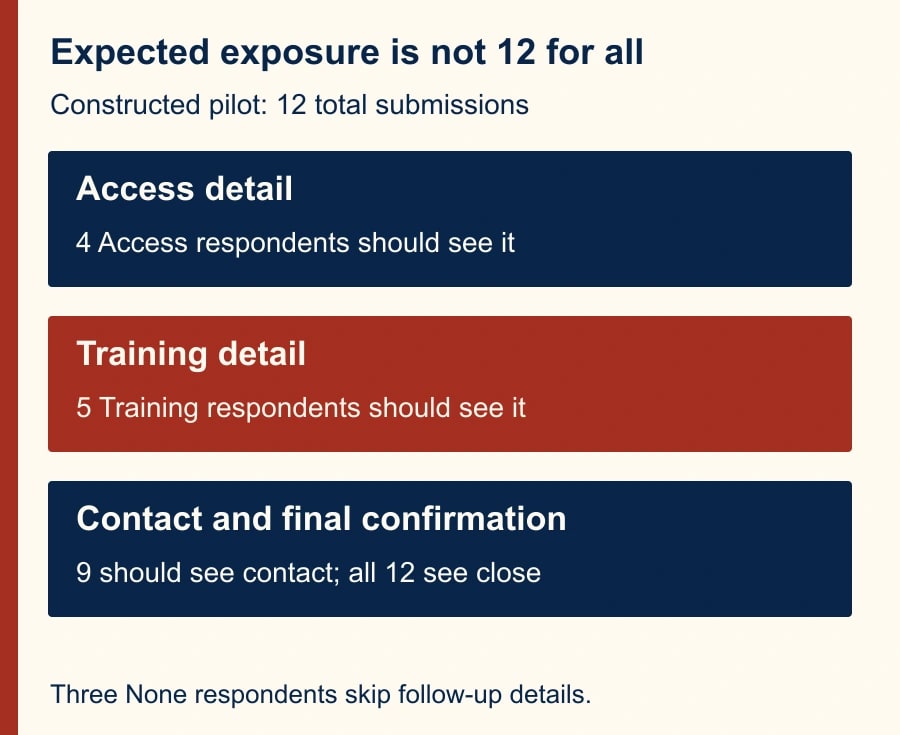
Suppose a constructed pilot receives 12 submissions: four Access, five Training and three None. The expected number of people shown the access detail is four, the training questions five, the contact question nine and the final confirmation twelve. Those are exposure counts derived from the intended routes. They are not all twelve simply because the survey had twelve submissions.
If the access detail has four completed answers, its completion rate among intended recipients is 100%. Dividing four by all twelve submissions would produce 33.3%, which measures something else: the share of all respondents providing an access detail. A manager could wrongly interpret that smaller percentage as widespread nonresponse. Keep the routing answer available when analyzing branch-specific questions.
If only eight of the nine follow-up respondents have a contact route, inspect the corresponding records. One person may have skipped an optional question, encountered a route defect or supplied information elsewhere. The data alone does not establish which. Count the exception and investigate it. Do not let an AI summary turn a blank field into “did not want contact” unless the form explicitly collected that choice.
Apply the same discipline to automation. A workflow that sees no training topic should check the selected help route before deciding the response is incomplete. Blank because not applicable differs from blank where information was required. Preserve that distinction in the work queue so staff do not chase the three None respondents for unnecessary details.
Repair existing responses without inventing their meaning
If the form was already live, identify the period and routes affected by the defect. Save the previous route map and the corrected version. Compare the submissions with the intended exposure counts. Do not populate missing answers from an AI guess, the person's department or what similar respondents said. Where information is needed to act, ask the process owner to arrange an appropriate follow-up.
A correction notice should state what was missing and what action remains, without implying that the respondent made an error. For example, the team may need a contact preference from an access request whose form ended early. The owner decides whether existing contact information can be used under the normal process. The form repair itself does not grant new permission to contact everyone.
Keep test responses identifiable and exclude them from operational analysis through the approved reporting process. Do not casually delete historical submissions while diagnosing. If cleanup is needed, preserve the evidence required by the organization first. The useful outcome is a reconciled set of real requests with a clear action owner, not merely a cleaner response count.
Keep a route checklist with every change
- Decision question: name the allowed answers and whether the respondent selects one or several.
- Entry and exit: list the first question in each branch and the destination after its final question.
- Common close: identify questions everyone must reach before submission.
- Required information: state which routes need each field and who uses it afterward.
- Test cases: record expected question sequence, observed sequence, saved answers and downstream result.
- Change record: retain form identifier, version date, editor, reviewer and affected live-link decision.
- Recovery: name the person who reconciles incomplete historical requests and handles unresolved exceptions.
Review that checklist whenever questions move, sections are added or the business changes its help categories. A small wording change may need only a copy check; a routing change needs the affected path and shared exits tested again. Do not make every minor correction an elaborate project, but do not treat a changed destination as cosmetic.
Measure successful handoffs, unexpected early submissions, follow-up requests for missing information and staff time spent reconstructing intent. If ten weekly requests each require six minutes of avoidable clarification, the baseline is 60 minutes. A constructed improved process with two such requests plus 15 minutes of route maintenance uses 27 minutes, releasing 33 minutes. That is capacity, not automatic cash savings, and actual results must be measured.
Stop publication of the revised form if any intended route misses the shared close, reaches another route's irrelevant questions or saves an unexplained stale answer. The next action is to draw the three complete paths and run one harmless submission through each. For the broader training process, use our business-team AI adoption training plan. If a submitted request later stalls in approval, diagnose that separately with our approval timeout recovery guide.
Weekly Newsletter
AI Adoption Weekly
New research, field guides, training studies, and tool decisions for operators.
No spam. Unsubscribe anytime.
Related Comparisons
Calculator
AI seat cost calculator
List price × headcount. You enter the hours and the operating assumptions.