
Microsoft’s Two AI Bills: Why a Copilot Seat Is No Longer the Whole Budget
Microsoft is separating predictable employee access from metered agent work. A useful budget now counts accepted work, credit consumption, and the review that remains.
Published September 25, 2026

A finance team approves 500 Copilot seats, multiplies a monthly license by twelve, and thinks it has the AI budget. That arithmetic is incomplete if teams also run agents that are charged for the work they do. Microsoft said on September 23 that it now sees two enterprise AI costs: per-person subscriptions for broad access and usage-based billing for work that varies by task. The useful response is not to stop the rollout. It is to give each bill a different test.
What Microsoft has said—and what it has not
In its September 23 statement, Microsoft describes the Copilot user subscription as predictable access to Chat, Microsoft 365 features, and ready-made agents. It describes longer-running agent work as usage-based billing through Copilot Credits, a common unit for eligible AI operations. Its cost-management documentation says administrators can view consumption, set spending policies and limits, and choose prepaid credits or pay-as-you-go for supported services. This is Microsoft’s product and billing description. It is not evidence that a given agent saves money or that every agent action is billed the same way.
Coverage matters. Microsoft’s documentation says different services and license combinations can be included, metered, or managed in different admin surfaces. Before a forecast becomes a purchase order, the Microsoft 365 administrator and procurement owner should confirm the exact service, user license, credit source, and billing route for the proposed workflow. Do not apply a generic per-credit figure to every task.
Keep two budgets, then reconcile them to one piece of work
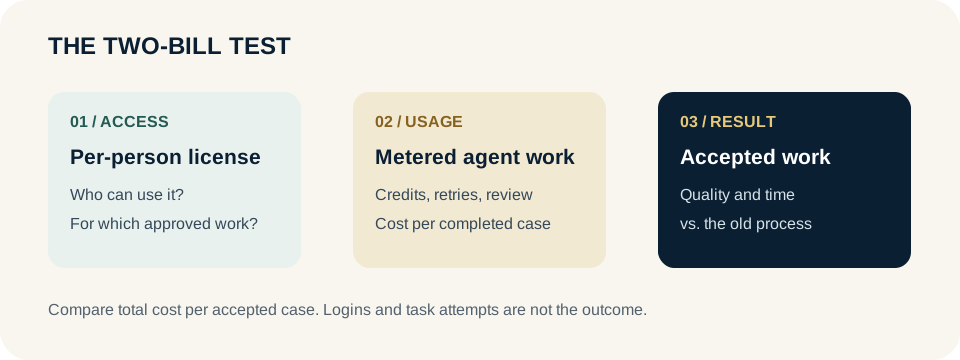
The seat budget answers who should have general-purpose access and whether that access is used for useful work. The usage budget answers how much a defined task costs each time it runs. Neither should be judged by logins or generated pages alone. Reconcile both to an accepted output: an approved customer response, a reconciled account, or a reviewed report. Otherwise a cheap seat can hide expensive agent use, while a costly task can look efficient because no one counted the reviewer.
- For seats: count eligible employees, active users doing approved work, license cost, and work that reaches its old quality standard.
- For metered work: count task attempts, Copilot Credits consumed, retries, human review minutes, and accepted completions.
- For the whole workflow: include setup, data connection, support, exceptions, and any existing software cost that does not actually go away.
A simple example makes the distinction visible. Suppose a team runs 1,000 monthly requests, 700 are accepted without repair, 200 need a reviewer, and 100 fail. Dividing usage charges by 1,000 requests would understate the cost of usable work. Divide the full monthly cost—including review and retries—by the 900 accepted cases, then compare it with today’s process. These numbers are an illustration, not observed Microsoft performance.
The spending policy is an operating control
Microsoft’s admin guidance describes service- and user-level spending limits, alerts, and a policy option that can automatically include newly supported services. That last setting deserves a conscious choice: a limit that expands to future services may be convenient, but the finance owner should know which new use can draw on the pool. Put a named owner on every metered workflow, set a pilot ceiling, and decide what happens when it is reached. Blocking a task at the cap is sometimes safer than discovering a surprise invoice; in a customer-facing process, it also needs a human fallback.
Run a four-week budget test
Choose one recurring task with a known monthly volume. In week one, replay representative cases and record the current process’s time, error rate, and cost. In weeks two and three, run the agent with a fixed group, permission boundary, credit limit, and reviewer. Every week, inspect accepted cases, exceptions, credits per accepted case, reviewer time, and any changed customer outcome. In week four, compare the result against the old process and a simpler alternative, such as a seat-based assistant with no autonomous action.
The stop rule should be written before the first run: pause if material errors rise, a required approval is bypassed, credit use breaches the ceiling, or the human fallback cannot clear work promptly. A team may reasonably keep the subscription for broad drafting while declining to fund a specific agent. The two purchases do not have to rise together.
The skeptical read
Microsoft has an interest in presenting variable usage as investment rather than overhead. That framing does not change the accounting or the outcome test. Credits can make unlike AI operations easier to administer, but they can also make unit cost harder to understand until task-level reporting is done. Prepaid capacity may reduce a headline rate while creating unused balance. Pay-as-you-go avoids a commitment but can expose a busy workflow to variable spend. The right plan depends on measured demand, limits, and the cost of a completed task.
The finance question for the next renewal is therefore specific: which work justified the seat, which work consumed credits, and what did the business accept after review? If the answer is only an activity chart, keep the experiment small.
Primary sources
- Microsoft: Building the system for AI at work — September 23 statement on subscriptions and usage-based billing.
- Microsoft Learn: Copilot Credits billing and cost management — Supported services, cost controls, and monitoring.
- Microsoft Learn: Licensing and cost considerations — Why agent billing varies with license and service.
Put this to work
- AI ROI decision lab — Keep released capacity separate from cash savings.
- AI business-case worksheet — Record cost, volume, quality, and owner.
- Why Copilot seats can plateau — Separate access from adopted work.
Weekly Newsletter
AI Adoption Weekly
New research, field guides, training studies, and tool decisions for operators.
No spam. Unsubscribe anytime.
Related Comparisons
Calculator
AI seat cost calculator
List price × headcount. You enter the hours and the operating assumptions.