
Power Automate Desktop Templates: Who Updates the Copies?
Desktop flow templates create independent copies. Use a copy register, patch plan and recovery tests to keep existing automations current.
Published November 25, 2026

Use Power Automate desktop templates to standardize how new automations begin, and keep a separate register for maintaining the flows created from them. Updating the template does not repair the copies already running. If several teams reuse your error handling, someone must own the later patch work as well as the initial design.
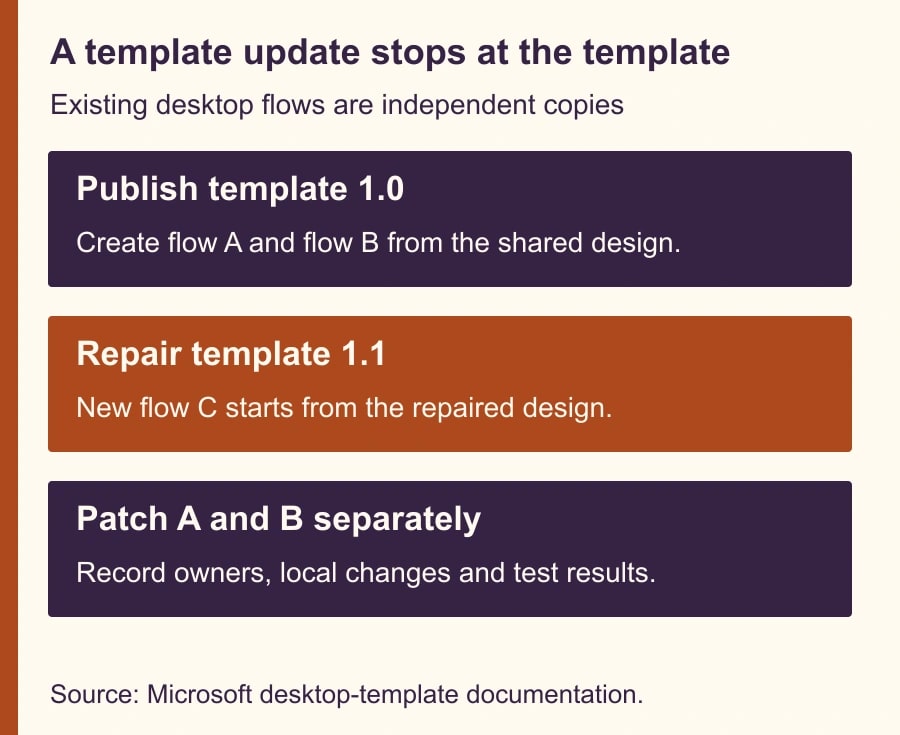
Microsoft included reusable desktop flow templates in its November 10 Power Platform update. The useful change is a shared starting point for repeated automation patterns. Its announcement also explains the maintenance boundary: flows made from a template are independent copies, and later template changes apply to future flows. Microsoft's October/November Power Platform feature update provides the release context.
For an operations manager with several daily exports or invoice-entry routines, that boundary changes the rollout plan. A common template can reduce repeated authoring, but it also distributes a common defect if the original design is wrong. Treat template publication as the start of an owned release process.
Where templates fit, and where they do not
This approach fits repetitive desktop work with a stable shared structure: open the application, validate the input, perform the approved steps, record the outcome, and route exceptions. It is especially useful when several makers would otherwise invent separate ways to report failures.
Skip a broad template program when you have one small flow with no plausible reuse. Maintain that flow directly. Also reconsider desktop automation when a supported data integration can perform the same job more reliably. A template cannot remove the fragility of an application interface that frequently changes its controls or layout.
As checked November 25, Microsoft's instructions require a work or school account, Power Automate for desktop version 2.72 or later, and suitable environment permissions. Templates can be tested in the designer, but a published template is not itself the runnable scheduled automation; create a flow from it. The desktop-template authoring guide explains the supported setup and publishing steps.
Confirm licensing for the actual run mode before approving savings. Attended execution involves a person being present; unattended execution runs without that person operating the desktop. Microsoft's licensing guidance distinguishes user entitlements from capacity licensing and unattended options. Reusing a template does not settle those requirements. Check the relevant Power Automate license types against the environment and machines you plan to use.
Put the shared behavior in writing first
Choose the smallest repeated business behavior worth standardizing. A good first template might validate an export file and produce a clear outcome report. A poor first template tries to automate every supplier's invoice process, every exception, and every department's naming convention at once.
The process owner supplies three inputs: an ordinary successful case, a recoverable failure, and a failure that must stop the run. Use synthetic or approved sanitized records. The maker turns those examples into behavior; the process owner decides whether that behavior is acceptable. Neither role can substitute for the other.
Specify what each flow may change. A report-export flow that only reads data has a different recovery problem from one that enters payments. Keep a clear boundary between preparing an output and committing an external action. If the flow writes to a business system, identify the record or transaction that proves the action already happened before allowing a retry.
Write the expected outcome as an artifact, not a green status icon. For example: a dated export with the expected columns, a row count, a completion record, and an exception list. A flow can finish its instructions while producing an empty or unusable file. The business check belongs inside the acceptance criteria.
Build one template and two deliberately different copies
The maker should build the shared logic in a test environment, validate it, and publish a clearly described version through the supported template workflow. Keep a human-readable release label such as Export Check 1.0 in your own register and description. This label is a team convention, not a claim about automatic version propagation.
Create two flows from that template before inviting wider reuse. Give them different legitimate settings: separate source folders, recipients or department codes. Run both with the same sample failure. If the error message identifies the wrong department or writes to a common live folder, the shared design still contains assumptions that should have been configurable.
Then change a harmless aspect of the template and create a third flow. Compare the older copies with the new one. This exercise makes the copy boundary visible to the people who will own maintenance. It is a proposed acceptance test, not a report of testing performed for this article.
Publish only after the owner can explain which settings a maker must customize and which shared behavior should remain consistent. A template that requires an undocumented search through dozens of actions is not ready for ordinary operational reuse, even if its demonstration succeeds.
Worked example: six exports and one faulty recovery step
Consider a constructed distributor with six branch export flows. All six were created from Export Check 1.0. A shared recovery step retries an export after a timeout, but the first attempt sometimes already wrote the file. The second attempt can leave two files for the downstream import.
The central maker repairs the template to check the destination before repeating the write. New flows start with the repaired behavior. The existing six flows still need attention. The operations lead should not close the incident merely because the template's release note says the duplicate-file problem is fixed.
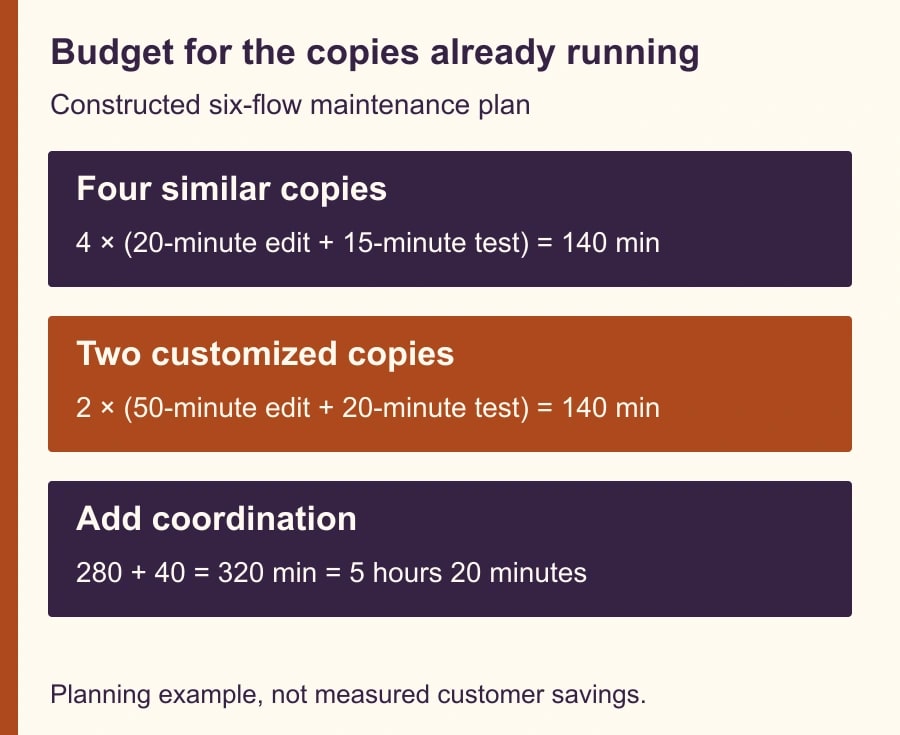
Assume four branch flows remain close to the original design. Each takes 20 minutes to update and 15 minutes to test: 35 minutes per flow, or 140 minutes. Two branches changed the recovery logic substantially. Each takes 50 minutes to update and 20 minutes to test: 70 minutes per flow, another 140 minutes.
The patch campaign therefore requires 280 minutes, or four hours and 40 minutes, before central coordination. Add a constructed 40-minute allowance for scheduling and reviewing evidence, and the planned effort is 320 minutes: five hours and 20 minutes. These are example estimates, not measured customer results.
Suppose the original template avoided 45 minutes of authoring for each of the six flows. That is 270 minutes of released capacity. It does not prove the template was a bad investment when a later patch takes 320 minutes. The shared design may improve consistency and reduce future work. It does show why the business case must include maintenance, and why released time should not be described as a payroll saving without an actual expense reduction.
Keep a copy register that someone will actually use
The minimum useful register contains the flow name, environment, business owner, maker, source template label, local changes, last tested release and next review date. Add the operating schedule and the consequence of stopping the flow. A missed weekly export and a stopped customer-order process need different maintenance windows.
Do not turn the register into a second development platform. A shared list with reliable owners is better than an elaborate tracker that nobody updates. Make registration part of accepting a new copy into production. The owner should not have to discover a hidden spreadsheet after an incident.
Record local differences in business terms. “Branch East writes a second file for the carrier” tells the next maintainer why that copy needs extra testing. “Modified steps 41–63” may help a maker locate code, but it does not explain the operational dependency.
Keep credentials, passwords and sensitive sample records out of the template and register. Each production flow should use the approved identity and access arrangement for its environment. When a maker leaves, the owner needs a supported handover process rather than knowledge of that person's desktop password.
Patch the existing fleet in small groups
Start with a complete list of affected copies. Ask owners to confirm whether each is active, retired, temporarily paused, or replaced. An apparently unused copy can still run at month-end. Retirement should be confirmed with the business owner before a maintainer decides it no longer matters.
Classify the change by consequence. A clearer log message may tolerate a normal maintenance window. A defect that can repeat an external transaction may require stopping affected runs until their outcome is checked. The process owner decides the business risk; the maker explains the technical failure and recovery options.
Repair one representative copy, run the success and failure cases, then inspect the actual output. Use that result to refine the instructions for the remaining copies. Keep the changed template and the updated flow records together so a future maker can understand both the standard and its deployment history.
For heavily customized copies, compare the shared behavior with the local exception before applying a replacement. Blindly pasting the new actions may remove a branch-specific check. Where the local design has diverged too far, the safer choice may be to create a fresh flow and migrate it deliberately, with a clear cutover and rollback.
A reusable acceptance and patch checklist
- Input: ordinary sample, empty input, malformed record and an unavailable destination.
- Success: expected file or business record exists, count matches, and the owner can use it.
- Recovery: rerunning does not create a second business action or conceal an incomplete first attempt.
- Customization: department settings are explicit and no shared live paths remain accidentally embedded.
- Ownership: both the business owner and maintainer are named, with access confirmed.
- Copy history: source label, local differences, patch date and test evidence are recorded.
- Rollback: the previous working version and the conditions for restoring it are understood.
- Closure: every active copy has a verified status; the template release note alone is insufficient.
Use this checklist as a handoff document. The maker fills in evidence locations, and the business owner signs off on the output and recovery result. A list of checked boxes without the relevant file, run or record is too weak for diagnosing the next incident.
Watch the maintenance signal, not just adoption
Count active copies, copies on the accepted release, copies with undocumented changes, and overdue repairs. Pair that with business outcomes such as missing exports, duplicated outputs and time spent recovering. A rising number of copies is not automatically progress if no one can explain which versions are still safe to run.
Use the first patch cycle to assess whether the template boundary is sensible. If almost every copy needs a different repair, the shared template may contain too much department-specific logic. Move the shared design back toward the genuinely common steps and document the intended variations.
Stop distributing a template when its outputs cannot be reconciled, when an owner is missing, or when the recovery procedure repeats a consequential action without checking the earlier result. Keep existing work visible and controlled while repairing the design. Do not disguise a paused rollout as a completed deployment.
The next useful step is small: choose one repeated desktop routine, create two test copies, and prove who will maintain them after the first change. For email-driven input problems, use our Power Automate attachment-content recovery guide to isolate the upstream issue before putting it into a shared template.
Weekly Newsletter
AI Adoption Weekly
New research, field guides, training studies, and tool decisions for operators.
No spam. Unsubscribe anytime.
Related Comparisons
Calculator
AI seat cost calculator
List price × headcount. You enter the hours and the operating assumptions.