
Google Workspace Usage Tiers: Budget Before Moving to Scaled
Measure requests by product, compare Standard and Scaled billing, and build a workload budget before expanding Workspace agent access.
Published November 25, 2026

Keep a Workspace automation on Standard Tier if its measured workload fits the applicable limits. Before choosing Scaled Tier, count requests by product and operation, check how billing changes, and name someone who can stop an expensive or runaway job. An internal application is not automatically entitled to unlimited agent access.
Google's November 24 announcement makes this a planning task now. It introduces a clearer commercial boundary around automated access to Workspace, with usage billing and enforcement scheduled for April 1, 2027. The practical question for an IT and finance team is whether a useful business job needs more capacity, or simply makes too many requests. Google's announcement of Workspace agent protections and developer tools describes the change and its timetable.
This guide is for teams operating agents or integrations against their own Workspace data. An application programming interface, or API, lets software request data or actions. Model Context Protocol, or MCP, gives an AI agent a structured way to use tools. The distinction matters because the same business task can have different access and billing rules depending on its implementation.
Skip the tier-selection exercise if you only use a finished supplier application and cannot control its Cloud project. Ask that supplier for its capacity and pricing plan instead. Also separate this decision from buying Workspace user seats: a subscription budget alone does not describe the operating cost of a custom automation.
The rules that change the decision
As checked November 25, Google's tier documentation sets Standard MCP access at 5,000 requests daily per project per product, alongside minute limits. Some tool calls consume multiple requests. Scaled selection applies to the whole project; enrollment alone does not increase quotas. From April 1, Scaled Gmail, Calendar and Drive MCP usage is charged from the first successful request, while REST allowances work differently. The internal-use exception concerns higher per-project REST quotas, not increased MCP quotas. It requires eligible internal access and administrator approval. These are provider rules, not estimates. Read Google's current usage-tier definitions before selecting a tier.
The operational implication is easy to miss: “we only need a little above the free limit” is not a sufficient cost estimate. First establish what becomes billable, what remains constrained, and which operations the workload uses. A daily total also cannot prove a concentrated morning burst will run reliably.
Treat the February 2027 agent-access requirements as a separate implementation dependency. A project that needs both a different access method and more capacity has two changes to test. Our Workspace agent identity and OAuth migration checklist covers the identity work; this article focuses on workload and budget decisions.
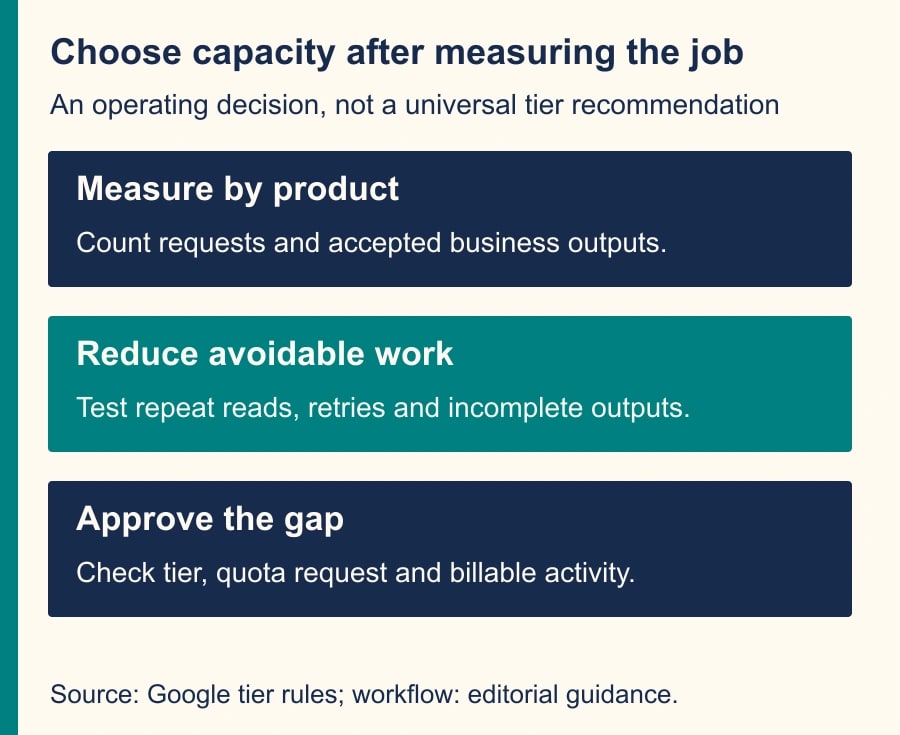
Start with the business job, then map the project
Choose one automation whose failure would cause recognizable work: a morning customer briefing, an invoice lookup, or a daily exception digest. Write its output in a sentence. “Prepare a reviewed briefing for each account manager by 8:30” is more useful than “run the agent.” It tells you which requests are necessary and what can wait.
The technical owner should identify the Cloud project, the products contacted, the access method, the job schedule, and the person responsible for the destination report. Include every other job sharing that project. A request count collected from one successful demonstration can miss the nightly sync, retries and exploratory calls made by another team.
Keep secrets out of the worksheet. Project identifiers, operation names, counts and owners are sufficient for planning. Do not paste access tokens or customer documents into an AI chat to ask for a cost estimate. A sanitized request summary gives a reviewer what they need without expanding access to the underlying business data.
The output of this first step is a map with one row per job and product. If nobody can identify the project or its owner, stop before changing tiers. Paying for a project that has no accountable operator does not make the workflow dependable.
Measure a representative cycle, including the bad day
Collect daily counts and the busiest short interval across a normal operating cycle. Include a high-volume day such as month-end if it matters to the process. A seven-day sample can be a useful starting point, but it is not representative of a monthly billing workflow merely because it contains seven days.
For each job, distinguish completed business outputs, requests attempted, successful requests, failed requests and retries. Keep the provider's quota and billing measurements as the source of truth for their respective purposes. Your own logs explain why a request occurred; they should not silently substitute a different unit for the provider's counters.
Calculate requests per accepted output. If a digest required 2,000 requests and only ten of its twenty intended account briefings were usable, the useful-output denominator is ten. Counting every generated file as a success conceals both operational failure and waste. A person responsible for the briefings should define what usable means before the trial.
Record the most expensive failure pattern as well as the average. An agent repeatedly searching for a missing file may consume more capacity than a successful job. The fix might be a clear “file unavailable” outcome and a human task, not another tier. That is an editorial operating recommendation, not a claim that Google's platform will impose your preferred stopping rule.
Worked example: the briefing that crosses a product limit
Consider a constructed business with 120 daily account briefings. Its measured design uses 30 counted Drive requests, eight Gmail requests and two Calendar requests per briefing. Assume for this example that these are actual counted requests after any tool expansion, not simply the number of agent tool calls.
The baseline is 3,600 Drive requests, 960 Gmail requests and 240 Calendar requests per day. A busy-day planning allowance of 20% makes those figures 4,320, 1,152 and 288. This allowance is our hypothetical planning choice; it is not a Google rule or a forecast of actual retries.
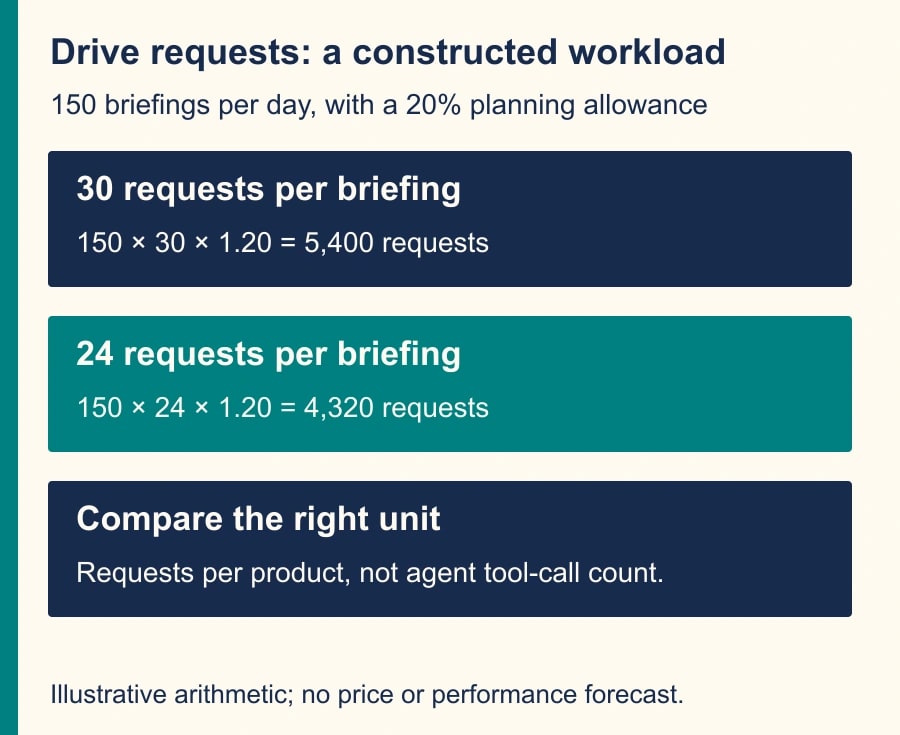
At 150 briefings, the same calculation becomes 5,400 Drive requests, 1,440 Gmail requests and 360 Calendar requests. Under the documented Standard MCP daily boundary, Drive is the first product to raise a capacity question. Adding all three into a single 7,200-request figure would obscure which product creates the constraint.
The operations lead has three reasonable choices. Reduce repeat document reads, spread discretionary work across operating days where that still meets the business need, or evaluate Scaled access and request the required quota. Moving a deadline just to make a spreadsheet look compliant is not an acceptable fourth choice.
Suppose better selection reduces Drive consumption from 30 to 24 counted requests per briefing. At 150 briefings with the same 20% allowance, Drive becomes 4,320 requests. This arithmetic shows a possible capacity benefit; it does not demonstrate that caching or reuse is safe for the actual documents. The owner must decide how much staleness a customer briefing can tolerate.
Build the cost worksheet without inventing a price
Do not multiply the request total by a rate copied from an unrelated API. Inventory the operation categories actually used, then enter the current applicable rates from the provider's pricing materials or console estimate. Keep the date and currency with the estimate. If you cannot identify a category, mark that line unresolved rather than assigning a convenient average.
For each product and operation category, record daily units, the applicable allowance, the billable-unit calculation, the quoted pricing unit, and the expected number of operating days. If a rate is quoted per thousand operations, divide by one thousand before applying it. Do not treat a per-million rate as a per-thousand rate; this elementary mistake can overwhelm every careful assumption elsewhere.
Prepare at least a normal workload and a peak workload. The example's 150 briefings are a volume scenario, not a dollar forecast. A complete estimate would also include model usage, monitoring, support time and any other separately charged services. Keep those costs in separate lines so a change in one provider's pricing does not require rebuilding the entire model.
The finance owner should approve a spending envelope and a review date. The technical owner should implement job-level stopping and escalation behavior appropriate to the application. Do not assume a budget notification automatically prevents further work. Verify exactly what the chosen control does before describing it as a cap.
An internal-use review is a classification decision
Before applying any exception, ask who uses the application, which organization they belong to, and whether another service directly receives access through the project. The person completing an attestation should understand the actual deployment. A label such as “internal helper” in a repository is not evidence of how customers, contractors or vendors access it.
Keep a short approval record containing the eligible use case, the administrator who checked it, the date, and the change that would require reassessment. A later customer portal or supplier connection can change the facts. Revisit the classification when the application changes, not only when a quota error appears.
For an agent workload, the particularly important checkpoint is whether the desired increase is even covered by the exception. Do not spend a week preparing an internal-use argument for capacity that the exception does not provide. Take the measured product and access-method worksheet to the administrator first.
A reusable decision brief for the approval meeting
- Business output and deadline: what must be delivered, to whom, and by when?
- Project and owner: which project contains the workload, and who can stop it?
- Access and products: which requests use MCP, which use REST, and which products are involved?
- Observed demand: normal day, busiest interval, peak day and requests per accepted output.
- Capacity gap: product, relevant limit, required increase and evidence that fewer requests would not meet the job.
- Cost assumptions: dated rates, categories, allowances, operating days and separately charged services.
- Recovery plan: what happens when requests are throttled or a job cannot finish?
- Approval: finance owner, technical owner, review date and condition for reversing the decision.
This brief should fit on one working page plus the request-count export. The meeting should end with a decision or a named missing fact. “We will monitor it” is incomplete unless someone defines the measure, the threshold and what action follows.
Test interruption before expanding the workload
Run a small pilot in which the job deliberately encounters an unavailable source or an exhausted application-level request allowance. Confirm that it stops predictably, records incomplete outputs, and tells the operator which work remains. Test the recovery process with a small batch rather than assuming a rerun will safely pick up where the first run ended.
Watch for duplicate messages, stale briefing sections and repeated writes. A retry that reads information again is different from a retry that sends another customer email. The business owner must approve which actions can be repeated automatically and which require a person to inspect the earlier result.
Measure completion by deadline, accepted outputs, request intensity and total operating cost. Released staff capacity is the time people can use elsewhere; it becomes cash savings only if an actual expense is removed. Keep those two outcomes separate in the approval paper.
Start with one week's workload map and one peak-day scenario. Choose a tier only after you can explain both the capacity gap and the billable activity. If the map shows repeated searching without better business outputs, repair that behavior before buying room for more of it.
Weekly Newsletter
AI Adoption Weekly
New research, field guides, training studies, and tool decisions for operators.
No spam. Unsubscribe anytime.
Related Comparisons
Calculator
AI seat cost calculator
List price × headcount. You enter the hours and the operating assumptions.